Race conditions in async JavaScript do not crash loudly. They fail silently: wrong data renders, updates stomp each other, components update after unmount. Most AI-generated code skips the defensive patterns that prevent them. This deep-dive shows you how to recognize the three main classes of async bugs, debug them systematically, and prevent them with patterns that actually hold up in production.
What Race Conditions Look Like in AI-Built Apps
AI coding assistants write clean, optimistic async code. A useEffect fetches data, sets state, renders the result. Works in the demo; falls apart in production when users type fast, networks are slow, or components unmount mid-fetch.
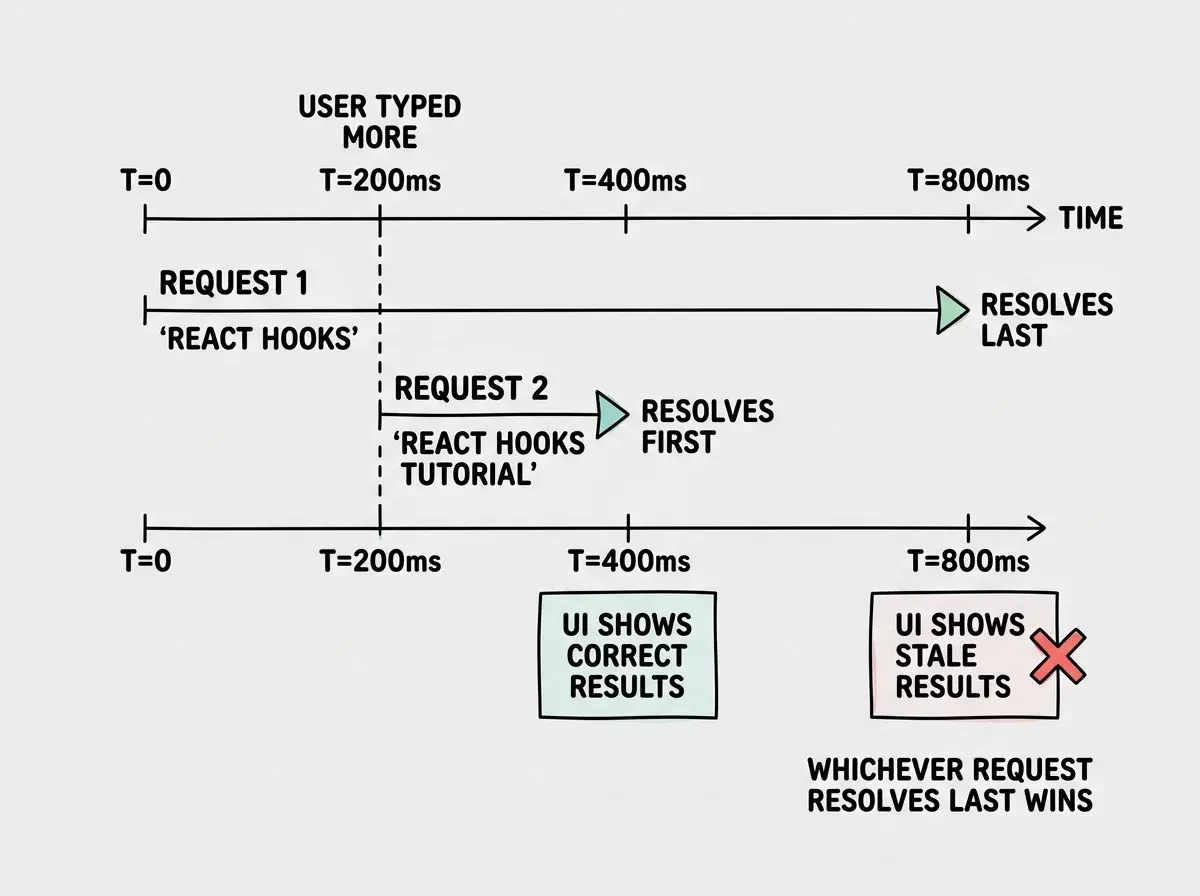
The most common presentation is stale data flashing on screen. A user searches "react hooks," types "react hooks tutorial," and briefly sees old results before the correct ones arrive. Two requests are in flight; the slower one resolves last, overwriting the correct answer.
AI-generated code almost never includes the cleanup that prevents this. The fetch fires, the component might unmount, but setState still executes when the promise resolves. In development, React 18 strict mode sometimes surfaces this through double-invoked effects. In production it shows up as ghost data and "can't perform a state update on an unmounted component" warnings.
Async operations have no built-in ordering guarantee. You fire two requests and get two responses, but JavaScript does not guarantee which resolves first. Every AI-written effect that fetches without cleanup is a latent race condition waiting on the right network conditions.
The Three Types of Async Bugs
Stale Closures
A stale closure captures a variable at creation time and holds that snapshot even as the variable changes. In React, this is most dangerous inside useEffect and event handlers.
// Bug: stale closure captures the initial count value
function Counter() {
  const [count, setCount] = useState(0);

  useEffect(() => {
    const interval = setInterval(() => {
      // `count` is always 0 here - captured when effect ran
      setCount(count + 1);
    }, 1000);
    return () => clearInterval(interval);
  }, []); // empty deps = stale closure

  return <div>{count}</div>;
}

// Fix: use the functional updater form
useEffect(() => {
  const interval = setInterval(() => {
    setCount(prev => prev + 1); // reads current value, not closure
  }, 1000);
  return () => clearInterval(interval);
}, []);
The fix is the functional updater form of setState, which lets React provide the current value rather than relying on the snapshot. For non-state values, a useRef holding the latest function is the standard solution.
Out-of-Order Responses
Out-of-order responses happen when multiple async operations are triggered in sequence but the earlier one resolves after the later one, leaving your UI in a state that reflects a superseded request.
// Bug: out-of-order responses corrupt state
function SearchResults({ query }: { query: string }) {
  const [results, setResults] = useState<Result[]>([]);

  useEffect(() => {
    // No cancellation - whichever resolves last wins,
    // regardless of which was triggered last
    fetch(`/api/search?q=${query}`)
      .then(r => r.json())
      .then(data => setResults(data.results));
  }, [query]);

  return <ResultList items={results} />;
}
If the user types "a" then "ab", the "a" request might resolve after "ab" and overwrite correct results with stale ones.
Unmounted State Updates
When a component unmounts before an async operation completes, the operation's callback still fires. The state update it tries to perform has no valid target.
// Bug: state update after unmount
function UserProfile({ userId }: { userId: string }) {
  const [user, setUser] = useState<User | null>(null);

  useEffect(() => {
    loadUser(userId).then(data => {
      // If component unmounted during the fetch,
      // this setState fires on a dead component
      setUser(data);
    });
  }, [userId]);

  return user ? <Profile data={user} /> : <Skeleton />;
}
In React 18 this no longer crashes, but it still causes memory leaks when the callback holds references that prevent garbage collection, and logs warnings in development that signal a real cleanup problem.
All three async bug classes share a root cause: an async operation outlives its context. The async operation was fired with certain assumptions about the world (this query is current, this component is mounted, this value is fresh) and those assumptions became false before the operation completed. Every defensive pattern in this article is a mechanism for detecting or reacting to that mismatch.
Debugging Techniques
AbortController for Request Cancellation
AbortController cancels in-flight fetch requests when a new request supersedes them. Pass the signal to fetch and call abort() in the cleanup function.
function SearchResults({ query }: { query: string }) {
  const [results, setResults] = useState<Result[]>([]);
  const [error, setError] = useState<string | null>(null);

  useEffect(() => {
    const controller = new AbortController();
    fetch(`/api/search?q=${query}`, { signal: controller.signal })
      .then(r => r.json())
      .then(data => setResults(data.results))
      .catch(err => { if (err.name !== 'AbortError') setError(err.message); });
    return () => controller.abort();
  }, [query]);

  return error ? <Error message={error} /> : <ResultList items={results} />;
}
When query changes, React runs the cleanup from the previous effect first, aborting the in-flight request. The AbortError in the catch handler is expected; ignore it and only surface real errors.
useRef for Latest Value
When you need a value inside an async callback that should always reflect the current version (not the closure snapshot), store it in a ref. Refs are mutable containers that do not trigger re-renders.
// Fix: useRef holds latest callback, stable effect deps
function LiveFeed({ onMessage }: { onMessage: (msg: Message) => void }) {
  const onMessageRef = useRef(onMessage);
  onMessageRef.current = onMessage; // update synchronously before effects

  useEffect(() => {
    const ws = new WebSocket('/ws/feed');
    ws.onmessage = (e) => onMessageRef.current(JSON.parse(e.data));
    return () => ws.close();
  }, []); // safe: ref always points to latest onMessage
}
No onMessage in the dependency array prevents reconnecting on every render. The ref ensures the callback always reflects the latest prop.
Race Condition Logging
For intermittent bugs, structured logging with request IDs gives you the forensic trail. Increment a counter per request and discard any response where the ID no longer matches the latest.
function useTrackedFetch(url: string) {
  const [data, setData] = useState(null);
  const requestIdRef = useRef(0);

  useEffect(() => {
    const controller = new AbortController();
    const requestId = ++requestIdRef.current;

    fetch(url, { signal: controller.signal })
      .then(r => r.json())
      .then(result => {
        if (requestId !== requestIdRef.current) {
          console.debug(`[fetch] STALE id=${requestId}, current=${requestIdRef.current}`);
          return; // discard out-of-order response
        }
        setData(result);
      })
      .catch(err => { if (err.name !== 'AbortError') console.error(err); });

    return () => controller.abort();
  }, [url]);

  return data;
}
The log line STALE id=3, current=5 tells you request 3 resolved after requests 4 and 5 had already fired. Race conditions become concrete instead of mysterious.
Prevention Patterns
Debouncing to Reduce Concurrent Requests
Debouncing delays the execution of a function until a pause in input, reducing how many concurrent requests you fire. For search-as-you-type, debouncing by 200-300ms means most keystrokes do not trigger a fetch at all, eliminating most of the race surface.
function useDebounce<T>(value: T, delayMs: number): T {
  const [debounced, setDebounced] = useState(value);
  useEffect(() => {
    const timer = setTimeout(() => setDebounced(value), delayMs);
    return () => clearTimeout(timer);
  }, [value, delayMs]);
  return debounced;
}

// Usage: only fires when user pauses for 300ms
const debouncedQuery = useDebounce(query, 300);
useEffect(() => {
  if (!debouncedQuery) return;
  const controller = new AbortController();
  fetch(`/api/search?q=${debouncedQuery}`, { signal: controller.signal })
    .then(r => r.json())
    .then(setResults)
    .catch(e => { if (e.name !== 'AbortError') setError(e.message); });
  return () => controller.abort();
}, [debouncedQuery]);
Debouncing reduces the problem. Cancellation solves it. Use both together.
Optimistic vs Pessimistic Updates
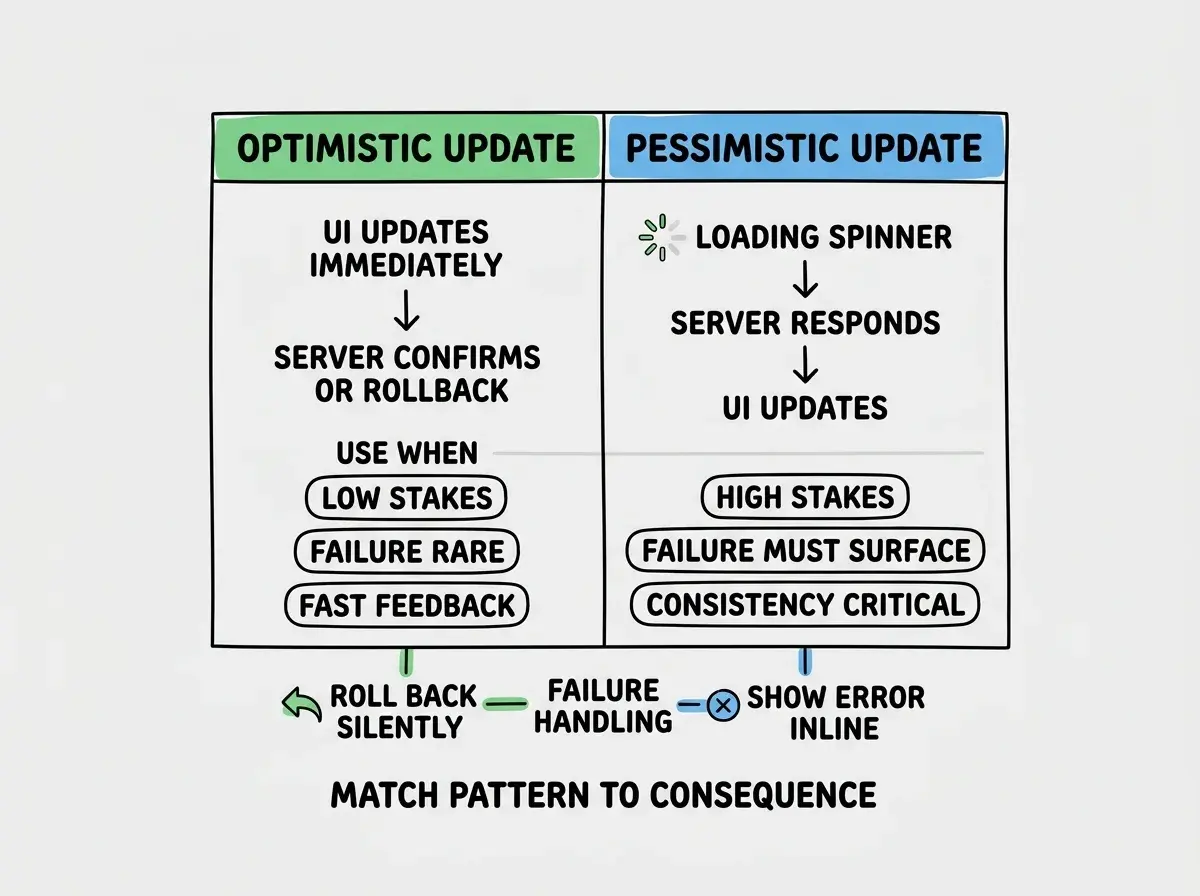
Optimistic updates apply the expected result immediately and roll back on failure. Pessimistic updates wait for server confirmation first. For low-stakes actions (liking a post, toggling a setting), optimistic is fine. For high-stakes actions (payment, deletion, account changes), pessimistic prevents a premature success state.
async function toggleLike(postId: string, currentlyLiked: boolean) {
  // Apply optimistic update immediately
  setLiked(!currentlyLiked);
  setLikeCount(prev => currentlyLiked ? prev - 1 : prev + 1);

  try {
    await api.post(`/posts/${postId}/like`, { liked: !currentlyLiked });
  } catch {
    // Roll back to previous state on failure
    setLiked(currentlyLiked);
    setLikeCount(prev => currentlyLiked ? prev + 1 : prev - 1);
    toast.error('Could not update like. Please try again.');
  }
}
The critical discipline: always implement the rollback path. Optimistic code without rollback is code that lies to users and hides errors.
Adding debouncing without request cancellation. Debouncing reduces the rate of requests but does not eliminate overlapping ones. A debounced function still fires multiple times during a long typing session. Without AbortController cleanup, you still have a race condition. You just have it less often, making it harder to catch in testing and more surprising in production.
What This Means For You
Senior devs reviewing AI code: async cleanup is the first thing to audit. Look for useEffect calls that fire fetches without a cleanup function, setInterval without clearInterval, and promise chains that call setState without checking request currency. These are not edge cases in AI output; they are the default.
Career changers and bootcamp grads: race conditions feel like dark magic until you internalize one principle. An async operation captures assumptions at the moment it fires. Those assumptions might be wrong by the time it resolves. Every defensive pattern here is a mechanism for detecting or reacting to that mismatch. Once you see it that way, the patterns become intuitive.
Founders and indie hackers shipping fast: at minimum, add AbortController cleanup to every useEffect that fires a fetch. Debounce any input that triggers a search or autocomplete. You do not need every pattern before shipping; you need to not ship code that actively corrupts your UI state.
Get the patterns that keep async code from breaking in production.
See all deep-divesThe underlying skill is not memorizing patterns. It is developing an eye for operations that outlive their context, then reaching for the right tool before the mismatch becomes a production bug.
More deep-dives on the real problems in AI-assisted development.
Read more