Email is the feature that fools you. You add a sending library, paste in an API key, and it works in your test environment. Then you ship, and real users never see the welcome email. Or it lands in spam. Or it silently bounces. There are no JavaScript errors, no red text in the console, nothing obviously broken. The code executed. The email just did not arrive.
This is the gap between happy-path code and production-ready code, and it comes up constantly in AI-built apps. 92% of US developers now use AI coding tools daily, and email is one of those features where the AI handles the happy path confidently and skips everything else. The send call succeeds. The error handling is missing. The DNS records were never configured. And you have no idea until users start asking why they never got their password reset link.
This guide covers the three main failure modes (not delivered, going to spam, bouncing) and how to debug each one systematically.
Why Aren't My Emails Getting Delivered
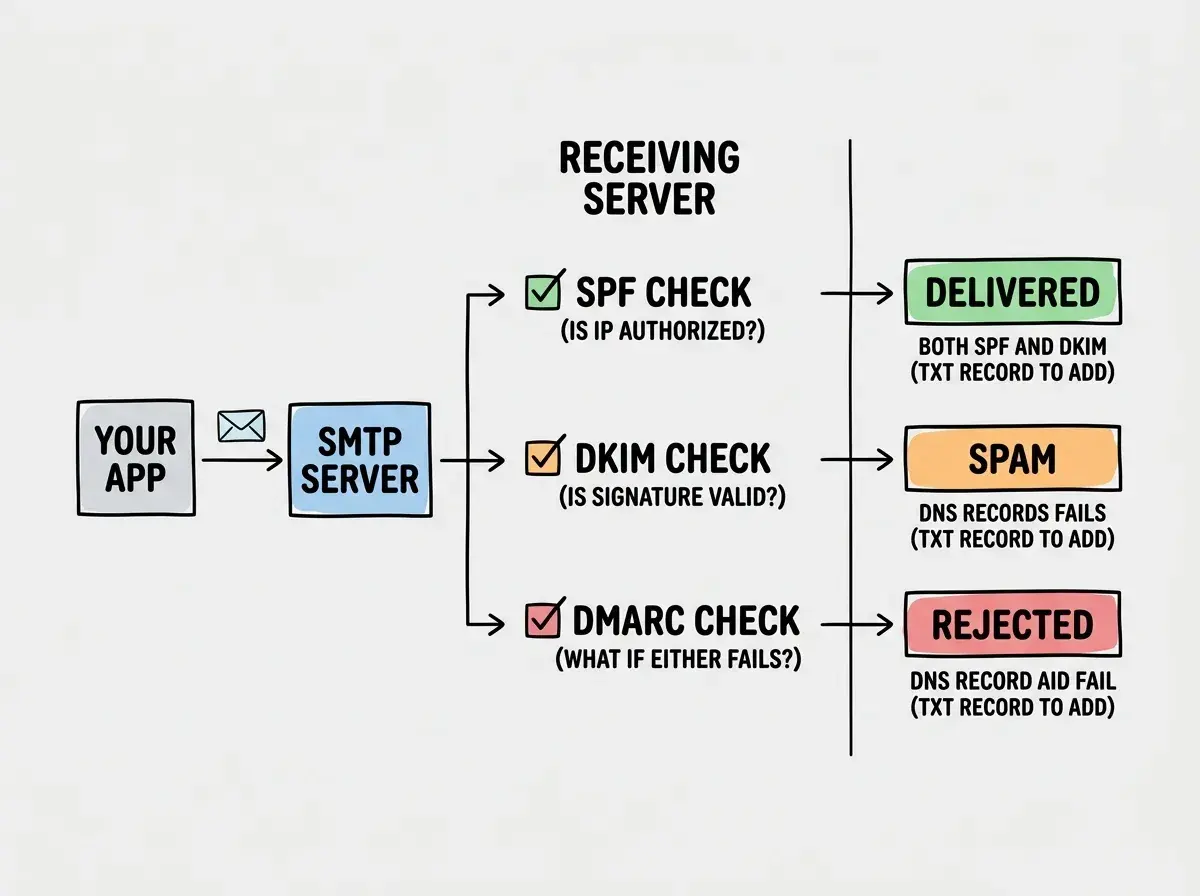
The most common reason email never arrives is a DNS misconfiguration. Your email provider can send the message, but receiving servers check whether you have permission to send from your domain before accepting it. Without proper DNS records, many servers will quietly drop the message without a delivery failure report.
The three DNS records that control email authentication are SPF, DKIM, and DMARC.
SPF (Sender Policy Framework) is a TXT record that lists which servers are authorized to send email on behalf of your domain. If you send from Resend but your SPF record only covers SendGrid, Resend-sent emails look unauthorized.
DKIM (DomainKeys Identified Mail) adds a cryptographic signature to every outgoing message. Receiving servers verify the signature using a public key you publish in DNS. If the signature is missing or invalid, the message is suspicious.
DMARC tells receiving servers what to do when SPF or DKIM checks fail. Without a DMARC policy, each receiving server makes its own decision. With a DMARC policy set to reject, unauthenticated messages are blocked outright.
Here is how to check your current DNS setup. Use dig or an online tool like MXToolbox to look up your records:
# Check SPF record
dig TXT yourdomain.com | grep spf

# Check DKIM (replace 'resend' with your provider's selector)
dig TXT resend._domainkey.yourdomain.com

# Check DMARC
dig TXT _dmarc.yourdomain.com
If any of these return empty results, you have found the problem. Most email providers (Resend, SendGrid, Postmark) have a domain verification page that shows exactly which DNS records to add and whether they have propagated correctly. Start there before digging anywhere else.
The other common reason for non-delivery is sending from a hardcoded address that does not match your verified domain. AI tools frequently generate code like from: "noreply@gmail.com" or from: "app@yourapp.com" without verifying that yourapp.com is configured in your email provider's dashboard.
// Common AI-generated mistake: unverified sender address
await resend.emails.send({
  from: "noreply@gmail.com", // Not your domain, not verified
  to: user.email,
  subject: "Welcome!",
  html: welcomeHtml,
});

// Correct: use your verified domain
await resend.emails.send({
  from: "hello@yourdomain.com", // Verified in Resend dashboard
  to: user.email,
  subject: "Welcome!",
  html: welcomeHtml,
});
How to Solve Mail Delivery Problems
Once DNS is correct and the sender address is verified, the next layer is your code. AI-generated email code almost always has two specific problems: no error handling on the send call, and no logging of what actually happened.
A Resend or SendGrid send() call can fail in several ways. The API might return an error response. The network call might time out. Your API key might be invalid or over its rate limit. Without error handling, your server logs show nothing and your user gets no feedback.
// What AI typically generates
async function sendWelcomeEmail(user: User) {
  await resend.emails.send({
    from: "hello@yourdomain.com",
    to: user.email,
    subject: "Welcome to the app",
    html: getWelcomeHtml(user),
  });
}

// What you actually need
async function sendWelcomeEmail(user: User) {
  try {
    const { data, error } = await resend.emails.send({
      from: "hello@yourdomain.com",
      to: user.email,
      subject: "Welcome to the app",
      html: getWelcomeHtml(user),
    });

    if (error) {
      console.error("Email send failed:", {
        userId: user.id,
        error: error.message,
        name: error.name,
      });
      // Don't throw here if email is non-critical; just log it
      return { success: false, error };
    }

    console.log("Email sent:", { userId: user.id, emailId: data?.id });
    return { success: true, emailId: data?.id };
  } catch (err) {
    console.error("Unexpected email error:", err);
    return { success: false, error: err };
  }
}
The { data, error } pattern is specific to Resend's SDK. SendGrid throws on failure instead of returning an error object, so the pattern looks slightly different, but the principle is identical: check what actually happened and log it.
Once you have logging in place, you can trace failures. The email ID returned by a successful send call lets you look up delivery status in your provider's dashboard. Use it.
Before changing any code, verify your DNS setup first. Most email delivery failures come from missing or misconfigured SPF, DKIM, and DMARC records. Check your email provider's domain verification page and confirm all three records are present and propagated. Only move to debugging code after DNS is confirmed clean.
The other practical fix is separating email sending from your main request-response cycle. If you send a welcome email synchronously during user signup, a temporary email API outage will fail the entire signup. Use a background job or at minimum handle the email failure gracefully so the user still gets registered.
// Signup route: don't fail the user if email fails
export async function POST(request: Request) {
  const user = await createUser(requestData);

  // Fire and forget (acceptable for non-critical welcome emails)
  sendWelcomeEmail(user).catch((err) => {
    console.error("Welcome email failed silently:", err);
  });

  return Response.json({ success: true, userId: user.id });
}
Why Is My Email Experiencing Delivery Issues
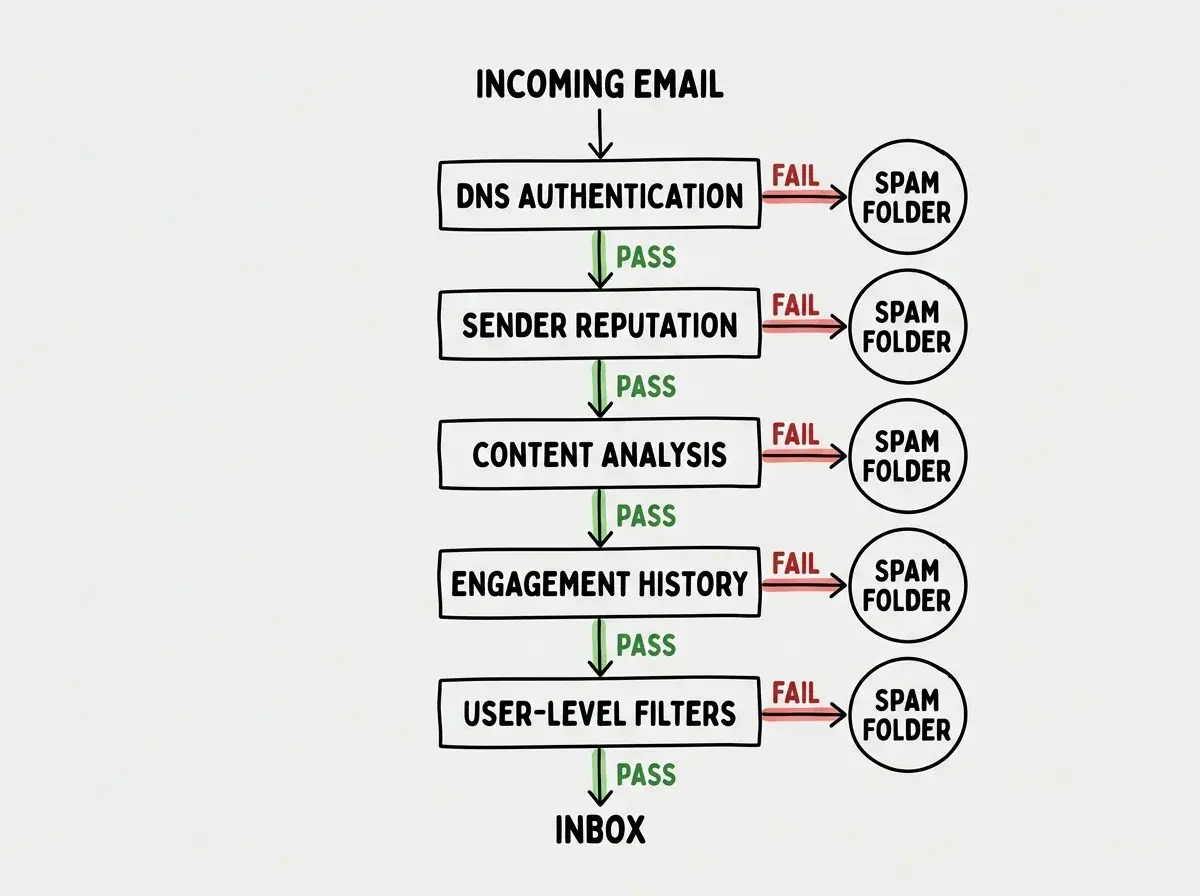
Landing in spam is a different problem from not arriving at all. The message was accepted, but spam filters decided it looked suspicious. A few things trigger this consistently.
The first is sending to unverified or old email addresses. If a significant portion of your emails bounce or get marked as spam, your domain's sender reputation drops. Providers use reputation scores across all senders, and a bad score means more messages get filtered even for clean recipients.
The second is email content that reads like spam. This is less obvious with transactional email than with marketing email, but certain patterns still trigger filters. Avoid all-caps subject lines, excessive exclamation marks, subject lines with words like "free" or "urgent," and HTML emails with very little text relative to image area.
The third (and least obvious) is sending from a shared IP without a warm-up period. Many email providers put new accounts on shared IP addresses. If the other senders on that IP have poor reputations, your messages get penalized by association. Dedicated IPs solve this but cost more. In the meantime, using providers that actively manage their shared IP reputation (Postmark is particularly strong here) reduces the problem.
To actually test spam score before it reaches real users, use tools like Mail Tester (mail-tester.com) or GlockApps. Send a test email to the address they provide and get a score with specific reasons for any deductions. This takes five minutes and immediately tells you whether your DNS is correct and whether your content has issues.
// For local testing: send to your mail-tester.com address
const TEST_EMAIL = "test-abc123@mail-tester.com"; // from mail-tester.com

await resend.emails.send({
  from: "hello@yourdomain.com",
  to: isDevelopment ? TEST_EMAIL : user.email,
  subject: "Welcome to the app",
  html: welcomeHtml,
});
Handling Bounces and Protecting Your Sender Reputation
Bounces fall into two categories. Hard bounces mean the address does not exist or permanently rejected the message. Soft bounces are temporary failures like a full inbox or a server that is temporarily unavailable.
Every major email provider tracks bounces. Resend, SendGrid, and Postmark all have webhook systems that notify your app when a bounce occurs. AI-generated code almost never sets these up. That means you keep sending to bounced addresses, your bounce rate climbs, and your sender reputation degrades.
The minimum viable bounce handling is a webhook endpoint that receives bounce events and flags the email address in your database so you stop sending to it.
// Resend webhook handler for bounces
export async function POST(request: Request) {
  const payload = await request.json();

  if (payload.type === "email.bounced") {
    const bouncedEmail = payload.data.to[0];
    const bounceType = payload.data.bounce?.type; // "hard" or "soft"

    if (bounceType === "hard") {
      // Hard bounce: never send to this address again
      await db
        .update(users)
        .set({ emailBounced: true })
        .where(eq(users.email, bouncedEmail));

      console.log("Hard bounce recorded:", bouncedEmail);
    }
  }

  return Response.json({ received: true });
}
Register this endpoint URL in your email provider's webhook settings. Resend, SendGrid, and Postmark all have dashboard sections for this. Without it, you are flying blind on delivery failures.
AI tools generate email sending code that treats a successful API response as a successful delivery. The two are not the same. The API accepted your message for delivery, but the message can still bounce, land in spam, or be blocked by the recipient's server afterward. Always set up bounce webhooks and track delivery events separately from your send calls.
A Debugging Checklist for Email Delivery
When users report email problems, work through these steps in order instead of randomly changing things.
First, confirm the DNS records are correct. Go to your email provider's domain verification page and check each record: SPF, DKIM, and DMARC. DNS propagation can take up to 48 hours, so check the actual values returned by dig, not just what you entered.
Second, verify the sender address is from a domain you own and have verified with your email provider. A mismatch here causes silent failures or immediate spam filtering.
Third, add error handling and logging to your send calls if they are not already there. You cannot debug what you cannot see.
Fourth, use a spam testing tool (mail-tester.com or GlockApps) to check the actual deliverability score before digging deeper into content.
Fifth, check your email provider's dashboard for the specific message. Resend, SendGrid, and Postmark all have logs that show whether a message was accepted, delivered, bounced, or opened. The log entry usually tells you exactly what went wrong.
Sixth, set up bounce webhooks if you have not already. Ongoing high bounce rates will kill your deliverability for everyone, not just the bounced addresses.
What This Means For You
Email delivery has more moving parts than most features in a web app, and AI tools are good at generating the sending code while skipping the operational setup that makes delivery reliable. DNS records, bounce handling, error logging, and spam testing are not afterthoughts. They are the actual work of shipping email in production.
The good news is that each fix is small and isolated. Correct the DNS records, add error handling, set up one webhook. None of these changes require restructuring your app. You can work through the checklist in an afternoon and end up with email delivery that works reliably across all the major providers.
Make sure the basics are right before you flip the switch on real users.
See the post-deploy checklistMost delivery failures fall into the same handful of categories. Once you have debugged one, you will recognize the pattern immediately in the next project. The logs will make sense, the DNS checks will be second nature, and you will know within five minutes whether you have a DNS problem, a code problem, or a reputation problem.
Resend, SendGrid, and Postmark have different strengths for transactional email.
Read the comparison