Database scaling is what separates apps that survive a traffic spike from apps that go down during one. With 92% of US developers using AI tools daily, more production databases exist today than at any point in history. Most of them are running on a single server, and most of them will hit a wall far sooner than their builders expect.
Think of your database as a water treatment plant. When you built your app, you had one intake pipe bringing requests in, one processing facility handling queries, and one output pipe sending results back. That plant was designed for a small town. Now the town is growing, and the plant cannot keep up. You have three options: make the pipes bigger, add more processing tanks, or build entire satellite plants. Database scaling follows exactly the same logic, and the order you do it in matters enormously.
The mistake most builders make is jumping to the complex solutions first. They read about sharding and want to implement it at 500 users. That is like building a satellite plant when the original just needs a bigger pump.
The Order of Operations for Database Scaling
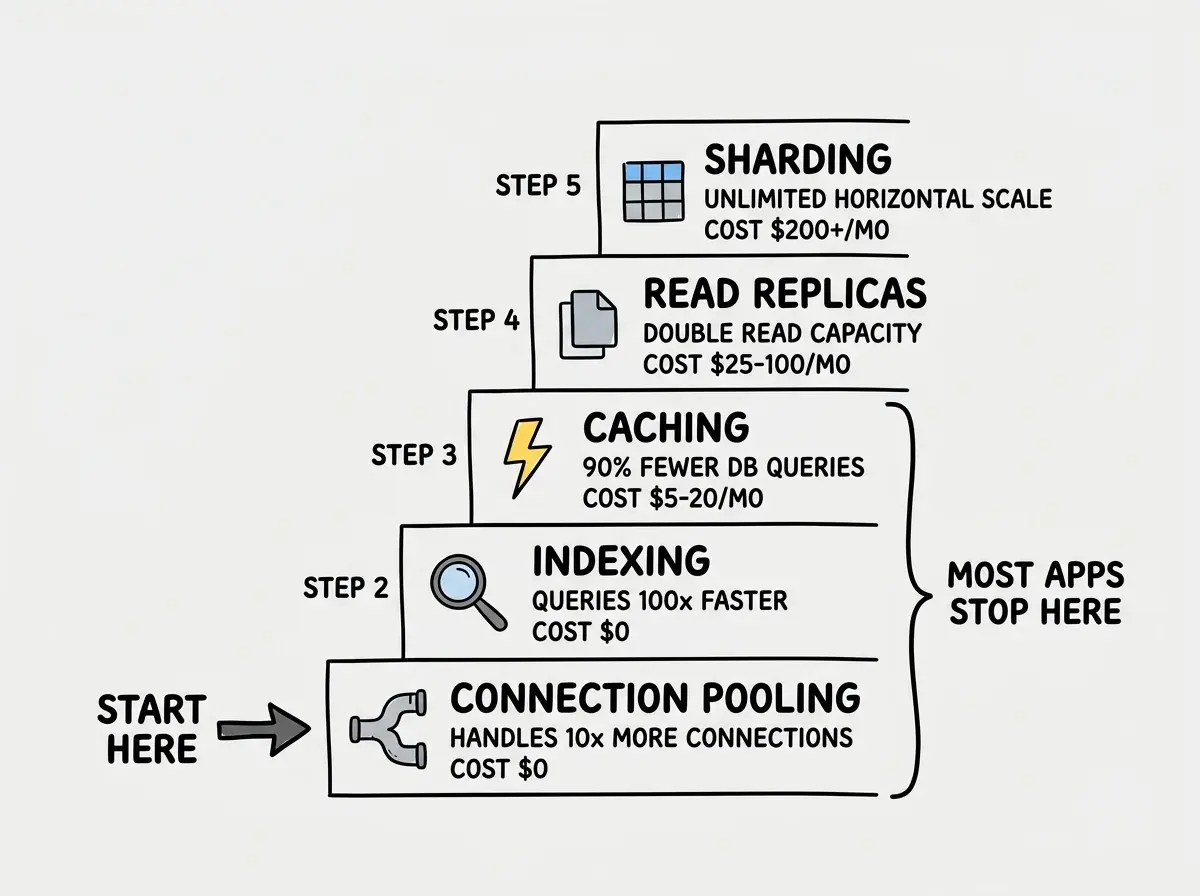
Each step is cheaper and simpler than the next. You move down the list only when the previous step is no longer enough.
Step 1: Connection pooling. This is always first. Always.
Step 2: Indexing. Find slow queries and add indexes.
Step 3: Caching. Put a Redis or Upstash layer between your app and your database.
Step 4: Read replicas. Distribute read traffic across multiple database copies.
Step 5: Sharding. Split your data across multiple databases by some partition key.
Most vibe-coded apps will never get past step 3. That is not a failure. That means you solved the problem at the simplest level possible. Every step you skip saves you weeks of engineering complexity and thousands of dollars in infrastructure costs.
Connection Pooling, the Single Biggest Win
Your database has a hard limit on simultaneous connections. Supabase free tier allows around 60. Neon free tier allows around 100. PlanetScale Hobby allows 1,000 but with strict rate limits. When your connection count hits the ceiling, new requests fail. Your users see errors.
The problem is how connections work in serverless environments. Every serverless function invocation opens its own connection. If 200 requests arrive in the same second, that is 200 connection attempts. With a 60-connection limit, 140 of those fail.
Connection pooling is a pipe splitter at the water treatment plant. Instead of running a dedicated pipe from each house to the plant, you run a shared trunk line that multiplexes traffic. One hundred requests share ten actual database connections. The pooler queues requests and reuses connections as they free up.
Supabase Supavisor is built in. Switch your connection string from port 5432 to port 6543 and you are pooling. That one change takes your effective capacity from 60 to several thousand concurrent users.
Neon includes pooling by default. Every connection string they provide already routes through their pooler.
PgBouncer is the open-source option for self-hosted PostgreSQL. It sits between your app and the database and takes five minutes to configure.
The numbers are stark. A Supabase project without pooling fails at 60 concurrent users. With Supavisor, the same project handles 1,000+ with zero code changes. That is a 16x improvement for changing one number in a connection string.
Connection pooling is the single highest-leverage database scaling technique. It costs nothing, requires no code changes, and multiplies your effective connection capacity by 10x or more. If your database is struggling and you have not enabled connection pooling, nothing else matters until you do. Change the port number, swap the connection string, and test. That is it.
Indexing, Making Queries 100x Faster for Free
After connection pooling, indexing is the next step because it is free and often dramatic. An index is a sorted reference card, like the index at the back of a textbook. Without it, the database reads every row to find what you need. With it, the database jumps directly to the right page.
A posts table with 100,000 rows running SELECT * FROM posts WHERE user_id = 'abc-123' takes 200 milliseconds without an index. With one, it takes 2 milliseconds. Same query, same data, 100x faster. Check your slow query log (Supabase shows this under "Database > Query Performance," Neon shows it in the console) and add indexes for any column that appears in a WHERE clause on a table with more than 10,000 rows.
CREATE INDEX idx_posts_user_id ON posts (user_id);
Caching, Shielding Your Database From Repetitive Work
Caching is the water tower at your treatment plant. Instead of processing the same water repeatedly, you store processed water in a tank and serve it directly. Most apps ask the same questions thousands of times per hour. If the answer does not change every second, there is no reason to query the database every time.
Redis is the industry standard. Reads happen in under a millisecond compared to 5 to 50 milliseconds for a database query. Upstash is Redis built for serverless, with a free tier of 10,000 daily commands that handles most vibe-coded apps comfortably.
The pattern is simple: check Redis first, return cached data if fresh, otherwise query the database and store the result with a 60-second expiration. An app doing 10,000 database queries per hour can drop to 1,000 with this approach. That is 90% more headroom before you need replicas or sharding.
Read Replicas, Doubling Your Capacity
At this point you have pooled connections, indexed slow queries, and cached repetitive reads. If your database is still the bottleneck, the next step is read replicas.
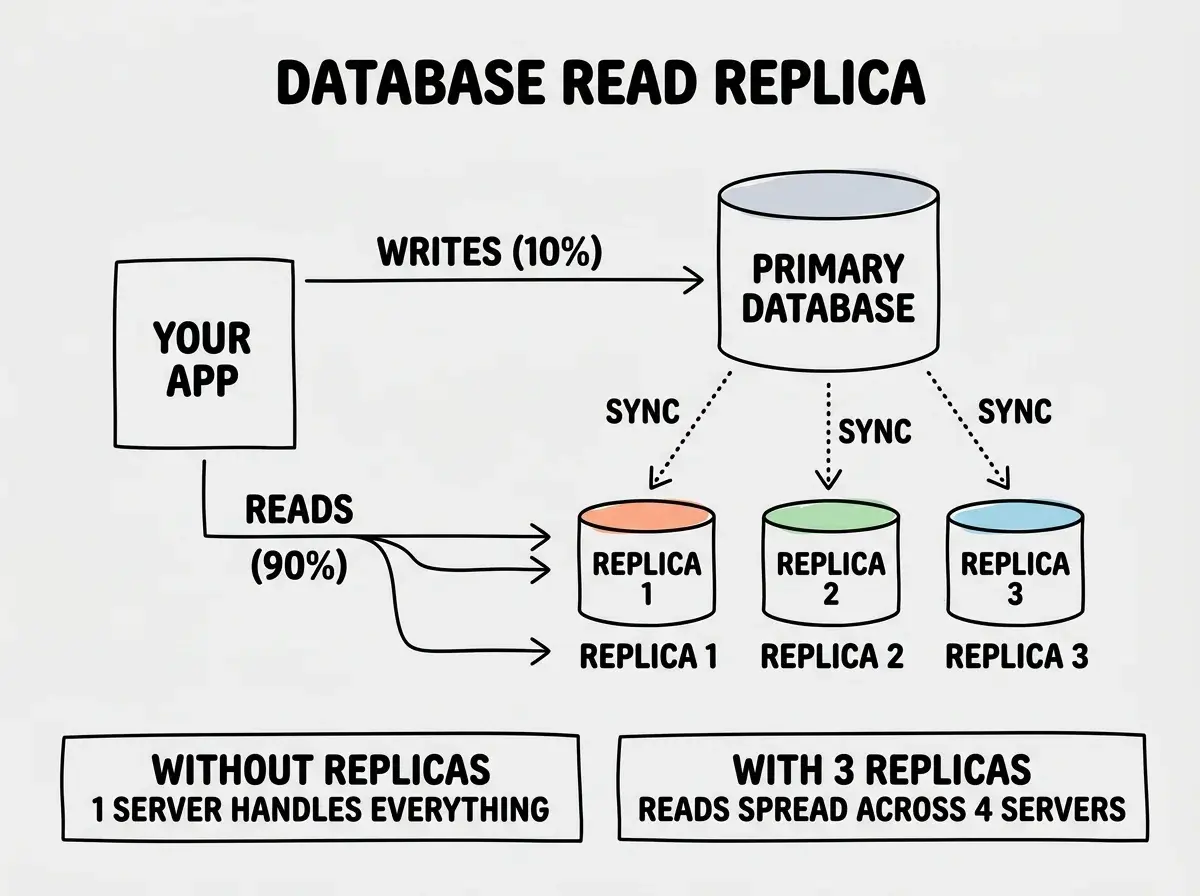
A read replica is a full copy of your database that handles only read queries. Your primary handles all writes. The replicas stay synchronized within milliseconds. In the water plant analogy, it is a second output facility drawing from the same supply. Writes go to the main plant. Reads get distributed across all facilities.
Neon branching makes this nearly free through copy-on-write storage. PlanetScale offers replicas with automatic read/write routing through Vitess. Supabase supports replicas on the Pro plan at $25/month each.
The implementation is straightforward. Most database clients support separate read and write connection strings. You configure a DATABASE_URL for writes and a DATABASE_READ_URL for reads. Your ORM or query builder routes accordingly. A typical SaaS product runs 90% reads and 10% writes. Adding one read replica effectively doubles your total read throughput because it offloads the bulk of your traffic from the primary.
Sharding, the Last Resort
Sharding is splitting your database into multiple independent databases, each holding a portion of the data. It is building entirely separate water treatment plants, each serving a different neighborhood.
You shard when a single database server cannot hold all your data or handle all your writes, even with everything above in place. This happens at millions of rows or thousands of writes per second. For context, that is a scale very few vibe-coded apps ever reach.
PlanetScale handles sharding automatically through Vitess. You define a sharding key (usually user_id or organization_id), and Vitess distributes data across shards transparently. Your application code does not change.
For Supabase or Neon, sharding is manual. You partition data across multiple database instances and route queries in your application layer. This is complex, error-prone, and expensive. It is why sharding is step 5, not step 1.
The cost of sharding wrong is severe. Cross-shard queries are slow, transactions require distributed coordination, and rebalancing data when a shard grows too large is a multi-day project. If you are considering sharding, you should have exhausted every previous option and have the revenue to justify the investment.
Do not shard a database that has not been indexed, cached, and replicated first. Sharding adds permanent architectural complexity that is nearly impossible to undo. Every query must know which shard to hit. Joins across shards become expensive or impossible. If you are at fewer than 10 million rows or fewer than 1,000 writes per second, sharding is premature. Connection pooling, indexing, caching, and read replicas will get you to that scale for a fraction of the cost and complexity.
What Each Step Actually Costs
The first three steps (pooling, indexing, caching) are essentially free. Connection pooling is built into Supabase, Neon, and PlanetScale at no extra charge. Indexing costs nothing. Upstash Redis caching runs $0 to $10 per month for most apps. Read replicas start at $25/month on Supabase, are nearly free on Neon through branching, and cost $29/month on PlanetScale. Sharding starts in the hundreds per month and requires significant engineering investment. This cost curve is intentional. It reinforces the order of operations: do the free things first.
Before you scale your database, make sure you understand what breaks first when traffic spikes. Our Scaling 101 guide covers the full picture.
Read the Scaling 101 GuideWhat This Means For You
If your database is slow, do not panic and do not jump to the complex solutions. Follow the staircase. Enable connection pooling today. It takes five minutes and handles 10x more traffic. Run your slow query log and add indexes for the worst offenders. Add an Upstash Redis cache for your most-read data. These three steps, all free or nearly free, will handle the scaling needs of 95% of vibe-coded applications.
Read replicas are for when you have proven product-market fit and your read traffic genuinely overwhelms a single server. Sharding is for when you are processing millions of rows and thousands of writes per second. If you are not there yet, you do not need them yet.
The builders who scale successfully are not the ones who architect for millions on day one. They are the ones who know the order of operations and apply each technique at the right moment. Start with the pump before you build the satellite plant.
You cannot fix what you cannot measure. Set up cost and performance alerts so you know exactly when your database needs the next scaling step.
See the Cost Monitoring Guide