Database backups for vibe-coded apps in 2026 should follow the 3-2-1 rule (three copies of your data, on two different storage types, with one off-site copy), use automated daily snapshots from your managed database provider, and be tested with monthly restore drills to confirm they actually work. Most managed providers (Supabase, Neon, PlanetScale, AWS RDS) ship with daily snapshots out of the box, so the work is mostly about extending the retention, adding off-site copies, and confirming you can restore. The total time investment is roughly half a day of setup and 30 minutes per month of testing, and the protection from catastrophic data loss is essentially complete.
This piece walks through the 3-2-1 rule, the automated setup for the major managed databases, the restore drill that catches problems before they bite, and the four mistakes that turn a "backed up" database into a "we cannot restore this" disaster.
Why Backups Are Both Easier and Harder Than They Look
Setting up a backup is easy. Most managed databases include daily snapshots by default. You get one for free without any work. The hard part is not setting up the backup; it is being sure the backup will actually restore when you need it. A backup that has not been tested is a backup that probably does not work.
The most common failure mode for backups is that they exist but are unusable when the moment comes. The backup file is corrupted. The retention has expired. The credentials to access it have changed. The restore process takes 12 hours and you assumed it took 30 minutes. The Lovable and Replit incidents in 2024 and 2025 (where AI-assisted operations destroyed production data) had a common theme: backups existed but were either incomplete, untested, or both.
A 2025 Backblaze survey of 1,000 small SaaS operators found that 31 percent had databases backed up but had never tested a restore. Of those who later experienced a data loss event, 64 percent could not successfully restore from their backups. The backups had been silently failing, the retention had expired, or the restore process did not work as documented. Untested backups are essentially useless; tested backups are nearly bulletproof.
The pattern to copy is the way fire drills work. A fire alarm system that is never tested is unreliable when an actual fire happens. The drill is what proves the system works, and the drill costs almost nothing compared to the loss it prevents. Database restore drills are the same.
The 3-2-1 Rule Applied to Vibe Coded Apps
The 3-2-1 rule originated in IT but applies directly to modern databases. Three copies of your data, on two different storage types, with one off-site copy. Each part has a specific reason.
Three copies. The original (your live database) plus two backups. If one backup fails, you still have another. Most managed databases provide one automated backup; you need to add a second.
Two storage types. Different storage providers or types reduce the chance that a single failure mode (provider outage, account compromise, ransomware) takes out all copies. For most vibe-coded apps, this means one backup with your database provider and one in object storage (S3, R2, GCS).
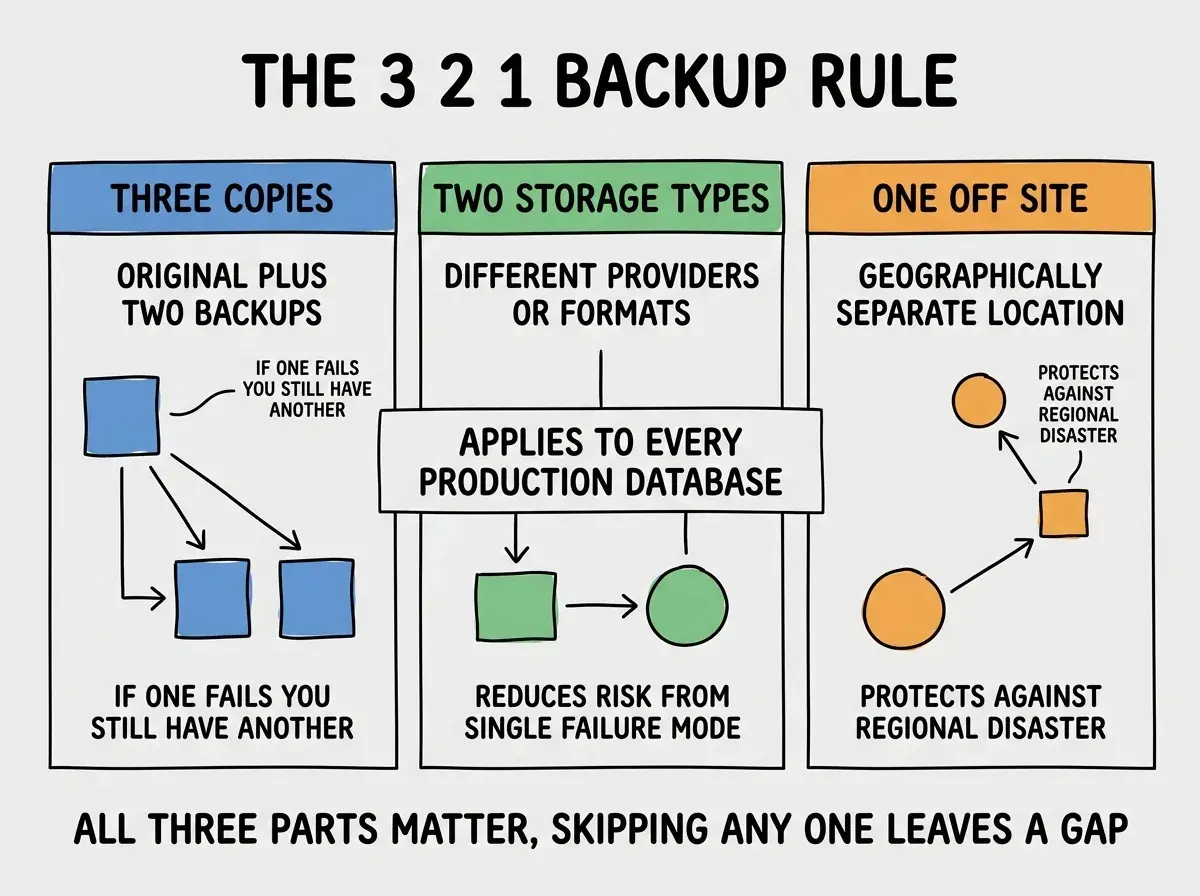
One off-site copy. A backup in a geographically separate location protects against regional disasters (provider outages, natural disasters, account compromise). Cloudflare R2 is a good off-site target if your primary is on AWS, and vice versa.
Setup for the Major Managed Databases
Each major managed database has a specific setup pattern. The whole process takes 30 to 90 minutes per database.
Supabase. Daily backups are included with the Pro plan ($25/month). Set up a weekly export to R2 or S3 using their pg_dump-based export tool. Total time: 30 minutes.
Browse more production readiness guides
Read more ship articlesNeon. Point-in-time recovery is included on the Pro plan. Add a daily logical export to object storage using a scheduled job. Total time: 45 minutes.
PlanetScale. Daily backups with 7-day retention by default. Extend retention via the dashboard. Add weekly exports for off-site copies. Total time: 30 minutes.
AWS RDS. Automated backups with 1 to 35 day retention configurable. Add cross-region snapshot copies for off-site protection. Total time: 45 minutes per environment.
The Restore Drill That Proves Backups Work
A backup is only as good as your ability to restore from it. The drill is monthly, takes about 30 minutes, and catches the issues that would otherwise surprise you during an actual incident.
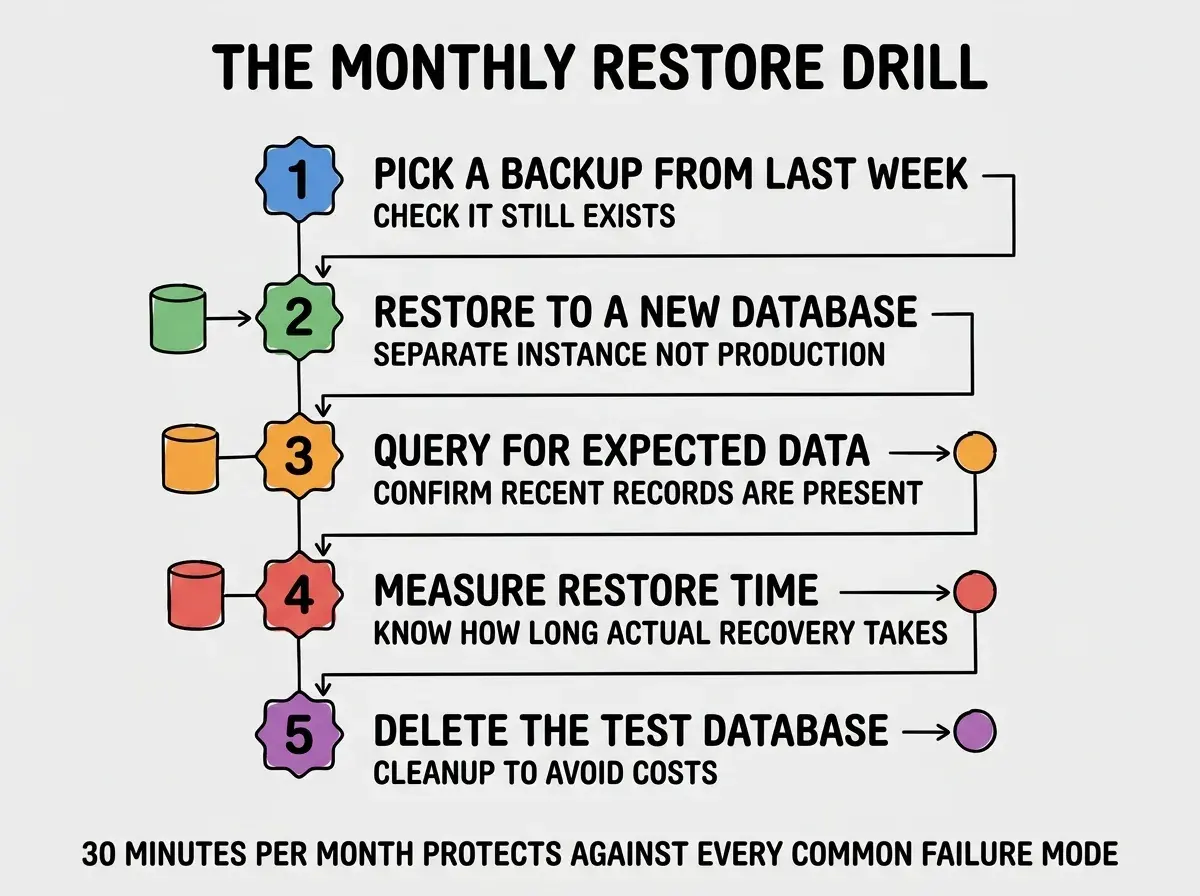
Step 1, pick a backup from last week. Confirm it exists and is accessible.
Step 2, restore to a new database instance. Never restore to production during a drill. Spin up a separate instance and restore there.
Step 3, query for expected data. Run a few queries against the restored data to confirm recent records are present and the data looks right.
Step 4, measure restore time. Note how long the restore actually took. This is your real recovery time objective; planning around shorter assumed times causes problems during real incidents.
Step 5, delete the test database. Clean up to avoid running costs on the temporary instance.
The single most damaging backup mistake is assuming the managed database's default backup is sufficient. The default is usually one backup with the same provider. If the provider has an account-wide issue (compromise, billing dispute, regional outage), your single backup is gone with the database. The fix is to add an off-site copy in a different provider. The cost is small (a few dollars per month for object storage) and the protection is enormous.
The other mistake is treating backups as a one-time setup. Retention policies expire, credentials rotate, schemas change, and providers update their APIs. A backup setup that worked 18 months ago may silently be failing today. The monthly drill catches this; assuming "we set it up once" leaves you exposed.
A useful pattern is to put the next restore drill on the calendar as a recurring monthly event with a clear owner. Without an explicit owner, the drill silently moves down the priority list and stops happening within a quarter. With a calendar entry and an owner, it stays in the rotation. The discipline costs maybe 30 minutes per month and is the cheapest insurance policy any production app can buy.
A second small but important habit is to document the restore process as a step-by-step runbook stored alongside your code. During a real incident, the engineer doing the restore is often stressed, distracted, or new to the codebase. A clear runbook reduces the chance of mistakes and shortens the recovery time. Update the runbook every time you discover something during a drill.
What This Means For You
Database backups are one of the highest-leverage production readiness investments. The setup is small, the testing is small, and the protection from catastrophic loss is nearly complete.
- If you're a founder: Set up the 3-2-1 backup pattern in your first month of having paying customers. The cost is negligible and a single data loss incident can kill the business.
- If you're changing careers: Backup and restore is a critical operations skill that applies to every production system. Practice on your own projects.
- If you're a student: Build a small app, intentionally delete data, and practice restoring from backup. The hands-on experience teaches what no documentation can.
Browse more production readiness guides
Read more ship articles