Cursor and Windsurf are the two AI code editors that dominate the conversation in 2026, and picking between them is harder than it should be. Both are VS Code forks, both cost $20 per month at the Pro tier, and both promise to make you dramatically faster. With 92% of developers now using AI tools daily, this is not a niche decision anymore. It is a workflow decision that affects every hour you spend coding.
Quick Verdict
| Cursor | Windsurf | |
|---|---|---|
| Best for | Power users who want model choice and granular control | Developers who prefer a collaborative, iterative AI flow |
| Price | Free (limited), Pro $20/mo, Business $40/mo | Free (generous), Pro $20/mo |
| AI Chat | Composer (separate panel, multi-file) | Cascade (continuous flow, multi-step reasoning) |
| Strength | Model flexibility, Tab completions, .cursorrules | Cascade transparency, free tier generosity, smooth UX |
| Weakness | Free tier is restrictive, context can miss files | Fewer model options, less community ecosystem |
The table gives you the overview. The rest of this article explains the tradeoffs that actually matter when you are writing code eight hours a day.
Code Completion Quality
Both editors offer inline autocomplete powered by AI, and honestly, the gap between them has narrowed significantly. Cursor Tab remains the gold standard for single-line and multi-line predictions. It predicts not just the next line but the next logical edit, suggesting changes to related code when you modify a variable name or function signature. The predictions feel aware of your intent, not just your syntax.
Windsurf's autocomplete is solid and has improved substantially since early 2025. It pulls context from your indexed codebase and generates relevant suggestions. Where it falls slightly behind Cursor is in those moments of near-telepathic prediction where Cursor guesses your next three edits in sequence. Windsurf's completions are accurate but less ambitious. They complete what you are typing rather than anticipating what you will type next.
For most daily coding tasks, you will not notice a meaningful difference. The gap shows up during rapid editing sessions where you are making coordinated changes across a file and want the AI to keep up with your pace.
Cursor Composer vs Windsurf Cascade
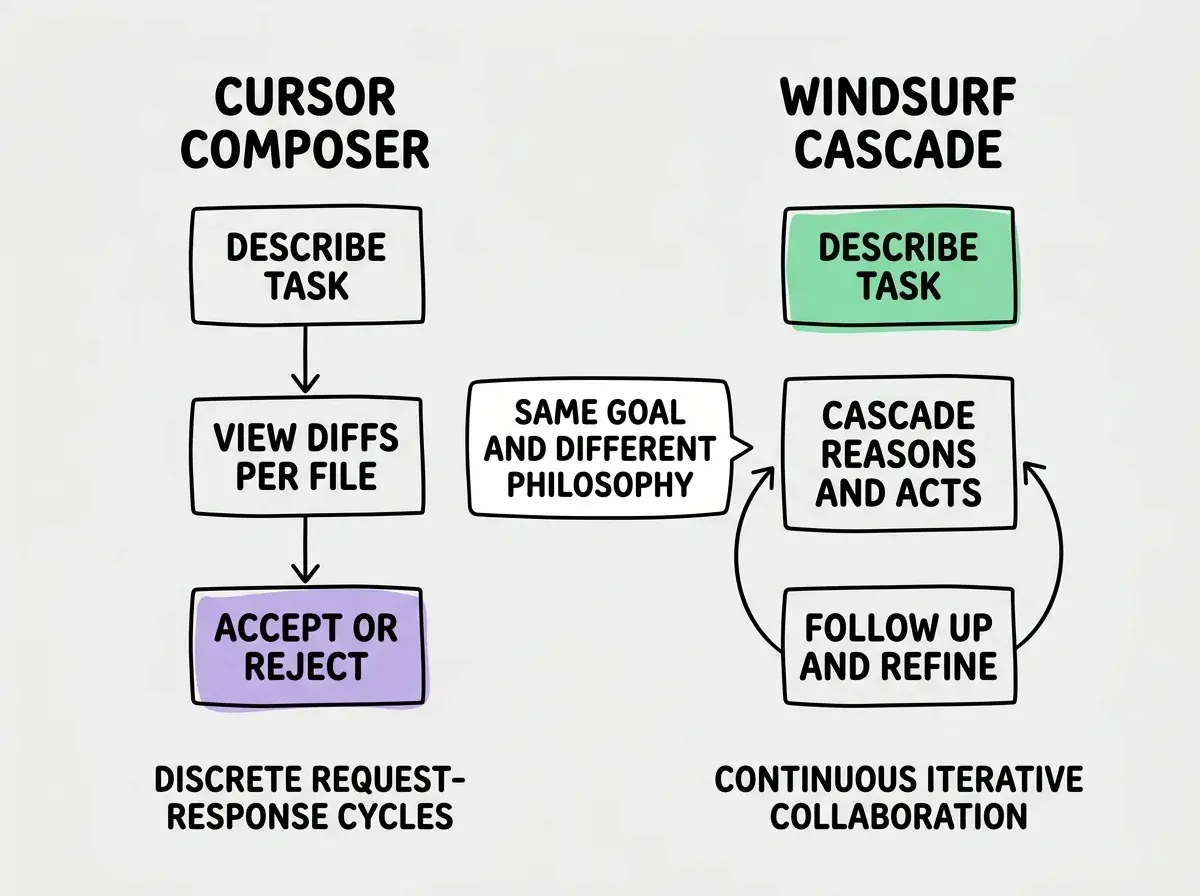
This is the comparison that matters most, because it reflects fundamentally different philosophies about how AI should collaborate with developers.
Cursor Composer operates as a distinct mode. You open it, describe a task, and it proposes changes across multiple files as visual diffs. You review each file's changes individually, accept or reject them, and iterate. Composer is powerful but transactional. Each interaction is a discrete request-response cycle. You ask, it answers, you review. The mental model is "AI as a tool you direct."
Windsurf Cascade takes an iterative, conversational approach. You describe a task and Cascade shows its reasoning as it works, explaining which files it is reading, what patterns it found, and why it made specific choices. The key difference is that Cascade maintains context across multiple steps within a single session, so follow-up requests build on previous work naturally. The mental model is "AI as a collaborator that works alongside you."
In practice, Composer is faster for well-defined, bounded tasks. "Add error handling to all API routes" or "Convert these three components from JavaScript to TypeScript." You know exactly what you want, and Composer delivers it in a clean diff format. Cascade is better for exploratory, open-ended tasks. "This page loads slowly, help me figure out why and fix it." Cascade will investigate, reason through possibilities, and propose fixes iteratively.
Context Handling and Codebase Awareness
Both editors index your project to provide AI context, but they handle it differently. Cursor lets you manually control context by referencing specific files with the @ symbol, and it respects your .cursorrules file for project-wide instructions. This manual control is a strength for developers who want precision. You know exactly what context the AI is working with because you specified it.
Windsurf's context handling is more automatic. Cascade reads files proactively based on what it thinks is relevant to your task. This is convenient when it works well, and it often does, but it can occasionally miss important files or include irrelevant ones. Windsurf supports its own rules file for project-level instructions, though the ecosystem around .cursorrules is more established with more community examples and templates.
For large codebases with hundreds of files, both editors face context window limitations. Neither tool can hold your entire project in memory simultaneously. The difference is in strategy. Cursor gives you the controls to manage context manually. Windsurf tries to manage it for you automatically.
Model Selection and Flexibility
This is where Cursor pulls ahead decisively. Cursor offers access to multiple AI models, including Claude 3.5 Sonnet, GPT-4o, and their own fine-tuned models. You can switch between models depending on the task. Need creative problem-solving? Use Claude. Need fast completions? Use their smaller model. This flexibility matters for developers who have learned that different models excel at different types of work.
Windsurf provides fewer model options. Cascade uses Codeium's own models and selectively routes to frontier models on Pro plans, but you have less visibility and control over which model handles your request. For many developers this is fine. You want the editor to give you good results without worrying about which model produced them. But for power users who have developed preferences about model behavior, Cursor's transparency is a significant advantage.
The emerging consensus among experienced developers is to use Cursor (or Windsurf) for daily coding and add Claude Code for the hard problems. Your AI editor handles the moment-to-moment work. A dedicated agent handles the complex, multi-file refactors that need autonomous execution and deep codebase reasoning. The two tools complement rather than compete.
Pricing and Real-World Costs
Both editors charge $20 per month for their Pro tiers, but the value equation is different because of their free tiers.
Cursor's free tier gives you limited completions and a small number of premium chat requests. It is enough to evaluate the tool but not enough for sustained daily use. Most developers who try Cursor seriously end up on Pro within a week.
Windsurf's free tier is genuinely generous. You get meaningful Cascade usage, autocomplete, and chat without a credit card. For developers working on side projects or learning, the free tier can last an entire month of moderate use. This is Windsurf's strongest competitive advantage and the reason many developers try it first.
At the Pro level, both are $20 per month. Cursor Pro gives you higher limits on premium model usage and access to more models. Windsurf Pro removes the usage caps and adds priority access to frontier models. The value is roughly equivalent for developers who code full-time.
For teams, Cursor Business at $40 per month adds admin controls, centralized billing, and higher usage limits. Windsurf's team offering is less mature, which matters for organizations evaluating these tools at scale.
Extension Ecosystem
Both editors are VS Code forks, which means both support the VS Code extension marketplace. Your favorite themes, language support, linters, formatters, and Git tools all work in either editor. If you rely on specific extensions for your workflow, you will not lose them by choosing either tool.
The practical difference is in edge cases. Some extensions that hook deeply into VS Code internals can behave unexpectedly in forks. Both Cursor and Windsurf handle most popular extensions without issues, but obscure or complex extensions may need testing. If your workflow depends on a very specific extension, install both editors and verify before committing.
Developers often pick an AI editor based on a single viral demo they saw online. Demos show best-case scenarios with clean, small projects. The real test is how the tool performs on your actual codebase, with your actual complexity, over weeks of daily use. Download both, use them for a full week each on real work, then decide.
When Cursor Is the Better Choice
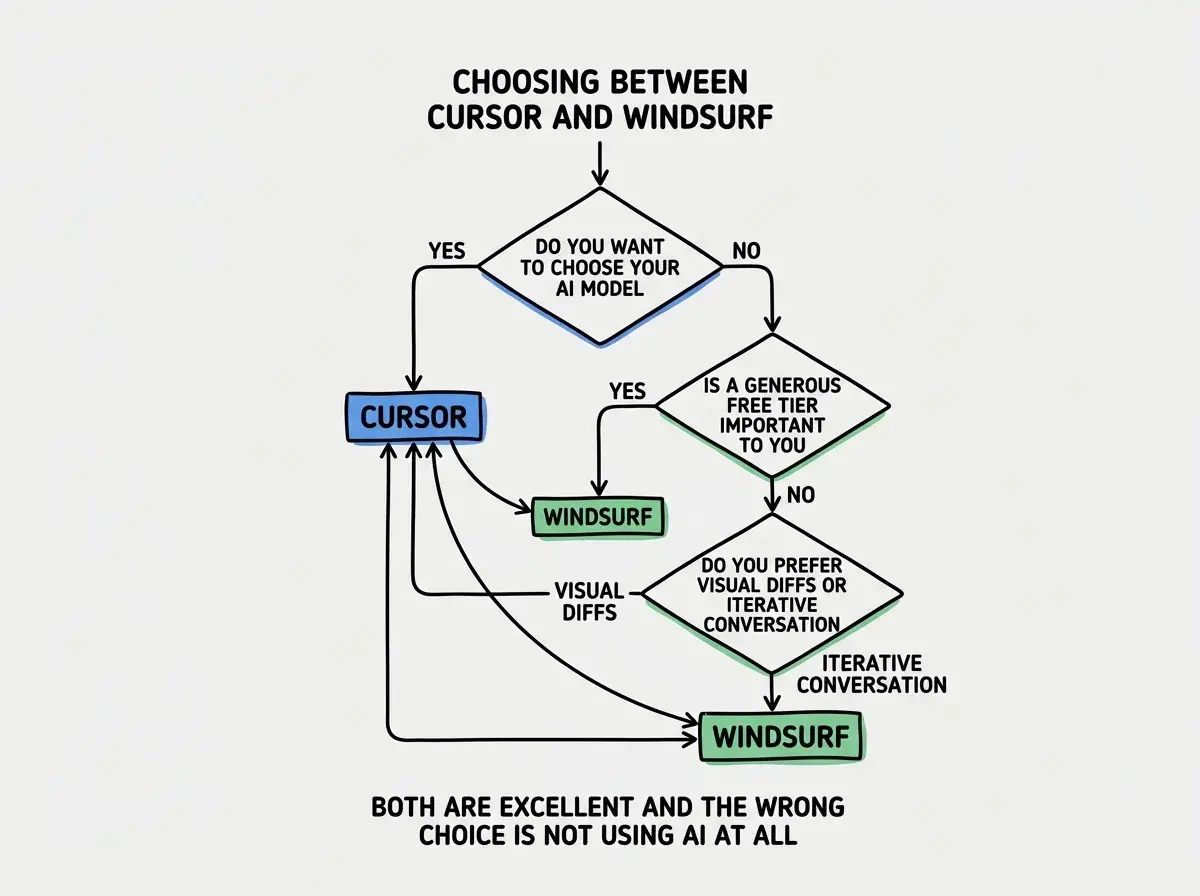
Cursor wins when you want maximum control over your AI coding experience. If you care about choosing specific models, if you want to reference exact files in your prompts, if you prefer reviewing clean visual diffs before accepting changes, and if you value a large community sharing tips, .cursorrules templates, and workflows, Cursor is the more mature choice.
It is also the better choice for teams. Cursor's Business tier, admin controls, and established track record make it easier to adopt across an organization. The onboarding experience is smooth because the tool is well-documented and widely discussed.
When Windsurf Is the Better Choice
Windsurf wins on accessibility and collaborative feel. If you want a generous free tier that does not pressure you into paying, if you prefer Cascade's transparent reasoning over Composer's diff-focused approach, and if you like the feeling of working with the AI rather than directing it, Windsurf is worth choosing.
It is also a better starting point for developers who are new to AI-assisted coding. Cascade's step-by-step explanations of what it is doing and why teach you how AI coding tools think, which makes you better at using any AI tool. The lower financial barrier removes pressure and lets you learn at your own pace.
Start with the fundamentals of choosing the right tool for your workflow.
Explore the guidesWhat This Means For You
The honest answer is that both Cursor and Windsurf are excellent tools, and either one will make you faster than coding without AI assistance. The differences are real but they are differences of preference, not quality. Here is how to think about it for your specific situation.
- If you are an experienced developer who wants control: Start with Cursor. The model selection,
.cursorrulesecosystem, and Composer's explicit diff workflow will feel natural to you. You are used to choosing your tools precisely, and Cursor lets you do that with AI models too. - If you are budget-conscious or exploring AI coding for the first time: Start with Windsurf. The free tier gives you enough to form a genuine opinion, and Cascade's explanatory approach helps you understand what AI coding tools can actually do. You can always switch to Cursor later if you outgrow it.
- If you are building production software daily: Try both for a week each, then pick the one where you feel less friction. The technical capabilities are comparable enough that personal comfort will determine which tool makes you faster. Then add Claude Code for the complex refactoring tasks that neither editor handles as well as a dedicated agent.
The worst decision is spending weeks researching instead of just trying them. Both are free to start. Install one today, use it on real work, and you will know within a few days whether it fits how you think.
Read detailed guides on Cursor, Windsurf, and Claude Code to master your AI toolkit.
Browse all tool guides