With 92% of professional developers now using AI coding tools daily, the Cursor vs Copilot question has become one of the most practical decisions you will make this year. Cursor has crossed one million daily active users. GitHub Copilot reports over 20 million total users, with 4.7 million on paid plans. Both tools are mature, both are fast, and both will genuinely make you more productive. The question is which one fits the way you actually work.
Quick Verdict
| Cursor | GitHub Copilot | |
|---|---|---|
| Best for | Complex reasoning, multi-file edits, deep codebase context | GitHub-native workflows, team plans, broad IDE support |
| Price | Free (limited), Pro $20/mo, Business $40/mo | Free (limited), Individual $10/mo, Business $19/mo, Enterprise $39/mo |
| Strength | Composer mode for coordinated multi-file changes | Works in VS Code, JetBrains, Neovim, and more |
| Weakness | Locked to a single editor (VS Code fork) | Shallower reasoning on complex, interconnected tasks |
The table gives you the quick comparison. The rest of this article breaks down the details that actually matter when you are deciding whether to switch.
Pricing and What You Actually Pay
Copilot's pricing is more flexible. The free tier gives you limited completions per month, enough to evaluate whether AI coding tools fit your workflow. Individual at $10/mo is the most affordable paid option in the AI coding space. Business at $19/mo adds organization management. Enterprise at $39/mo unlocks fine-tuned models and deeper codebase indexing.
Cursor's pricing is simpler but starts higher for paid users. The free tier gives you limited completions and slow premium requests. Pro at $20/mo is the plan most individual developers use. Business at $40/mo adds team features and admin controls. There is no $10/mo entry point.
For students and early-career developers, this price difference matters. A $10/mo Copilot subscription is easier to justify than $20/mo for Cursor, especially when you are not yet doing complex multi-file work where Cursor's advantages show. For professional developers billing their time, the $10/mo difference is irrelevant compared to productivity gains.
Pricing only tells half the story. Copilot is cheaper at every tier, but Cursor's stronger reasoning capabilities can save hours on complex tasks. A single multi-file refactor that Cursor handles cleanly and Copilot fumbles could pay for the price difference several times over. Match the tool to the complexity of your work, not just the line item on your credit card statement.
Code Completion Quality
Both tools provide inline code completions as you type. You write a function signature, the AI suggests the body, you hit Tab to accept. The experience feels similar on the surface, but quality diverges as tasks get more complex.
Copilot's completions are fast and reliable for common patterns. Standard CRUD endpoints, familiar React components, utility functions that exist in thousands of open-source projects. The suggestions arrive quickly and they are usually correct. For bread-and-butter coding, Copilot's completion engine is excellent.
Cursor's completions benefit from deeper context awareness. Because Cursor indexes your entire project and maintains a model of how files relate to each other, its suggestions align more closely with your codebase conventions. A custom hook pattern used throughout your React app? Cursor picks it up faster and suggests code that matches. The difference is subtle for small projects but noticeable in larger codebases.
Where Cursor pulls ahead is on completions that require understanding code in other files. If you are writing a function that calls an API endpoint defined elsewhere, Cursor is more likely to get the parameter types and response shape correct because it has already indexed that endpoint. Copilot sometimes guesses based on naming conventions, which works until your naming does not match the implementation.
Multi-File Editing
This is where the tools diverge most dramatically.
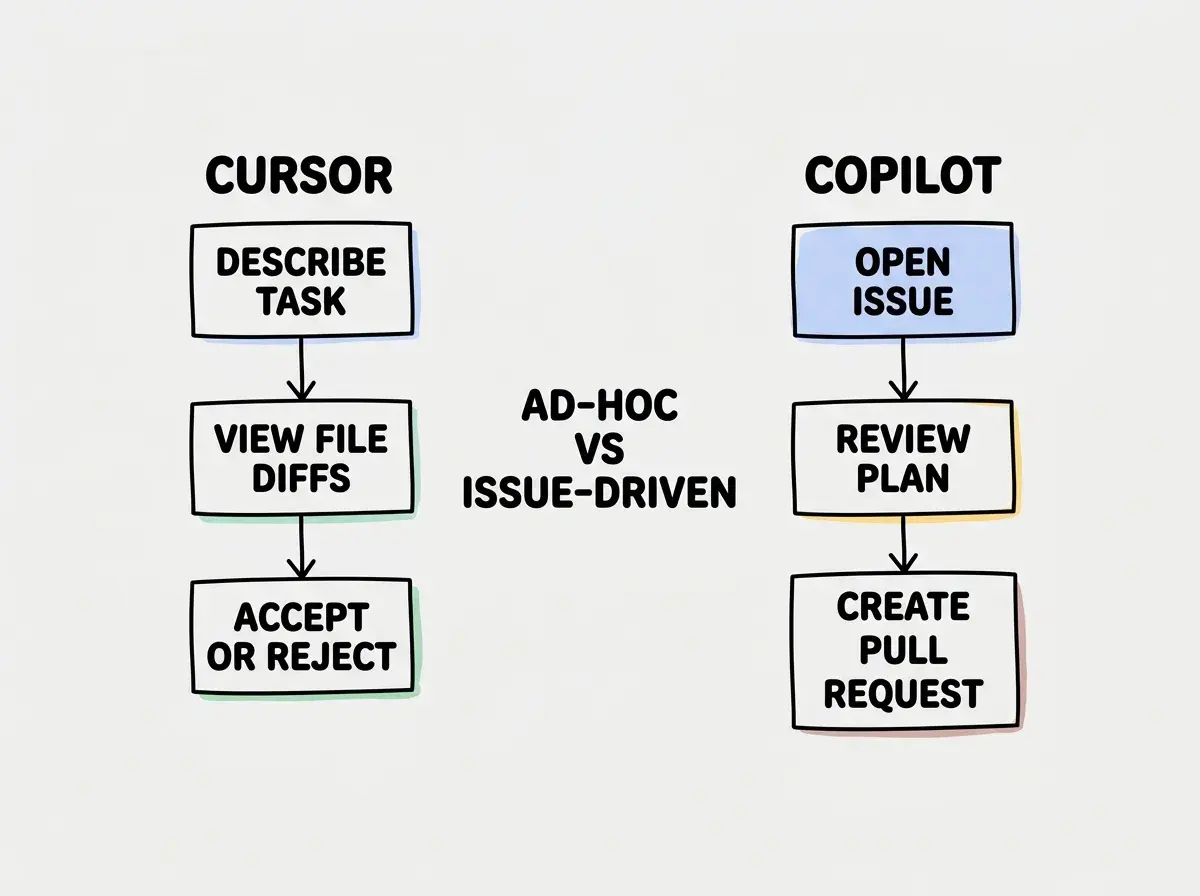
Cursor Composer lets you describe a change in natural language and see proposed edits across multiple files simultaneously. You can review each file's diff, accept or reject individual changes, and iterate on the prompt. Composer understands the relationships between files, so when you rename a type in one file, it updates imports and references in others. For coordinated changes that touch five, ten, or twenty files, Composer is genuinely transformative. You describe what you want once, and the tool handles the tedious work of finding and updating every affected location.
Copilot Workspace (available in GitHub Copilot) approaches multi-file editing differently. It is more tightly integrated with GitHub's workflow, starting from an issue or pull request and proposing a plan for implementation. The approach works well when your changes originate from a GitHub issue, but it feels less flexible for ad-hoc refactoring that starts from "I want to restructure this module."
For developers doing frequent refactoring, restructuring modules, or making architectural changes, Cursor's Composer is the stronger tool. For developers whose workflow revolves around GitHub issues and pull requests, Copilot Workspace fits more naturally into the process you already follow.
Reasoning Depth and Context Awareness
Cursor lets you choose between multiple AI models, including Claude and GPT-4o, routing requests to the model best suited for the task. When you need the AI to understand a nuanced architectural decision, trace a bug through several layers of abstraction, or plan a refactor that respects subtle business logic, this model flexibility gives Cursor an edge.
Copilot primarily uses OpenAI's models and has been expanding its options, but reasoning depth on complex, multi-step problems still lags behind Cursor's model routing. For straightforward code generation, the difference is negligible. For tasks requiring the AI to think several steps ahead, Cursor produces better results more consistently.
Context awareness follows a similar pattern. Cursor's codebase indexing gives it a more complete picture of your project, referencing specific files and patterns when you ask about architecture. Copilot's context window focuses more on the current file and nearby open tabs. Fine for most daily coding, but limiting when you need the AI to understand how a change in one module affects another.
The IDE Ecosystem Question
This might be the most important practical consideration, and it is the one most comparison articles gloss over.
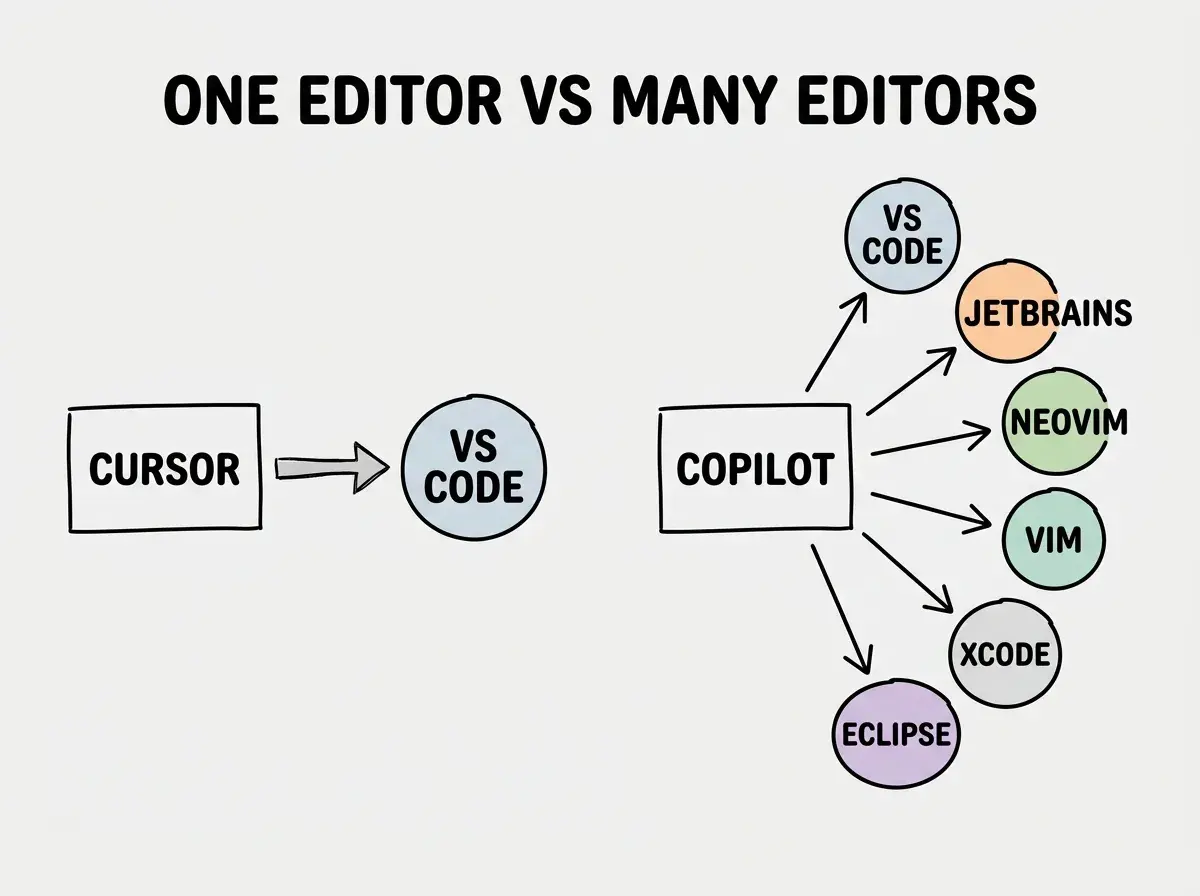
Cursor is a VS Code fork. If you use VS Code, the transition is seamless. Your extensions, keybindings, and themes all carry over. But if you use JetBrains, Neovim, Emacs, or any other editor, Cursor is not an option unless you are willing to switch your entire development environment. That is a significant ask for developers with years of muscle memory in a specific editor.
Copilot works everywhere. VS Code, JetBrains IDEs, Neovim, Vim, Xcode, and more. If you work across multiple editors or your team uses different IDEs, Copilot is the only option that works for everyone without forcing a tool change.
Developers often compare Cursor and Copilot purely on AI capabilities while ignoring the disruption cost of switching editors. If you have two years of muscle memory in JetBrains, the productivity loss from switching to Cursor's VS Code environment can take months to recover. Factor in the transition cost, not just the feature comparison.
When Copilot Is the Better Choice
You live in the GitHub ecosystem. If your workflow revolves around GitHub issues, pull requests, and Actions, Copilot's integration is deeper and more natural. Pull request descriptions, automated review suggestions, and Workspace's issue-to-code pipeline make it feel like a native part of the platform.
Your team uses different editors. Developers on JetBrains, VS Code, and Neovim? Copilot is the only AI tool that works for everyone. Standardizing on Cursor means forcing everyone onto a VS Code fork, which is a non-starter for many teams.
You want the lowest entry cost. At $10/mo Individual and $19/mo Business, Copilot is the most affordable paid AI coding tool on the market.
Your work is mostly standard patterns. If you spend most of your time writing typical web application code, API endpoints, and database queries, Copilot's completion quality is excellent. You do not need Cursor's more powerful reasoning for work that follows well-established patterns.
When Cursor Is the Better Choice
You regularly do complex, multi-file refactors. Composer is genuinely better at coordinated changes across many files. Restructuring modules, migrating libraries, or making architectural changes that ripple through your codebase all go smoother with Cursor.
You want deeper reasoning on hard problems. When you need the AI to understand subtle business logic, trace complex data flows, or plan changes that respect non-obvious constraints, Cursor's model selection and codebase indexing produce better results.
You already use VS Code. The transition to Cursor is trivially easy. All the AI features on top of the environment you already know, with zero disruption.
You value codebase-aware context. For larger projects where the AI needs to understand how files relate to each other, Cursor's indexing provides better suggestions and fewer hallucinated function signatures.
Read honest comparisons and guides for every major tool in the space.
See all tool guidesThe Switching Cost Is Real
Switching tools is not free. You lose muscle memory, you lose workflow habits, and you spend your first two weeks fighting the tool instead of using it. If you are currently productive with Copilot and considering Cursor, ask whether the improvements in multi-file editing and reasoning depth will offset the disruption.
The honest answer for most developers is to switch only if you frequently hit Copilot's limits. If you regularly think "this AI suggestion does not understand my codebase" or "I wish I could change all these files at once," Cursor will solve those frustrations. If Copilot handles 90% of your daily work well enough, the switching cost probably is not worth it.
What This Means For You
- If you are a student or early-career developer: Start with Copilot. At $10/mo (or free with a student account), it is the most affordable way to integrate AI into your workflow. The completions are strong for learning patterns, and it works in whatever editor your courses or bootcamp uses. Graduate to Cursor later if you find yourself doing more complex work that needs deeper reasoning.
- If you are a senior developer doing complex refactors: Cursor's Composer and reasoning capabilities are worth the extra $10/mo. The time you save on multi-file changes will pay for itself within the first week. If you already use VS Code, the switch is painless.
- If you manage a team with mixed editor preferences: Copilot is the practical choice. Forcing an editor change to adopt Cursor creates friction that offsets the AI improvements. Revisit this decision when Cursor expands beyond its VS Code fork.
Learn the fundamentals that make every AI coding tool more effective.
Start learning