Claude Code vs Copilot is the question that defines a bigger divide in AI-assisted development than most people realize. With 92% of developers now using AI tools daily, the choice between a terminal-based agent and an editor-integrated autocomplete engine is really a choice between two fundamentally different paradigms for how humans and AI should collaborate on code.
Two Paradigms, Not Two Products
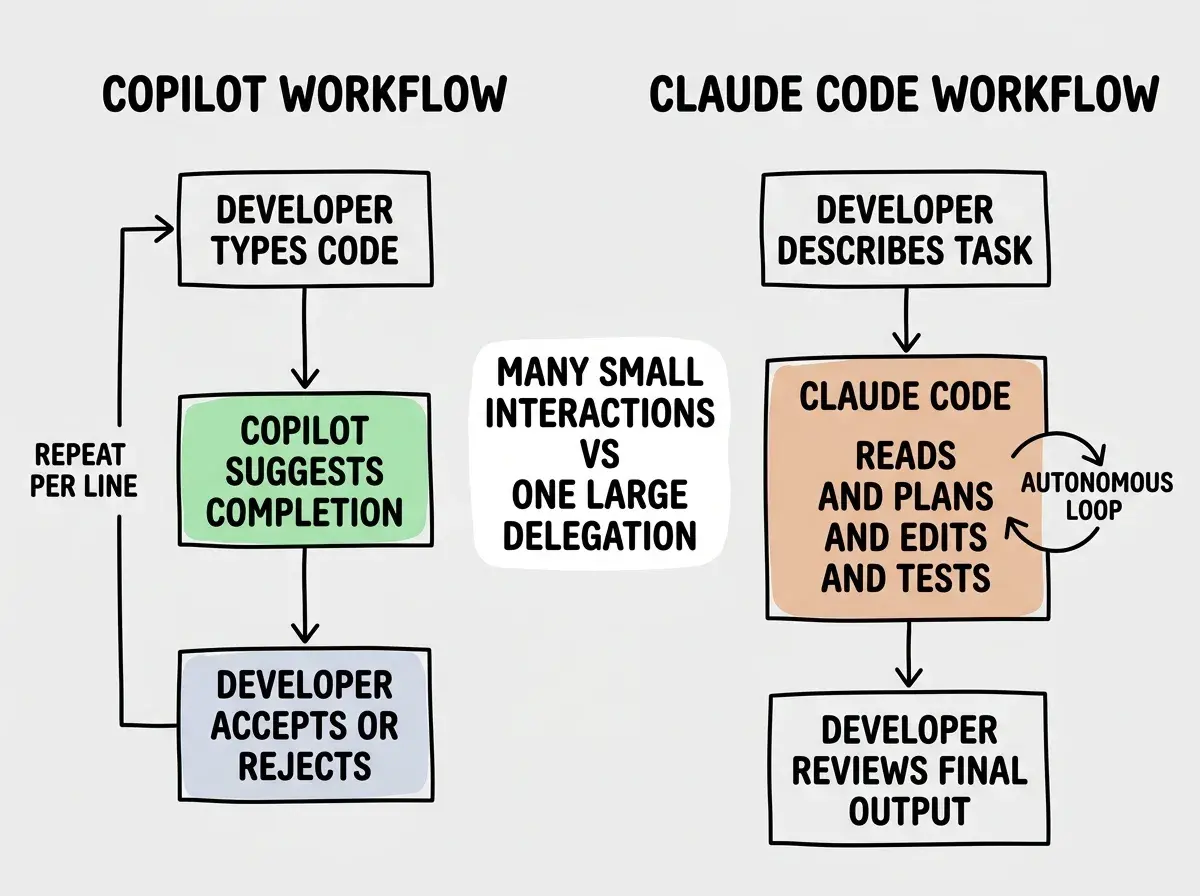
GitHub Copilot lives inside your editor. It watches what you type, predicts what comes next, and offers inline suggestions that you accept with a Tab key press. It is autocomplete evolved into something genuinely useful, and its 20 million-plus users prove the model works. You stay in your editor, you stay in control of every keystroke, and the AI accelerates what you were already doing.
Claude Code lives in your terminal. It reads your entire codebase, plans multi-step tasks, executes shell commands, edits files across your project, runs your tests, and iterates until the job is done. Anthropic built it as an autonomous agent, not a suggestion engine, and its rapid adoption (contributing to a $2.5 billion annualized revenue run rate for Anthropic) signals that developers want more than autocomplete.
The difference is not just interface. It is philosophy. Copilot augments the developer. Claude Code delegates to the AI. Understanding this distinction matters more than any feature comparison chart, because picking the wrong paradigm for your workflow will slow you down even if the tool itself is excellent.
Where Claude Code Wins
Multi-file refactors that would take hours. When you need to rename an abstraction, change an error handling pattern, or migrate from one library to another across dozens of files, Claude Code handles this in a single prompt. It reads the codebase, builds a plan, makes coordinated changes, runs the test suite, and fixes anything that breaks. You describe the goal, walk away, and review the result. Doing the same work with Copilot means opening each file, triggering suggestions, reviewing them individually, and running tests manually between changes.
Hard debugging sessions. Claude Code can read error logs, trace through call stacks, examine relevant source files, form hypotheses, make targeted fixes, and re-run the failing code to verify the fix works. This iterative loop happens autonomously. With Copilot, debugging means you do the investigation yourself and occasionally get a useful suggestion when you start typing a fix. The difference in complex debugging scenarios is dramatic.
Architectural reasoning and planning. When you are deciding how to structure a new feature, Claude Code can analyze your existing patterns, consider constraints from your CLAUDE.md file, and propose an implementation plan before writing a single line. It thinks about the problem at a system level. Copilot operates at the line and function level, which is the wrong granularity for architectural decisions.
Working across environments. Claude Code runs in any terminal. SSH into a production server, a Docker container, a remote dev machine, a tmux session on a headless box. It works everywhere a terminal exists. Copilot requires VS Code, JetBrains, or one of its supported editors, which limits where you can use it.
Where Copilot Wins
Speed on routine code. For the everyday work of writing functions, filling in boilerplate, implementing well-known patterns, and completing repetitive structures, Copilot is faster. The suggestions appear instantly as you type, and accepting them is a single keystroke. There is no context switch, no prompt writing, no waiting for an agent to spin up. For the 80% of coding that is straightforward, this speed advantage is real and meaningful.
Zero friction onboarding. Copilot works inside editors that millions of developers already use. Install the extension, sign in, and you are done. There is no API key to manage, no terminal configuration, no new mental model to learn. If you use VS Code or a JetBrains IDE, Copilot feels like a natural extension of your existing tool. This matters enormously for teams, where getting every developer on the same tool needs to be simple.
Predictable cost. Copilot Individual costs $10/mo. Copilot Business costs $19/mo. Copilot Enterprise costs $39/mo. You know what you are paying, and the price does not change based on how much you use it. For budget-conscious teams and individuals, this predictability is a genuine advantage over usage-based pricing that can surprise you.
Works everywhere editors work. Copilot supports VS Code, JetBrains IDEs, Neovim, and the GitHub web editor. If your team uses different editors, Copilot is the same experience across all of them. It also works for every programming language without configuration, which makes it a safe default for polyglot teams.
Claude Code vs Copilot is not a "which is better" question. It is a "which paradigm fits your work" question. If most of your day is writing new code line by line, Copilot's inline suggestions will save you more time. If your hardest problems involve understanding existing code and making coordinated changes across many files, Claude Code's autonomous agent model will save you more time. The paradigm has to match the problem.
The Pricing Reality
Copilot's pricing is straightforward. $10/mo for individuals, $19/mo for business, $39/mo for enterprise. You get unlimited suggestions (with fair use policies) and chat features. The price is the same whether you use it ten times a day or a thousand.
Claude Code uses Anthropic's API pricing, which means you pay per token. In practice, light usage runs around $50/mo, moderate daily use lands between $100-150/mo, and heavy use during complex refactoring sprints can push past $200/mo. There is also a Max subscription plan at $100/mo or $200/mo that includes Claude Code access with usage limits, giving you more predictability.
The raw price comparison favors Copilot. But raw price is misleading. A $150 Claude Code bill that automates a full-day refactoring task is cheaper than doing it yourself at any reasonable hourly rate. A $10 Copilot subscription that saves you 20 minutes per day of typing is similarly excellent value. The right comparison is cost per hour saved, not monthly subscription price.
Choosing your AI coding tool based on monthly price alone ignores the value equation entirely. A developer earning $80/hr who saves 5 hours on a refactor with Claude Code at a cost of $30 in API tokens got an extraordinary return. The same developer using Copilot to save 10 minutes per day, 20 days per month, saves over 3 hours for $10. Both are great deals. Compare the value generated, not the line item.
The "Use Both" Strategy
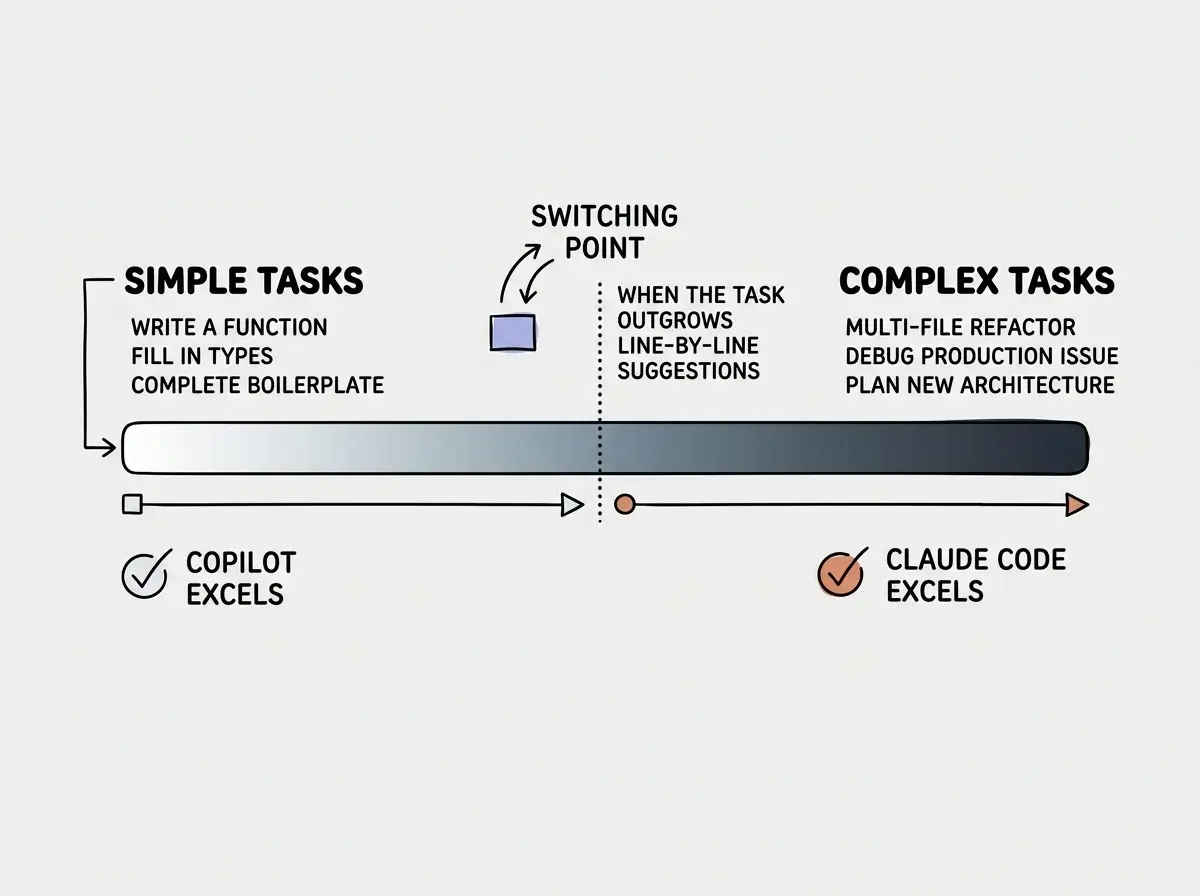
The most productive developers I have observed do not pick one tool exclusively. They use Copilot for daily coding, the routine work of writing new functions, filling in types, completing test assertions, and building out features line by line. Then they switch to Claude Code when they hit a task that requires the agent paradigm, like a complex refactor, a tricky debugging session, or an architectural planning exercise.
This is not a cop-out recommendation. It is the practical reality of how these tools complement each other. Copilot handles the high-frequency, low-complexity interactions that make up most of a coding day. Claude Code handles the low-frequency, high-complexity tasks that would otherwise consume entire afternoons.
The workflow looks like this: you write code in your editor with Copilot active, accepting suggestions as you go. When you hit a task that requires understanding across many files, or debugging that needs iterative investigation, you open a terminal pane and bring in Claude Code. When that task is done, you go back to your editor. Each tool operates in its natural paradigm without forcing the other into a role it was not designed for.
When to Reach for Each One
Reach for Copilot when you are writing new code from scratch, implementing well-understood patterns, working in an unfamiliar language where seeing idiomatic suggestions helps you learn, pair programming and wanting real-time suggestions, or doing any task where the unit of work is a single function or file.
Reach for Claude Code when you need to refactor across more than five files, you are debugging an issue that requires reading multiple source files and log output, you want to plan and execute a new feature that touches several layers of your stack, you need to understand a codebase you did not write, or you are doing any task where describing the goal is easier than executing the steps yourself.
Reach for neither when you are doing creative design work that requires human judgment, making business decisions the AI lacks context for, or working on proprietary code you do not want sent to an external API.
Start with the fundamentals that every builder needs before choosing a tool.
Learn the basicsWhat This Means For You
The terminal vs editor paradigm split is not going away. If anything, it is deepening as both tools get better at what they already do well. Copilot is adding more agentic features, and Claude Code is getting faster and more accessible, but the core philosophies remain distinct.
- If you are a senior developer who already lives in the terminal, start with Claude Code. The agent paradigm will feel natural, and the ability to delegate complex tasks will change how you think about your work. Add Copilot in your editor for the routine stuff, and you have covered the full spectrum.
- If you are an indie hacker shipping fast on a budget, start with Copilot at $10/mo. It covers 80% of daily coding needs with zero friction. When you hit a wall on a complex refactor or a nasty bug, use Claude Code for that specific task. Your monthly spend stays manageable because you only use the expensive tool when you genuinely need it.
- If you are building a team, standardize on Copilot for the shared editing experience and predictable billing, then let senior developers add Claude Code to their individual toolkits for the tasks that justify the cost. This gives you consistency across the team without sacrificing power for the developers who can leverage it.
The best strategy is not loyalty to one tool. It is fluency with both paradigms so you can reach for the right one at the right moment.
Find the right AI coding workflow for your specific situation.
Browse all articles