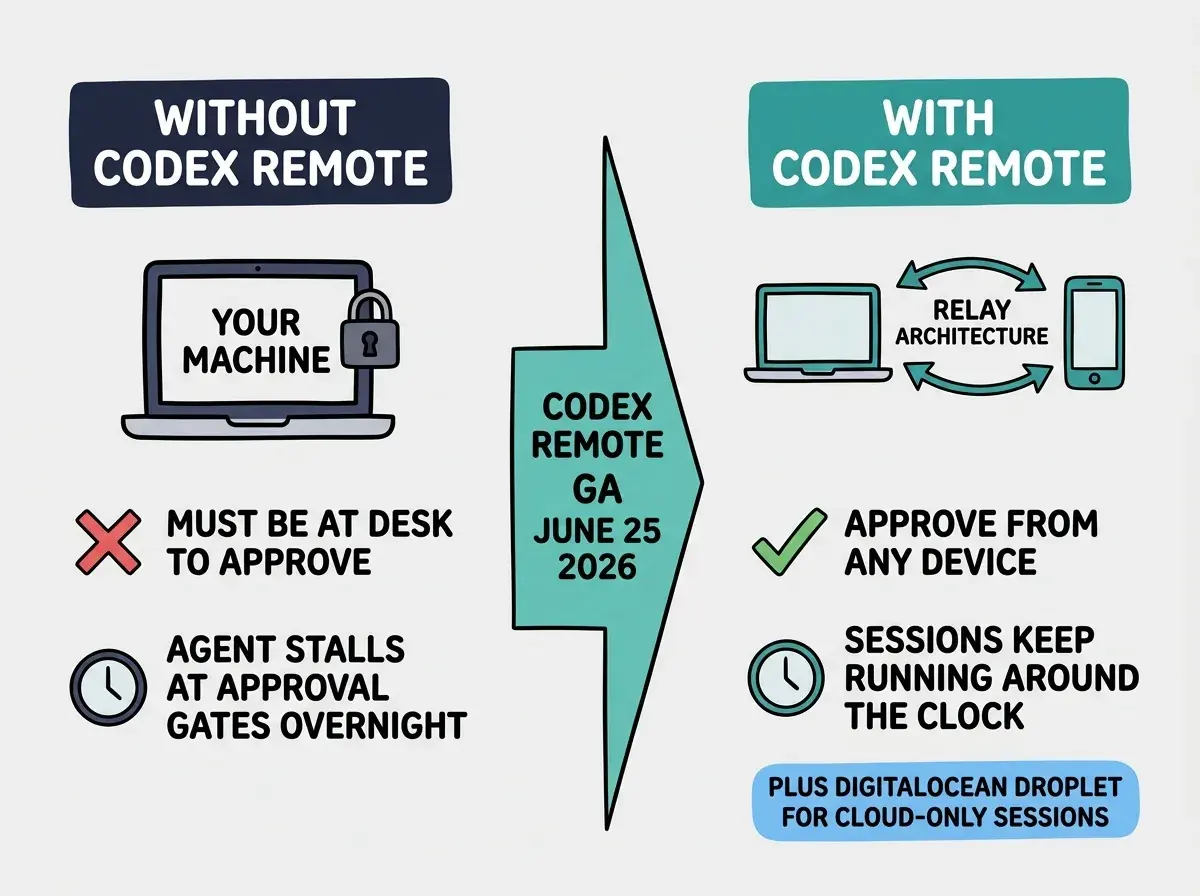
OpenAI Codex Remote reached general availability on June 25, 2026, opening phone-based control of long-running AI coding sessions to every paid ChatGPT subscriber across Plus, Pro, Business, Enterprise, and Education plans. From the ChatGPT app on iOS or Android, you can now start new Codex sessions, review progress across all active threads, approve agent actions, swap models mid-task, and steer work in any direction without touching the machine where the code is running.
The previous preview version, which launched in mid-May 2026, connected a phone to a single host session. The GA release is broader: it works across all of your threads at once, uses a new relay architecture that keeps your development machine off the public internet, and ships a DigitalOcean plugin that lets Codex provision a cloud Droplet as a dedicated remote workspace. For the more than 5 million developers who already use Codex weekly, this changes the unit of work from "a task I run while sitting at my desk" to "a task I kick off before closing my laptop."
Why does managing long-running agents from your phone matter
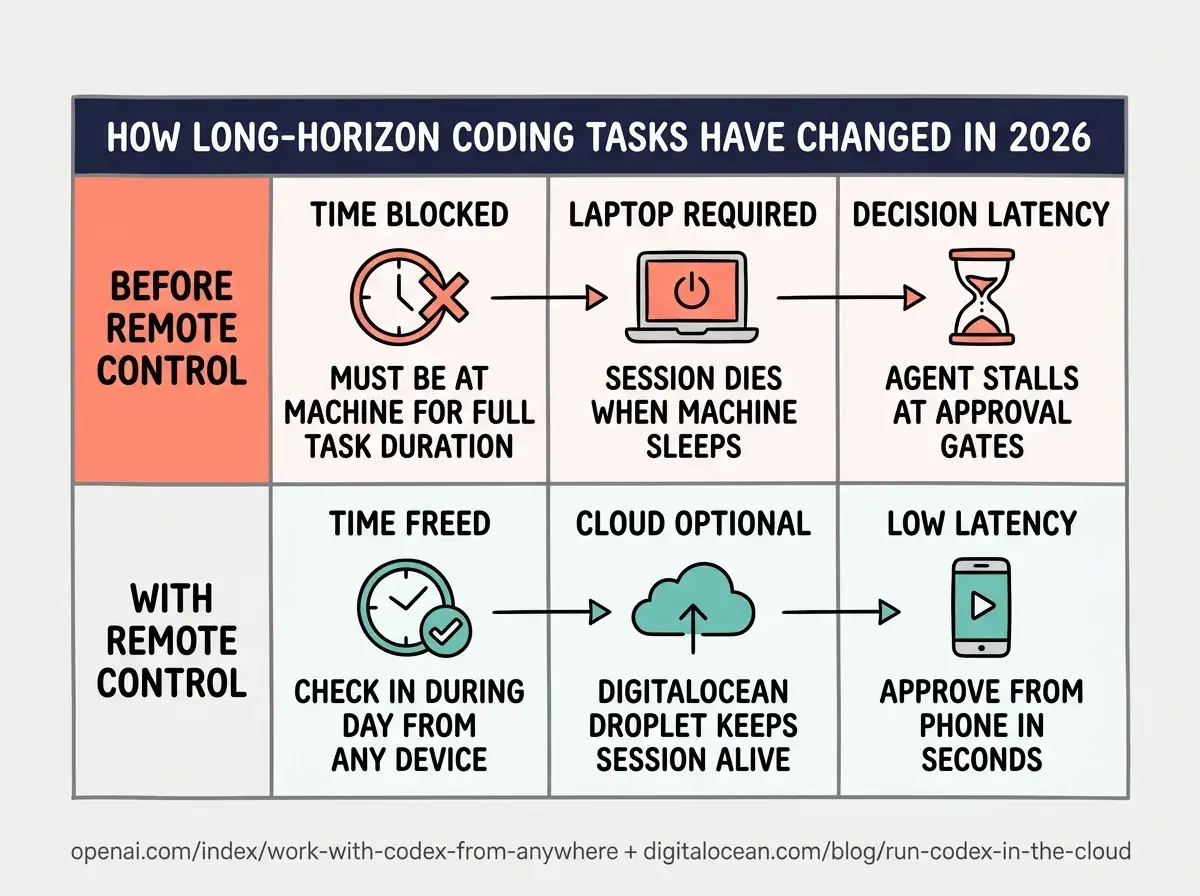
The bottleneck in agentic coding is not what the AI can do, it is when you are available to supervise it. When checking in on a running agent requires a developer to be physically at a machine, those check-ins become infrequent. Sessions that hit an approval gate at midnight sit idle until morning. Long-horizon tasks that need two or three steering decisions get abandoned after the first one because the overhead of re-opening the environment is too high. Phone-based control removes that bottleneck. You can approve a command from your couch, steer a long-running refactor during your commute, and review the diff output before a session ends without opening your laptop.
Codex Remote GA is available to all paid ChatGPT plans from June 25, 2026. To set it up, open the Codex app sidebar on your desktop, select "Set up Codex mobile," scan the QR code with the ChatGPT iOS or Android app, and confirm the same account. You will then have full control of any active or new Codex session from your phone. The DigitalOcean plugin (available separately at digitalocean.com/codex) provisions a cloud Droplet as a remote workspace so the session runs even when your laptop is closed.
The practical shift is biggest for vibecoders who run tasks that take more than 30 minutes. A Codex session working through a database migration, a full test suite, or a multi-file refactor typically hits decision points that require human input. Before Remote GA, missing one of those decision points meant the session stalled until the developer returned. With Remote GA, the session stays active and the developer stays in the loop from wherever they are.
What shipped in the Codex Remote general availability
The GA release differs from the May 2026 preview in three concrete ways. First, coverage expanded from individual sessions to all threads. In the preview, phone control was tied to a single active session. In GA, opening the ChatGPT mobile app shows every Codex thread you have open across every connected host or workspace, so you can switch between tasks without navigating away from the phone view.
Second, the connection model changed. The preview used a remote-shell connection that exposed a port to incoming traffic. GA replaces this with a purpose-built relay architecture where the host machine reaches out to OpenAI's relay service rather than accepting inbound connections. The phone communicates with the relay; the relay communicates with the host. Your development machine never accepts a connection from the public internet. Pairing is done once per device with a QR code that requires confirming the same ChatGPT account and completing any MFA or passkey steps set on that account. Connections established since June 8, 2026, are automatically migrated; older inactive connections need to pair again.
Third, the DigitalOcean plugin launched alongside GA. This plugin provisions a DigitalOcean Droplet directly from within Codex, configures SSH access, and connects the Droplet as a remote workspace. From that point, the Codex session runs on the cloud machine rather than your local machine, which means the session keeps running even when you close your laptop, the CPU load stays off your development machine, and you can start new sessions from your phone without a local host to connect to at all.
What does the DigitalOcean plugin add to the workflow
The DigitalOcean plugin addresses the main friction point in truly async coding: your laptop has to stay on and connected for the session to keep running. Most developers do not leave their laptops powered and awake overnight, which means long-horizon tasks either get cut short or need to be kicked off at the start of a workday and monitored. The Droplet removes that constraint.
Setting up the plugin takes a few minutes. You install the Codex DigitalOcean plugin from the Codex plugins list, authenticate with your DigitalOcean account, and Codex provisions a standard Droplet (the plugin defaults to a 4 vCPU, 8 GB RAM configuration). The Droplet appears in the Codex remote workspaces sidebar and you can start or connect sessions to it exactly as you would a local host. DigitalOcean bills the Droplet at standard compute pricing; you delete it when the work is done, or keep it running as a persistent workspace.
The Vibe Coder Blog covers capability shifts in AI coding tools focused on what builders need to act on this week.
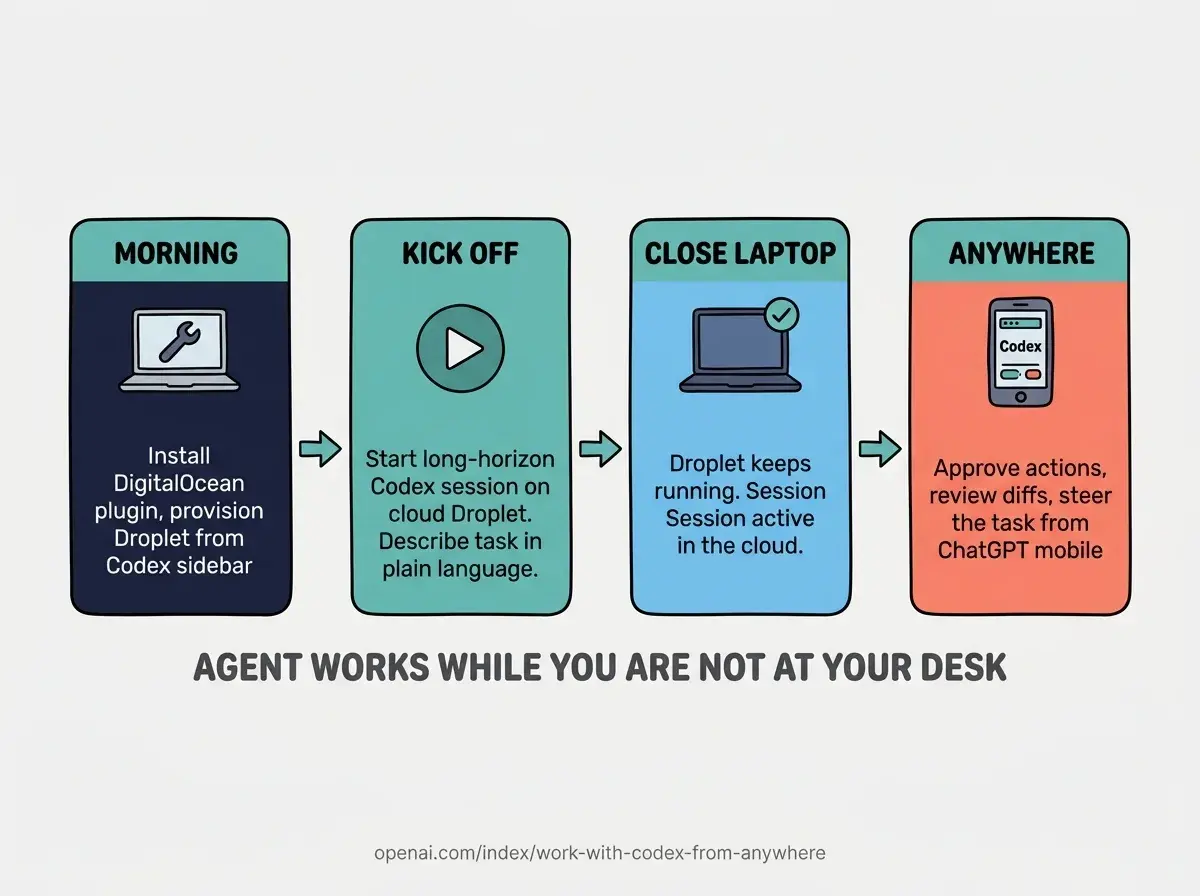
Browse All PostsThe plugin also integrates with the QR pairing flow. Once the Droplet is connected as a remote workspace, you can pair your phone to it just like a local host. That means you can provision a cloud machine from your desk, start a Codex session on it, close your laptop, and approve actions or review outputs on your phone for the rest of the day without any machine of yours staying powered on. For multi-day tasks (a large migration, a codebase audit, a batch of test generation), this pattern makes long-running Codex sessions genuinely practical rather than theoretically possible.
How should vibecoders set up Codex Remote today
The setup has two paths depending on whether you want to use your local machine as the host or a DigitalOcean Droplet. For local hosting, open the Codex desktop app (Mac or Windows), click the sidebar menu, and select "Set up Codex mobile." This starts the QR pairing flow and displays a code on screen. Open the ChatGPT app on iOS or Android, tap Settings, find the Codex Remote section, and scan the code. You will be asked to confirm the same ChatGPT account and complete MFA if it is enabled. Pairing completes in under a minute and persists until you remove the device from the Codex settings.
For the DigitalOcean path, install the Codex DigitalOcean plugin from Codex plugins settings, authenticate with your DigitalOcean account, and select "Create new Droplet workspace." Codex handles the provisioning. Once the Droplet appears as a connected workspace, pair your phone to it using the same QR flow. You can then start sessions directly on the Droplet from your phone without a local machine as an intermediary.
The most common mistake with Codex Remote is treating it as a passive monitoring tool rather than an active steering surface. If you set it up, kick off a session, and then only check in when notifications arrive, you are getting only a fraction of the value. The ChatGPT mobile interface lets you change the model mid-session, add context by attaching files from your phone, and redirect the agent to a different subtask if the current approach is not working. Treat the phone view as a lightweight editor for active sessions, not a read-only status dashboard, and you will get meaningfully better results from long-running tasks.
What does Codex Remote GA mean for how vibecoders plan their work
The most immediate shift is that long-horizon coding tasks become plannable. Before phone-based control was available, breaking down a large task into a single Codex session had a hidden cost: you needed to be at your machine for the duration. That cost made most vibecoders prefer shorter, more bounded sessions even when a longer automated run would have been more efficient. With Remote GA, the duration constraint is gone. You can describe a task that takes four hours, kick it off, and check in during gaps in your day rather than blocking time to watch it run.
The DigitalOcean plugin extends this further by removing the local-machine dependency entirely. A vibecoder with a low-power laptop can now run heavy Codex sessions on a cloud machine provisioned for the task and shut down when it completes. The economics are favorable: a DigitalOcean Droplet at standard compute pricing for a four-hour session costs well under a dollar in compute, and you avoid the heat, battery, and distraction of running an intensive process locally.
The broader pattern here is consistent across the major AI coding tools: Cursor Automations runs cloud agents triggered by GitHub events while you sleep, Kiro shipped a native iOS app at AWS Summit NYC for managing sessions from mobile, and now Codex Remote GA brings the same capability to every paid OpenAI subscriber. Async, phone-first agent management is becoming the expected baseline, not a premium feature for enterprise teams.
The official announcement and the Codex Remote Connections docs cover the setup steps in detail. The DigitalOcean blog post includes pricing guidance and the specific Droplet configurations Codex provisions by default.
New posts on AI coding tool releases, workflow patterns, and what is actually worth using right now.
See All Posts