You opened the project. You remember building it. You remember the excitement when it first worked. But now, staring at the file tree, nothing looks familiar. The code is yours, technically. You just have no idea what any of it does.
That is completely normal. And there is a way out.
Why AI Code Is Especially Hard to Revisit
When a developer writes code by hand, the act of typing every character burns the logic into memory. They argued with the problem, tried three approaches, and arrived at the solution themselves. The code is a record of their thinking.
When AI writes the code, that mental imprint never forms. You described what you wanted, the AI produced something that worked, and you moved on. The code was never really yours in the cognitive sense. It was always a black box that happened to behave correctly.
This creates a specific kind of forgetting. It is not like forgetting where you put your keys. It is more like trying to retrace a route you took in a taxi. You arrived at the destination, but you were not the one navigating. Every turn, every landmark, every decision was handled by someone else.
Three weeks later, you are back at the starting point with no map.
This is not a personal failure. It is a structural feature of how AI-assisted development works. The solution is not to start taking better notes in the moment (though that helps). The solution is to have a method for excavation, a way to systematically uncover what the code does even when you have no memory of building it.
Forgetting AI-generated code is not a discipline problem, it is a structural one. You never encoded the logic in the first place because the AI did the navigation while you watched. A reliable excavation method matters more than trying harder to remember.
That method exists. It is called code archaeology, and it works by treating your codebase the way a field researcher treats an unfamiliar site. You start at the surface, follow the artifacts that seem significant, and trace inward from there.
The Excavation Method
The most common mistake when returning to unfamiliar code is opening a random file and trying to make sense of it. That almost never works. Individual files are fragments. They only make sense in relation to other files, and without context, every line looks equally meaningless.
Archaeologists do not start by digging random holes. They start from the surface, mapping what is visible, before they go deeper.
Start from the entry points.
Every app has entry points. These are the places where execution begins, where user input first touches your code. In a Next.js app, that means the top-level page files in the app directory. In an API, it means the route handlers. In a script, it means the file that runs first.
Find these files and read only the first few lines of each one. Do not try to understand everything. You are looking for breadcrumbs: function calls, imports, variable names that hint at purpose. A file named app/api/checkout/route.ts that imports something called processPayment tells you a lot without you reading a single line of logic.
Trace outward from the entry point.
Once you find a function or import that looks significant, follow it. If processPayment is imported from lib/stripe.ts, open that file next. Read the function signature. What goes in, what comes out. You are not memorizing this. You are building a mental model of connected pieces.
This is the excavation method in its simplest form. Entry point first, then follow the most interesting artifact outward. Repeat.
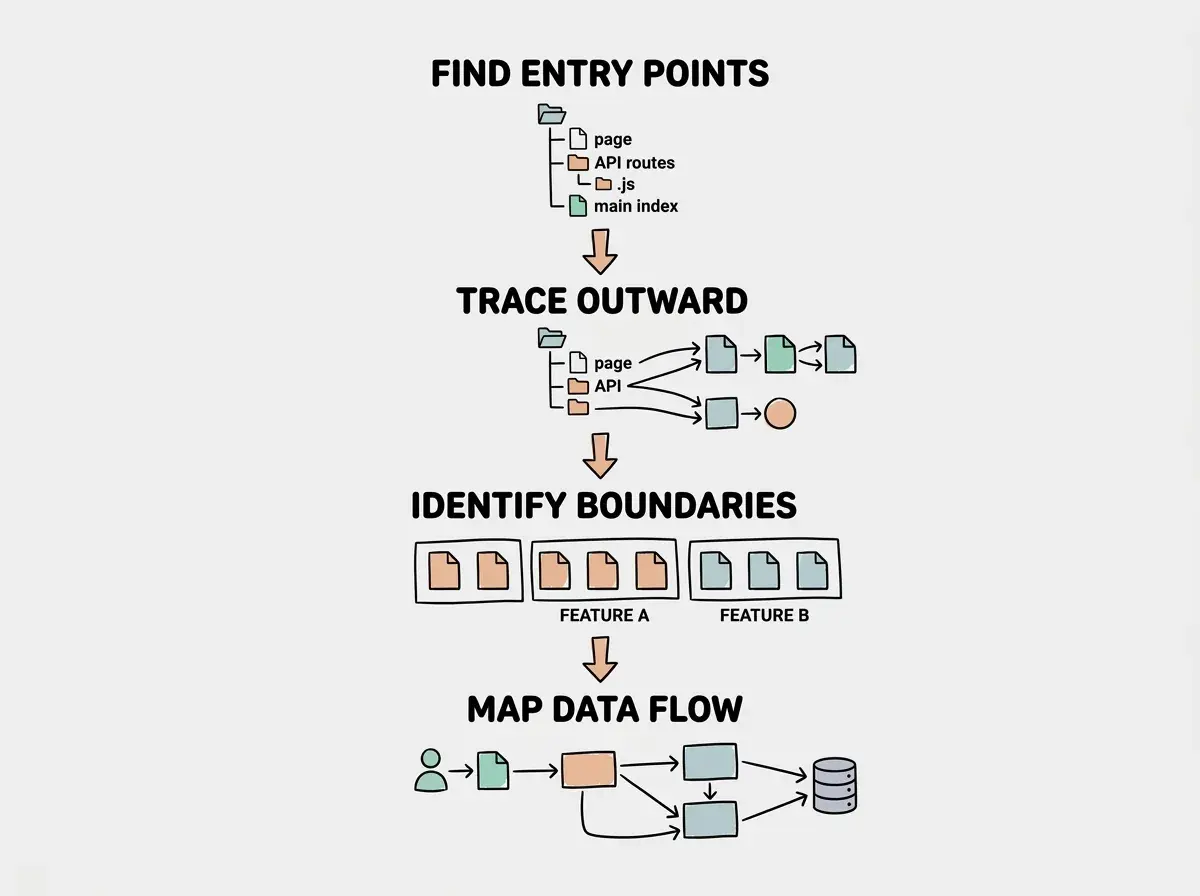
Most codebases, even complex ones, have a surprisingly small number of entry points. If you can read all of them in fifteen minutes, you have already recovered 60% of the map.
Using AI to Read AI Code
Here is the part that feels slightly absurd but works beautifully. You can use AI to explain AI-generated code you no longer understand. The AI that wrote it is stateless; it has no memory of the project. But it is still very good at reading code and explaining what it does in plain language.
The key is the specificity of your prompts. Vague prompts get vague explanations. Specific prompts get useful ones.
These prompts work consistently well:
For understanding a file's purpose: "Read this file and tell me in one sentence what it does and which other parts of the app it connects to. Do not explain the code line by line."
For understanding a function: "What does this function do? What does it expect as input, what does it return, and what breaks if it fails?"
For recovering the big picture: "Based on these file names and their imports, describe the architecture of this app. What are the main data flows?"
For finding the dangerous parts: "Which functions in this file make network requests, write to a database, or send emails? List them with a one-line description of what they do."
That last prompt is particularly useful. When you are returning to old code, the first thing you need to know is what the code can actually affect in the world. Read-only operations are safe to experiment with. Operations that send emails, charge cards, or write to a database require more care.
The AI gives you a map. You give the AI the territory, and it sketches the layout in language you can act on.
Building a Living Map of Your Codebase
The excavation method gets you oriented quickly. But if you are going to work on a project regularly, you need something more durable than a mental model that fades by next week.
The answer is a living map: a short document that describes the key files, their purposes, and how they connect. Not technical documentation. Not an API reference. Just a one-page orientation guide you can re-read in three minutes and immediately know where to start.
Here is what belongs in a living map:
The entry points. List the three to five files where execution begins, with a one-line description of each.
The critical functions. The five to ten functions that do the real work of the app. What goes in, what comes out, what they connect to.
The external services. Every API, database, or third-party service the app talks to. Which files handle those connections.
The things that can go wrong. The parts of the code where a bug would have real consequences. Payments, authentication, data writes.
Keep this document in the project root. Update it when you add significant new features. When you return to the project after a gap, read it first. It collapses the re-orientation from an hour to three minutes.
You can also use AI to generate a first draft. Open the project, list the key files, and prompt: "Based on these files and their contents, write a one-page orientation guide for a developer who is returning to this project after a long break. Focus on entry points, critical functions, and external services." The result will not be perfect, but it gives you something to edit rather than something to write from scratch.
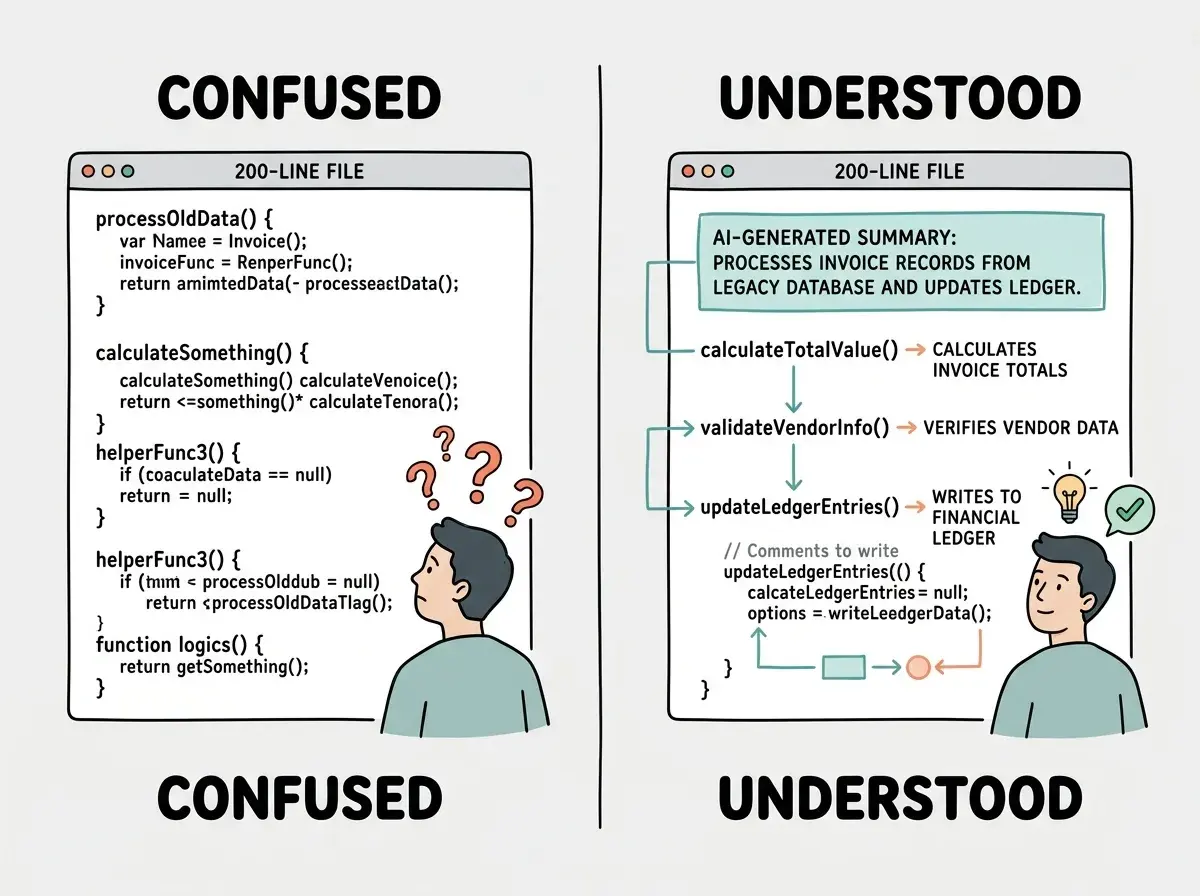
The living map turns a one-time excavation into a reusable asset. You do the hard work once. Every future session starts with context instead of confusion.
Writing documentation that is too detailed. Long, comprehensive documentation requires maintenance, and when it falls out of sync with the actual code, it becomes actively misleading. A living map should be short enough that you can update it in five minutes whenever you make a significant change. Aim for one page, not ten.
Dig deeper
A few hand-picked sources if you want to go further.
What This Means For You
Code archaeology is not a skill you develop over years. It is a method you can start using today, on the project you already have open.
If you are a founder who has been building with AI tools for months, there is almost certainly a project in your file system that you have been avoiding because it feels too unfamiliar to touch. The excavation method takes two hours the first time. It gives you back a project that felt permanently lost.
If you are an indie hacker shipping fast and iterating constantly, the living map is the thing that keeps you from spending the first forty-five minutes of every session re-orienting. That time compounds. Over a month of regular sessions, recovering orientation quickly adds up to real hours returned to actual building.
The deeper shift is this. When AI writes your code, you are not the author of the implementation. You are the author of the intent. Code archaeology is the practice of reading the implementation back through the intent, recovering the logic that the AI expressed on your behalf, and making it yours in a way it never was during the initial build.
That makes you a more capable owner of your own software. Not because you suddenly understand every line, but because you have a method for finding what matters and ignoring what does not.
The code was always yours. You just needed a way to remember it.
Get weekly deep-dives for founders and indie hackers who build with AI tools. Practical methods, not theoretical advice.
Join the NewsletterThe next time you open a project that feels foreign, do not close the laptop. Start at the entry points. Follow the most interesting artifact. Ask AI to sketch the map. Then write that map down somewhere you will actually read it.
You excavate once. You orient forever.
From debugging to architecture to shipping, weekly guides for people building real products with AI.
Subscribe Free