Cloudflare Pages gives you something no other hosting platform does: unlimited bandwidth on the free tier. No overages. No surprise bills when your app lands on Hacker News. The tradeoff is real, though. The developer experience is rougher than Vercel, the documentation is scattered, and you will spend time solving configuration problems that simply do not exist on more polished platforms. But if you are building something that needs to be fast everywhere and cheap at scale, Cloudflare Pages is worth the friction.
I have deployed multiple production projects on Cloudflare Pages, and the pattern is always the same. The first hour is harder than it should be. After that, you have a deployment pipeline that costs almost nothing and runs closer to your users than anything else available.
Why Cloudflare Pages Exists
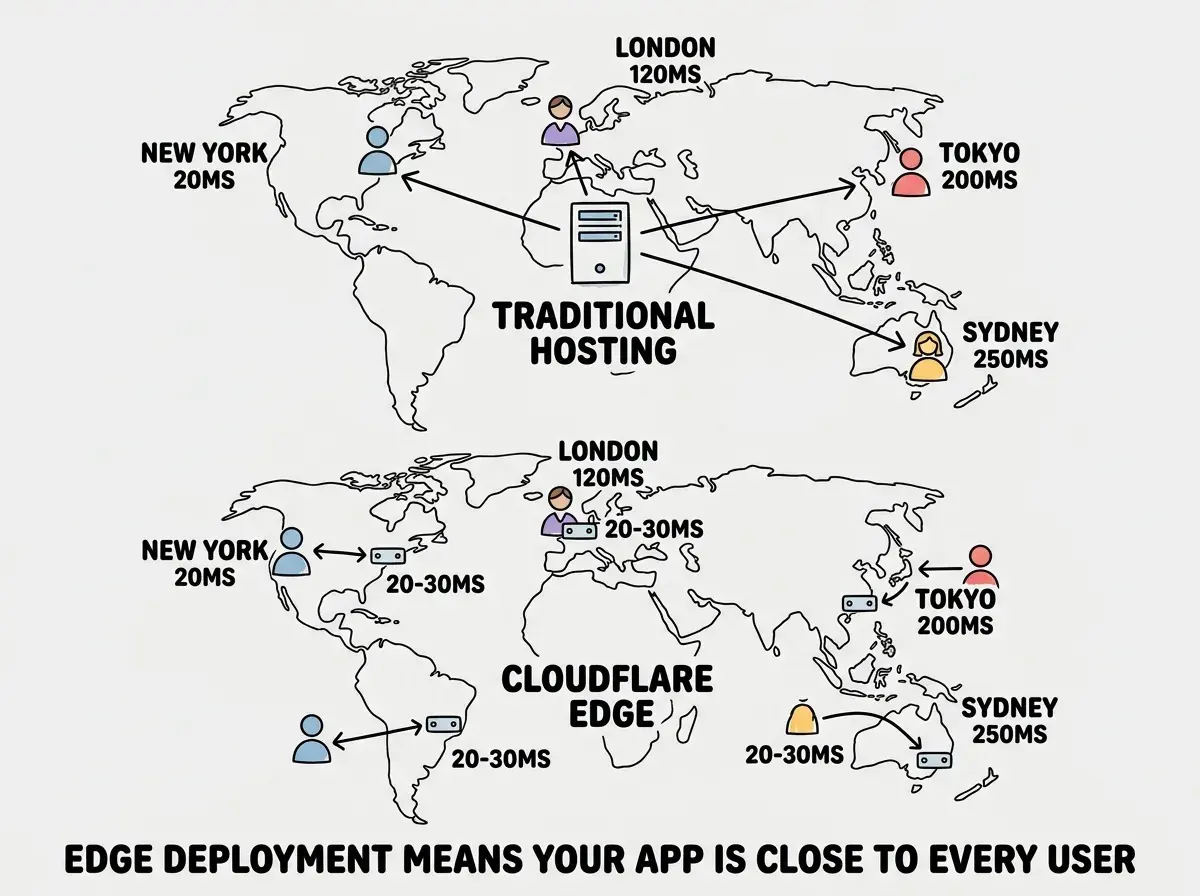
Think of traditional hosting like shipping all your packages from one central warehouse. A user in Tokyo, a user in Berlin, and a user in Sao Paulo all wait for their response to travel from a single server in Virginia. Cloudflare Pages works more like a network of local post offices. Your app gets copied to over 300 locations worldwide, and each user gets served from the one closest to them. That is edge computing in practice, and it is why Cloudflare consistently wins on time-to-first-byte benchmarks.
The business model is fundamentally different from Vercel and Netlify. Cloudflare makes money from enterprise network services, not from your hosting bill. Pages pulls developers into the Cloudflare ecosystem, which means the free tier is genuinely generous rather than a funnel to expensive overages.
The free tier includes unlimited bandwidth, 500 builds per month, 1 custom domain, and access to Workers. The Workers Paid plan at $5/mo adds 10 million requests, KV storage, Durable Objects, and R2. An app serving 50,000 monthly users might cost $5-10 on Cloudflare versus $100-300 on Vercel at the same traffic level.
Connect GitHub and Configure Your Build
Start at dash.cloudflare.com. Navigate to "Workers & Pages" in the sidebar, click "Create application," then "Pages," then "Connect to Git."
Authorize Cloudflare to access your GitHub repositories. Select the repository you want to deploy. The three fields that matter are "Production branch" (usually main), "Build command," and "Build output directory."
For common frameworks, here are the correct settings:
- Vite (React, Vue, Svelte): Build command
npm run build, output directorydist - Astro: Build command
npm run build, output directorydist - Next.js (static export): Build command
npm run build, output directoryout - Next.js (SSR): Requires the
@opennextjs/cloudflareadapter or@cloudflare/next-on-pages
If you are deploying a Next.js app with server-side rendering, the adapter is the extra configuration layer that does not exist on Vercel, and it is where most first-time Cloudflare deployers get stuck.
Cloudflare Pages works best with static sites and frameworks that produce static output. If your app uses Next.js server components, API routes, or ISR, you will need an adapter and additional configuration in wrangler.jsonc. The complexity is manageable, but do not expect the same zero-config experience you get on Vercel.
Add your environment variables before clicking deploy. Cloudflare Pages supports separate variables for "Production" and "Preview" environments, which is useful if your staging and production APIs differ. Click "Save and Deploy." If the build fails, the most common causes are missing environment variables, incorrect build output directory, or Node.js version incompatibility (set NODE_VERSION=18 in your environment variables).
Workers for Server-Side Logic
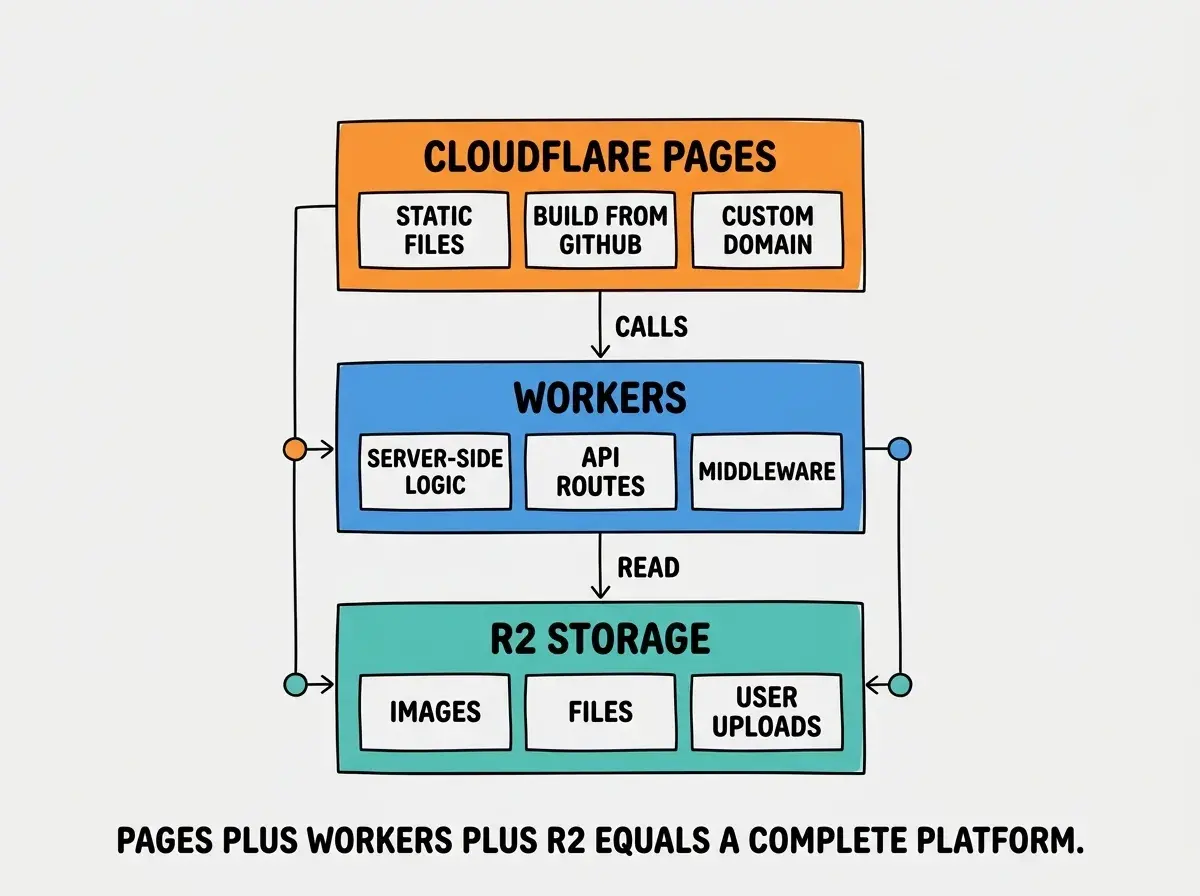
Static pages are only half the story. Most real apps need API endpoints, form handlers, authentication flows, and database queries. On Cloudflare, that is Workers.
Workers are serverless functions that run on Cloudflare's edge network. Unlike traditional serverless (AWS Lambda, Vercel Functions) with 200-500ms cold starts, Workers run on V8 isolates and cold-start in under 5ms. Your API responses feel instant instead of sluggish on first request.
For Pages projects, create a functions directory in your project root. Each file becomes an API endpoint. A file at functions/api/hello.js becomes available at /api/hello. If you are using the OpenNext adapter for Next.js, your existing API routes in app/api/ work through the adapter without any restructuring.
Workers have constraints worth knowing. The runtime is V8-based, not full Node.js, so some Node.js APIs are unavailable. The nodejs_compat compatibility flag enables most of what you need, but libraries depending on native modules like fs will not work. There is no filesystem, no long-running processes, and no native binary execution on the edge.
R2 for Image and File Storage
If your app handles images or file uploads, Cloudflare R2 is the storage layer you want. R2 is S3-compatible object storage with one critical difference: zero egress fees.
On AWS S3, serving 1 TB of images costs roughly $90 in transfer fees. On R2, that same 1 TB costs $0 in egress. You pay only for storage ($0.015/GB per month) and operations. For image-heavy apps, this difference compounds fast.
Create an R2 bucket in the Cloudflare dashboard under "R2 Object Storage." Connect it to your Pages project by adding an r2_buckets binding in your wrangler.jsonc. For public access, connect a custom domain like images.yourdomain.com to the bucket, and files become accessible at that URL.
Understand the fundamentals before diving into platform-specific setup.
Start with the basicsWrangler CLI for Local Development
The Wrangler CLI is how you develop and test Cloudflare projects locally. Install it with npm install -D wrangler, then run wrangler login to authenticate.
wrangler pages dev starts a local server that simulates the Pages environment, including Workers functions and bindings to KV, R2, and other services. This is where Cloudflare's rougher DX shows most. The dev server does not always match production behavior perfectly, hot reload is slower than next dev, and you will occasionally restart Wrangler because something got into a bad state.
The wrangler.jsonc configuration file centralizes your project settings. Here is a minimal example:
{
  "name": "my-app",
  "compatibility_date": "2026-03-01",
  "compatibility_flags": ["nodejs_compat"],
  "pages_build_output_dir": "dist",
  "r2_buckets": [
    {
      "binding": "MY_BUCKET",
      "bucket_name": "my-app-assets"
    }
  ]
}
wrangler pages deploy lets you deploy from the CLI without touching the dashboard, useful for CI/CD pipelines. And wrangler tail streams live logs from production Workers, which is invaluable for debugging issues that only appear at the edge.
The Honest Tradeoff
Cloudflare Pages is not the easiest platform to deploy on. Vercel has better DX for Next.js. Netlify has a simpler onboarding flow. Both have more intuitive dashboards, clearer error messages, and documentation that does not require you to cross-reference three different product docs.
But Cloudflare Pages is dramatically cheaper at scale, and the performance advantage is real.
Cloudflare is the right choice when you are building something that might actually get traffic. An indie SaaS, a content site, an API that serves mobile clients globally. If you have shipped apps before and are comfortable with documentation that is occasionally incomplete, the setup friction is a one-time cost that pays dividends every month.
Cloudflare is the wrong choice when you are deploying your first app ever. The learning curve is real and the error messages are less helpful. Start with Vercel or Netlify, then migrate to Cloudflare when costs become a concern.
Assuming you are locked into your first hosting platform. You are not. Deploy your MVP on Vercel for the speed and DX, then move to Cloudflare when your traffic grows and the bill starts climbing. The migration is a weekend project, not a rewrite. What matters is shipping first and optimizing costs second.
The DX gap is closing. Cloudflare has invested heavily in developer experience over the past year. The Pages dashboard has improved, Wrangler is more stable, and the @opennextjs/cloudflare adapter makes Next.js deployment increasingly smooth. It is not at parity with Vercel yet, but the trajectory is clear.
What This Means For You
The platform you deploy on matters more than most vibe coders realize, and it matters least on day one and most on day one hundred.
- If you are a senior dev building for production traffic, Cloudflare Pages with Workers and R2 gives you the most compute per dollar of any major platform. The setup is an afternoon. The savings are every month after that. You already know how to read docs and debug configuration issues, so the rougher DX is a temporary inconvenience, not a blocker. Start here and skip the platform migration later.
- If you are an indie hacker validating an idea, deploy your MVP on Vercel or Netlify first. Speed to market matters more than hosting costs when you have zero users. But the moment your app gets consistent traffic, run the math on Cloudflare. The difference between $5/mo and $200/mo is real money when you are bootstrapping, and that money is better spent on the product than the hosting bill.
Cloudflare Pages is not the easiest way to deploy. It is the cheapest way to deploy at scale, with the fastest edge network, and the most generous free tier. If your app is heading somewhere, this is where you want it to land.
See how Cloudflare stacks up against Vercel and Netlify across every dimension.
Read the full comparison