With 92% of developers now using AI tools daily, the cockpit of a modern code editor looks very different than it did two years ago. Copilot autocompletes your lines. Cursor rebuilds the entire editor around AI. And then there is Cline, which takes a different approach entirely. Think of it as a co-pilot sitting beside you in the cockpit of VS Code. It can read your instruments, scan your flight path, and take actions when you give the word. But you never leave the captain's seat.
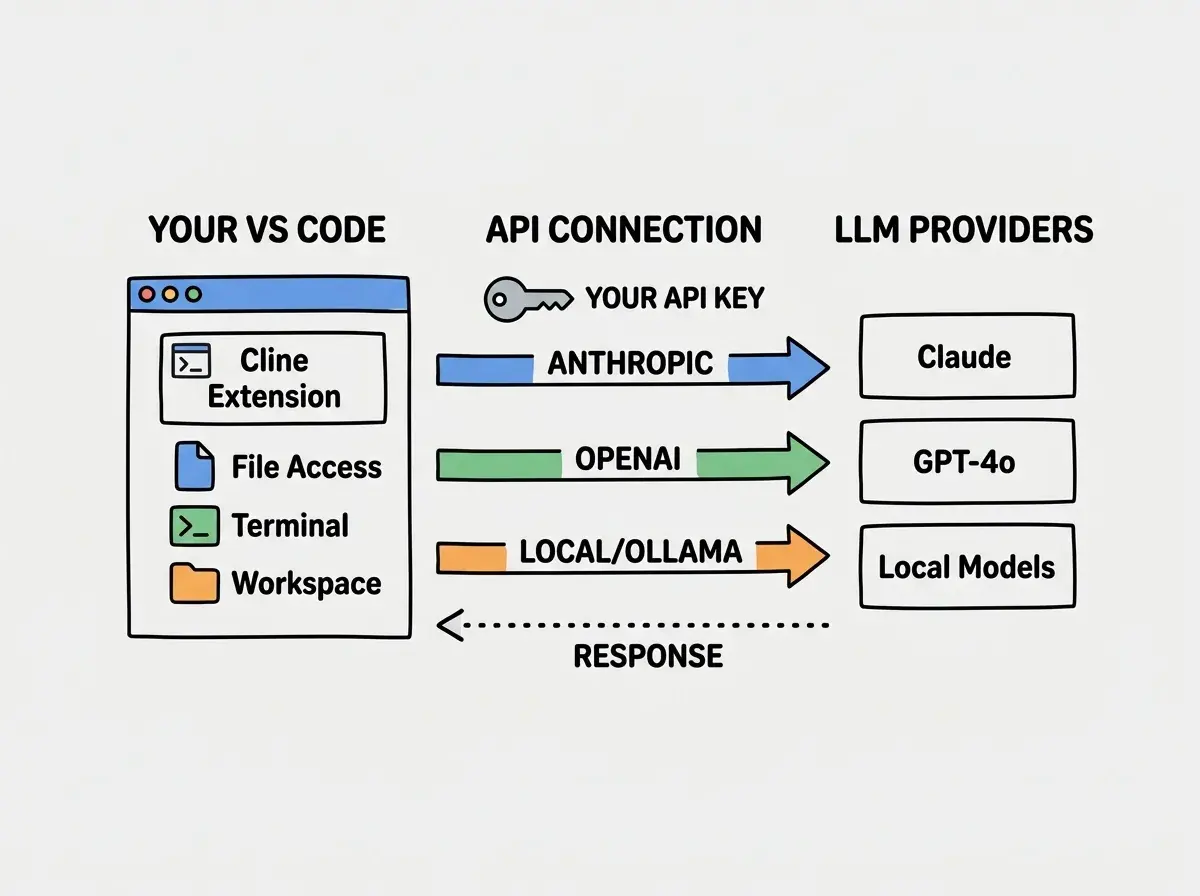
Cline is an open-source VS Code extension that connects to any major LLM provider through your own API key. It reads your files, edits them autonomously, runs terminal commands, and integrates with external tools through the Model Context Protocol. Unlike hosted solutions that own the intelligence layer, Cline puts you in control of which model you fly with and how much you pay per flight.
This review covers what Cline does well, where it falls short, and how it compares to the alternatives you are probably already evaluating.
Cline is the right pick if you want autonomous AI editing inside VS Code without locking into one provider. You bring your own API key, choose the model, and pay per token. Best for senior developers who want approval-gated editing with terminal access. Skip Cline if you prefer flat-rate pricing or do not want to manage API keys; Cursor or Copilot will be simpler.
How Cline's Architecture Works
Most AI coding tools are closed systems. Copilot routes everything through GitHub's servers with a fixed model. Cursor bundles a custom editor with proprietary intelligence baked in. Cline flips that model on its head.
Cline is a VS Code extension, not a separate application. You install it from the marketplace, plug in an API key from Anthropic, OpenAI, Google, or any OpenRouter-compatible provider, and start working. The extension runs inside your existing VS Code setup, so your keybindings, themes, other extensions, and workspace configuration stay exactly where they are. No second editor to learn, no migration to manage.
The API-key model changes the economics. Instead of paying a flat monthly subscription, you pay per token based on actual usage. A light day might cost $0.50. A heavy refactoring session with Claude Sonnet could run $5-8. For developers who code intermittently, this pay-as-you-go structure often works out cheaper than a $20/month subscription. For those who code eight hours straight every day, it can cost more.
You choose your model. This is the architectural decision that separates Cline from nearly everything else. Want Claude Sonnet for complex refactoring? Switch to it. Need a cheaper model for simple boilerplate generation? Drop down to Haiku or GPT-4o Mini. Working on a project with strict data residency requirements? Point Cline at a local model running through Ollama. The extension is model-agnostic by design.
Autonomous File Editing and Terminal Access
This is where Cline earns its reputation as a genuine pair programmer rather than a glorified autocomplete engine.
Cline reads and writes files across your entire project. When you describe a task, Cline scans the relevant files, understands the context, and makes coordinated edits across multiple files. Ask it to add error handling to an API route, and it will modify the route handler, update the type definitions, and adjust the tests. It shows you a diff for each change before applying it, so you review every edit before it lands. The co-pilot suggests the heading change; you approve or reject it.
Terminal execution is the feature that surprised me most. Cline can run commands in your VS Code terminal. It will install dependencies, run test suites, execute build scripts, and read the output to diagnose problems. When a test fails after its edit, Cline reads the error, adjusts the code, and reruns the test. This creates a feedback loop that feels remarkably close to having another developer sitting at the keyboard.
The approval system keeps you in command. Every file edit and terminal command requires your explicit approval unless you enable auto-approve for specific action types. This is deliberate. Cline is powerful enough to do real damage if it runs the wrong command or overwrites the wrong file. The approval step adds friction, but it is the same friction that prevents a co-pilot from banking the plane without the captain's agreement.
For senior developers, this approval model hits the right balance. You get the speed of AI-assisted editing with the safety net of human review. The alternative, fully autonomous editing without review, is a footgun that experienced developers rightly avoid.
Cline's real advantage is not any single feature. It is the combination of autonomous editing, terminal access, and model flexibility inside an editor you already use. You do not switch tools, learn a new interface, or commit to a single AI provider. The co-pilot joins your cockpit instead of asking you to move to a different plane.
How Cline Differs from Copilot and Cursor
The AI coding tool market is crowded, and the differences between options are not always obvious. Here is where Cline carves out its own lane.
Copilot is an autocomplete engine. Cline is an agent. Copilot predicts the next few lines based on your current context. It is fast and excellent at boilerplate. But Copilot does not read your entire project, run terminal commands, or make coordinated multi-file edits. Copilot is a spellchecker for code. Cline is a co-pilot that understands the flight plan.
Cursor is a full editor replacement. Cline is an extension. Cursor ships as a fork of VS Code with AI baked into every interaction. The experience is polished and tightly integrated. But adopting Cursor means leaving VS Code behind, along with extensions that have not been ported and workspace configurations that do not transfer. Cline preserves your existing setup completely.
Pricing models differ fundamentally. Copilot charges $10-19/month. Cursor charges $20/month for Pro. Cline charges nothing for the extension; you pay your LLM provider directly. For teams with existing API agreements, Cline adds zero incremental licensing cost.
| Cline | GitHub Copilot | Cursor | |
|---|---|---|---|
| Type | VS Code extension | VS Code extension | Standalone editor |
| Pricing | Pay-per-token (your API key) | $10-19/mo subscription | $20/mo subscription |
| Model choice | Any provider | GitHub's models | Cursor's models + some choice |
| File editing | Multi-file autonomous | Inline suggestions | Multi-file autonomous |
| Terminal access | Yes, with approval | No | Yes |
| Open source | Yes (Apache 2.0) | No | No |
The tradeoff is clear. Cline gives you maximum flexibility and control at the cost of setup complexity and variable pricing. Copilot gives you frictionless autocomplete at the cost of limited capability. Cursor gives you a polished all-in-one experience at the cost of editor lock-in.
MCP Support and Tool Integration
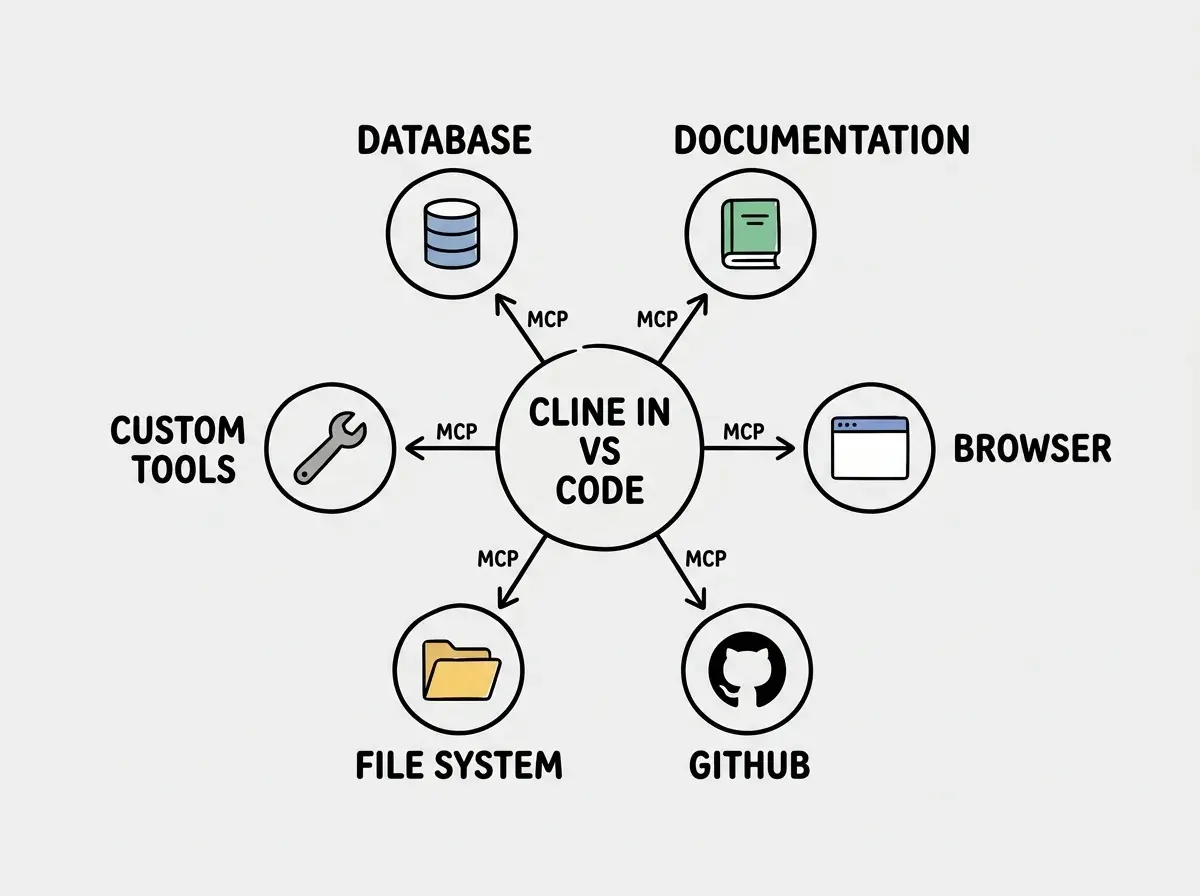
The Model Context Protocol is where Cline's architecture pays the biggest dividends. MCP is an open standard (created by Anthropic) that lets AI assistants connect to external tools and data sources through a unified interface.
Cline was one of the first coding tools to support MCP natively. You can connect it to databases, documentation sites, project management tools, browser automation, and custom internal tools. Need Cline to read your Jira tickets before starting a task? Connect a Jira MCP server. Want it to query your staging database to understand the schema? Connect a Postgres MCP server. The extension becomes a hub that connects your LLM to your entire development infrastructure.
Practical MCP use cases that actually work well. Connecting Cline to your documentation source means it references accurate information instead of hallucinating API signatures. Connecting it to a browser tool lets it verify that UI changes render correctly. Connecting it to a GitHub MCP server lets it read issues and pull request comments without you copying and pasting links.
The setup is not trivial. Configuring MCP servers requires editing JSON config files, running server processes, and debugging connection issues. Expect to spend an hour or two getting your first MCP server connected. Once configured, connections persist across sessions and the payoff is substantial.
Cost Considerations for Real Projects
The pay-per-token model can surprise you in both directions.
Light usage is remarkably cheap. A developer who uses Cline for a few focused tasks per day, maybe a refactoring session, some test generation, and occasional debugging help, typically spends $1-3 per day with Claude Sonnet. Over a month, that is $20-60, comparable to or cheaper than Cursor's flat rate.
Heavy usage adds up fast. A developer using Cline as their primary coding partner for eight hours daily can hit $15-25 per day. Over a month, that is $300-500 with a top-tier model. Switching to a cheaper model for routine tasks helps, but managing model selection adds cognitive overhead.
The hidden cost is context window usage. Large projects burn through tokens quickly when Cline gathers context. A single complex task in a monorepo can consume 100K+ tokens in context alone before the model generates a single line of output.
Running Cline with an expensive model on auto-approve mode across a large codebase. Without the approval step gating each action, Cline will chain together file reads, edits, and terminal commands that consume tokens continuously. One developer reported a $50 bill from a single afternoon where Cline got stuck in a retry loop on a failing test. Keep approvals on until you understand your token consumption patterns.
Who Should Fly with Cline
Cline fits a specific developer profile better than others.
It excels for senior developers who want AI assistance without changing their workflow. If you have spent years customizing VS Code and building workflows around its ecosystem, Cline slots in without disrupting any of it. You gain a capable co-pilot without changing planes.
It works well for teams with existing API contracts. Organizations already paying for Anthropic or OpenAI API access can deploy Cline without additional per-seat licensing. The total cost is pure API usage, which many finance teams prefer over another SaaS subscription.
It is less ideal for developers who want a turnkey experience. If you do not want to manage API keys, choose models, or configure MCP servers, Cursor or Copilot will serve you better. Those tools trade flexibility for simplicity, and that tradeoff is valid.
The co-pilot analogy holds all the way through. Cline does not try to fly the plane for you. It reads the instruments you point it at, suggests maneuvers based on what it sees, and executes when you give the green light. For developers who want that collaboration without giving up the captain's seat, it is the most capable option inside VS Code today.
Choosing the right assistant depends on your workflow, budget, and how much control you want to keep.
Compare AI coding toolsThe AI coding tool landscape will keep shifting. New models, new pricing, new features. What will not change is the fundamental question: do you want an AI that owns the cockpit, or one that joins you in it?
Learn how to integrate AI-assisted development into real production projects.
Explore the guides