Claude Code v2.1.186 shipped on June 22 with a fix for one of the most frustrating failure modes in agentic workflows: background subagents that hit a permission wall would silently auto-deny and get stuck, often looping in read-only mode with no visible error. Starting with this version, permission prompts from background subagents surface directly in your main session, where you can approve or deny on the fly without stopping the agent.
What was broken about background agents before this version
Before v2.1.186, when a background subagent (any agent launched with run_in_background: true) reached a tool call requiring approval, the prompt had nowhere to go. The main session was still running; the background agent could not interrupt it. The only option the system had was to auto-deny the tool call.
The failure mode was worse than a hard crash. The subagent would typically continue running, treating the denied tool call as a non-critical failure. If the denied call was a write operation via an MCP tool, the agent would often retry, fail again, and eventually settle into a read-only loop. The task would keep showing as active in claude agents. The work would not get done. The user would have no obvious signal about what was happening.
Multiple GitHub issues (#34095, #36042) documented subagents stuck in silent loops after permission denials. The fix Anthropic shipped is an async queue approach: prompts surface to the main session and wait for a decision.
Update Claude Code with claude update to reach v2.1.186 or later. Once updated, background subagents that need a permission show a prompt in your main session labeled with the subagent's name. Press Enter to approve that specific tool call and let the subagent continue. Press Esc to deny that one call without stopping the subagent. The subagent stays running either way; you are deciding whether one particular tool call goes through, not whether to kill the task.
The change matters most for teams running multi-agent workflows that mix background work with active sessions. A common pattern: a coordinator subagent runs in the background while the main session stays open for the user to give guidance. Before this fix, if the background coordinator needed to, say, write a file it had not previously written or call an MCP tool not yet in its permission set, it would fail silently. Now it asks.
How does permission surfacing actually work in your session
When a background subagent reaches a gated tool call, Claude Code interrupts your main session's current output and renders the permission prompt in-line. The prompt includes the subagent's name (if you gave it one in Agent(name: "my-agent", ...)) or its task description if unnamed. It shows the exact tool call that is waiting, including the tool name and any relevant parameters.
You have two options. Pressing Enter or the approval key allows that specific tool call. The subagent resumes from exactly where it paused. Pressing Esc denies just that one call; the subagent receives a refusal result but continues running and can attempt other work. You are not making a blanket permission decision for the whole subagent's lifetime, just ruling on the specific call in front of you.
To pre-authorize a tool before an agent even asks, the Tool(param:value) syntax from v2.1.178's parameterized permission rules still works. The v2.1.186 behavior is the fallback for unanticipated requirements.

How does this change agentic workflow design
The practical consequence is that you can write looser permission rules for background subagents and rely on on-demand approval for edge cases, instead of trying to enumerate every possible tool call upfront.
Previously, the safe pattern for a background subagent was to either grant it broad permissions (or use --dangerously-skip-permissions) to avoid silent denials, or to painstakingly predict every tool it might need and add permission rules before launch. Neither option was good. Broad permissions raised real safety concerns. Upfront enumeration was tedious and still broke when the agent encountered an unanticipated scenario.
Now you can launch a background subagent with the permissions you are confident about, knowing that edge cases will surface for approval rather than fail silently. A practical starting point: grant read permissions upfront (reading files, searching code, querying databases) and leave write operations unapproved. If the agent needs to write, it will surface a prompt naming the exact call.
The Vibe Coder Blog covers Claude Code changes focused on what agentic developers need to act on.
Browse All PostsFor teams running unattended overnight jobs, the behavior is slightly different to consider. If no human is watching the main session to approve prompts, a stuck permission request will pause the background subagent until the session times out or the user returns. For fully headless use, pre-specifying permissions with Tool(param:value) rules remains the right approach. The new surfacing behavior is primarily valuable for interactive sessions where a developer is present.
What is the claude mcp login command for
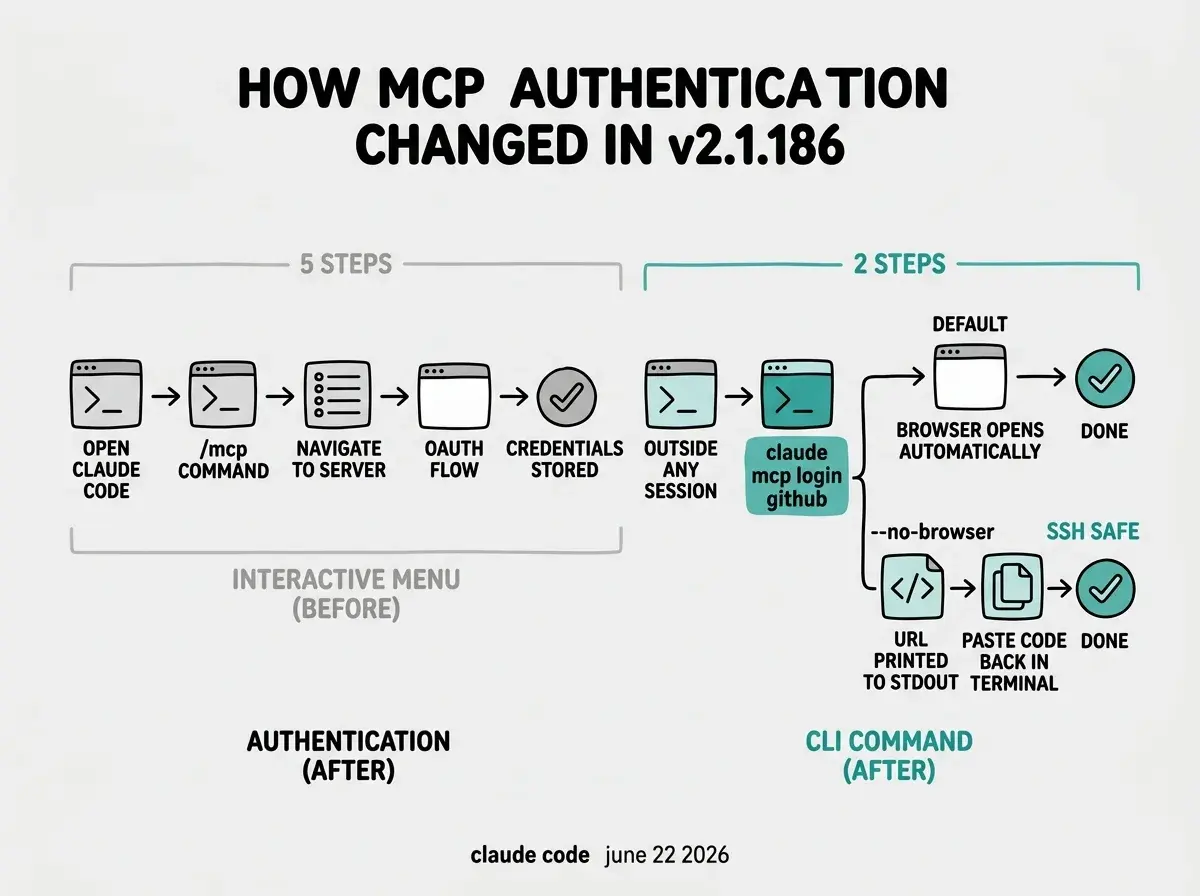
Claude Code v2.1.186 also adds claude mcp login <name> and claude mcp logout <name> as direct CLI commands. Before this, authenticating an MCP server required opening the interactive /mcp menu inside a session, navigating to the server, and completing the OAuth flow from there.
The new commands remove that friction. Run claude mcp login github (or whatever server name you configured) from your shell, and Claude Code opens the browser OAuth flow for that specific server. On success, the credentials are stored in the same place /mcp would have stored them and are available immediately in new sessions.
For SSH and remote environments, the --no-browser flag changes the OAuth flow to print the authorization URL to stdout. You copy the URL, open it in a browser on your local machine, complete the flow, and paste the resulting code back into the terminal. This makes MCP authentication usable in any environment where Claude Code can run, including CI runners and cloud-hosted remote sessions.
What else changed in v2.1.186
The release includes a few smaller additions worth knowing.
! bash commands in interactive sessions now trigger automatic Claude responses by default. Previously, running a command with ! would execute it and print the output, but Claude would not comment unless you explicitly asked. Now Claude reads the output and responds if there is something actionable. To keep the old behavior, add "respondToBashCommands": false to your settings.
The /review <pr> command now uses the same underlying engine as /code-review medium. Previously, /review had a lighter implementation that did not match the thoroughness of the code-review skill. They now produce equivalent output.
The CLAUDE_CODE_MAX_RETRIES environment variable is capped at 15. If you have unattended sessions that need unlimited retries, the replacement is CLAUDE_CODE_RETRY_WATCHDOG, which handles retry logic for long-running headless processes without the hard cap.
Running background subagents in unattended sessions and expecting permission prompts to resolve automatically. When a background subagent hits a gated tool call and no human is watching the main session, the prompt waits. The subagent pauses at that step. The session does not time out from inactivity because it is technically still active. If you run overnight agentic jobs, either pre-specify all required permissions using Tool rules, or set the agent's permission mode to allow the operations you expect it to need. The new prompt surfacing is for interactive use, not headless automation.
The release also fixes Agent(type) deny rules and Agent(x,y) type restrictions that were not being enforced since the agent teams redesign in v2.1.178. If you had deny rules written for specific subagent types and found them not triggering, v2.1.186 restores that enforcement.
The full v2.1.186 release notes include the complete list of bug fixes and smaller improvements. Run claude update to get the version.
The Vibe Coder Blog covers Claude Code and other AI coding tools with a focus on what changes your daily workflow.
Read More