Claude Code v2.1.172, released June 10, ships one capability change with architectural implications: sub-agents can now spawn their own sub-agents, up to five levels deep. The official sub-agents documentation still reads "subagents cannot spawn other subagents." The shipped binary disagrees, and the changelog is authoritative. Any sub-agent running on v2.1.172 or later can call the Agent tool and create its own children.
What exactly changed in v2.1.172
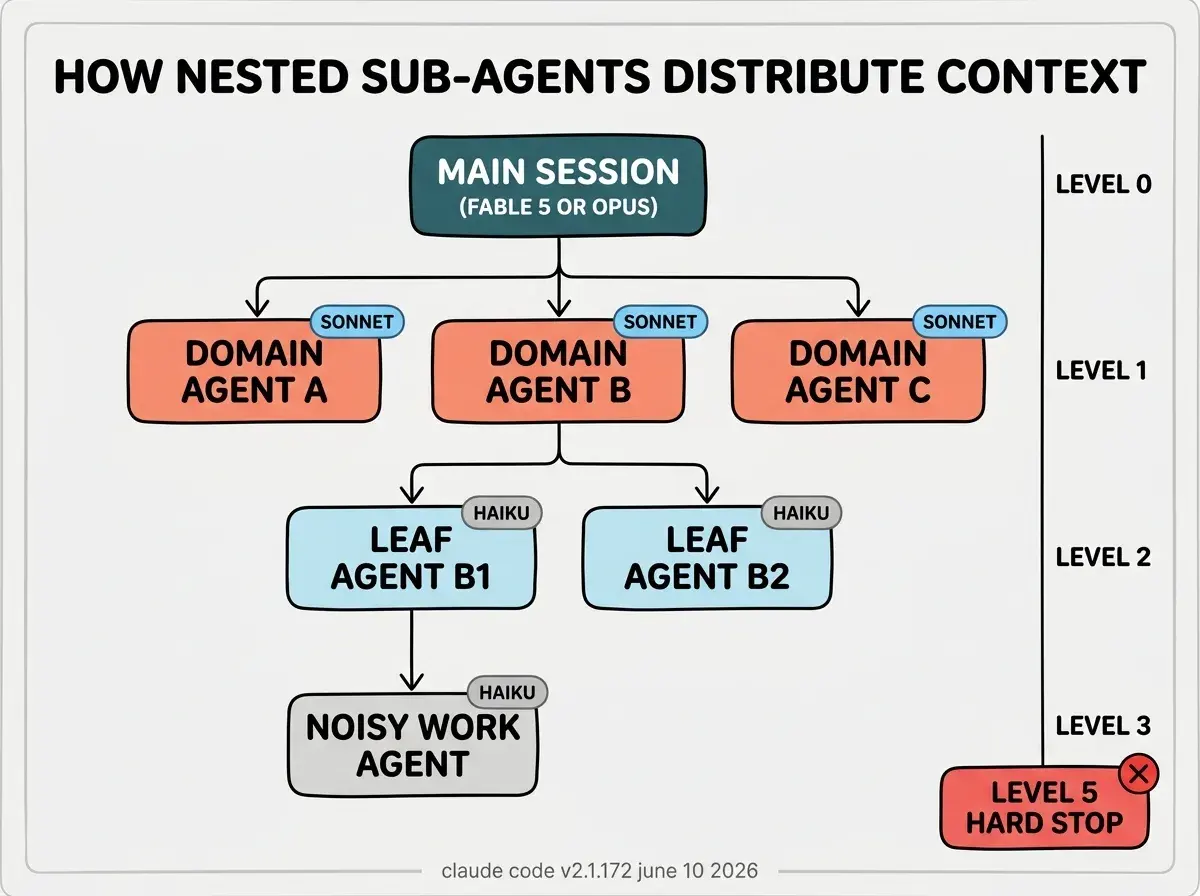
Before June 10, calling the Agent tool from inside a sub-agent had no effect. The runtime blocked sub-agent-to-sub-agent delegation, enforcing a flat structure: main session down to sub-agent, full stop. The June 10 update removes that block and replaces it with a depth counter. The counter starts at zero for the main session, increments by one each time a sub-agent spawns a child, and errors at six. Five levels of nesting is the hard ceiling, enforced server-side with no setting to raise it.
v2.1.173, released June 11, ships two minor fixes on top: Fable 5 model names with a [1m] suffix now normalize automatically (Fable 5 includes 1M context by default, so the suffix was redundant), and a spurious "sandbox dependencies missing" startup warning on Windows is resolved. Neither changes the nesting behavior.
Run claude update and verify with claude --version that you are on v2.1.172 or later. No configuration is required to use nested sub-agents. Any existing sub-agent that calls the Agent tool will now successfully spawn children, limited to five levels deep from the root session. The depth counter resets per conversation chain. If a sub-agent YAML definition lacks an explicit Agent allowlist, it can now spawn any available sub-agent, including ones with broad tool access. Audit your definitions before relying on nesting in production workflows.
Boris Cherny, Claude Code lead at Anthropic, attributed the motivation to "agents kicking off agents as a way to better manage context." That framing is the full story. This is not a feature for running more agents in parallel. It is a feature for pushing noisy work further from the context you care about.
Why does context isolation across levels change agentic workflows
Every node in the hierarchy gets its own context window. Work that produces large intermediate results, such as log grep outputs, multi-file reads, or test suite output, previously had two options: run in the main session and balloon the context, or run in a single-level sub-agent and return the full noisy result to the session. Now a sub-agent can push that noisy exploration one or two levels further down, get back a condensed summary, and pass only that summary upward. The main session sees clean verdicts at each step.
The practical illustration is a debugging scenario. A main session agent identifies four candidate causes for an incident. It spawns four level-1 sub-agents, one per hypothesis. One hypothesis requires cross-referencing hundreds of megabytes of server logs against a large codebase, a job that would flood a sub-agent's context with raw log lines. Pre-v2.1.172, that sub-agent had to do it inline and return bloated. Post-v2.1.172, it spawns a level-2 Haiku sub-agent to do the grep work and returns a single-line correlation. The level-1 agent stays focused. The main session stays clean.
How does token cost scale with nesting depth
Nesting does not reduce total tokens. It redistributes where tokens are consumed and what reaches the levels you care about. The official cost guidance for sub-agent-heavy workflows cites roughly 7x token consumption compared to working conversationally, and that figure compounds as you branch deeper. A wide hierarchy with heavy work at every level can reach significant total token spend even when each individual window stays lean.
The primary cost control is model selection per level. Fable 5 or Opus at the root gives the strongest reasoning for orchestration decisions. Sonnet at level 1 handles domain-level coordination at lower cost and acceptable latency. Haiku from level 2 downward handles leaf tasks (search, read, format, grep) at the lowest cost and highest speed. This tiered assignment is not mandatory, but it is the pattern the Claude Code team recommends for cost control in nested hierarchies.
Sub-agents inherit the model of their parent unless you explicitly override it in the sub-agent YAML definition using the model field. Without overrides, a chain of Fable 5 agents all the way to level five will complete tasks well and exhaust usage credits quickly on anything non-trivial.
The Vibe Coder Blog covers AI coding tool changes focused on what vibecoders can act on today.
Browse All PostsWhat are the anti-patterns vibecoders hit first with nested sub-agents
Over-nesting routine work. Nesting is for tasks that produce noisy intermediate data which would degrade the context at the level above. Spawning a child sub-agent to run a shell command that returns two lines is pure overhead: setup cost, context handoff, and round trip delay. If the result is short and you will reference it later in the conversation, keep it in the parent. Nest only when the volume or noise of intermediate work justifies the context isolation.
Running Opus at every level. Each level in the hierarchy has its own model choice, and that choice compounds. Leaf-level work at level two and below is typically search, read, and format operations that do not require strong reasoning. Haiku handles those tasks at a fraction of the cost and at higher speed. Reserve Opus or Fable 5 for the levels where orchestration decisions and reasoning quality actually matter.
Broad Agent allowlists in sub-agent definitions. The Agent field in a sub-agent YAML controls which sub-agents that node is permitted to spawn. An empty or wildcard allowlist gives a sub-agent permission to spawn any available agent, including ones that can write files, call MCP tools, or run shell commands. With v2.1.172 enabling nesting by default, this is no longer a theoretical concern. Set explicit allowlists per sub-agent to keep the capability surface narrow at each level of the hierarchy.
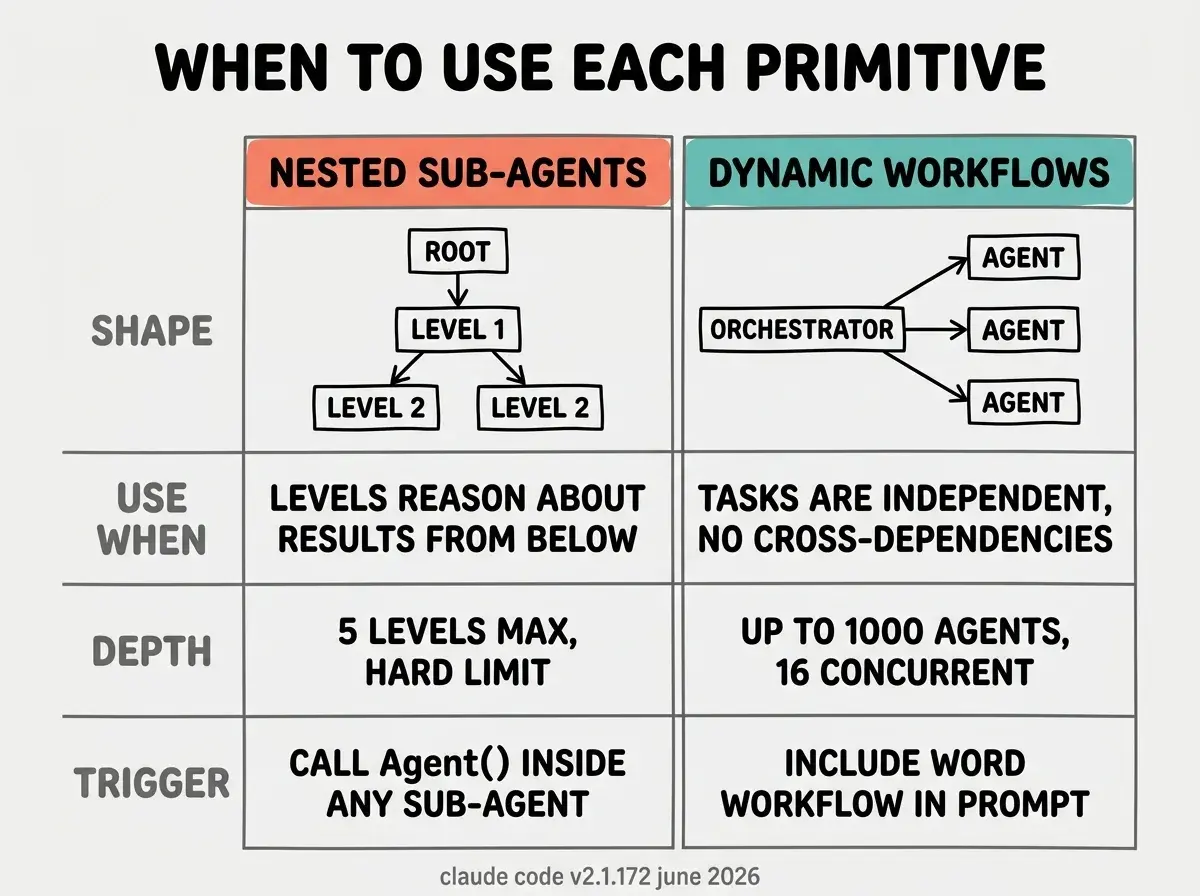
Treating nested sub-agents as a substitute for dynamic workflows. If your task is parallelizable (running independent lint checks, scanning hundreds of files, processing a batch of pull requests), use dynamic workflows triggered by including the word "workflow" in your prompt. They fan work to up to 1,000 parallel agents via a JavaScript orchestration script and resume if interrupted. Nested sub-agents are the right primitive when levels need to reason about what the level below returned. Dynamic workflows are the right primitive when tasks are independent. These are different shapes of problem and using the wrong primitive for either adds cost without benefit.
How should vibecoders restructure their agent setups today
The first step is updating to v2.1.172 and auditing existing sub-agent YAML definitions for missing Agent allowlists. If any definition has no explicit allowlist, add one now. Before this release, an empty allowlist was harmless because nesting was blocked. After this release, an empty allowlist means that sub-agent can spawn anything, which may not be what you intend.
The second step is identifying existing workflows where the flat structure forced noisy research inline into the main session. These are the candidates for an additional nesting layer. You do not need five levels for most tasks. The typical useful depth is two or three: main session orchestrates, level-1 agents handle domains or phases, level-2 agents handle noisy leaf work. Beyond three levels, setup overhead and context handoff latency tend to outweigh the context savings unless the leaf work is genuinely voluminous.
For vibecoders already using dynamic workflows: nested sub-agents and dynamic workflows are complementary. A dynamic workflow can spawn sub-agents at each step that themselves delegate downward into a nested hierarchy. The Claude Code workflows documentation covers how the two primitives interact.
One thing worth noting directly: the official sub-agents reference page still contains the line "This prevents infinite nesting (subagents cannot spawn other subagents)" in the Plan subagent description. That line is stale as of v2.1.172. The shipped binary is the correct reference, and the changelog confirms the change.
The full v2.1.172 release notes include the complete list of fixes and improvements alongside the nesting change.
The Vibe Coder Blog covers capability updates focused on what builders can act on today.
Read More