Claude Code v2.1.169, released June 8, ships three workflow-changing additions: a --safe-mode flag that disables every customization layer for clean debugging, a /cd command that moves a live session to a new working directory without losing the prompt cache, and a disableBundledSkills setting that strips the model's visibility into built-in skills. The release also carries more than 30 bug fixes targeting background agent reliability, MCP policy enforcement, and Windows-specific blockers.
Why Does Claude Code Need a Safe Mode
The --safe-mode flag signals that Claude Code's customization surface has grown complex enough that diagnosing failures now requires a way to isolate the base tool from every layer built on top of it. A production setup today might include a CLAUDE.md with hundreds of lines of context, three or four MCP servers (GitHub, database, documentation search), a set of project-specific skills with slash commands, a pre-tool hook that validates dangerous commands, and a stop hook that sends notifications when long jobs finish. Any of those layers can cause unexpected behavior that looks like a Claude reasoning problem but is actually a configuration issue.
Before v2.1.169, diagnosing these failures meant commenting out hooks, disabling MCP servers one at a time, renaming CLAUDE.md, and testing each combination until the symptom disappeared. The process required understanding exactly which file controlled which behavior and could consume more time than fixing the original problem.
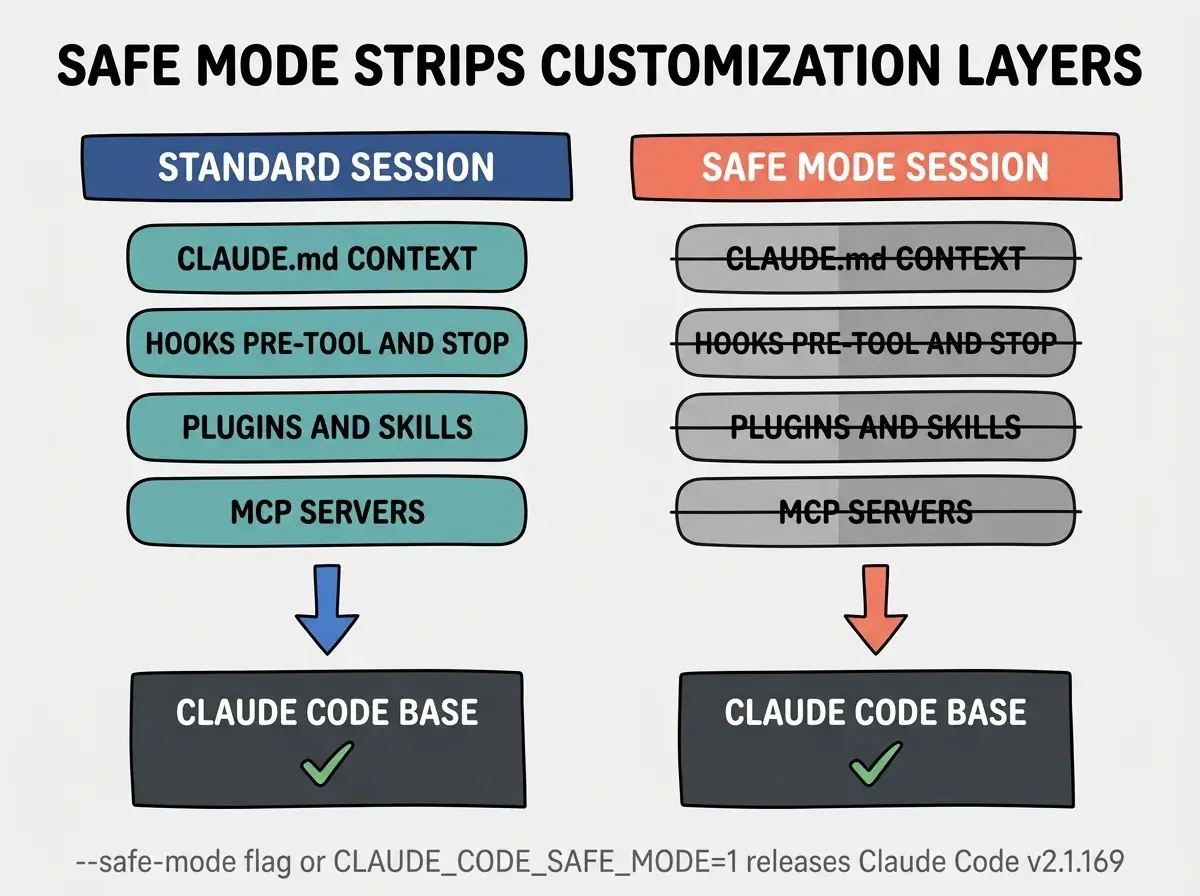
Run claude --safe-mode or set CLAUDE_CODE_SAFE_MODE=1 when your session behaves unexpectedly and you suspect a customization is responsible. Safe mode disables CLAUDE.md, all plugins, all skills, all hooks, and all MCP servers for that session without modifying any files. If the problem disappears in safe mode, the cause is in your customization layers, not in Claude Code itself. Re-enable layers one at a time in a fresh session to pinpoint the culprit.
The layered troubleshooting approach that --safe-mode enables is systematic: confirm the base is working with safe mode on, then re-enable layers one at a time in a fresh session (MCP servers first, then hooks, then skills, then CLAUDE.md) until the problem reappears. The layer you re-enabled last is the source.
What Does --safe-mode Actually Disable
Safe mode disables a specific list of customization layers, and knowing exactly which ones matters for accurate diagnosis. Running claude --safe-mode or setting CLAUDE_CODE_SAFE_MODE=1 before launch disables all of the following for that session: CLAUDE.md files at both project and user level, all plugins and skills registered at project and user level, all pre-tool and stop hooks defined in settings.json, and all MCP servers including those in project settings, user settings, and enterprise managed policies.
None of your files are modified. Safe mode is a session flag that tells Claude Code to skip loading those layers for the duration of that session. When you exit and start a new session without the flag, everything returns to normal.
The complementary disableBundledSkills setting gives teams precise control over what skills the model can see. Setting "disableBundledSkills": true in settings.json (or using CLAUDE_CODE_DISABLE_BUNDLED_SKILLS=1) hides the bundled skills, workflows, and built-in slash commands from the model. Enterprise deployments use this to prevent agents from acting on built-in automations that have not been reviewed for their specific environment.
How Does the /cd Command Change Multi-Project Sessions
The /cd command solves a concrete problem for vibecoders who work across multiple repositories or service directories in a single session. Before v2.1.169, changing the working directory mid-session required starting a new session, which meant losing the accumulated prompt cache and starting cold again. The model had to re-read files, re-establish project conventions, and re-learn recent decisions.
For developers working across a monorepo with multiple service directories, or maintaining a primary project alongside a shared configuration repository, this restart cost added up quickly. Each new session reset the accumulated context from previous turns, and the first several exchanges of any session were largely spent re-establishing shared understanding.
The Vibe Coder Blog covers AI coding tool updates focused on what changes for builders.
Browse All PostsThe /cd <path> command moves the session's working directory to the new path while keeping the prompt cache intact. You can start a session on your API service, use /cd to move to your frontend directory, make changes there, and return to the API directory with the conversation history and cached context from both sides of the session still available.
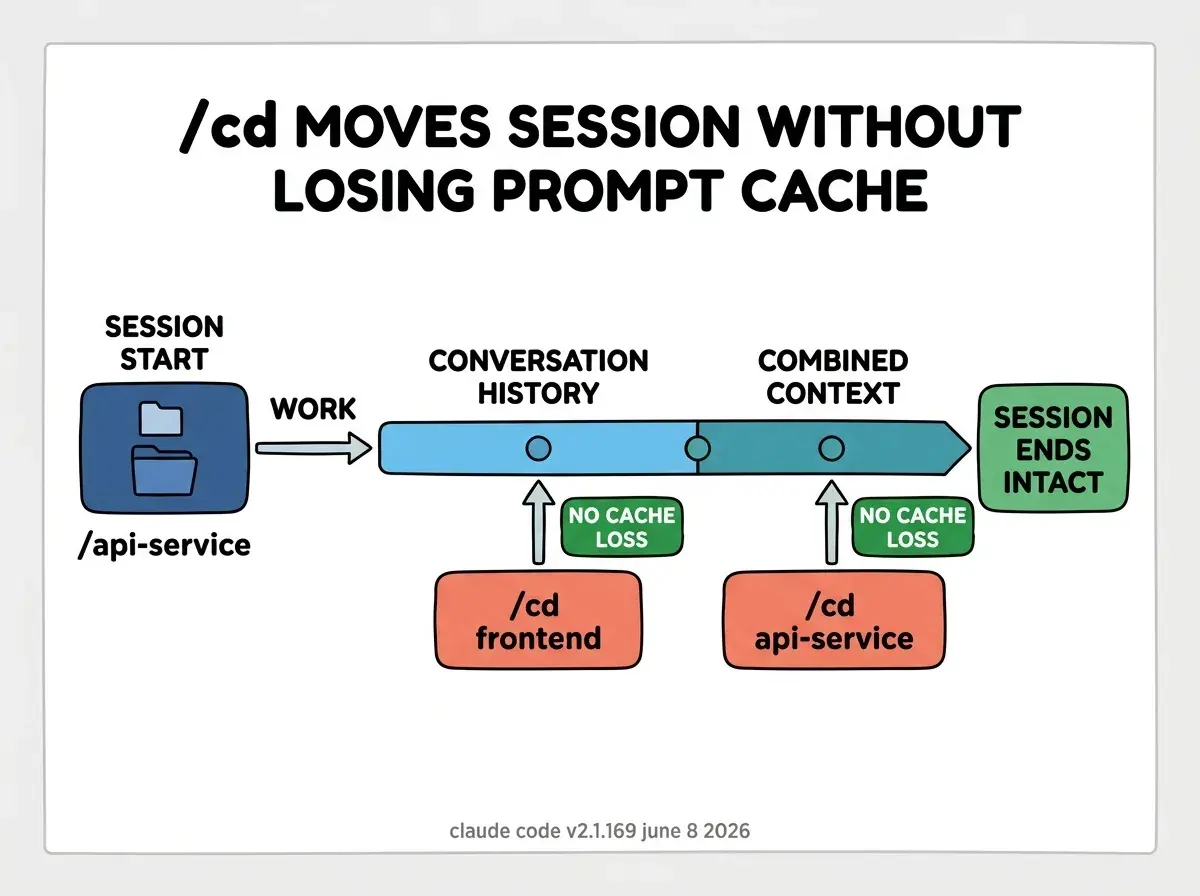
One constraint to keep in mind: /cd does not change which project's .claude/settings.json is loaded. The settings and CLAUDE.md from the session's original directory remain active throughout. If you need the target directory's project settings to take effect, starting a new session from that directory is still the right approach. For cases where you just want to read, edit, or run commands in a different directory without changing the configuration context, /cd is the correct tool.
What Other Fixes Did v2.1.169 Include
Beyond the new commands and flags, v2.1.169 addresses several failure modes that were causing silent or hard-to-diagnose problems in production Claude Code setups.
Enterprise MCP policy enforcement. Managed policies were not being enforced on reconnect, IDE-typed configurations, or initial session startup. For teams running Claude Code with centrally managed MCP allowlists, this gap meant policies restricting which MCP servers agents could access were silently not applied at session start or after reconnecting. The fix ensures policies are enforced from the first turn.
macOS UI stall. A 30-50ms stall at the start of every turn for macOS users authenticating via claude.ai credentials has been resolved. Small in isolation, but perceptible across long sessions with many turns.
Background agent environment variables. Agents in background sessions were ignoring project-level env settings, so custom environment variables set in .claude/settings.json were not reaching agents running in the background. This caused silent failures in workflows that depended on project environment variables for API keys, paths, or feature flags.
PID lock file accumulation. The .in_use PID lock files that accumulate in Claude Code's working directory are now swept daily for stale entries. In long-running environments such as CI containers or always-on development machines, these files were accumulating without cleanup and occasionally caused false conflicts at session start.
Vertex and Foundry idle timeout. A 5-minute idle timeout on Vertex and Foundry deployments has been restored to prevent streams from hanging indefinitely. This was a regression that caused background sessions on Vertex to hang silently after a period of inactivity rather than timing out cleanly.
Remote session reattachment. Stale permission and dialog prompts that reappeared when reattaching to a remote session have been fixed. Previously, a prompt that had already been answered could reappear after session resume, confusing automation that expected clean state.
Using --safe-mode as a permanent workaround rather than a diagnostic tool. If sessions only work correctly in safe mode, that is a signal to investigate and fix the misconfigured customization layer, not to add CLAUDE_CODE_SAFE_MODE=1 permanently to your shell profile. Running permanently without hooks and MCP servers means losing the productivity layers those customizations provide. Use safe mode to identify the problem, then fix the root cause and remove the flag.
What Does This Mean for Vibecoders Running Complex Setups
The v2.1.169 release is most immediately useful for Claude Code users who have invested in customization. If your setup includes hooks, MCP servers, and a non-trivial CLAUDE.md, the --safe-mode flag gives you a clean debugging path the next time something breaks unexpectedly. The /cd command is immediately usable for multi-repository work or monorepo navigation.
For teams running Claude Code in enterprise or CI contexts, the MCP policy enforcement fix and the PID lock cleanup address operational hygiene issues that were causing intermittent failures. Update with claude update to pick up all of the above.
The presence of a --safe-mode flag in Claude Code reflects where the tool has arrived in mid-2026. The original Claude Code was a relatively simple CLI. The current version runs background agents, enforces managed policies, loads plugins and skills from multiple sources, executes hooks at both pre-tool and session-end points, and connects to multiple MCP servers simultaneously. A diagnostic mode is a natural addition to a tool that has grown this complex, and it is the kind of feature that signals the tool is being used in production seriously enough to need structured recovery paths when things go wrong.
The full v2.1.169 release notes list all 30-plus changes for this release.
The Vibe Coder Blog covers agentic coding tool changes focused on what vibecoders need to act on.
Read More