Choosing your first vibe coding tool is like choosing your first car. You do not need the fastest, most feature-packed option. You need something reliable that matches how you actually plan to drive. The wrong choice does not ruin your life, but the right choice saves you weeks of frustration and makes the learning curve feel manageable instead of overwhelming.
There are over a dozen AI coding tools available right now, and that number grows every month. This guide will help you ignore the noise and pick the one tool that matches your specific situation.
Why the Tool You Pick Actually Matters
Here is a truth that most comparison articles will not tell you: for your first project, almost any popular tool will work. The differences between Cursor, Lovable, Bolt, and Replit are smaller than the marketing would have you believe. They all connect to powerful AI models. They all generate working code. They all have free tiers.
But the experience of using them is dramatically different depending on who you are. A founder who has never opened a code editor will have a completely different experience with Cursor (which looks like a professional development environment) than with Lovable (which looks like a design tool with a chat window). Neither tool is better. They are built for different people.
63% of people using vibe coding tools are not developers. They are founders, marketers, designers, and career changers. If you are in that majority, you need a tool designed for people like you, not a tool designed for professional engineers that happens to have AI features bolted on.
The best vibe coding tool for beginners is the one that lets you see results within five minutes of signing up. If a tool requires you to install software, configure settings, or understand terminal commands before you can start building, it is not the right first tool. Start with a browser-based option, then graduate to desktop tools once you understand the fundamentals.
The goal of this guide is not to crown a winner. It is to give you a simple framework for matching your situation (your experience level, your goals, and the type of thing you want to build) to the right starting point.
The Restaurant Kitchen Analogy
Think of vibe coding tools as different types of kitchens. They all let you cook, but the experience varies wildly depending on who is cooking.
Browser-based tools (Lovable, Bolt, Replit) are like cooking classes with a professional kitchen. Everything is set up for you. The ingredients are prepped, the tools are laid out, and an instructor walks you through each step. You focus entirely on what you want to make, not on setting up the kitchen. The tradeoff is that you have less control over exactly how things work behind the scenes.
Desktop IDE tools (Cursor, Windsurf) are like having your own home kitchen. You have complete control over every ingredient and every tool. You can cook anything. But you need to stock the pantry yourself, maintain the equipment, and know your way around the space. The learning curve is steeper, but the ceiling is much higher.
Hybrid tools (Replit sits here too, along with GitHub Copilot in VS Code) fall somewhere between the two. They give you more control than a cooking class but less setup than a full home kitchen. They are good second tools once you outgrow the browser-based options.
Your first question should not be "which tool is the most powerful?" It should be "which kitchen matches my current cooking ability?"
The Three Questions That Pick Your Tool
Instead of comparing feature lists, answer these three questions honestly. Your answers point directly to the right tool.
Question 1: Have you ever opened a code editor before?
If no, start with Lovable or Bolt. These tools are built for people who have never touched code. You type a description of what you want, the AI builds it, and you see the result immediately in a visual preview. No file management, no terminal, no configuration. Just describe and build.
If yes (even a little), Replit or Cursor become viable options. Replit works in the browser but gives you more visibility into the code. Cursor is a desktop application that feels like a professional code editor with an AI assistant built in. Both assume some comfort with seeing code on screen, even if you cannot write it yourself.
Question 2: What are you trying to build?
For websites, landing pages, and simple web apps, Lovable and Bolt excel. They generate clean, modern designs using React and Tailwind (the combination that AI tools work best with), and they handle deployment so your project can go live quickly.
For more complex applications with databases, user accounts, and backend logic, Replit or Cursor give you the control you need. These projects require managing multiple files, configuring services, and making architectural decisions that browser-based tools abstract away.
For mobile apps, Replit and Cursor both support React Native development, though this is intermediate territory regardless of which tool you choose.
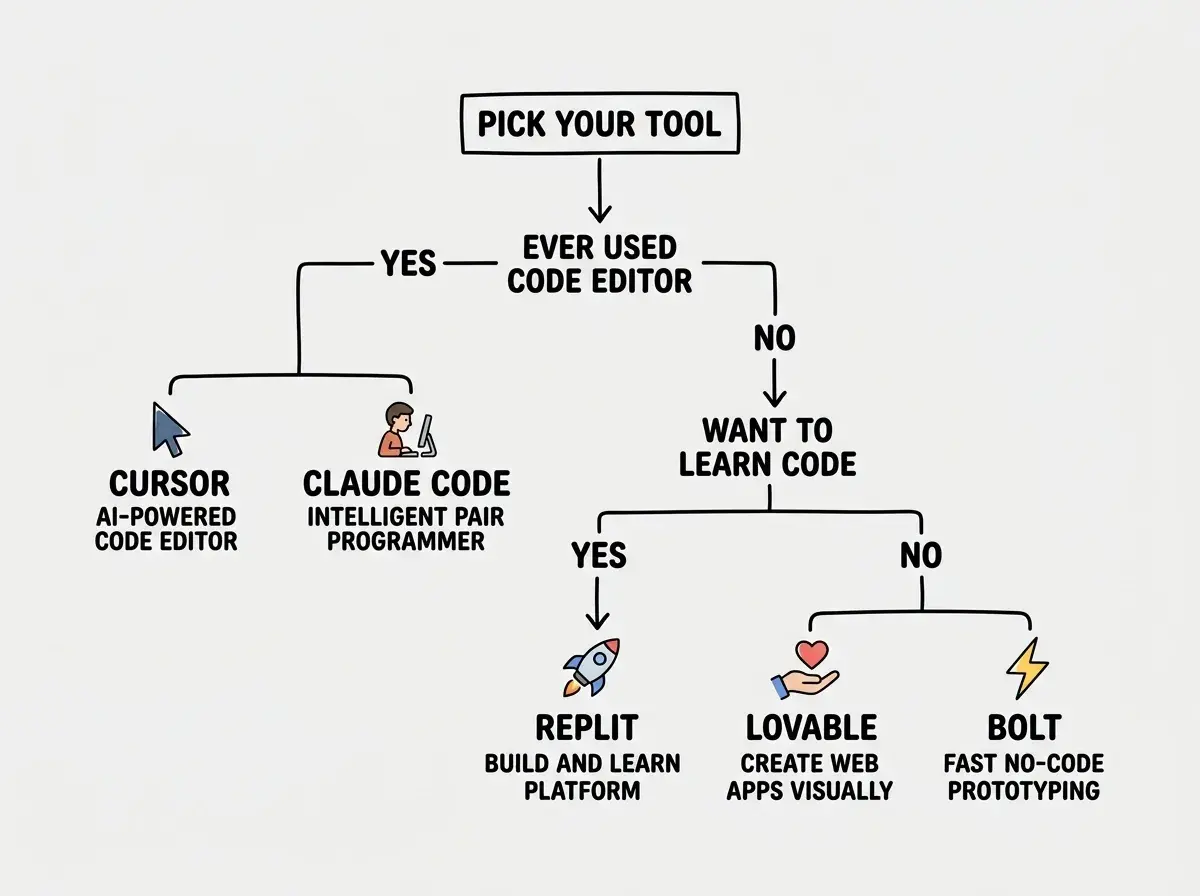
Question 3: How much time do you want to spend on setup?
If the answer is "zero," choose Lovable or Bolt. You sign up, type a prompt, and you are building. Literally two minutes from landing page to first result.
If you are willing to spend fifteen to thirty minutes on setup, Replit is a solid middle ground. It runs in the browser but gives you access to the underlying code and a terminal.
If you are comfortable with an hour of setup (installing software, configuring settings, understanding the file system), Cursor is the most powerful option and the one you will likely graduate to eventually.
A Closer Look at the Top Options
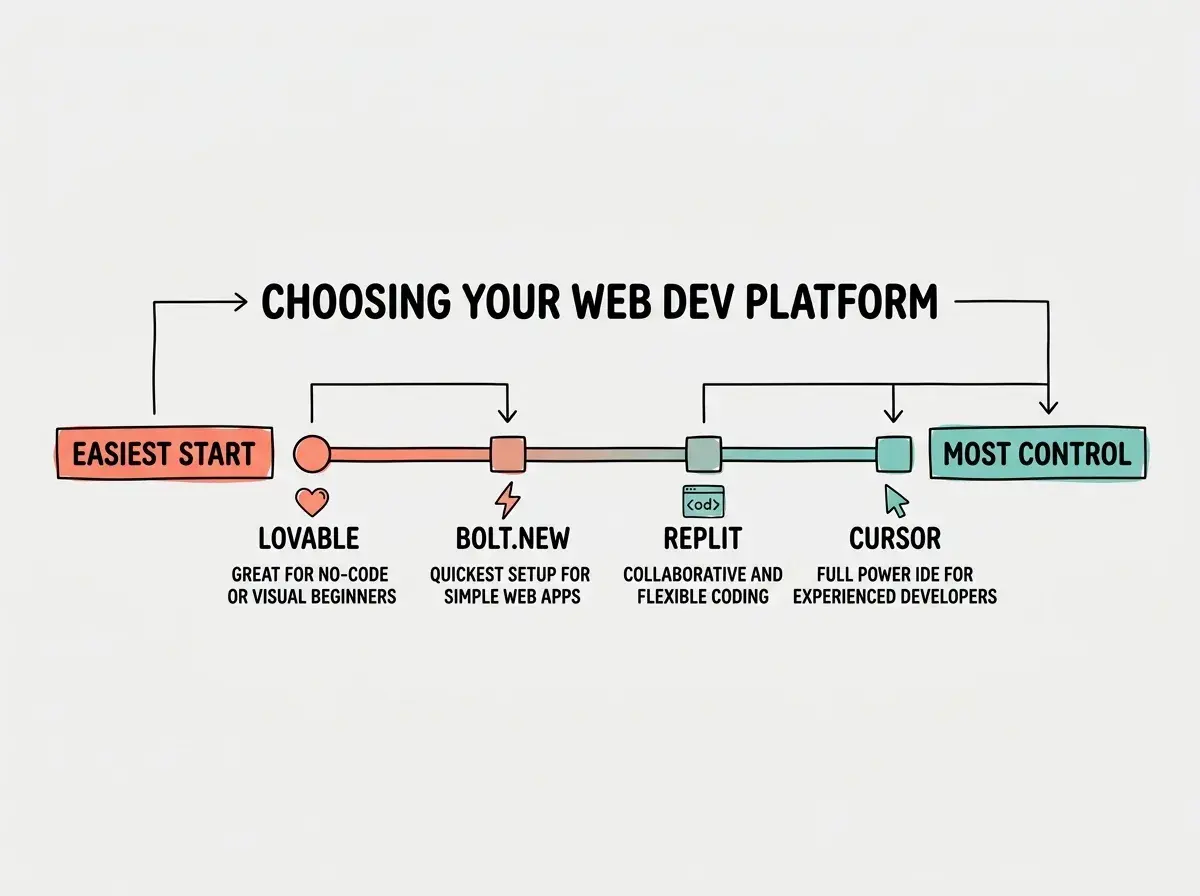
Lovable is the friendliest entry point for non-technical builders. It generates full-stack web apps from descriptions, handles design decisions automatically, and produces polished results. Best for: founders building MVPs, marketers creating landing pages, anyone who wants results fast.
Bolt (bolt.new) is similar to Lovable but with a slightly more technical feel. It gives you more visibility into the code and more control over individual files. Best for: people who want browser-based convenience but like seeing what is happening under the hood.
Replit is a full development environment in your browser with deployment, database hosting, and collaboration built in. Its AI assistant can build complete projects from descriptions. Best for: students, career changers who want to learn gradually, anyone who plans to eventually understand the code.
Cursor is a desktop code editor (built on VS Code) with deep AI integration. The learning curve is steeper, but the capabilities are significantly broader. Best for: people with some technical background, anyone building complex projects, vibe coders who have outgrown browser tools.
Explore in-depth guides on the most popular AI coding tools.
Browse tool guidesWhat About the Tools Not on This List
You might be wondering about GitHub Copilot, Claude Code, Windsurf, or one of the dozens of newer tools launching every month. Here is a simple filter: if a tool requires you to already know what a terminal is, what Git does, or how to navigate a file system, it is not a first tool. It might be an excellent second or third tool.
GitHub Copilot works inside VS Code and assumes developer familiarity. Claude Code runs in the terminal and is built for experienced developers. Windsurf is similar to Cursor with a different AI approach. All three are worth exploring once you have completed a few projects with a beginner-friendly option.
The framework stays the same even as new tools launch: match the tool to your experience level, your project type, and your willingness to do setup.
The most important thing is to pick one tool and commit to it for your first three projects. Tool-hopping is the second biggest time-waster for beginners (after trying to build something too ambitious). Every tool has quirks. Learning those quirks is part of the process. Switching tools resets that learning.
Spending more time comparing tools than actually building with one. Founders are especially prone to this, treating tool selection like a strategic business decision when it is really just a starting point. You will almost certainly switch tools as you grow. The tool you pick today is not a permanent commitment. It is a starting line. Pick one, build three projects, and then evaluate whether you need something different. You will learn more from thirty minutes of building than from three hours of reading comparison articles.
After three projects with your first tool, you will have a much clearer sense of what matters to you. Maybe you want more design control. Maybe you want to see the code. Maybe you want faster deployment. Those preferences are impossible to know in advance. They only emerge through experience.
Dig deeper
A few hand-picked sources if you want to go further.
What This Means For You
The right first tool is the one that matches your current situation, not the one with the most features or the best reviews. Start simple, build real things, and graduate to more powerful tools when you feel the limitations of your current one.
- If you are a founder building a product: Start with Lovable or Bolt. Your goal is to validate ideas quickly, not to become a developer. These tools let you go from concept to clickable prototype in hours. Once your prototype gets traction and needs more sophisticated features (user accounts, payments, complex logic), that is when you consider moving to Cursor or hiring a developer to take over.
- If you are a career changer learning vibe coding: Start with Replit. It gives you the guided experience of a browser-based tool while gradually exposing you to real code. This exposure builds the vocabulary and mental models that make you more valuable in technical roles. Your ability to read and discuss code, even if you did not write it, sets you apart from other non-technical candidates.
- If you are a student exploring technology: Start with whatever tool has the best free tier for your needs. Right now that is Lovable or Replit. Build things for your classes, your student organizations, and your personal projects. The specific tool matters far less than the habit of building. Employers and grad school programs want to see that you can create things, not that you picked the "right" tool.
Pick a tool from this guide and follow our step-by-step first session walkthrough.
Start your first project