Think of your app's infrastructure like a highway toll plaza. Every request has to stop, show its credentials, wait in line, and get processed before it can continue. When traffic is light, the system works fine. When traffic spikes, you get a gridlocked mess of timeouts and 500 errors. Redis caching at scale is how you add express lanes to that toll plaza so the majority of traffic flies through without ever touching the slow booth.
92% of developers use AI tools daily now, and those AI-assisted apps are shipping faster than ever. The problem is that faster shipping means faster growth, and faster growth means your single database becomes a bottleneck sooner than you planned. Caching is how you buy yourself runway without rewriting your entire backend.
This guide walks through three layers of caching that work together: Redis (and its serverless cousin Upstash), Memcached for specific use cases, and edge caching via Cloudflare or similar CDNs. By the end, you will know exactly when to cache what, how long to cache it, and how to invalidate without losing your mind.
Why Your Database Is the Toll Booth
Every database query costs time. A simple SELECT on an indexed column might take 2-5ms. A join across three tables with filtering and sorting might take 50-200ms. Multiply those numbers by a thousand concurrent users and your database connection pool fills up, queries start queuing, and response times climb exponentially.
The express lane analogy holds up perfectly here. Most of your traffic is asking for the same data repeatedly. Your homepage, your product listings, your user profile sidebar, your navigation menu. These queries return the same result for hundreds or thousands of requests before the underlying data changes. Making your database do that work every single time is like forcing every car through the manual toll booth when 80% of them have an E-ZPass.
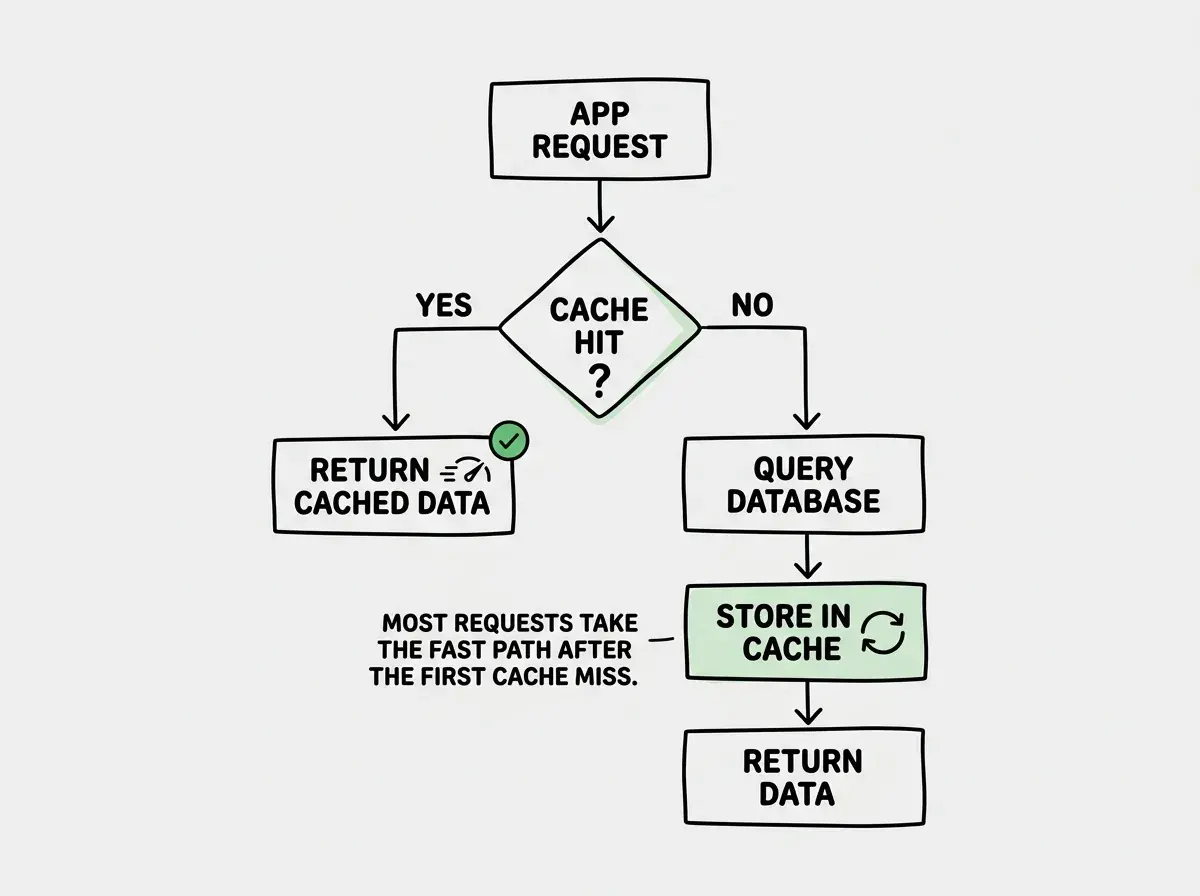
Caching puts frequently accessed data in a faster storage layer, closer to the user. Instead of hitting the database, your app checks the cache first. If the data is there (a "cache hit"), it returns instantly. If not (a "cache miss"), it queries the database, stores the result in the cache, and returns. The next thousand requests for that same data get the express lane.
Redis and Upstash for Application Caching
Redis is the workhorse of modern caching. It stores data in memory, which means reads happen in microseconds rather than milliseconds. It supports strings, hashes, lists, sets, sorted sets, and streams. For caching purposes, you mostly care about strings (for simple key-value pairs) and hashes (for structured objects).
Traditional Redis runs as a server you manage. You spin up a Redis instance on AWS ElastiCache, DigitalOcean, or your own VPS. You get full control over configuration, memory limits, and eviction policies. The tradeoff is operational overhead. You need to monitor memory usage, handle failover, and plan capacity.
Upstash Redis gives you a serverless Redis that scales automatically and charges per request. No server to manage, no capacity to plan. It works especially well with serverless deployments on Vercel, Cloudflare Workers, or AWS Lambda because it uses HTTP-based connections instead of persistent TCP connections. For apps that are growing but not yet at the scale where a dedicated Redis cluster makes financial sense, Upstash is the pragmatic choice.
Here is a typical caching pattern with Upstash:
import { Redis } from "@upstash/redis";

const redis = new Redis({
  url: process.env.UPSTASH_REDIS_URL!,
  token: process.env.UPSTASH_REDIS_TOKEN!,
});

async function getProduct(id: string) {
  const cacheKey = `product:${id}`;

  // Check the express lane first
  const cached = await redis.get<Product>(cacheKey);
  if (cached) return cached;

  // Cache miss, go through the toll booth
  const product = await db.query.products.findFirst({
    where: eq(products.id, id),
  });

  if (product) {
    await redis.set(cacheKey, product, { ex: 3600 }); // 1 hour TTL
  }

  return product;
}
This is the cache-aside pattern (also called lazy loading). Your application code manages the cache explicitly. It checks the cache, falls back to the database on a miss, and populates the cache for next time. Simple, predictable, and easy to reason about.
When Memcached Still Makes Sense
Memcached is older than Redis and simpler by design. It stores key-value pairs in memory with automatic eviction when memory fills up. No data structures, no persistence, no pub/sub. Just fast reads and writes.
You might wonder why anyone would choose Memcached when Redis does everything it does and more. There are two scenarios where Memcached still wins.
Multi-threaded performance at extreme scale. Memcached is natively multi-threaded. Redis (until very recently) was single-threaded, using I/O multiplexing to handle concurrency. For workloads with millions of simple GET/SET operations per second, Memcached can utilize all CPU cores without the clustering complexity that Redis requires to scale horizontally.
Simple session storage and HTML fragment caching. If you just need a distributed key-value store for session tokens or pre-rendered HTML fragments, Memcached's simplicity is an advantage. There is less to configure, less to break, and the memory overhead per key is slightly lower than Redis because there is no metadata for advanced data structures.
For most growing apps in 2026, Redis (or Upstash) is the better default choice. Memcached earns its place in architectures that are already at massive scale and need raw throughput on simple operations. If you are reading this article because your app just crossed its first scaling threshold, start with Redis.
Redis caching at scale follows the express lane principle. Cache the data that gets requested most often, closest to where it gets requested. Start with application-level Redis caching for database query results, add edge caching for static and semi-static responses, and only consider Memcached if you hit the specific performance ceiling where its multi-threaded architecture matters.
Edge Caching With Cloudflare and CDNs
Edge caching is the outermost express lane. Instead of caching data on your application server, you cache entire HTTP responses at CDN nodes distributed around the world. When a user in Tokyo requests your product page, the response comes from a Cloudflare node in Tokyo instead of traveling to your origin server in Virginia.
Cloudflare's caching works at multiple levels. Static assets like images, CSS, and JavaScript files get cached automatically with long TTLs. Dynamic responses can be cached using Cache-Control headers or Cloudflare's Cache API in Workers.
// Cloudflare Worker with Cache API
export default {
  async fetch(request: Request): Promise<Response> {
    const cache = caches.default;

    // Check the edge express lane
    const cached = await cache.match(request);
    if (cached) return cached;

    // Cache miss, fetch from origin
    const response = await fetch(request);

    // Cache the response at the edge for 5 minutes
    const cachedResponse = new Response(response.body, response);
    cachedResponse.headers.set("Cache-Control", "public, max-age=300");
    await cache.put(request, cachedResponse.clone());

    return cachedResponse;
  },
};
The combination of edge caching plus Redis caching creates two express lanes. Most requests never leave the CDN edge. The ones that do hit your application server and find the answer in Redis. Only cache misses on both layers actually touch your database. In practice, this can reduce database load by 90-95% for read-heavy applications.
Cache Invalidation Patterns That Actually Work
Phil Karlton famously said there are only two hard problems in computer science: cache invalidation and naming things. He was right about the first one. Stale caches cause subtle bugs that are maddening to debug because the behavior is intermittent and time-dependent.
Here are three invalidation patterns that scale without driving you crazy.
Time-based expiration (TTL). Every cached value gets a time-to-live. After that time passes, the cache entry expires and the next request fetches fresh data. This is the simplest approach and works well for data where slight staleness is acceptable. Product catalog pages can tolerate a 5-minute TTL. User dashboards might need a 30-second TTL. Your site's footer content can have a 24-hour TTL.
Event-driven invalidation. When data changes, your application explicitly deletes the relevant cache keys. A user updates their profile, and your API handler calls redis.del("user:123") after the database write succeeds. This gives you immediate consistency at the cost of additional application logic. The challenge is making sure every code path that modifies data also invalidates the right cache keys.
Versioned keys. Instead of invalidating cache entries, you change the cache key itself. Store a version counter alongside your data, and include it in cache keys: product:456:v7. When the product updates, increment the version to v8. Old cache entries expire naturally via TTL while new requests immediately fetch fresh data. This avoids race conditions where a request reads stale data between the database write and the cache invalidation.
Setting the same TTL for everything in your cache. A 1-hour TTL might be perfect for product listings but catastrophic for inventory counts. Match your TTL to how frequently the underlying data changes and how much staleness your users can tolerate. User session data needs seconds. Marketing content can handle hours. Think about each data type independently rather than applying a blanket expiration.
TTL Strategies by Data Type
Picking the right TTL is where the express lane analogy gets specific. Different types of traffic deserve different lanes with different speed limits.
| Data Type | Recommended TTL | Why |
|---|---|---|
| Static marketing pages | 1-24 hours | Changes rarely, staleness is invisible to users |
| Product catalog | 5-15 minutes | Balances freshness with database relief |
| User profiles | 30-60 seconds | Users expect immediate reflection of their own changes |
| Inventory / stock counts | 10-30 seconds | Overselling is worse than a cache miss |
| Session tokens | Match session duration | Security-sensitive, must not outlive the session |
| Search results | 1-5 minutes | Slight staleness is acceptable, query cost is high |
| API rate limit counters | Exact window size | Must be precise for fairness |
The pattern is straightforward. Data that changes slowly and tolerates staleness gets long TTLs. Data that changes frequently or has correctness requirements gets short TTLs or event-driven invalidation.
Your app is growing. Learn what to monitor and optimize before traffic doubles again.
Read the scaling guidePutting It All Together
When all three caching layers work in concert, you get a system where the vast majority of requests never reach your origin server. Here is how those layers look in practice.
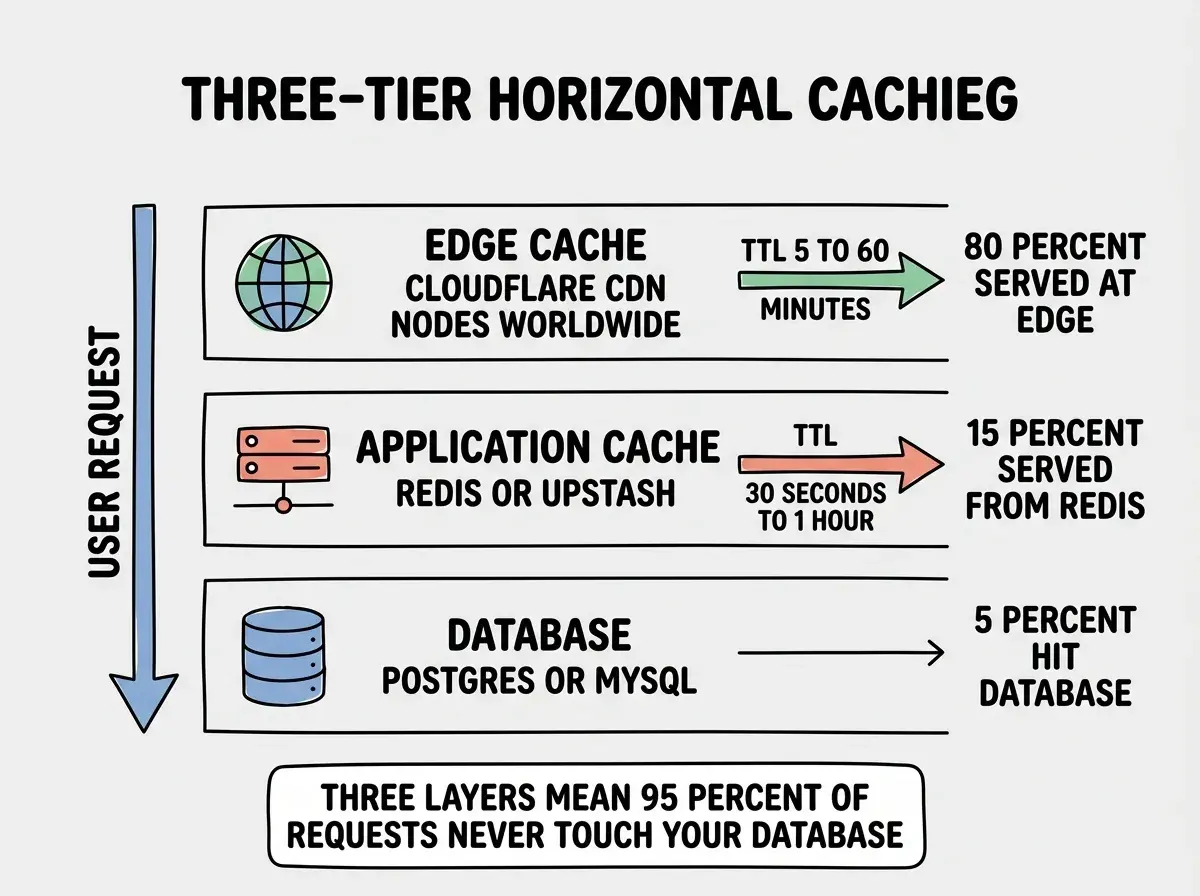
Here is the practical sequence for adding caching to a growing app:
-
Identify your hot paths. Look at your database query logs or APM tool. Find the queries that run most frequently and take the most total time. These are your toll booth bottlenecks.
-
Add Redis caching to your top 5 hottest queries. Use the cache-aside pattern shown earlier. Start with conservative TTLs (1-5 minutes) and adjust based on how frequently the underlying data changes.
-
Set Cache-Control headers on your API responses. Even without a CDN, browsers cache responses locally based on these headers. With a CDN like Cloudflare in front of your app, these headers tell the edge nodes what to cache and for how long.
-
Add event-driven invalidation for user-facing mutations. When a user updates their profile, purchases a product, or changes their settings, delete the relevant cache keys immediately. Users should always see their own changes reflected instantly.
-
Monitor your cache hit ratio. A healthy cache should have a hit ratio above 85%. Below that, you are either caching the wrong data, setting TTLs too short, or not caching enough endpoints. Upstash and ElastiCache both provide hit/miss metrics in their dashboards.
Get practical scaling patterns delivered to your inbox as we publish them.
Follow the blogWhat This Means for Your App
Caching is not an optimization you bolt on when things break. It is an architectural decision you make early and refine as your traffic patterns become clear. The express lane system works because each layer handles a different class of traffic: edge caching for geographically distributed reads, Redis for application-specific data, and your database for writes and true cache misses.
Start with Redis (Upstash if you are on serverless), add edge caching through your CDN, and match your TTLs to how your data actually behaves. You do not need all three layers on day one. But understanding how they fit together means you can add each one when the traffic demands it, without rearchitecting everything from scratch.
The apps that handle ten times the traffic without ten times the cost are not running on magical infrastructure. They are just really good at making sure most cars take the express lane.