When you build a URL shortener, you touch nearly every skill that matters in modern web development: databases, API routes, redirects, and analytics. With 92% of developers now using AI tools daily, this project is one of the fastest ways to go from "I wonder how that works" to "I built that." This tutorial walks you through the entire thing step by step.
A URL shortener takes a long, ugly link and turns it into something like myapp.com/abc123. When someone clicks that short link, your app looks up the original URL, records the click, and redirects the visitor. Simple concept, but it teaches you database design, server-side logic, and data visualization all in one project.
Why This Project Teaches You More Than Most
Most beginner tutorials have you build something static. A landing page, a to-do list, a portfolio site. Those projects teach you layout and styling, but they skip the parts of web development that make apps actually useful: storing data, processing requests, and measuring results.
A URL shortener is different. It requires a database to store links. It requires an API route to handle redirects. It requires analytics logic to track and display clicks. These three pieces map directly to the architecture of real-world applications like dashboards, SaaS tools, and e-commerce platforms. You are not learning abstract concepts here. You are building the same patterns that power products people pay for.
The project also has a clear finish line. When you can paste a long URL into your app, get a short link back, click that short link, land on the right page, and then see that click recorded in a dashboard, you are done. No ambiguity about whether it "works."
A URL shortener is one of the best beginner projects because it forces you to connect a frontend, a backend, and a database in a way that produces something immediately useful. Every short link you create and share is proof that your full-stack skills work end to end. You can use it for your own links the same day you build it.
Step 1, Set Up the Project With AI
Open your preferred AI coding tool (Cursor, Lovable, Bolt, Replit, or similar) and start with this prompt:
"Create a URL shortener web app with these features: a form where I paste a long URL and get a short code back, a redirect route that takes the short code and sends the visitor to the original URL, a clicks table that records every redirect with a timestamp, and a simple analytics dashboard that shows total clicks per link. Use a SQLite database for storage and Next.js for the framework."
The AI will generate your project structure. You should see files for the frontend (the form and dashboard), API routes (for creating links and handling redirects), and a database schema (for storing URLs and clicks). Before you start tweaking anything, read through what the AI created. Understanding the structure now saves you hours of confusion later.
Your project will typically have three main pieces: a database schema defining two tables (links and clicks), API routes handling link creation and redirects, and frontend pages for the form and analytics view.
Step 2, Design the Database
The database is the foundation of your URL shortener. You need two tables, and they are simpler than you might expect.
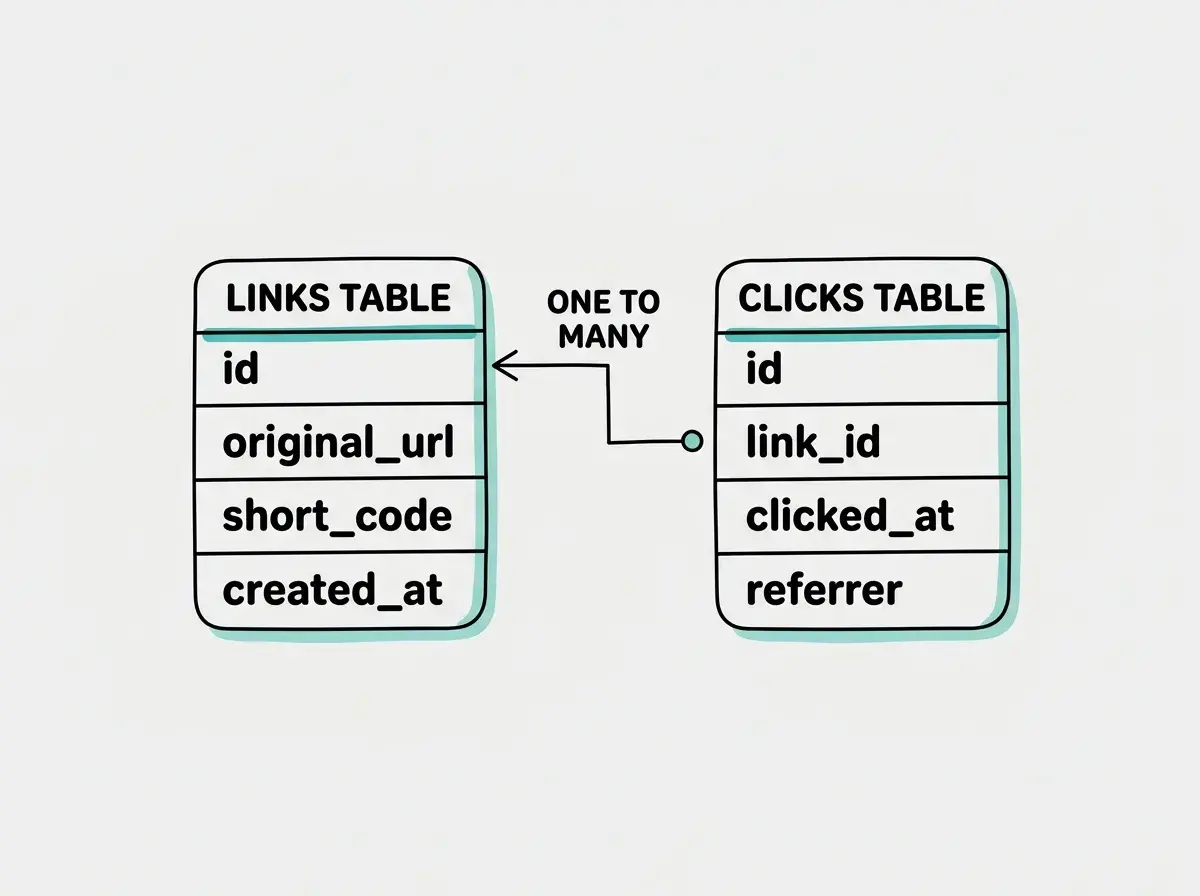
The first table is links. It stores the original URL, the short code (like abc123), and the date the link was created. The short code is what makes the magic happen. When someone visits myapp.com/abc123, your app searches this table for the row where the short code matches, grabs the original URL, and redirects.
The second table is clicks. Every time someone uses a short link, your app inserts a row into this table with the link ID, a timestamp, and optionally the visitor's country or referrer. This is where your analytics data comes from.
Tell the AI: "Show me the database schema for both tables. The links table should have columns for id, original_url, short_code, and created_at. The clicks table should have columns for id, link_id (referencing the links table), clicked_at, and referrer."
The relationship between these tables is important. Each link can have many clicks, but each click belongs to exactly one link. This is called a one-to-many relationship, and it is the most common pattern in database design. Understanding it here means you will recognize it everywhere.
Step 3, Build the Link Creation API
Now you need an API route that accepts a long URL and returns a short code. This is the engine of your app.
Tell the AI: "Create an API route at /api/shorten that accepts a POST request with a JSON body containing the original URL. It should generate a random 6-character alphanumeric code, check the database to make sure that code does not already exist, save the link to the database, and return the full short URL."
The short code generation is the interesting part. Your app creates a random string of letters and numbers, checks if it already exists in the database (to avoid collisions), and saves the new link. In practice, with 6 characters using letters and digits, you have over 2 billion possible codes. Collisions are extremely rare, but checking for them is good practice.
Test the API by having the AI add a simple form to the homepage. Paste in a long URL, click "Shorten," and your app should display the short link. Copy that short link, and keep it handy for the next step.
Step 4, Handle the Redirect and Track Clicks
The redirect is where your URL shortener actually does its job. When someone visits your short link, your app needs to look up the original URL, record the click, and send the visitor to the right place.
Tell the AI: "Create a dynamic route that catches any short code from the URL path. When a request comes in, look up the short code in the links table. If it exists, insert a row into the clicks table with the current timestamp and the request's referrer header, then redirect the visitor to the original URL with a 301 status. If the short code does not exist, show a 404 page."
The 301 status code tells browsers (and search engines) that this is a permanent redirect. The referrer header tells you where the click came from, whether that is Twitter, an email client, or a direct visit. Both of these are small details that make your analytics much more useful.
Test this by clicking the short link you created in the previous step. You should land on the original URL. Then check your clicks table (you can ask the AI to add a temporary page that shows raw click data). You should see one row with the timestamp of your click.
Start with the fundamentals before tackling your first project.
Learn the basicsStep 5, Build the Analytics Dashboard
This is where your project goes from "functional" to "impressive." A dashboard that shows click data turns your URL shortener from a utility into a tool with real value.
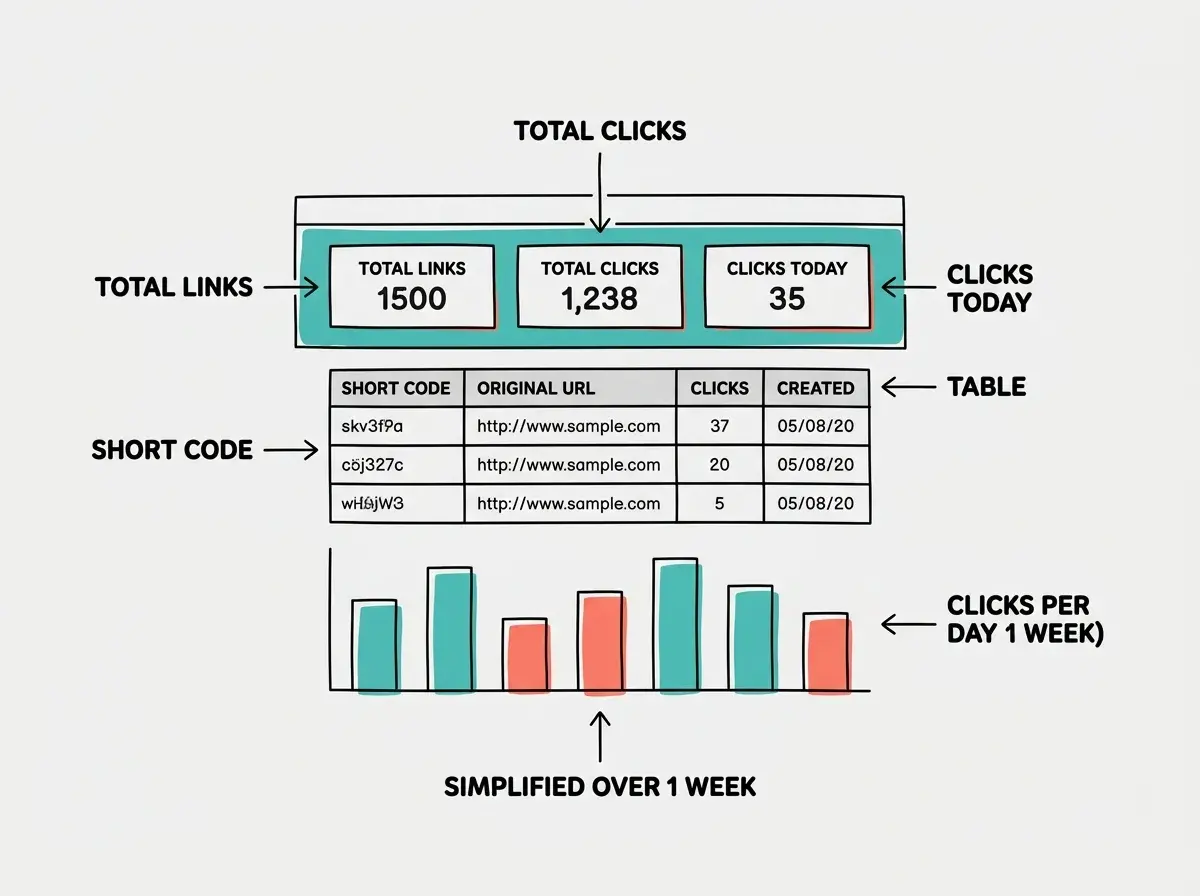
Tell the AI: "Create an analytics page at /dashboard that shows all shortened links in a table. Each row should display the original URL (truncated to 50 characters), the short code, the total number of clicks, and the date created. Sort by most recent first. Add a simple bar chart showing clicks per day for the last 7 days for each link."
The dashboard pulls data from both tables. It joins the links table with the clicks table, counts the clicks per link, and groups the click timestamps by day for the chart. This kind of data aggregation is exactly what backend developers do professionally, and you are doing it in your first project.
For the chart, the AI will likely use a library like Recharts or Chart.js. Both work well. The key insight is that your analytics data is just rows in a database table, and the chart is just a visual representation of a SQL query. Once you understand that connection, you can build analytics for anything.
Once the dashboard is working, create a few short links and click them from different browsers and devices. Watch the numbers update in real time. This is the moment where the project clicks, when you see your own data flowing through a system you built.
Trying to build every analytics feature at once. Beginners often want geographic tracking, device detection, UTM parameter parsing, and real-time charts before they have basic click counting working. Start with total clicks per link. Get that working perfectly. Then add one feature at a time in separate sessions. A URL shortener with reliable click counts is more useful than one with half-finished advanced analytics that breaks on edge cases.
Extend It and Make It Yours
Once the core app works, here are the highest-value features you can add in future sessions.
Custom short codes. Let users choose their own codes instead of random ones. Tell the AI: "Add an optional custom code field to the creation form. If provided, check if the code is available and use it instead of generating a random one."
Link expiration. Add an expires_at column to the links table. Tell the AI: "Add an optional expiration date to link creation. When a redirect is requested, check if the link has expired. If it has, show an 'This link has expired' page instead of redirecting."
QR code generation. Tell the AI: "When a short link is created, also generate a QR code image for that link and display it alongside the short URL." This is a single-prompt addition that makes your app significantly more useful, especially for sharing links in physical spaces.
Each of these extensions is one session. Twenty to thirty minutes, a few prompts, and your app gets meaningfully better.
What This Means For You
You just built a full-stack application with a database, API routes, redirect logic, and an analytics dashboard. That is not a toy project. Those are the exact same building blocks that power production SaaS tools, and you assembled them in an afternoon.
- If you are a student learning web development: You now have a portfolio project that demonstrates full-stack thinking, not just frontend styling. When you interview or apply for internships, you can walk through the database schema, explain the redirect flow, and show real analytics data. That conversation is worth more than a dozen static websites.
- If you are an indie hacker testing product ideas: You now understand the pattern for any tool that creates, stores, and measures things. A URL shortener is structurally identical to a form builder, a survey tool, or a link-in-bio page. Swap the "URL" for any other content type and the architecture stays the same. Your next product idea is one prompt away from a working prototype.
Find more beginner-friendly projects that teach real skills.
Explore more tutorials