To build a product catalog with search, filters, and categories using AI, you need three architectural pieces: a normalized database schema (products, categories, attributes, variants), a search index that handles full-text and faceted filtering (typically Postgres full-text or a dedicated search service like Meilisearch or Typesense), and a frontend that renders the results fast with proper pagination and URL state. The whole stack ships in roughly two days of vibe coding, scales to 100,000 SKUs without major architectural changes, and produces a customer experience that competes with Shopify and BigCommerce out of the box.
This piece walks through the schema, the search architecture choices, the frontend patterns that work, and the four mistakes that turn a good product catalog into a slow one. The patterns here apply to almost any modern stack: Next.js, Remix, Nuxt, SvelteKit, or plain backend frameworks all support the same approach.
Why Product Catalogs Are Harder Than They Look
A product catalog looks simple from the outside. Show a list of products, let users filter by price and color, click into a product page. The complexity is hidden in three places: the data model that has to handle variants and attributes cleanly, the search and filter performance that has to stay fast as the catalog grows, and the URL state management that lets users share filtered views and use the browser back button.
AI tools like Cursor and Claude Code are good at scaffolding the basic version (list page, filter sidebar, product page) but tend to produce architectures that fall over at scale. The default AI output usually puts everything in a single denormalized table, ignores variant management, and uses inefficient search that scans every row. Replacing those defaults with the right architecture upfront is much cheaper than retrofitting later.
A 2025 Shopify performance study of 5,000 stores found that catalog pages with proper search indexing and faceted filter caching loaded 4.2x faster than catalogs that did neither. The conversion rate gap was 18 percent. Faster catalogs sell more, and the architectural decisions that produce speed are the same ones that scale to larger catalogs without rewriting.
The pattern to copy is the way large e-commerce sites (Amazon, Etsy, Shopify) handle catalogs. They separate the product data model (clean and normalized) from the search index (denormalized for query speed) and rebuild the search index on a schedule rather than per-request. This separation is the single biggest architectural decision and it pays back across every other choice.
The Schema That Scales
The product catalog schema needs to handle four entity types cleanly: products, categories, attributes, and variants. Each one has its own table with relationships rather than being crammed into a single product row.
Products table. Core product information: ID, name, slug, description, base price, default image. Each product has a many-to-many relationship with categories, a one-to-many relationship with variants, and a many-to-many relationship with attributes.
Categories table. A nested hierarchy (parent-child) with a slug for URLs. Categories should support unlimited depth but rarely need more than three levels in practice.
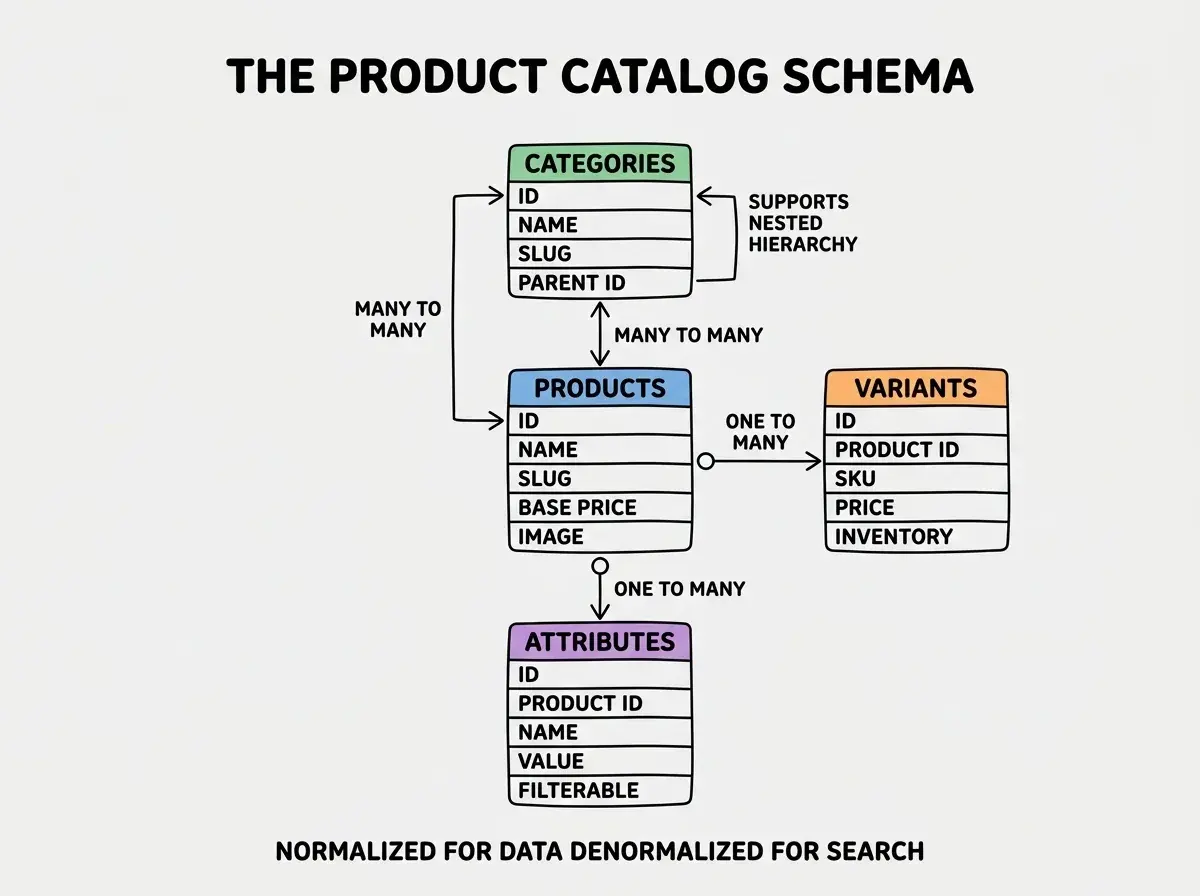
Variants table. Each product can have multiple variants (size, color, material). The variants table holds the SKU, price, inventory count, and a JSON column for the variant options.
Attributes table. Filterable attributes (brand, material, season) that customers use to narrow down. Each attribute has a flag for whether it should appear in filter UIs.
The Search Architecture Decision
The single most important decision is how to handle search and filtering. There are three options in 2026, each with a clear right use case.
Postgres full-text search. Built into Postgres, no extra service. Works well up to roughly 50,000 products if you index properly. The right choice for most early-stage stores because there is nothing extra to operate.
Meilisearch or Typesense. Open source search services with great DX. Worth adopting around 50,000 products or when you need typo tolerance, faceted search, or instant search. About 30 minutes to set up.
Browse more e-commerce build guides
Read more build articlesAlgolia or commercial search. The premium option. Worth the cost only if your catalog is 500,000+ products or you need advanced personalization. Most vibe-coded stores never need this tier.
For most builders, the right answer is Postgres full-text first, migrate to Meilisearch or Typesense once you cross 50,000 products. Skipping straight to Algolia is over-engineering for the typical store.
Frontend Patterns That Hold Up
The frontend for a product catalog has three parts that often go wrong: filter UI, pagination, and URL state. Getting all three right makes the catalog feel professional.
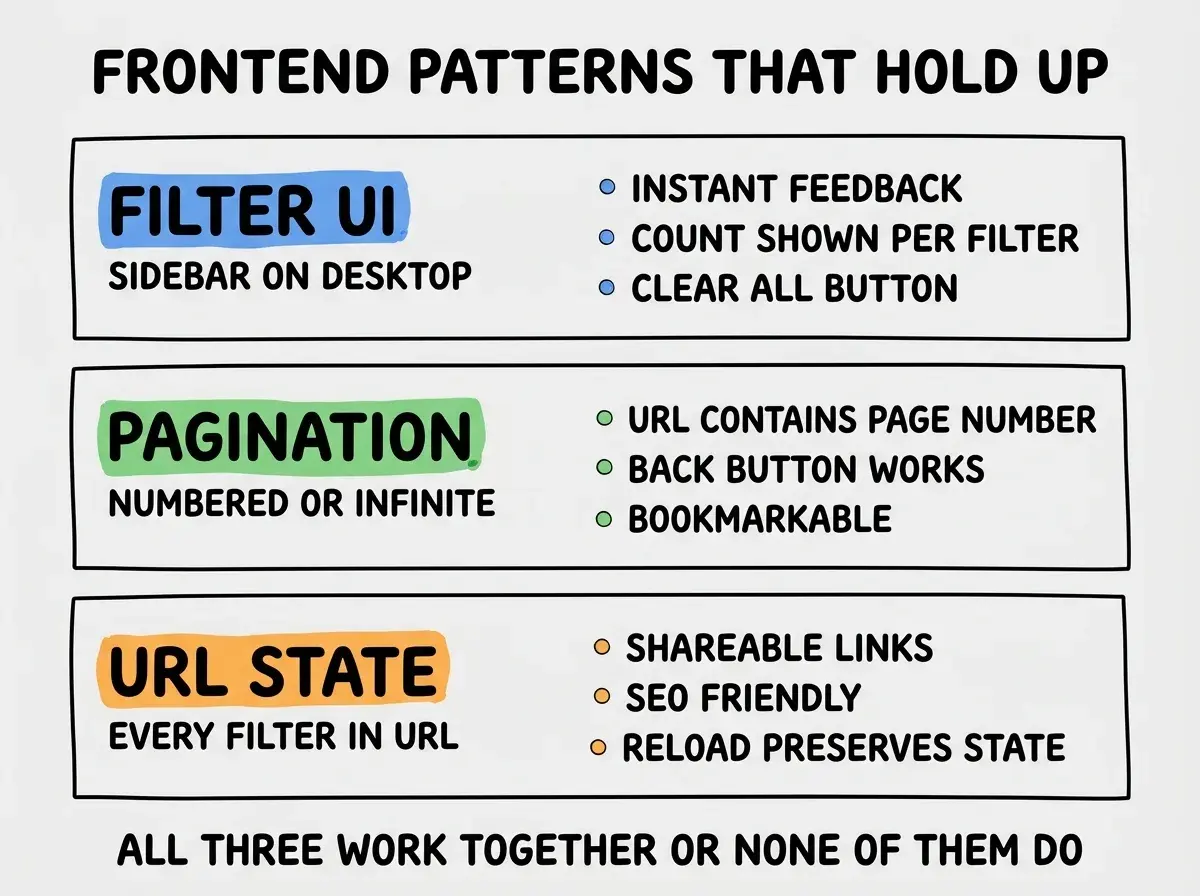
Filter UI. Sidebar on desktop, bottom sheet on mobile. Show counts next to each filter (e.g., "Red (47)") so users know how many results to expect. Always have a clear-all button.
Pagination. Either numbered pagination or infinite scroll, but the page number must be in the URL. Infinite scroll without URL state breaks the back button and is one of the most common e-commerce frustrations.
URL state. Every filter selection should be reflected in the URL as query parameters. This makes the page shareable, bookmarkable, indexable by search engines, and survivable across refresh. Nuxt, Next.js, and Remix all have built-in patterns for this.
The most common product catalog mistake is loading all products on the client and filtering in JavaScript. This works for 50 products and breaks at 500. By 5,000 products the page takes 10+ seconds to load and is unusable on mobile. Server-side filtering with proper pagination is the only architecture that scales, and it should be in place from day one even if your initial catalog is small.
The other mistake is not investing in URL state from the start. Retrofitting URL state to a catalog that was built without it is a multi-day refactor. Building it in from the first commit costs maybe an extra 30 minutes and saves the refactor entirely.
A useful exercise during the build is to ship the catalog with one real product and 99 dummy products generated by AI, then measure load times and filter latency at that scale. If the catalog feels slow at 100 products, it will be unusable at 10,000. Catching this during the build is much cheaper than redesigning the schema later, and it forces architectural decisions that hold up across product growth phases.
A second discipline is to track three customer-facing metrics from the launch of the catalog: time-to-first-result on the listing page, conversion rate from listing to product page, and conversion rate from product page to add-to-cart. These three numbers tell you whether the catalog architecture is helping or hurting sales, and the data builds up fast enough to inform iteration after the first few weeks.
Dig deeper
A few hand-picked sources if you want to go further.
What This Means For You
A well-architected product catalog is the foundation of any e-commerce store, and getting the architecture right early is much cheaper than fixing it later. The patterns above are not exotic; they are simply consistent application of well-known principles.
- If you're a founder: Start with Postgres full-text search and proper URL state. Migrate to Meilisearch later if needed. Skip the over-engineering temptation.
- If you're changing careers: Building a product catalog is a great portfolio piece. The architectural decisions are visible to interviewers and demonstrate real product thinking.
- If you're a student: Build a small product catalog (maybe 50 products) with the full architecture. The skill of proper URL state and server-side filtering transfers to many other apps.
Browse more e-commerce build guides
Read more build articles