Building a multi-tenant SaaS is where a side project becomes a real business. With 92% of builders using AI tools daily and 25% of YC W25 startups shipping codebases that are 95% or more AI-generated, the question is not whether AI can scaffold your multi-tenant architecture. It is whether you understand it well enough to prompt correctly.
Most AI tools will happily generate a SaaS boilerplate. They will give you auth, a dashboard, and maybe even a Stripe integration. What they will not do, unless you explicitly ask, is isolate tenant data. And that single missing piece is the difference between a product and a lawsuit.
What Multi-Tenancy Actually Means
Multi-tenancy is an architecture where a single application serves multiple customers (tenants), each with their own data, users, and configuration. The tenants share the infrastructure but never see each other's information.
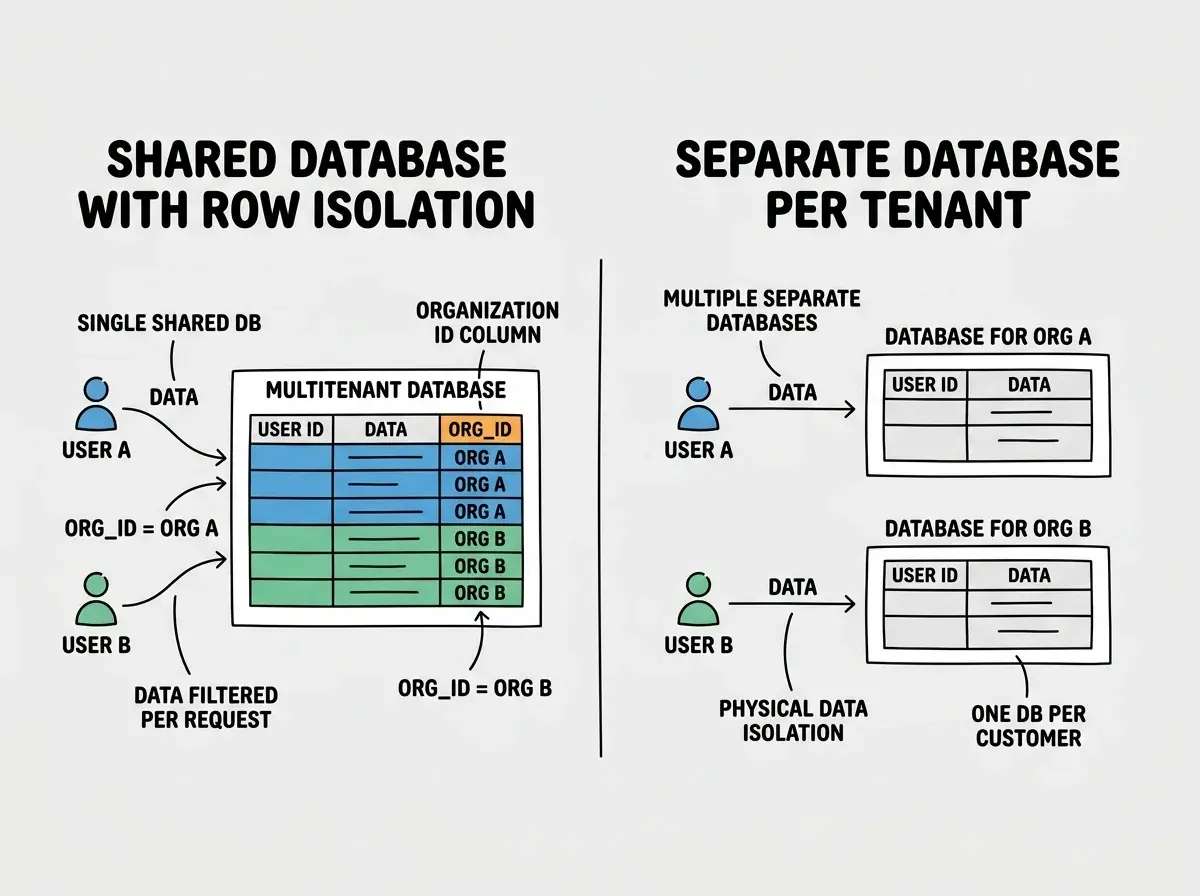
There are two common approaches for handling tenant data.
Shared database with row-level isolation uses one database for all tenants. Every table includes an org_id column, and every query filters by that column. This is simpler to manage, cheaper to operate, and the approach used by the vast majority of SaaS products including Notion, Linear, and Slack.
Separate databases per tenant gives each customer their own database instance. This provides stronger isolation and makes compliance easier for enterprise customers, but it adds significant operational complexity. You need to manage migrations across hundreds or thousands of databases, handle connection pooling differently, and pay substantially more for infrastructure.
For most builders using AI tools, the shared database approach is the right call. It works with Supabase, PlanetScale, Neon, and every major database provider. It scales to thousands of tenants without operational headaches. And it is the pattern AI tools are most familiar with, meaning your prompts will generate better results.
The Organization Model
The foundation of multi-tenant SaaS is the organization. Users do not exist in isolation. They belong to organizations, and organizations own all the data.
Here is the core schema that makes this work:
CREATE TABLE organizations (
  id UUID PRIMARY KEY DEFAULT gen_random_uuid(),
  name TEXT NOT NULL,
  slug TEXT UNIQUE NOT NULL,
  stripe_customer_id TEXT,
  plan TEXT DEFAULT 'free',
  created_at TIMESTAMPTZ DEFAULT now()
);

CREATE TABLE memberships (
  id UUID PRIMARY KEY DEFAULT gen_random_uuid(),
  user_id UUID REFERENCES auth.users(id) ON DELETE CASCADE,
  org_id UUID REFERENCES organizations(id) ON DELETE CASCADE,
  role TEXT NOT NULL CHECK (role IN ('owner', 'admin', 'member')),
  created_at TIMESTAMPTZ DEFAULT now(),
  UNIQUE(user_id, org_id)
);
The memberships table is the join between users and organizations. A user can belong to multiple organizations (think of how you might have both a personal workspace and a company workspace in tools like Vercel or Figma). The role on the membership determines what they can do within that specific organization.
Every other table in your application should include an org_id column. Projects, documents, invoices, uploads, comments. All of it belongs to an organization, never directly to a user.
CREATE TABLE projects (
  id UUID PRIMARY KEY DEFAULT gen_random_uuid(),
  org_id UUID REFERENCES organizations(id) ON DELETE CASCADE,
  name TEXT NOT NULL,
  created_by UUID REFERENCES auth.users(id),
  created_at TIMESTAMPTZ DEFAULT now()
);
This pattern feels repetitive, and AI tools sometimes try to shortcut it by linking data directly to user_id instead. Do not let them. Direct user ownership breaks the moment a team member leaves and their data needs to survive the departure.
Supabase RLS for Tenant Isolation
With the organization model in place, you need Row Level Security policies that enforce tenant boundaries at the database level. This is not optional. Client-side filtering is not enough. A determined user with browser dev tools can bypass any frontend check in minutes.
The core pattern uses a helper function that returns the organizations the current user belongs to:
CREATE OR REPLACE FUNCTION user_org_ids()
RETURNS SETOF UUID AS $$
  SELECT org_id FROM memberships
  WHERE user_id = auth.uid()
$$ LANGUAGE sql SECURITY DEFINER STABLE;
Now every RLS policy on every tenant-scoped table follows the same pattern:
ALTER TABLE projects ENABLE ROW LEVEL SECURITY;

CREATE POLICY "Org members can view projects"
  ON projects FOR SELECT
  USING (org_id IN (SELECT user_org_ids()));

CREATE POLICY "Org members can create projects"
  ON projects FOR INSERT
  WITH CHECK (org_id IN (SELECT user_org_ids()));

CREATE POLICY "Org members can update projects"
  ON projects FOR UPDATE
  USING (org_id IN (SELECT user_org_ids()));

CREATE POLICY "Org members can delete projects"
  ON projects FOR DELETE
  USING (org_id IN (SELECT user_org_ids()));
This ensures that no matter what query a user sends, they only ever see data belonging to organizations where they have a membership. If someone manipulates API calls to include a different org_id, the database silently returns nothing instead of leaking data.
Every table that stores tenant data needs an org_id column and RLS policies that check organization membership. There are no exceptions. If you skip RLS on even one table, that table becomes the breach point. AI tools will not add these policies unless you explicitly include them in every prompt that creates or modifies a table.
Role-Based Access Within Organizations
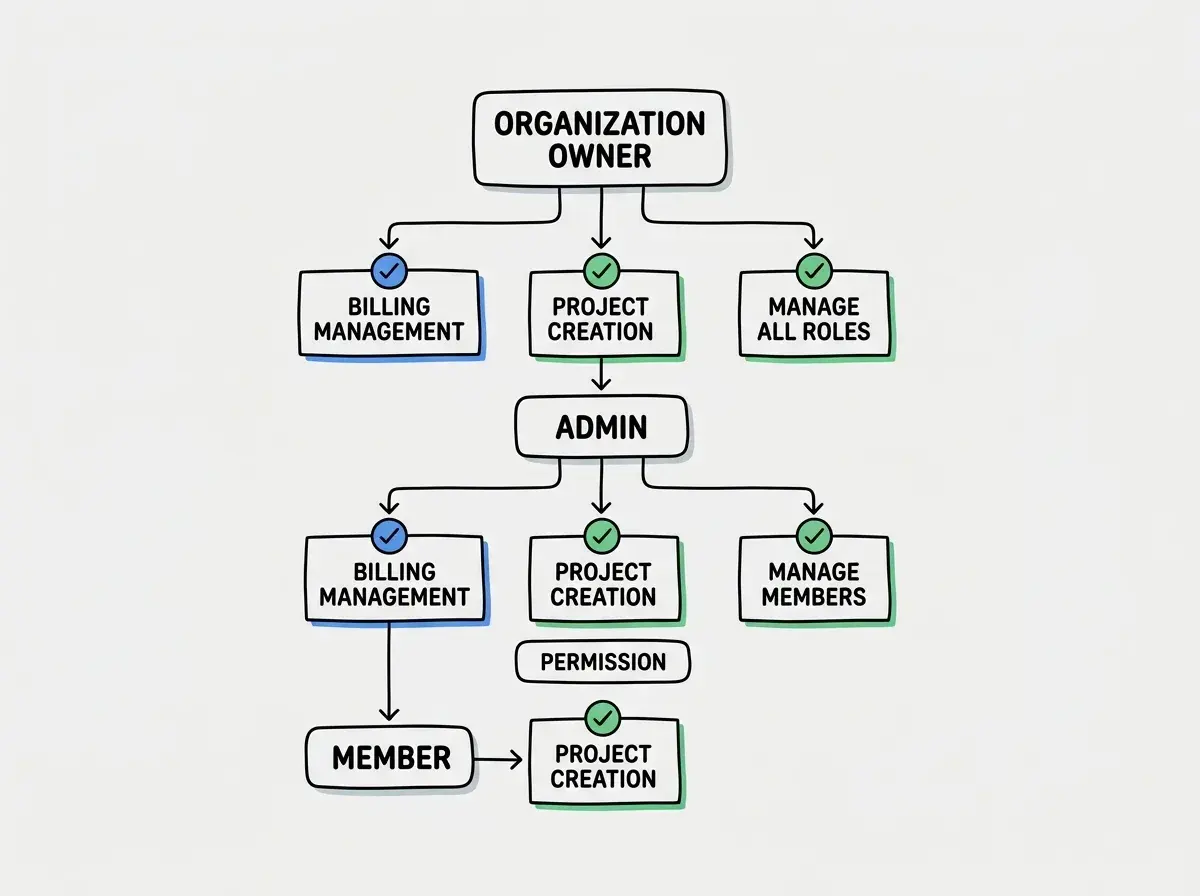
Not every organization member should have the same permissions. The three-role model covers most SaaS use cases.
Owner is the person who created the organization. They can manage billing, invite and remove members, change roles, and delete the organization. There is always exactly one owner.
Admin can do everything except manage billing and delete the organization. They can invite members, manage projects, and configure settings.
Member can create and edit their own work within the organization but cannot invite users, change settings, or access billing.
Enforce these roles in your application code, not just in the UI. Here is a middleware pattern:
function requireOrgRole(allowedRoles: string[]) {
  return async (req: Request, orgId: string, userId: string) => {
    const membership = await db
      .from('memberships')
      .select('role')
      .eq('user_id', userId)
      .eq('org_id', orgId)
      .single();

    if (!membership.data) {
      throw new Error('Not a member of this organization');
    }

    if (!allowedRoles.includes(membership.data.role)) {
      throw new Error('Insufficient permissions');
    }

    return membership.data.role;
  };
}

// Usage
await requireOrgRole(['owner', 'admin'])(req, orgId, userId);
You can also enforce role checks at the database level with more granular RLS policies. For example, only allowing owners and admins to delete projects:
CREATE POLICY "Only admins can delete projects"
  ON projects FOR DELETE
  USING (
    org_id IN (
      SELECT org_id FROM memberships
      WHERE user_id = auth.uid()
      AND role IN ('owner', 'admin')
    )
  );
Per-Organization Stripe Subscriptions
Billing in multi-tenant SaaS is tied to the organization, not the individual user. When someone upgrades to a paid plan, the entire organization gets access.
The key is linking your organizations table to a Stripe Customer:
import Stripe from 'stripe';
const stripe = new Stripe(process.env.STRIPE_SECRET_KEY!);

async function createOrgWithBilling(orgName: string, email: string) {
  const customer = await stripe.customers.create({
    name: orgName,
    email: email,
    metadata: { source: 'app_signup' }
  });

  const org = await db.from('organizations').insert({
    name: orgName,
    slug: slugify(orgName),
    stripe_customer_id: customer.id,
    plan: 'free'
  }).select().single();

  return org.data;
}
When handling Stripe webhooks, update the organization's plan based on the subscription status:
// In your Stripe webhook handler
case 'customer.subscription.updated':
case 'customer.subscription.created': {
  const subscription = event.data.object;
  const plan = subscription.items.data[0].price.lookup_key;

  await db.from('organizations')
    .update({ plan })
    .eq('stripe_customer_id', subscription.customer);
  break;
}
This means when a team of five people shares an organization and one person upgrades, all five get access to paid features immediately. Feature gating then checks the organization's plan, not the individual user's payment status.
Follow the Vibe Coder blog for step-by-step guides on shipping real products with AI tools.
Start Building Your SaaSThe Prompt Sequence for AI-Assisted Multi-Tenant Setup
AI tools work best when you break multi-tenant architecture into focused, sequential prompts rather than asking for everything at once. Here is the sequence that produces the cleanest results:
Prompt 1: Schema and organization model. "Create the database schema for a multi-tenant SaaS. Include organizations, memberships with roles (owner/admin/member), and all application tables should have an org_id foreign key. Include RLS policies for every table."
Prompt 2: Auth flow with org context. "When a user signs up, create a default organization for them and add them as the owner. Store the active org_id in the session. All API routes should read org_id from the session, never from the request body."
Prompt 3: Invitation system. "Build an invite flow where admins and owners can invite users by email. Create a pending_invitations table with org_id, email, role, and an invite token. When the invited user signs up, automatically add them to the organization."
Prompt 4: Stripe integration. "Add Stripe billing tied to the organization. Create a Stripe Customer when an org is created. Handle checkout sessions and webhooks to update the org's plan. Gate features based on org.plan, not user attributes."
Prompt 5: Org switcher. "Add an organization switcher to the app header. Users can belong to multiple orgs. When they switch, update the active org_id in the session and reload the current page data."
Each prompt builds on the previous one. Combining all five into a single prompt leads to shortcuts, and tenant isolation is usually the first thing AI simplifies away.
Common Pitfalls That Leak Data Between Tenants
The most dangerous multi-tenant bug is a missing org_id filter on a single query. AI tools frequently generate queries like SELECT * FROM projects WHERE id = $1 without including AND org_id = $2. If a user guesses or enumerates another tenant's project ID, they see data they should never access. Every query on every tenant-scoped table must filter by org_id, with no exceptions.
Beyond missing filters, watch for these patterns:
Org ID from the client. Never trust an org_id sent in a request body or URL parameter. Always read it from the server-side session. If your API accepts { orgId: "abc" } from the frontend, a user can substitute any organization's ID and access their data.
Shared resources without scoping. File uploads, images, and documents need org-level scoping in their storage paths. Use patterns like /uploads/{org_id}/{file_id} instead of /uploads/{file_id}. Without org scoping, enumeration attacks on file URLs can expose files across tenants.
Admin endpoints without org checks. Internal admin dashboards and API routes are common leak points. An admin should only see data for organizations they belong to, not all organizations. AI tools often generate admin panels that query all rows without filtering.
Webhook handlers that skip verification. Stripe webhooks include a customer ID that maps to an organization. Always verify the webhook signature and look up the organization from the customer ID.
Dig deeper
A few hand-picked sources if you want to go further.
What This Means For You
Multi-tenant architecture is not something you bolt on later. If you are building a SaaS that serves teams, organizations, or multiple customers, the org model and tenant isolation need to be in your first set of prompts. Retrofitting multi-tenancy into a user-centric data model is one of the most painful rewrites in software.
The good news is that AI tools are excellent at generating this architecture when you prompt them correctly. The schema, the RLS policies, the Stripe integration, the role checks. All of it can be AI-generated. What AI cannot do is decide to include it. That decision, and the sequential prompting that makes it work, is on you.
Start with the organization model. Add RLS on every table from day one. Tie billing to the org, not the user. And test tenant isolation before you test anything else. The rest of your SaaS features do not matter if one customer can see another customer's data.
Explore the full library of practical build guides for shipping production SaaS apps with AI.
Read More Build Tutorials