You can build a CRM from scratch with AI coding tools over a single weekend, and it will actually work. Not a tutorial toy, but a functional system to track contacts, manage deals, and log every customer interaction. 92% of developers now use AI tools daily, and projects like this are exactly why.
Think of a CRM like a restaurant kitchen. Contacts are the ingredients, deals are the orders being prepared, the pipeline is the line where dishes move from prep to plating, and activity logs are the tickets the kitchen uses to track everything. You are not building a commercial kitchen from blueprints. You are assembling a very capable home kitchen with an assistant who can cut, measure, and plate while you decide the menu.
Why a CRM Is the Perfect Intermediate Project
A CRM sits in the sweet spot between "too simple to learn anything" and "too complex to finish." It requires a database, multiple related data models, a real user interface with several views, and enough business logic to exercise your prompting skills. But it does not require payment processing, real-time collaboration, or infrastructure that costs money to run.
The business value is also real. If you are a founder or freelancer, you probably manage contacts in a spreadsheet or bounce between three different tools. A custom CRM that fits your exact workflow is genuinely useful, not just a portfolio piece.
CNBC journalists recently replicated Monday.com in under an hour using AI coding tools. A CRM is a comparable project in scope and complexity. The difference is that you are building it to fit your specific needs, not recreating someone else's product.
Build each feature as a complete vertical slice, from database table to API route to UI component, before moving to the next one. AI tools generate far better code when they can see the full context of a single feature rather than abstract layers that span the entire application. Start with contacts, get that working perfectly, then add deals, then pipelines, then activity tracking.
Saturday Morning, Set Up and Build the Contacts Module
Start by choosing your stack. For a weekend CRM, a good combination is Next.js for the frontend and API routes, SQLite (via Prisma or Drizzle) for the database, and Tailwind CSS for styling. This keeps everything in one project with zero external services to configure.
Open your AI coding tool and start with the foundation. Your first prompt should describe the project structure and the contacts feature together.
"Create a Next.js app with a SQLite database using Prisma. Set up a Contact model with fields for name, email, phone, company, notes, and timestamps. Build a contacts page that shows all contacts in a searchable table with columns for name, company, email, and last contacted date. Add a form to create new contacts and the ability to edit existing ones. Use Tailwind CSS for a clean, professional look."
This single prompt should generate your project scaffolding, database schema, and a working contacts page. Review what the AI creates before moving on. Check the database schema to make sure the fields are reasonable. Click through the UI to confirm you can add and edit contacts.
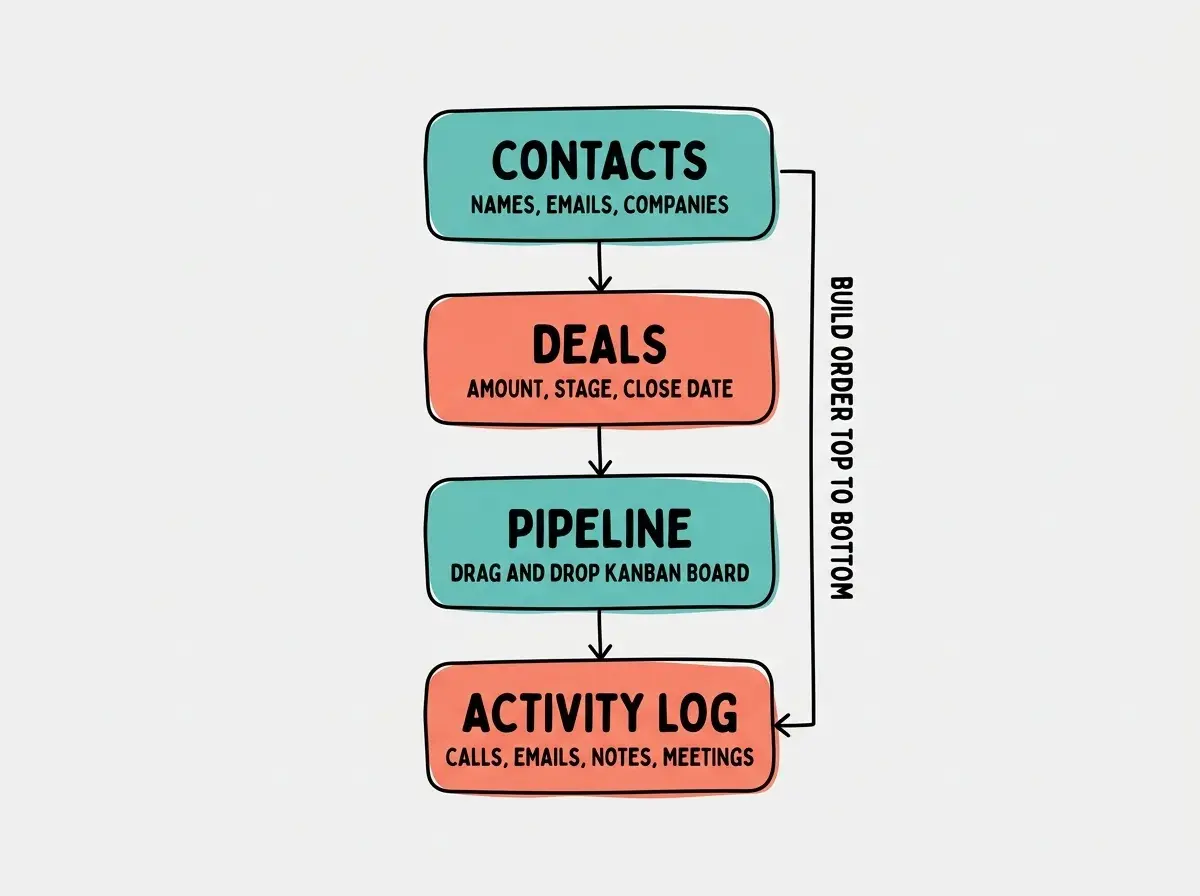
Now refine the contacts page. "Add sorting to the contacts table so I can sort by name, company, or last contacted date. Add a filter dropdown to filter contacts by company. Make the table rows clickable so clicking a contact opens a detail view showing all their information."
These refinements should take ten to fifteen minutes. By the end of your first hour, you should have a fully functional contact management system with search, sort, filter, and detail views.
Saturday Afternoon, Add Deals and the Pipeline
Deals are where a CRM becomes more than a fancy address book. Each deal connects to a contact, has a monetary value, belongs to a pipeline stage, and has an expected close date.
"Add a Deal model to the database with fields for title, value (in dollars), stage (Lead, Qualified, Proposal, Negotiation, Closed Won, Closed Lost), expected close date, and a relation to the Contact model. Build a deals page that shows all deals in a table with the deal title, associated contact name, value, stage, and close date. Add a form to create deals that includes a dropdown to select an existing contact."
After the basic deals table works, build the pipeline view. This is the kanban board that makes a CRM feel like a CRM.
"Create a pipeline page that shows deals as cards arranged in columns by stage. Each column should be labeled with the stage name and show the total value of deals in that stage. Each card should show the deal title, contact name, and value. Add drag-and-drop so I can move deal cards between columns to update their stage."
Drag-and-drop is a feature where AI tools sometimes struggle. If the first implementation is buggy, simplify your request. "Instead of drag-and-drop, add a dropdown menu on each deal card that lets me change the stage. When I select a new stage, the card should move to that column." This achieves the same result with simpler code that is less likely to have issues.
Trying to build all features in a single massive prompt. When you ask for contacts, deals, pipeline, activity tracking, and email integration all at once, the AI loses context and produces shallow implementations of everything instead of a solid implementation of anything. The contact module alone should take three to four prompts to get right. If you rush, you will spend Sunday debugging instead of building new features.
Sunday Morning, Activity Tracking and the Timeline
Activity tracking turns your CRM from a static database into a living history of every customer relationship. Each activity links to a contact (and optionally a deal) and records what happened.
"Add an Activity model with fields for type (Call, Email, Meeting, Note), subject, description, date, and relations to both Contact and Deal. On the contact detail page, add a timeline section that shows all activities for that contact in reverse chronological order. Each activity should display an icon based on its type, the subject, date, and a truncated description. Add a button to log a new activity directly from the contact detail page."
The timeline is the feature that makes your CRM genuinely useful day to day. When a client calls, you open their contact page and immediately see every previous interaction. Before a meeting, you skim the timeline to refresh your memory. After a call, you log a quick note that your future self will thank you for.
Now connect activities to deals as well. "On the deal detail page, add a similar timeline showing all activities linked to that deal. When logging a new activity from a deal page, automatically associate it with both the deal and the deal's contact."
Sunday Afternoon, Dashboard and Final Polish
A dashboard ties everything together by giving you a single screen that answers "what needs my attention right now?"
"Create a dashboard page as the app's homepage. Show four stat cards at the top: total contacts, total open deals, total pipeline value, and deals closing this month. Below the stats, add two sections side by side: a list of the five most recent activities and a list of deals closing in the next seven days. Link each item so clicking it navigates to the relevant contact or deal."
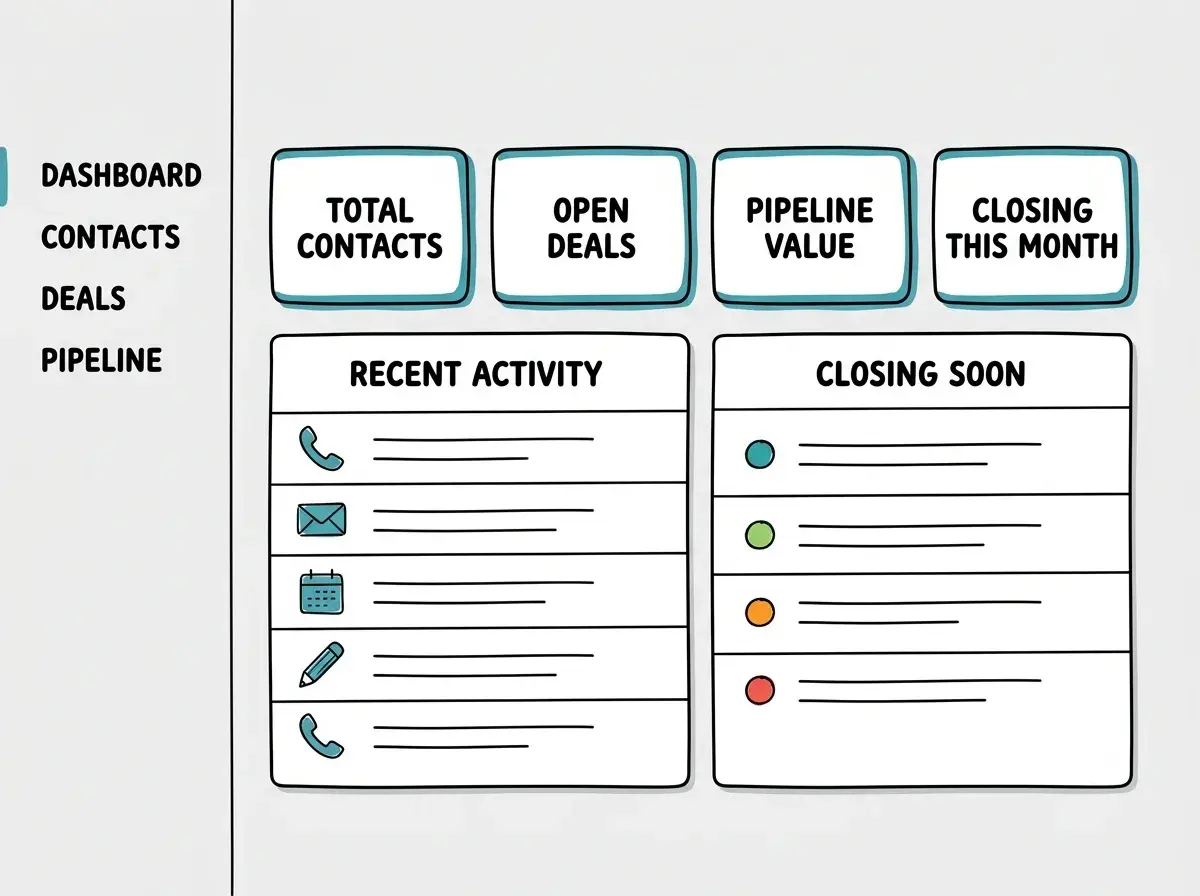
Spend the remaining time on polish. "Add a global search bar in the navigation that searches across contacts, deals, and activities. Show results in a dropdown as the user types." Then clean up the visual design. "Make the navigation sidebar fixed on the left with icons and labels. Highlight the current page. Add a consistent page header style across all pages."
Start with the fundamentals of AI-assisted development.
Learn the basicsExtending Your CRM After the Weekend
Once the core is working, you have a foundation that can grow with your needs. Each extension is a focused session, not a full rebuild.
Email integration connects your CRM to real communication. You can add a simple integration with Resend or SendGrid that lets you send emails directly from a contact page, with sent emails automatically logged as activities.
CSV import and export lets you migrate data from your existing spreadsheet. Ask the AI to build an import page that maps CSV columns to contact fields and handles duplicates.
Tags and custom fields make the CRM flexible enough to fit any workflow. A freelance designer needs different fields than a SaaS founder. Building a tagging system lets you categorize contacts and deals in ways that make sense for your business.
Simple reporting gives you charts showing deal velocity, conversion rates by stage, and revenue trends over time. A charting library like Recharts or Chart.js works well here, and AI tools are very good at generating chart configurations from data.
What This Means For You
You just built a real CRM in a weekend. Not a template, not a demo, but a working tool with contacts, deals, a visual pipeline, and activity tracking. That is the kind of project that used to take a small team weeks to deliver.
- If you are a founder managing early customers: You now have a CRM that fits your workflow exactly, with zero monthly subscription fees. Customize it as your business evolves. Add the fields you need, remove the ones you do not, and build integrations specific to your sales process. When your needs outgrow it, you will know exactly what features matter because you have been using your own tool.
- If you are an indie hacker exploring SaaS ideas: You just built a vertical SaaS product in a weekend. Pick a niche (real estate agents, freelance consultants, small agencies), customize the fields and workflow for that audience, and you have a product you can sell. The CRM market is enormous, and niche-specific tools consistently outperform generic ones for small teams.
- If you are a developer building your portfolio: A full-stack CRM with a database, multiple related models, a kanban board, and a dashboard is a portfolio piece that demonstrates real engineering judgment, not just the ability to follow a tutorial. Deploy it, put it on your resume, and be ready to talk about the architectural decisions you made along the way.
Keep building with more intermediate vibe coding projects.
Explore build tutorials