To build a cron job dashboard and monitor with AI tools, follow the four phase approach (define which cron jobs need monitoring and what success looks like for each, build the heartbeat tracking that detects job execution, design the dashboard that surfaces failures clearly, and ship with the alerting patterns that route notifications correctly), recognize what separates monitoring tools that solve incidents from tools that produce alert fatigue, and apply the patterns that produce monitoring engineers genuinely rely on. The cron job dashboard becomes valuable when failed jobs get noticed before users notice; without that bar, the dashboard becomes log archive.
This piece walks through the four phases, the alerting patterns, the specific tooling, and the four mistakes that produce monitoring tools engineers ignore.
Why Cron Job Dashboards Matter
Cron job dashboards solve the silent failure problem inherent to scheduled tasks. The problem matters; jobs that run reliably in development sometimes fail silently in production, and silent failures often produce data inconsistencies discovered weeks later.
The 2026 reality is that AI tools dramatically accelerate monitoring tool building while AI integration during incident analysis can correlate failures across jobs, detect anomaly patterns, and suggest causes faster than manual investigation. The combination means small teams can build internal monitoring matching what enterprises previously paid significant license fees for.
A 2025 reliability survey of 800 engineering teams found that teams with cron job monitoring detected job failures within 5 minutes on average, while teams without monitoring detected failures within 4.7 hours on average. The detection time gap produces dramatically different incident impact; fast detection prevents data inconsistencies that slow detection often produces.
The pattern to copy is the way smoke detectors work in homes. The detectors run constantly with minimal user interaction; they only become salient when something needs attention. Cron job monitors play similar role for scheduled tasks; quiet operation when things work, loud alerts when they do not.
The Four Phase Approach
Four phases produce cron job dashboards that solve incidents.
Phase 1, define which cron jobs need monitoring and what success looks like for each. Critical jobs need every execution monitored; optional jobs need only failure monitoring. Clarity here prevents alert fatigue.
Phase 2, build the heartbeat tracking that detects job execution. Jobs send heartbeats on success; missing heartbeats indicate failure. AI tools generate the heartbeat infrastructure effectively.
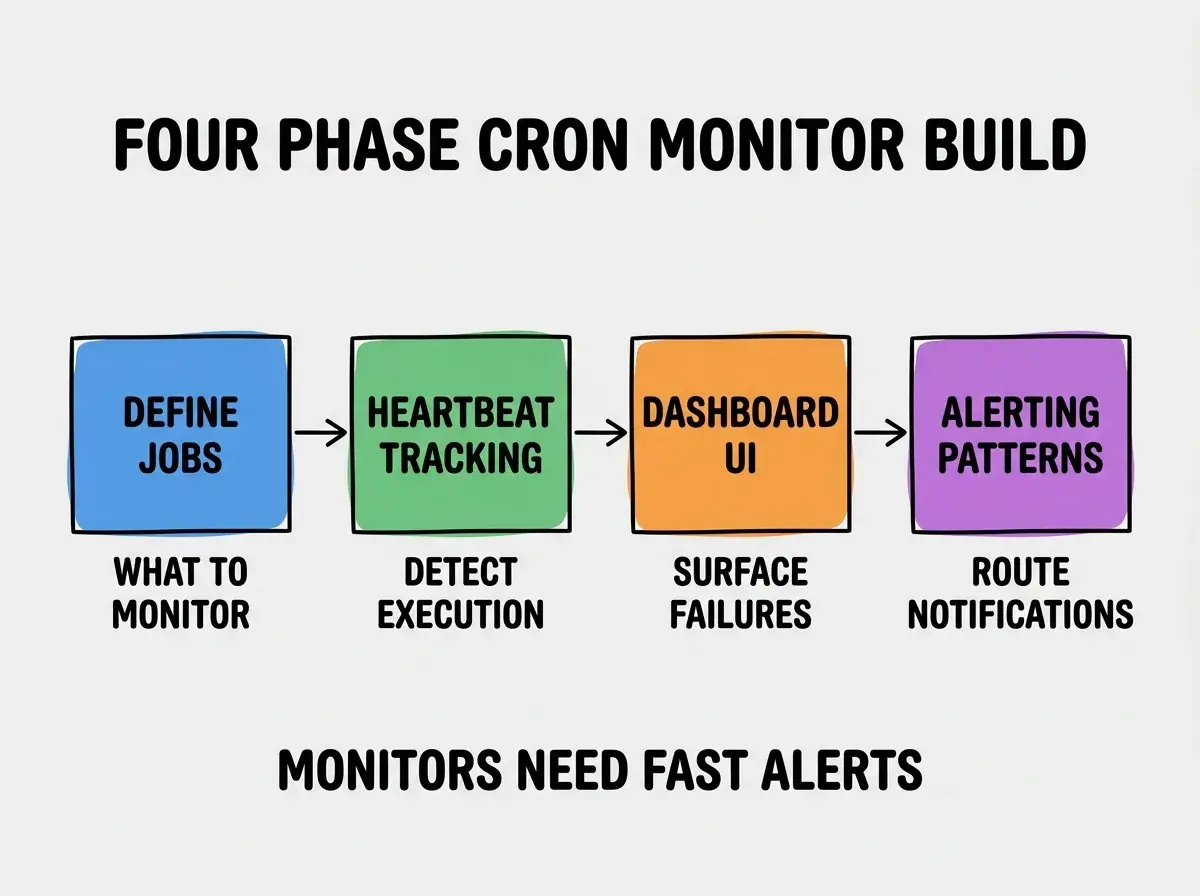
Phase 3, design the dashboard that surfaces failures clearly. Failed jobs at top, recent history, expected next run. Dashboard clarity determines incident response speed; cluttered dashboards delay response.
Phase 4, ship with alerting patterns that route notifications correctly. Slack, email, PagerDuty depending on severity. Alert routing matters; wrong routes produce alert fatigue or missed incidents.
The Alerting Patterns That Avoid Fatigue
Three patterns produce alerts engineers respond to rather than mute.
Pattern 1, severity tiers route differently. Critical to PagerDuty, important to Slack, low to email digest. Tiered routing matches alert importance to attention demand.
Browse more developer tool tutorials
Read more build tutorialsPattern 2, alerts include context for triage. Job name, last successful run, error message if available. Context enables triage from alert; alerts without context require dashboard visits that delay response.
Pattern 3, repeat suppression for ongoing failures. First failure alerts immediately; subsequent failures of same job suppress for 1 hour. Suppression prevents fatigue; without it, ongoing incidents produce alert floods.
The Specific Tooling That Worked
Three tool categories combine effectively for cron monitor building.
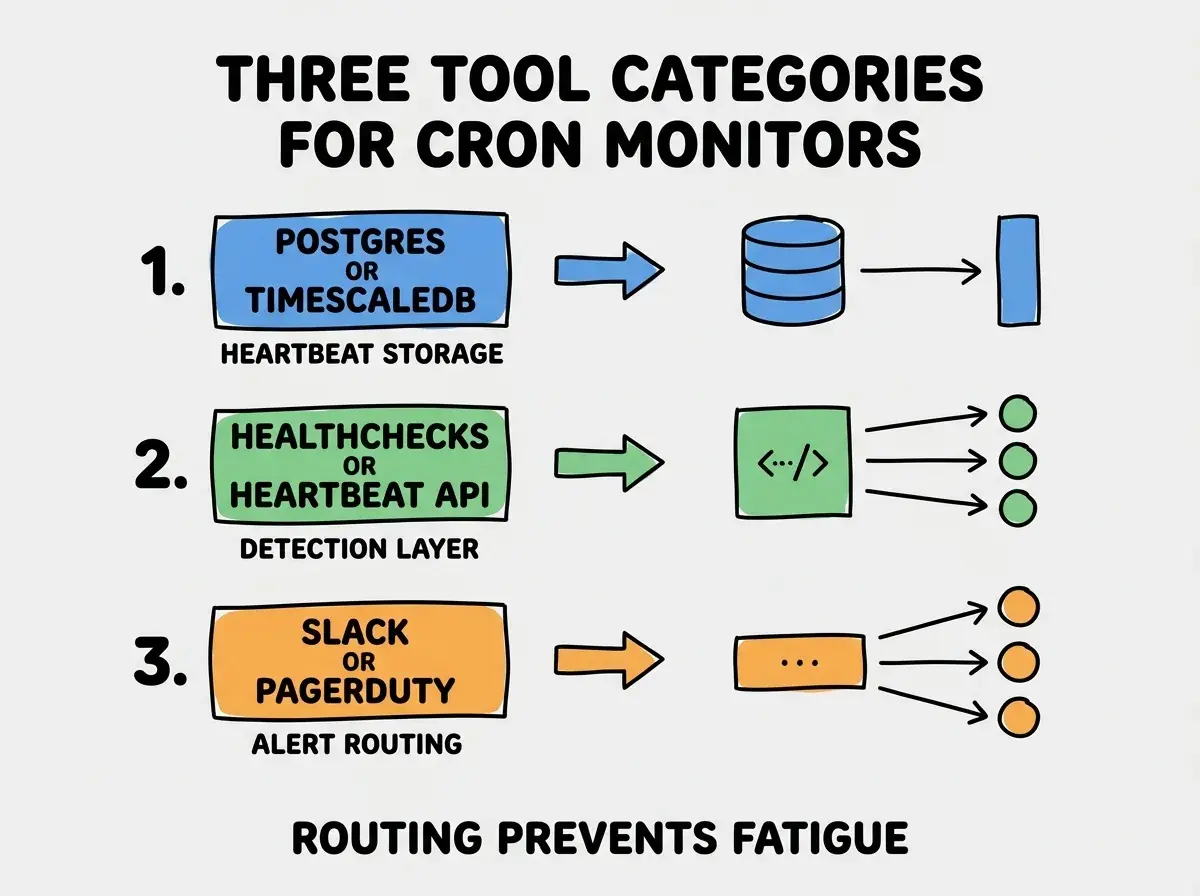
Tool 1, Postgres or TimescaleDB for heartbeat storage. Time series data fits both; Postgres for moderate volume, TimescaleDB for high volume.
Tool 2, Healthchecks.io style API or custom heartbeat receiver. Jobs ping the receiver on completion; missing pings trigger alerts. Standard pattern that many teams have implemented.
Tool 3, Slack or PagerDuty for alert routing. Slack for normal awareness; PagerDuty for incidents requiring urgent response. Routing layer determines effective alerting.
What Makes Cron Monitors Solve Incidents
Three patterns separate monitors that solve incidents from monitors that get ignored.
Pattern 1, alert quality stays high through deliberate tuning. Alerts that prove false get tuned out; remaining alerts get attention. Quality discipline matters more than alert volume.
Pattern 2, integration with incident response workflows. Alerts include runbook links, severity context, on call rotation awareness. Integration produces fast response; isolated alerts produce delayed response.
Pattern 3, regular review of alert patterns. Monthly review of which alerts fired, which were actionable, which were noise. Review produces tuning that sustains alert quality.
The combination produces monitors engineers respond to. Without these patterns, monitors become noise that engineers learn to ignore.
How to Build Your First Cron Monitor
Three implementation patterns help first cron monitors succeed.
Pattern A, start with critical jobs only. 5-10 critical jobs first. Validate the monitoring pattern. Add more jobs after the pattern works; trying to monitor everything from day one produces alert noise.
Pattern B, ship with explicit alert tuning expectation. Plan to tune alerts in first month. The first month reveals which alerts produce noise; tuning matters more than initial setup.
Pattern C, instrument the monitor itself. Heartbeat receiver uptime, alert delivery success. Without monitoring the monitor, monitor failures stay hidden until incidents reveal them.
The combination produces first cron monitors that establish the pattern for sustained reliability. Without these patterns, first monitors often produce alert fatigue that destroys the value of subsequent monitoring work.
The most damaging cron monitor mistake is alerting on every cron event rather than failures only. Success notifications produce alert fatigue; teams learn to ignore the channel, including the failure alerts that need attention. The fix is to alert on failures only by default; success notifications belong in dashboard view, not alert channels. Quiet success and loud failure produce the response pattern that monitoring requires.
The other mistake is using the wrong alert channel for severity. Critical alerts in Slack get missed during off hours; non critical alerts in PagerDuty produce burnout. The fix is to route by severity deliberately; severity tiers make the system work.
A third mistake is failing to handle expected job failures. Some jobs are expected to fail occasionally without intervention; treating them as critical produces noise. The fix is to design retry logic that suppresses single failure alerts when retries succeed; only persistent failures should alert.
A fourth mistake is missing integration with deployment events. Jobs sometimes fail because deployments broke them; without deployment context, debugging takes longer. The fix is to correlate alerts with deployment timestamps; correlation often reveals deployment caused failures immediately.
What This Means For You
The cron job dashboard and monitor built with AI tools becomes valuable through fast detection, alert quality, and incident response integration. The four phases, alerting patterns, and tool combinations produce monitoring engineers genuinely rely on.
- If you're a senior dev: Cron monitors solve silent failure problems inherent to scheduled jobs. Build them when scheduled jobs matter to product reliability; for systems with few critical jobs, lighter monitoring may suffice.
- If you're an indie hacker: Even small products benefit from cron monitoring when scheduled jobs handle revenue or notifications. The monitoring effort pays back the first time it catches a silent failure.
- If you're a founder: Cron monitoring reduces engineering on call burden. Build it when product complexity justifies; for simple products, ad hoc may suffice.
Browse more developer tool tutorials
Read more build tutorials