A blue green deployment lets you ship updates to a live application without any downtime by running two identical environments and switching traffic between them. With 92% of developers now using AI tools daily, shipping speed matters more than ever. But shipping fast means nothing if every update takes your app offline for even a few seconds. This pattern solves that problem entirely.
The simplicity of the idea feels almost too obvious once you see it. Two environments, one swap, zero downtime. But like most simple ideas, the execution has sharp edges that will cut you if you do not know where they are.
The Traffic Light With Two Lanes
Think of a blue green deployment like a road with two lanes controlled by a traffic light.
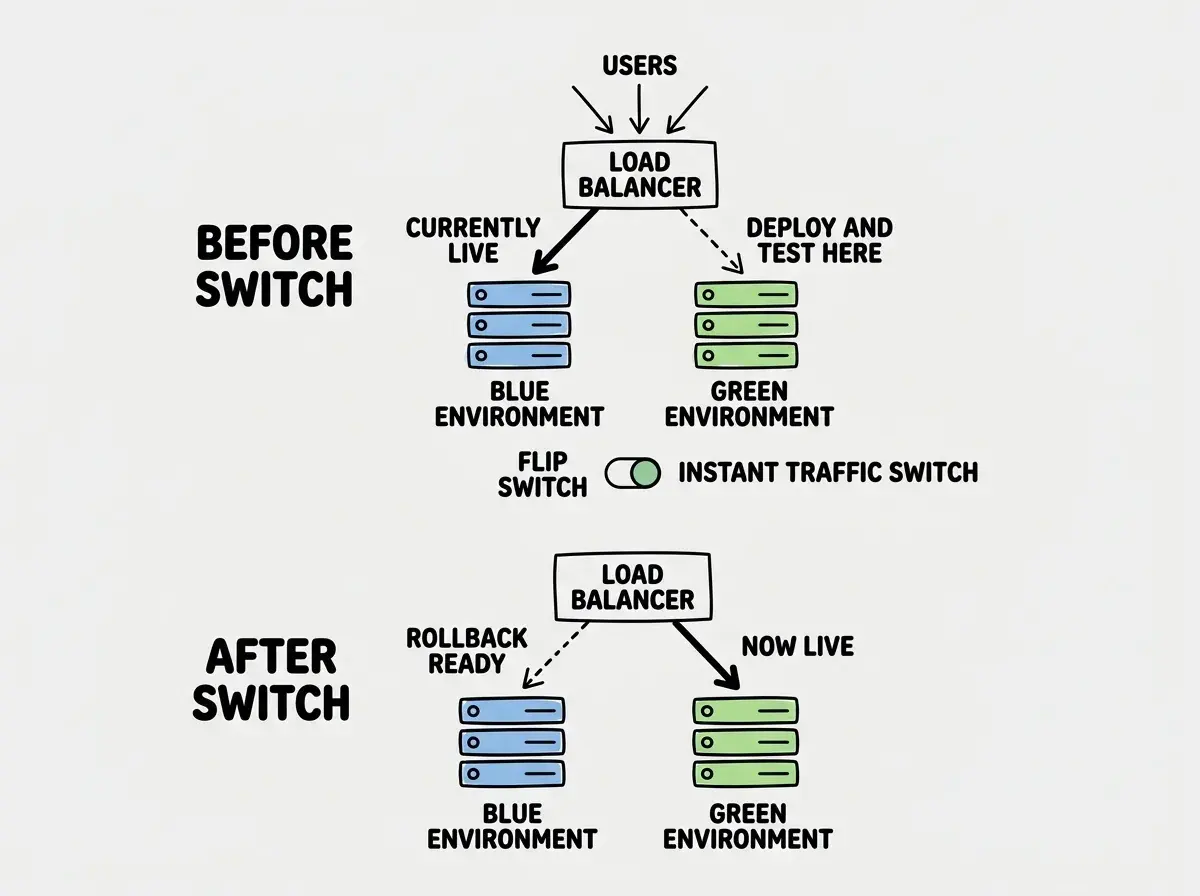
Lane Blue is currently carrying all the traffic. Cars (your users) flow through it without interruption. Lane Green sits empty, fully built and ready to go, but the light is red so no traffic enters it. When you want to ship an update, you deploy the new version to Lane Green. You test it. You verify everything works. Then you flip the traffic light so cars flow through Lane Green instead.
The switch is instant. No construction zone. No lane closure. No "please wait while we update" message. Users do not even notice the road changed beneath them.
If something goes wrong with Lane Green, you flip the light back. Rollback takes seconds, not minutes. Your users never saw the broken version because you tested it before switching traffic. This is the entire concept. Everything else is implementation details.
Blue-green deployment works by maintaining two identical production environments. Only one serves live traffic at any time. You deploy updates to the inactive environment, verify everything works, then switch traffic over instantly. If the new version has problems, you switch back. Users never experience downtime because there is always a healthy environment serving requests.
How the Switch Actually Works
The mechanism behind the traffic switch depends on your infrastructure, but the principle is the same everywhere. Something sits between your users and your servers, and that something decides which environment receives requests.
At the simplest level, this is a load balancer or reverse proxy. It receives every incoming request and forwards it to whichever environment is currently "live." When you flip from blue to green, you tell the load balancer to send requests to the green servers instead. The load balancer updates its routing in milliseconds.
Some teams use DNS-based switching, pointing the domain at a different IP address. This works but is slower because DNS changes take time to propagate. Load balancer switching is almost always better because it happens instantly and completely.
The important detail is that both environments are fully running at the moment of the switch. Green is not booting up when you flip. It has been running, warmed up, and tested while Blue handled production traffic. The switch is not a deployment. It is a routing change.
When You Actually Need This
Here is the honest part that most deployment articles skip. You probably do not need blue-green deployments right now.
If you are deploying to Vercel, Netlify, or Cloudflare Pages, you already have zero-downtime deployments built in. These platforms use immutable deployments. Every push creates a new, complete copy of your app. Once it is ready, the platform atomically swaps which version your domain points to. Old requests finish on the old version. New requests hit the new version. This is essentially blue-green deployment, handled invisibly.
You need blue-green deployments when you are running your own servers on Railway, Fly.io, or AWS. In these environments, a naive deployment means stopping the old version and starting the new one, creating a gap where your app is unavailable.
You also need this pattern when your app cannot tolerate even brief downtime. Payment systems, real-time platforms, healthcare applications. If a three-second gap could lose a transaction or drop a critical message, blue-green is worth the overhead.
For a side project or MVP on Vercel? You already have what you need. Do not add complexity you do not require.
Implementing on Railway and Fly.io
If you have outgrown the managed platforms and are running your own infrastructure, here is how the pattern works on two popular options for vibe coders.
On Fly.io, blue-green is close to built-in. Set strategy = "bluegreen" in your fly.toml and Fly handles the orchestration. It starts new machines with the updated code, waits for health checks to pass, shifts traffic to the new machines, and stops the old ones. Your old machines keep serving traffic until the new ones are verified healthy.
On Railway, you create two separate services in the same project, both connected to the same domain through Railway's load balancing. Deploy the update to the inactive service, verify it, then update the routing. It requires more manual orchestration, but the pattern is the same. Two environments, one switch.
In both cases, the critical step people skip is verification. Do not deploy to the inactive environment and immediately flip traffic. Hit the health check endpoint. Run your smoke tests. Verify the homepage loads, the API responds, authentication works. The whole point of two environments is testing the new one before real users touch it.
Start with the fundamentals before tackling advanced patterns like blue-green.
Learn deployment basicsDatabase Migrations Are the Hard Part
Everything I have described so far sounds clean. Two environments, one switch. But there is a problem that makes experienced engineers wince, and that problem is the database.
Both environments typically share the same database. They have to, because your user data, orders, and content live in one place. When your new version requires database changes, things get complicated fast.
Imagine you add a new phone_number column to your users table as part of the green deployment. You run the migration, and green now expects that column to exist. But blue is still serving traffic, and blue's code does not know about phone_number. If blue tries to write a new user row, it might fail because it does not provide a value for the new column.
The solution is backward-compatible migrations. Every database change must work with both the old and new versions of your application simultaneously. Instead of renaming a column, add the new column, deploy code that writes to both, then clean up the old column later. Instead of changing a column type, add a new column with the new type and migrate data gradually.
This requires discipline that goes against the vibe coding instinct of "just ship it." But it is the price of zero-downtime deployments when your app has a database, and there is no shortcut around it.
Deploying a database migration that only works with the new version of your code, then wondering why the old version breaks during the switchover. Both environments share the same database, so every schema change must be backward-compatible. Add new columns as nullable. Never rename or delete columns in the same deployment that introduces code depending on the change. Always make migrations work with both old and new code simultaneously.
Canary Deployments as an Alternative
Blue-green is not the only zero-downtime pattern. Canary deployments take a more gradual approach, and for many teams, they are a better fit.
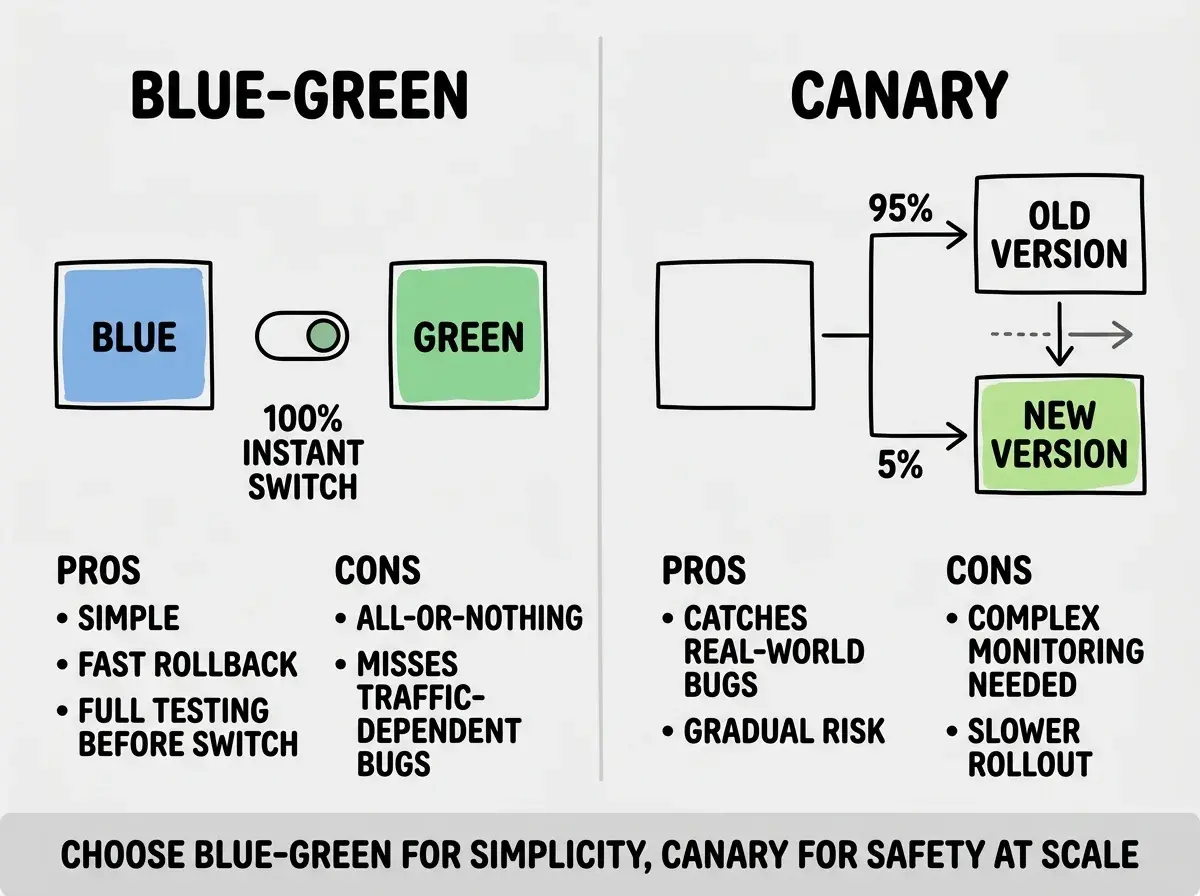
Instead of switching 100% of traffic in one move, a canary deployment sends a small percentage (say 5%) to the new version first. You monitor error rates and response times. If everything looks healthy, you increase to 20%, then 50%, then 100%. If something breaks, you route the canary traffic back to the stable version. The name comes from the canary in the coal mine. Send a small group in first to see if the air is safe.
Canary deployments are more complex to set up because you need traffic splitting at the load balancer level and monitoring to detect problems automatically. But they catch issues that blue-green misses. A bug that only appears under real production traffic, or only affects users with a specific browser, will not show up in your pre-switch testing. A canary deployment exposes the new version to real traffic gradually, giving you time to catch those edge cases.
Fly.io supports canary-style deployments through its rolling strategy. Kubernetes has native support through its Ingress controllers. For most vibe coders on their own infrastructure, blue-green is the simpler starting point. Graduate to canary when your user base is large enough that a percentage-based rollout gives you meaningful signal.
The Cost of Two Environments
Running two identical production environments means paying for two sets of servers, at least during the deployment window. For smaller apps on platforms like Fly.io, the cost is minimal because the inactive environment can run on the smallest machines and only scale up when it becomes the live target.
Some teams keep both environments running continuously. Others spin up the second environment only for deployments and tear it down after the switch is confirmed stable. If you deploy multiple times per day, keeping both running makes sense. If you deploy weekly, spinning up on demand saves money without meaningfully slowing things down.
Learn how modern deployment patterns keep your app stable while you move fast.
Explore moreWhat This Means For You
Blue-green deployment sounds intimidating until you understand the core idea. Two environments, one switch, zero downtime. The complexity lives in the details, but the concept itself is dead simple.
- If you are on Vercel or Cloudflare Pages: You already have zero-downtime deployments. The platform handles the pattern invisibly. Do not add infrastructure complexity you do not need.
- If you are running your own servers: Blue-green is worth implementing as soon as your app has real users who would notice downtime. Start with the simple version and add sophistication as your needs grow.
- If you are handling payments or critical data: You need both blue-green deployments and backward-compatible database migrations. Downtime during a payment flow loses money and erodes trust. Get this right before it becomes an emergency.
The 92% of developers using AI tools daily are shipping faster than ever. Faster shipping only works if your deployment process can keep up without breaking things. Blue-green gives you that safety net.