The best vibe coding tool stack for senior developers in 2026 pairs a configurable AI code editor with terminal-based AI tools, a typed ORM, infrastructure-as-code hosting, and comprehensive observability. It is not the cheapest stack or the simplest. It is the stack that gives experienced engineers the most leverage while keeping you in control of architecture decisions.
The tools below assume you can read code, write code, and spot when AI output is wrong. That assumption changes everything about which tools are worth your time and money.
Why Experienced Developers Need a Different Stack
Senior developers ship 2.5x more AI-generated code than juniors, according to a Fastly survey of 791 US developers. 32% of senior devs say over half their shipped code is AI-generated, compared to 13% of juniors. The productivity gap is not about the tools. It is about the experience to direct AI effectively and catch its mistakes before they reach production.
A beginner's stack optimizes for hand-holding. It abstracts away complexity so you can build without understanding the underlying systems. A senior developer's stack does the opposite. It exposes control surfaces, offers deep configuration, and integrates with the workflows you have spent years refining.
Senior developers report 81% productivity gains from AI tools. But that gain only materializes when the tools match your workflow instead of forcing you to adopt someone else's. The stack below prioritizes configurability, composability, and escape hatches over one-click magic.
The risk for experienced developers is different too. Beginners risk building something that does not work. Senior devs risk building something that works today but creates architectural debt that compounds for months. Your stack needs to help you write correct code, not just working code.
The Senior Developer's AI-Assisted Stack
Think of this stack as a well-equipped workshop rather than a factory assembly line. Every tool is chosen because it does one thing well and composes cleanly with the others. No vendor lock-in, no proprietary glue, no "works great as long as you use all our products" bundles.
Primary AI Editor: Cursor Pro ($20/month) with custom rules
Cursor's value for senior developers is not the autocomplete. It is Composer for multi-file refactoring, the ability to reference entire directories as context, and .cursorrules files that encode your project's conventions. Write rules for your architecture patterns, naming conventions, and forbidden anti-patterns. The AI then generates code that follows your standards instead of generic best practices.
Terminal AI: Claude Code ($20/month via Max plan)
Claude Code operates on your entire project from the terminal. It reads your CLAUDE.md file for project context, understands your directory structure, and executes commands. For senior developers, it is most valuable for three tasks: large-scale refactoring across dozens of files, generating comprehensive test suites, and investigating unfamiliar codebases. The terminal interface means it integrates with your existing shell workflow, git aliases, and scripts.
Framework: Next.js (latest) with App Router
Next.js remains the default for AI-assisted development because every major AI tool has been trained on Next.js patterns. The App Router gives you server components, streaming, and fine-grained caching control. AI tools generate more correct Next.js code than any other framework, which means less time fixing AI mistakes and more time building features.
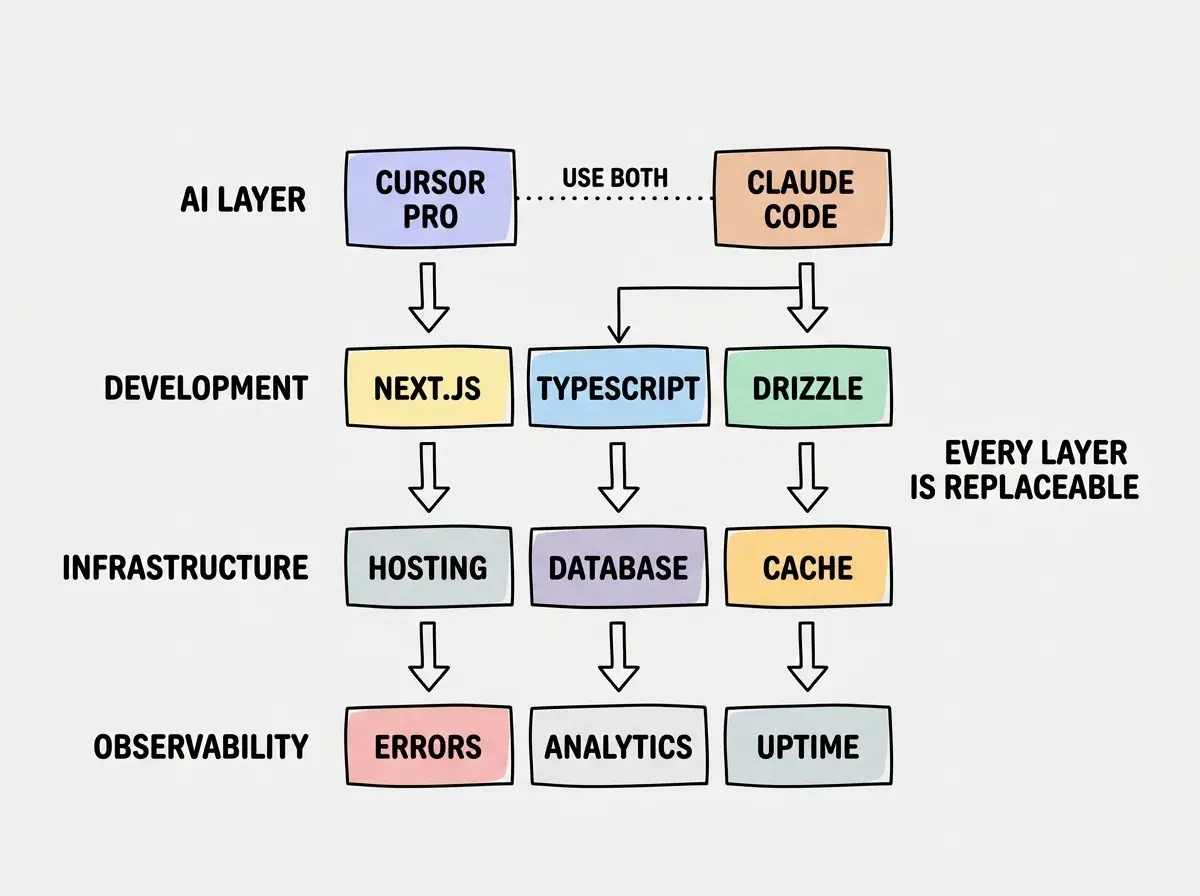
Database: Supabase Pro ($25/month) or Neon Pro ($19/month)
Supabase gives you PostgreSQL with auth, storage, real-time, and Row Level Security in one package. Neon gives you serverless PostgreSQL with database branching for testing. The choice depends on whether you want a platform (Supabase) or a database (Neon). Senior developers who prefer managing auth separately (with Auth.js or Clerk) often prefer Neon for its lighter footprint and branching workflow.
ORM: Drizzle
Drizzle generates type-safe SQL queries with zero runtime overhead. It maps closer to raw SQL than Prisma, which means fewer surprises when you need to optimize queries. The schema file serves as documentation, and migrations are deterministic. For senior developers who think in SQL, Drizzle feels transparent rather than magical.
Type System: TypeScript in strict mode
This is non-negotiable for AI-assisted development. TypeScript strict mode catches entire categories of bugs that AI introduces: null reference errors, type mismatches, missing function parameters. AI tools generate significantly better TypeScript than JavaScript because the type system constrains the solution space.
Hosting: Vercel Pro ($20/month) or Cloudflare Workers
Vercel Pro for the smoothest deployment experience with Next.js. Cloudflare Workers for edge-first architecture with lower latency and no cold starts. Senior developers who need fine-grained control over caching, routing, and middleware often prefer Cloudflare despite the steeper learning curve.
Where Senior Dev Stacks Diverge From Beginner Stacks
The biggest divergence is in AI tool configuration. Beginners use AI tools with default settings and accept whatever output they produce. Senior developers invest time in:
Custom rules files. A well-written .cursorrules or CLAUDE.md file transforms AI output from generic code to code that follows your project's specific patterns. Document your preferred error handling approach, your state management pattern, your API route conventions, and your testing strategy. The upfront investment of an hour writing these rules saves dozens of hours of correcting AI output later.
Multiple AI tools for different tasks. Cursor for interactive editing and UI work. Claude Code for large refactors and test generation. GitHub Copilot for inline completions while typing. Each tool has a sweet spot, and experienced developers learn to reach for the right one.
Version control discipline. Commit before every AI-assisted change. Review diffs line by line, not file by file. Use feature branches for AI-generated refactors so you can discard the entire branch if the result is wrong. This discipline is what separates productive AI use from the "compulsive accept trap" that catches less experienced developers.
Configuration is the leverage point. Invest in rules files and tool-specific settings before adding more tools.
See all developer guidesThe second major divergence is observability. Beginners deploy and hope. Senior developers deploy with error tracking, performance monitoring, and structured logging from day one.
Optimizing Your AI Tool Configuration
Cursor settings that matter. Disable auto-accept for suggestions. Set the model to the latest Claude or GPT variant (not the default, which may be older). Enable the "always search codebase" option so Composer considers your full project context. Pin frequently-used files in the context window.
Claude Code project files. Your CLAUDE.md should include: project architecture overview, key file paths, common commands, testing strategy, and explicitly forbidden patterns. Claude Code reads this file automatically on every invocation. A good project file eliminates 80% of "AI generated code that does not fit my project" complaints.
Git integration. Configure pre-commit hooks for linting and type checking. AI-generated code frequently introduces lint violations and type errors that slip through if you rely on manual review alone. Automated gates catch these before they enter your commit history.
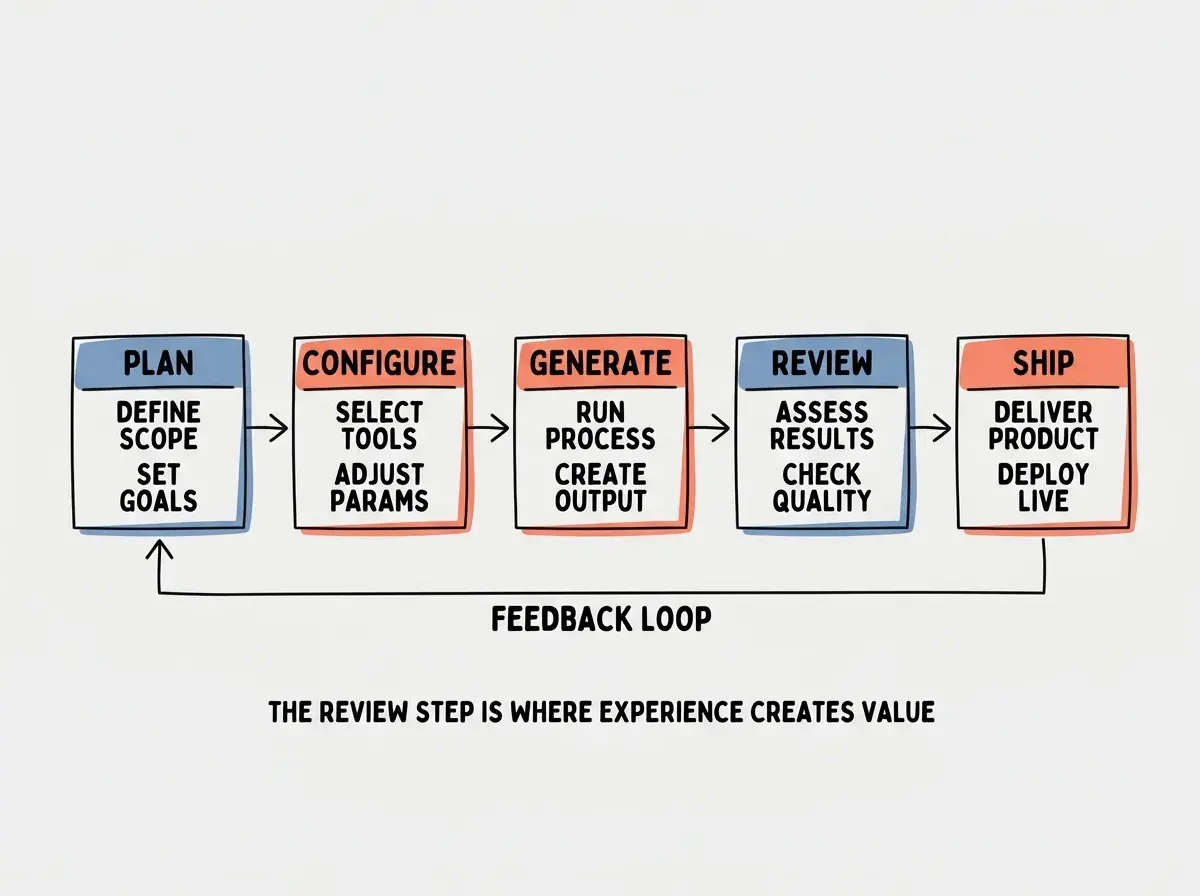
Testing strategy. Use AI to generate test scaffolding, then review and enhance. Claude Code is particularly strong at generating comprehensive test cases because it can analyze your entire codebase for edge cases. Always verify that generated tests actually test behavior, not just confirm that code exists.
Using AI tools with default configuration and then blaming the tool for generic output. A senior developer with a well-configured AI editor produces dramatically better code than the same developer with an unconfigured one. The difference is not the model or the subscription tier. It is the context you provide.
The developers who report the highest productivity gains are not using different tools. They are using the same tools with better configuration.
What This Means For You
- If you're a founder: This stack is more complex than you need for an MVP. Start with the founder stack and migrate to these tools when you have a developer on your team or when you have learned enough to benefit from the additional control.
- If you're changing careers: Focus on learning Cursor and TypeScript first. The senior developer workflow builds on fundamentals. Rushing to this stack without understanding the basics creates frustration rather than productivity.
- If you're a student: Study how senior developers configure their tools, especially
.cursorrulesandCLAUDE.mdfiles. Understanding AI tool configuration is a career differentiator that most bootcamps and university courses do not teach.
Configuration beats subscription upgrades. Invest an hour in your rules files before spending another dollar on tools.
Explore all developer guides