Running a freelance development business is like running a small kitchen. You could buy every gadget on the market, the sous vide machine, the commercial stand mixer, the $400 knife set. But a great home cook with three sharp knives and one good pan will outperform a mediocre cook surrounded by expensive equipment every time. The same is true for your AI tool stack.
The freelancer who picks three tools that fit together perfectly will ship faster, earn more per hour, and spend less on subscriptions than the one running six overlapping tools because each one seemed essential in a YouTube demo. Your stack needs to do three things well: generate code quickly, catch your mistakes before clients see them, and handle the repetitive work that eats your billable hours. Everything else is a gadget collecting dust.
The Economics of AI Tools for Solo Builders
Before picking any tool, you need to understand the math. As a freelancer, every dollar you spend on tools comes directly out of your profit margin unless you pass it through to clients. And you absolutely should pass it through.
Here is how the numbers work. If you bill $100 per hour and an AI tool saves you 5 hours per week, that tool generates $500 per week in recovered billable time. Even a $200 per month tool stack pays for itself four times over in the first week alone. The question is not whether AI tools are worth the money. The question is which combination gives you the best return per dollar.
Your AI tool stack is a business expense, not a personal subscription. Track the hours each tool saves you, bill clients for AI-assisted development as part of your rate, and upgrade only when the ROI justifies the cost. A $50/month tool that saves 10 hours is better than a $200/month tool that saves 12.
The trap most freelancers fall into is subscribing to the "best" tool in every category without considering overlap. You do not need a separate AI code reviewer if your AI coding assistant already catches errors inline. You do not need an AI documentation tool if your coding assistant generates docs when you ask. Every overlapping subscription is money you are lighting on fire.
The Core Stack Every Freelancer Needs
Your kitchen needs three things: a knife (AI coding assistant), a pan (deployment and hosting), and a cutting board (project management). Everything beyond that is optimization.
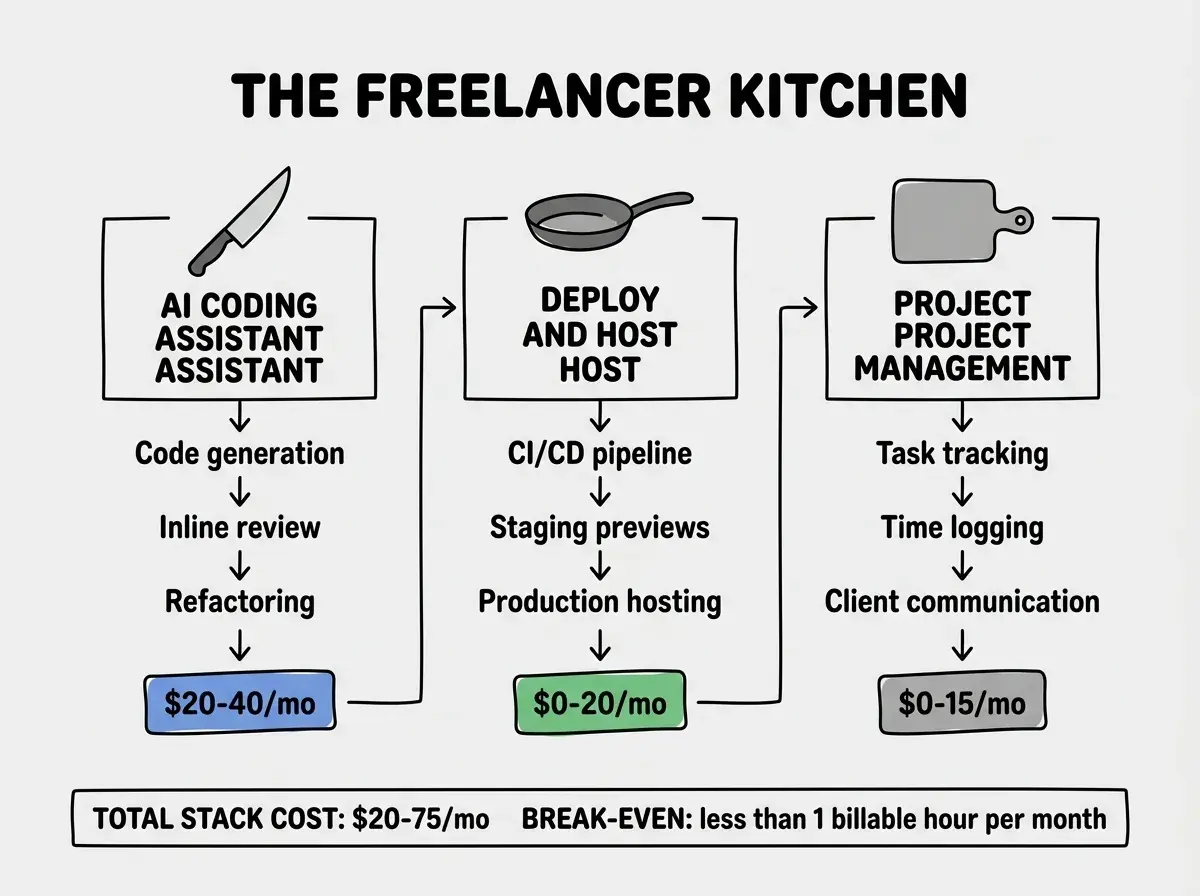
Layer 1: AI Coding Assistant. This is your primary tool and where most of your budget should go. You need one that handles code generation, inline editing, and chat-based problem solving. Cursor Pro ($20/month) or Claude Code with a Max subscription ($100/month but includes the API) are the two strongest options right now. Cursor gives you the best IDE integration. Claude Code gives you the best reasoning on complex problems. Pick one as your primary and use the other's free tier as a backup.
Layer 2: Hosting and Deployment. Vercel's free tier handles most client projects. Cloudflare Pages is free for unlimited sites. Railway gives you $5 of free compute monthly. Between these three, you can host every client project without paying a dollar until traffic justifies it. When a project outgrows the free tier, that is a conversation with the client about infrastructure costs, not your problem to absorb.
Layer 3: Project Management. Linear's free tier, Notion's free tier, or even a simple GitHub Projects board. The tool does not matter. What matters is that you have one place where every task, every client request, and every deadline lives. AI tools can now generate task lists from client emails and meeting notes. Use that capability to turn a 30-minute planning session into a 5-minute prompt.
Comparing the Top AI Coding Tools for Freelancers
Here is how the major options compare on the factors that matter most to solo builders.
| Feature | Cursor Pro | Claude CodeRecommended | GitHub Copilot | Windsurf |
|---|---|---|---|---|
| Monthly Cost | $20 | $20-100 | $19 | $15 |
| Code Generation Quality | Excellent | Best | Good | Good |
| Complex Reasoning | Good | Best | Fair | Good |
| IDE Integration | Native | Terminal | VS Code | Native |
| Codebase Awareness | ||||
| Free Tier Useful | ||||
| Multi-file Edits |
A few things stand out from this comparison. GitHub Copilot is the cheapest monthly cost but lacks codebase awareness and multi-file editing, which are the features that save the most time on real projects. Claude Code has the highest ceiling for complex work but runs in the terminal, which means you are switching contexts more. Cursor Pro hits the sweet spot for most freelancers because it combines strong AI with native IDE integration and full codebase awareness.
My recommendation: start with Cursor Pro as your daily driver. Use Claude Code's free tier for the occasional problem that needs deeper reasoning. That combination costs $20 per month and covers 95% of what you need.
Billing Clients for AI Tool Costs
This is where most freelancers leave money on the table. Your AI tools are a business expense, and there are three legitimate ways to account for them.
Option 1: Bake it into your rate. If your tools cost $75 per month and you bill 80 hours per month, add $1 per hour to your rate. Clients never see a line item, and you recover the cost invisibly. This is the simplest approach and works best for hourly engagements.
Option 2: Bill it as a project expense. For fixed-price projects, add a "development tools and infrastructure" line item. Most clients expect this. A $50 to $150 charge on a $5,000 project is never questioned, and it covers your entire tool stack for the project duration.
Option 3: Bill API costs directly. If a project requires heavy AI API usage (generating content, processing data, running AI features), track the API costs separately and bill them as a pass-through expense with a 15% to 20% markup. This is standard practice and clients appreciate the transparency.
Absorbing AI tool costs as a personal expense instead of a business expense. Your tools make you faster, which means clients get more value per dollar. Passing through $50 to $100 per month in tool costs on a project where those tools save 20 hours of work is not greedy. It is honest accounting.
Optimizing Your Solo Workflow
The tools are only half the equation. How you use them determines whether your stack pays for itself or sits unused.
Here is the workflow I use on every client project, from kickoff to delivery.
Project setup (30 minutes instead of 3 hours). Open your AI assistant and describe the project requirements. Have it generate the project scaffold, boilerplate files, database schema, and initial component structure. Review and adjust. This single step used to take half a day. Now it takes 30 minutes, and the output is more consistent because the AI follows the same patterns every time.
Daily development (4x output). Write the specification for each feature in plain English, then let the AI generate the implementation. Review, test, adjust. The key habit is writing detailed specifications. The more context you give the AI, the better the first draft, and the less time you spend on revisions. Most freelancers prompt too vaguely and then spend more time fixing the output than they saved on generation.
Code review before delivery (15 minutes instead of 60). Run your AI reviewer on the full diff before sending anything to the client. It catches the embarrassing mistakes: console.log statements left in production code, hardcoded API keys, missing error handling on user inputs. These are the things that make clients lose confidence in your work, and the AI catches them in seconds.
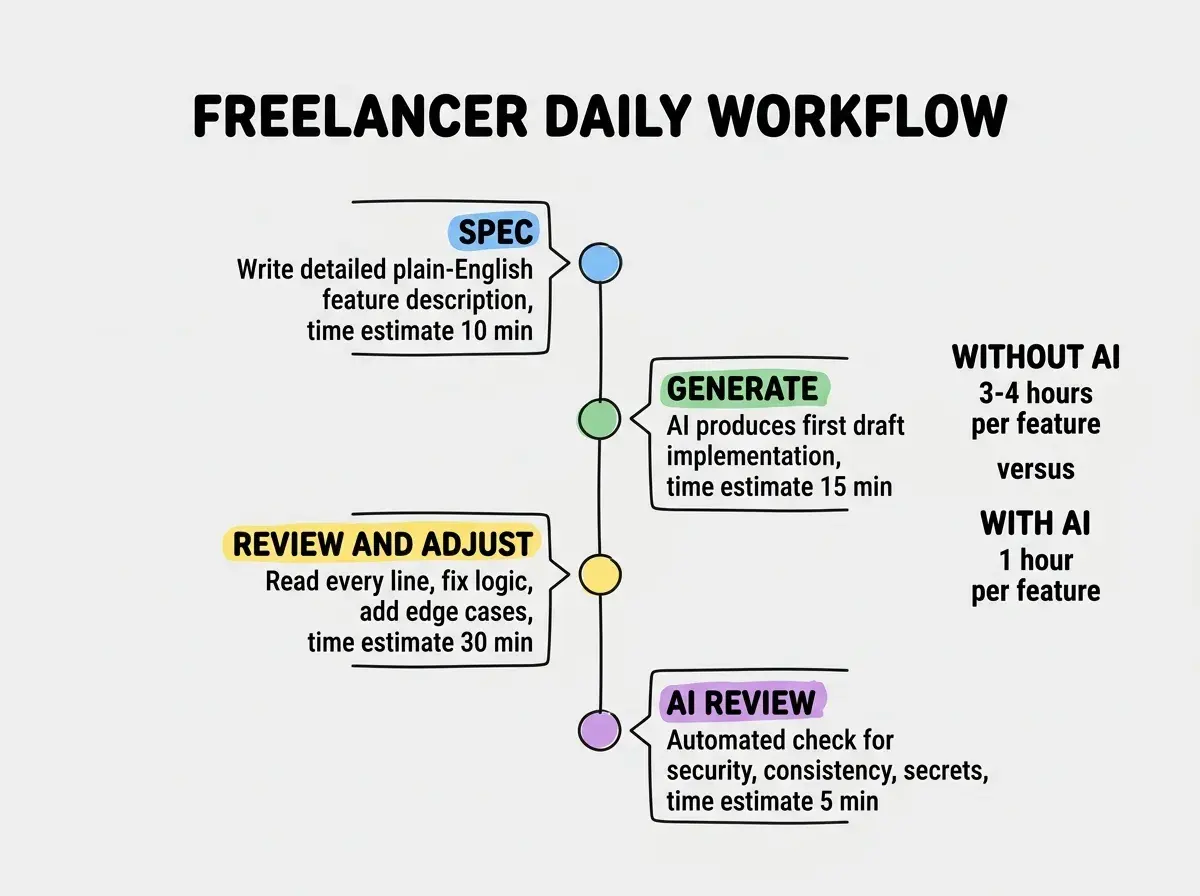
Weekly admin (1 hour instead of 4). Use AI to generate invoices from your time logs, draft client update emails from your commit history, and create project status reports from your task board. The administrative overhead of freelancing eats 5 to 10 hours per week for most solo developers. AI can cut that to 1 to 2 hours.
The right tools are just the starting point. Learn workflows that multiply your output as a solo builder.
Explore Solo Builder GuidesThe Upgrade Path
Start lean and add tools only when you hit a specific bottleneck. Here is the order I recommend.
Month 1 to 3: Cursor Pro ($20/month) plus free tiers for hosting and project management. Total: $20/month. This covers code generation, inline review, and basic workflow. If you are making more than $20 per month as a freelancer, this pays for itself immediately.
Month 4 to 6: Add a dedicated error monitoring tool like Sentry's free tier and a simple analytics setup. Total: still $20/month because both have generous free tiers. These additions help you deliver more polished work and catch issues before clients report them.
Month 7 and beyond: Consider Claude Max ($100/month) for complex architecture work. Add Vercel Pro ($20/month) if clients need preview deployments. Total: $120 to $140/month. Only justify this when monthly revenue consistently exceeds $5,000.
Never upgrade because a tool looks cool. Upgrade because you hit a wall that a specific tool removes.
Get cost-effective strategies and real workflows for freelancers using AI tools.
Read More Guides