The best vibe coding tool stack for non-technical founders in 2026 costs under $50 per month and includes an AI app builder, a database with built-in auth, a hosting platform with free SSL, and an email service for transactional messages. That is the entire stack. Everything else is optional until you have paying users.
Most tool recommendation lists overwhelm you with dozens of options per category. Founders do not need options. They need one answer per category that works, costs almost nothing, and grows with them. This guide gives you exactly that.
Why Your Tool Stack Matters More Than Your Code
The tool stack you choose determines three things about your product: how fast you build it, how much it costs to run, and how painful it is to maintain. Pick the wrong tools and you spend more time fighting configuration than building features. Pick the right ones and the tools disappear into the background while you focus on what matters.
Here is the reality that most guides skip. 36.4% of vibe coding users are founders, according to a Bubble survey of 793 respondents. Lovable reports that 60% of its users are non-developers. You are not an edge case. The tools that survive in this market are the ones designed for people exactly like you.
Sabrine Matos, a non-coder, built Plinq to 10,000 users and $456,000 in annual recurring revenue using AI tools. The stack she started with cost under $30 per month. Your tool choices matter, but spending more does not equal building better.
The stack below is not theoretical. It is the combination that produces the fewest surprises for someone who has never opened a code editor before.
The Complete Founder Stack Under $50 Per Month
Think of your tool stack like the kitchen in a restaurant. You need a stove (AI builder), a refrigerator (database), a dining room (hosting), and a way to reach customers (email). Everything else, the fancy gadgets, the specialty equipment, comes after you have proven people want what you are cooking.
AI Builder: Lovable ($20/month Starter plan)
Lovable is the default recommendation for non-technical founders because it generates full-stack applications from natural language descriptions. You describe what you want, it builds the frontend, connects the database, and handles deployment. The Starter plan gives you enough credits for building and iterating on one product. If you run out of credits mid-month, you can continue editing code directly in the built-in editor or connect the project to Cursor for more AI-assisted changes.
Database and Auth: Supabase (Free tier)
Supabase gives you a PostgreSQL database with 500MB of storage, authentication for 50,000 monthly active users, 1GB of file storage, and real-time subscriptions. All free. The 500MB limit sounds small, but it holds millions of rows of typical application data. Lovable integrates with Supabase directly, so connecting your database takes minutes, not hours.
Hosting: Vercel (Free tier) or Cloudflare Pages (Free tier)
Vercel offers the smoothest deployment experience. Push your code and it goes live automatically with free SSL, preview deployments, and 100GB of bandwidth per month. Cloudflare Pages offers unlimited bandwidth but requires slightly more setup. Either works. Pick Vercel for simplicity.
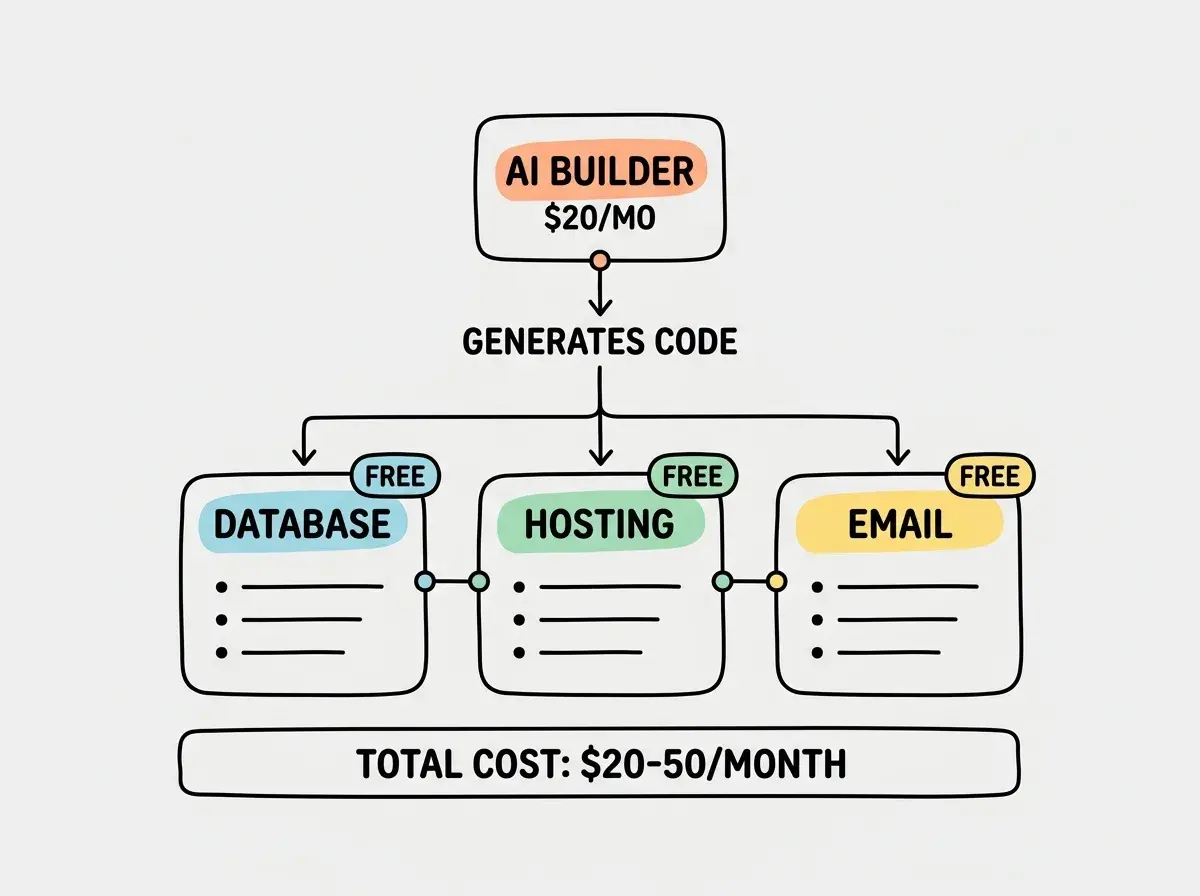
Email: Resend (Free tier)
Resend handles password reset emails, welcome messages, and notifications with 3,000 emails per month on the free tier. The API takes minutes to integrate and deliverability is strong. You will not need to upgrade until you have hundreds of active users sending multiple emails each.
Domain: Any registrar ($10-15/year)
Namecheap, Cloudflare Registrar, or Porkbun. All charge $10 to $15 per year for a .com domain. Cloudflare Registrar sells at wholesale cost with no markup, making it the cheapest option for most extensions. Buy your domain early, even before your product is ready. Having a real domain from day one means you avoid the headache of migrating URLs later.
Payments: Stripe (Pay as you go)
Stripe charges 2.9% plus $0.30 per transaction with no monthly fee. You pay nothing until customers pay you. Lovable has built-in Stripe integration templates that handle subscription billing, one-time payments, and customer portals. The Stripe dashboard also gives you basic revenue analytics, saving you from needing a separate analytics tool in the early days.
Version Control: GitHub (Free)
GitHub's free tier gives you unlimited private repositories, GitHub Actions for automated deployments, and issue tracking. Even if you never look at the code yourself, version control means every change is saved and reversible. Connect Lovable to GitHub so every generation creates a commit you can roll back to if something breaks.
What Most Tool Recommendation Lists Get Wrong
The biggest mistake founders make is adding tools they do not need yet. Analytics platforms, error monitoring, CMS systems, multiple databases, background job processors. These are solutions for problems you do not have when you are building version one.
The second mistake is choosing developer-focused tools when builder-focused alternatives exist. Cursor is excellent for people who are comfortable reading code. If you are not, Lovable or Bolt.new will get you further, faster, with less frustration. There is no shame in using the tool designed for your experience level.
The third mistake is optimizing for scale before you have users. A founder with zero customers does not need Redis caching, CDN configuration, or multi-region deployment. They need a working product that one person can use without it breaking.
Start with the stack above and focus on getting your first 10 users, not your first 10,000.
See all founder guidesSave your optimization energy for after you have validated that someone wants what you are building.
When to Upgrade From the Starter Stack
Your free tiers will carry you further than you expect. Supabase's free database handles thousands of daily active users. Vercel's free hosting serves most apps without hitting bandwidth limits. Resend's 3,000 monthly emails covers apps with up to a few hundred active users.
The first upgrade is typically Supabase. The free tier pauses your database after seven days of inactivity, which means your app goes down if nobody uses it for a week. The Pro plan at $25 per month removes this limit and gives you 8GB of storage. Upgrade when you have consistent daily traffic, not before.
The second upgrade is usually hosting. Vercel's Pro plan at $20 per month gives you faster builds, longer serverless function timeouts, and password-protected deployments. Most founders do not need this until they are processing hundreds of requests per minute.
The third upgrade is your AI builder's plan. Lovable's higher tiers give you more generation credits. If you are actively building new features weekly, you will feel this limit. If your product is stable and you are focused on marketing, the Starter plan is enough.
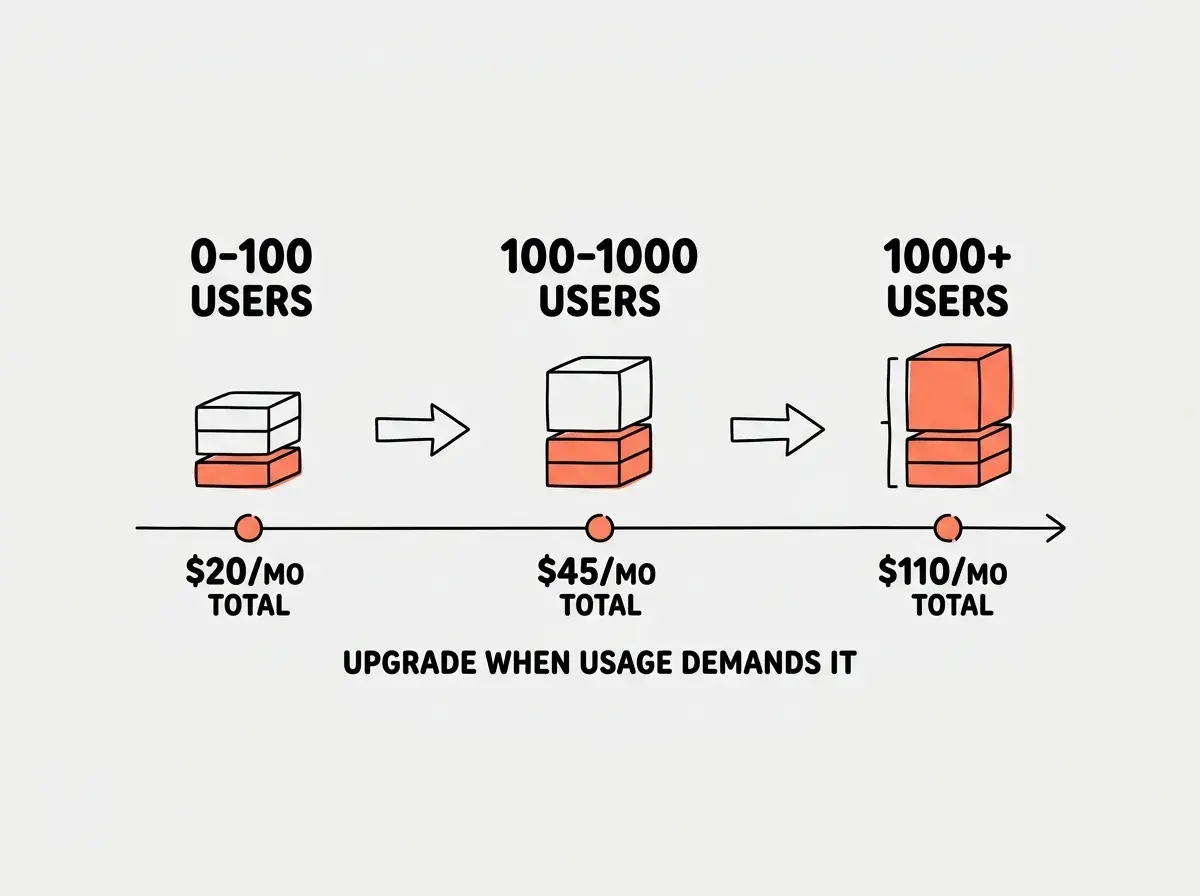
Notice the pattern. Every upgrade is triggered by a specific usage limit, not by a feeling that you should be using "more professional" tools.
Upgrading to paid plans before you have paying customers. If your product has fewer than 100 active users, you almost certainly do not need to pay for anything beyond your AI builder subscription. Let real usage data tell you when to upgrade, not the marketing pages of tool vendors trying to convert you from free to paid.
Founders who follow this approach typically spend $20 per month for months before needing their first upgrade.
What This Means For You
- If you're a founder: Start with Lovable plus Supabase plus Vercel plus Resend. Total cost under $25 per month including your AI builder. Build your product before you build your infrastructure.
- If you're changing careers: This stack is identical to what technical founders use, just with Lovable instead of Cursor as the primary builder. Learning this stack gives you immediately transferable skills.
- If you're a student: Swap Lovable for Replit (free tier) or Bolt.new (free tier) to stay at $0 per month. The rest of the stack is the same and all free.
Choose your tools in 10 minutes, then spend your energy on the product that matters.
Explore all tool guides