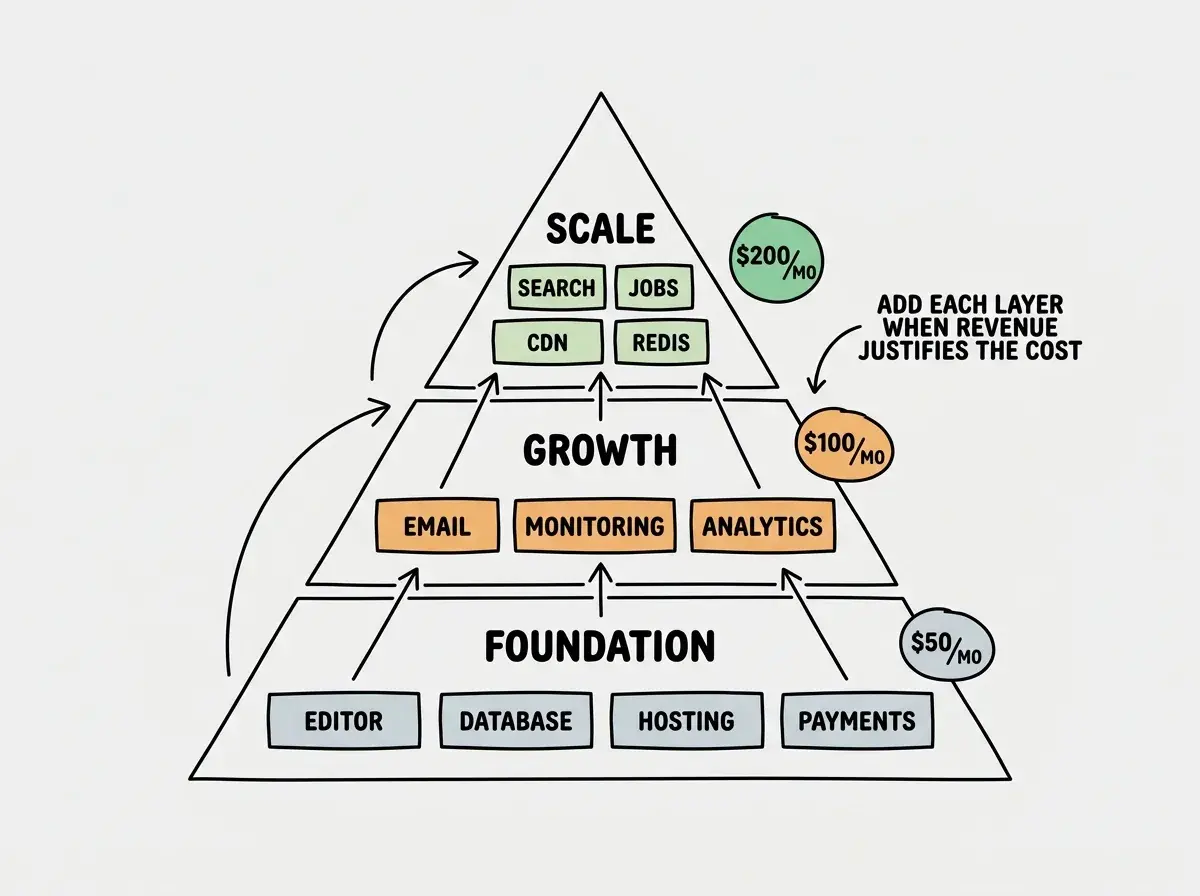
The best tool stack for indie hackers in 2026 costs $50 to $200 per month and balances shipping speed with production reliability. It pairs an AI code editor with a hosted database, edge hosting, payment processing, and basic monitoring. That combination lets you build, ship, and scale a revenue-generating product as a solo operator.
The difference between a founder stack and an indie hacker stack is not the tools. It is the expectations. Founders need to validate an idea quickly and cheaply. Indie hackers need to run a product that makes money, handles real traffic, and does not wake them up at 3 AM. This guide is built for the second scenario.
Why Speed and Cost Efficiency Define Your Stack
Pieter Levels built a multiplayer flight simulator in roughly three hours using AI tools. It now generates over $1 million per year in revenue. The 2025 Vibe Code Game Jam attracted 1,170 submissions, most from solo builders shipping in days, not months. The common pattern across successful indie hackers is not a specific tool. It is the ability to go from idea to paying customer before motivation fades.
Your stack needs to optimize for three things: building fast (AI editor that understands your codebase), running cheap (generous free tiers that scale to paid without migration), and failing safely (monitoring that catches problems before users complain).
92% of US developers now use AI tools daily, and senior developers (10+ years experience) ship 2.5x more AI-generated code than juniors. As an indie hacker, you likely fall somewhere in between. The tools below are calibrated for someone comfortable reading code but wanting AI to handle the grunt work.
The mistake most indie hackers make is spending tool budget on nice-to-haves before the product generates revenue. Every dollar in the $50 to $200 range should directly enable shipping or protect revenue.
The Indie Hacker Stack for $50 to $200 Per Month
Think of your stack as a pit crew. Every member has a specific job. No redundancy, no dead weight, no one standing around looking busy. If a tool in your stack is not actively helping you ship or protecting your revenue, it does not belong.
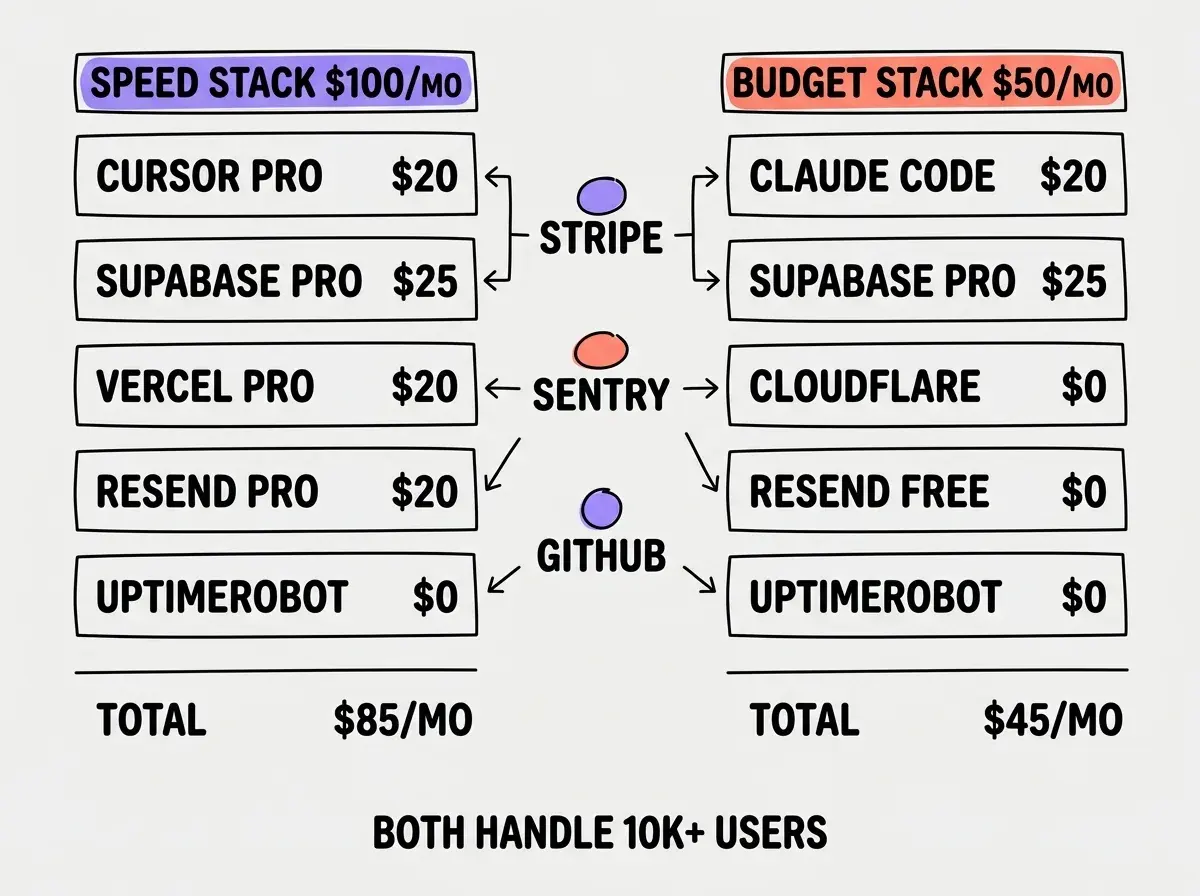
AI Code Editor: Cursor Pro ($20/month) or Claude Code ($20/month via Max plan)
Cursor Pro gives you unlimited AI completions, multi-file editing with Composer, and the ability to reference your entire codebase in prompts. For indie hackers building web apps, it is the fastest way to generate features, fix bugs, and refactor code. Claude Code is the better choice if you prefer terminal-based workflows and want deep project-wide context. Some indie hackers use both, Cursor for UI work and Claude Code for backend architecture.
Database: Supabase Pro ($25/month)
The Pro plan removes the free tier's seven-day inactivity pause and gives you 8GB of storage, daily backups, and 100,000 monthly active users for auth. For a single-product indie hacker, this covers everything from user management to file storage to real-time subscriptions. The built-in Row Level Security means you write security rules once and the database enforces them on every query.
Hosting: Vercel Pro ($20/month) or Cloudflare Pages (Free)
Vercel Pro gives you faster builds, longer serverless function timeouts (60 seconds vs 10), and team features if you bring on a collaborator. Cloudflare Pages remains free with unlimited bandwidth and is the better choice for apps that serve heavy static content or need global edge performance. The $20 saved on hosting can go toward monitoring or email.
Payments: Stripe ($0 fixed, 2.9% + $0.30 per transaction)
Stripe is the default for good reason. Excellent documentation, first-class Next.js integration, and no monthly fee. You pay only when customers pay you. Set up Stripe Billing for subscriptions, Customer Portal for self-service management, and webhooks for real-time payment events.
Email: Resend ($20/month Starter or Free tier)
The free tier gives you 3,000 emails per month. If you run a product with active users who receive regular notifications, you will outgrow this quickly. The Starter plan at $20 per month gives you 50,000 emails and removes the daily sending limit. Most indie hackers start free and upgrade within the first few months of real usage.
Monitoring: Sentry Free + UptimeRobot Free
Sentry catches JavaScript errors, performance issues, and server-side exceptions with 5,000 events per month on the free tier. UptimeRobot monitors your URLs every five minutes and sends alerts via email, Slack, or SMS. Together, they give you error tracking and uptime monitoring at $0.
Where Most Indie Hackers Waste Money on Tools
The first waste is paying for analytics before you have enough users to analyze. PostHog's free tier gives you 1 million events per month. Umami is free and self-hostable. You do not need a paid analytics plan until you are running experiments and A/B tests, which requires traffic you probably do not have yet.
The second waste is paying for CI/CD when GitHub Actions' free tier gives you 2,000 minutes per month. That handles automated testing, linting, and deployment for a solo project with room to spare.
The third waste is paying for multiple AI tools simultaneously. Cursor Pro, Copilot, Claude Code, and Windsurf all running at once costs $60 to $80 per month for overlapping functionality. Pick one primary editor and one secondary tool. Use the secondary only when the primary struggles with a specific task type.
The right stack lets you compete with funded teams. Start lean and upgrade when revenue justifies it.
See all indie hacker guidesThe fourth waste is background job services before you need them. Vercel Cron Jobs (free on Pro) and Supabase Edge Functions handle scheduled tasks and webhooks for most indie products. You do not need Inngest, Trigger.dev, or a dedicated queue until you are processing thousands of jobs per day.
Advanced Tools Worth the Investment
Once your product generates consistent revenue, these tools earn their cost back quickly.
Error Monitoring Upgrade: Sentry Team ($26/month)
The free tier's 5,000 event limit can vanish in a single incident. The Team plan gives you 50,000 events, performance monitoring, and session replay. For a product with paying customers, the ability to see exactly what went wrong and replay the user's session is worth far more than $26 per month in saved debugging time.
Search: Algolia or Meilisearch
If your product has searchable content (products, articles, user-generated data), dedicated search dramatically improves user experience. Algolia's free tier gives you 10,000 search requests per month. Meilisearch is open source and self-hostable for $0 if you have a server.
Caching: Upstash Redis (Free tier, then $10/month)
When your database queries start feeling slow or you need rate limiting, Upstash gives you serverless Redis with a pay-per-request model. The free tier includes 10,000 commands per day. This is enough for caching frequently accessed data and implementing rate limiting on your API endpoints.
Running paid plans for five or six tools simultaneously when your product has fewer than 100 paying customers. At $50 per customer per month, you need three customers just to cover a $150 per month tool stack. Keep fixed costs under your monthly revenue until you have a comfortable margin, then invest in developer experience and reliability tools.
The golden rule is simple: every tool should either help you ship faster or protect existing revenue.
Dig deeper
A few hand-picked sources if you want to go further.
What This Means For You
- If you're a founder: This stack is your upgrade path once you have validated product-market fit. Start with the founder stack under $50 and migrate here when you have consistent revenue.
- If you're changing careers: Learning Cursor or Claude Code plus Supabase plus Vercel is the most marketable combination for freelance AI-assisted development work. These are the tools clients expect.
- If you're a student: Use the free tiers of every tool on this list. Cursor offers a free tier, Supabase's free plan is generous, and Vercel's free hosting handles any student project. Your total cost can be $0.
Pick your stack, build your product, and let revenue guide your upgrades.
Explore all tool guides