AWS is the most powerful cloud platform on earth, and also the most confusing one. If you are looking for an AWS beginner guide that skips the enterprise jargon, this is it. With 92% of US developers using AI tools daily and 87% of Fortune 500 companies adopting vibe coding tools, AWS keeps showing up in conversations you cannot avoid.
The problem is simple. AWS has over 200 services. You need about five of them. The rest are noise that will waste your time, drain your budget, and make you feel like you wandered into a jungle without a map. This guide hands you the map.
Why AWS Feels Like a Jungle
Every other hosting platform you have used was designed to be simple. Vercel gives you one screen, one button, one deploy. Netlify is similar. They compress the complexity into a few decisions.
AWS was not built for that. It was built for Netflix to stream video to 200 million people simultaneously, for banks running millions of transactions per second. The platform evolved over 20 years by adding service after service, each solving a specific infrastructure problem for enterprise customers.
When you open the AWS console for the first time, you see that history. Hundreds of services with names like "Elastic Beanstalk," "SageMaker," "Kinesis," and "Step Functions." Each one has its own dashboard, pricing model, and documentation. The left sidebar alone has more items than most entire platforms.
This is not bad design. But it means the platform is actively hostile to someone who just wants to deploy a vibe-coded Next.js app. The good news is you need five services. Let me walk you through each one.
The Five AWS Services That Actually Matter
Think of AWS as a massive jungle. These five services are the cleared paths. Stay on them and you will get where you need to go. Wander off and you will spend days reading documentation that was written for infrastructure engineers with a decade of experience.
AWS Amplify for Frontend Hosting
Amplify is AWS's answer to Vercel. It connects to your GitHub repository, detects your framework, builds your app, and deploys it to a global CDN. You connect your repo, add your environment variables, and click deploy. It handles SSL certificates, custom domains, and automatic redeployments when you push to your main branch.
The free tier gives you 1,000 build minutes per month and 5 GB of hosting. That covers most MVPs without reaching for a credit card. Amplify falls short of Vercel in the details (less intuitive logs, more configuration for preview deployments), but the core experience works. If your company mandates AWS, Amplify is the sanest starting point.
S3 for File Storage
S3 (Simple Storage Service) is where you put files. Images your users upload, PDFs your app generates, static assets, backups. If your application needs to store anything that is not a database row, S3 is the answer.
S3 organizes files into "buckets," which are containers with globally unique names. You create a bucket, configure its permissions, and upload files through the AWS SDK. Your AI coding tool can generate the integration code in seconds.
The critical detail is permissions. By default, everything in S3 is private. If you want users to access files directly, you need to either make the bucket public or use signed URLs that expire. Getting this wrong means your files are either inaccessible or exposed to the entire internet.
Lambda for Serverless Functions
Lambda lets you run code without managing a server. You write a function, upload it, and Lambda runs it whenever something triggers it. That trigger might be an API request, a file upload to S3, or a scheduled timer.
For vibe coders, Lambda matters because it handles the backend logic that your AI tool generates. Need a function that processes a payment? Lambda. Need an endpoint that calls an external API? Lambda. Need a scheduled job that sends reminder emails? Lambda.
The free tier gives you one million requests per month and 400,000 GB-seconds of compute time. For context, a simple API endpoint that takes 200 milliseconds to run could handle about two million requests before you pay a cent. Most vibe-coded apps will never exceed this.
Lambda has a cold start problem. The first request after a period of inactivity takes 1-3 seconds longer than normal because AWS needs to spin up the execution environment. This delay is noticeable to users and cannot be eliminated on the free tier. If your app needs consistently fast responses, keep this in mind before choosing Lambda over a traditional server.
RDS for Databases
RDS (Relational Database Service) runs managed PostgreSQL, MySQL, or SQL Server databases. You pick your engine and instance size. AWS handles backups, patching, and failover.
The free tier gives you 750 hours of a db.t3.micro instance per month for 12 months. After that, a small instance runs $15-30 per month. For most vibe-coded apps, I would still recommend Supabase or Neon over RDS. They are simpler, their free tiers are more generous long-term, and they add features like auth and real-time subscriptions. Use RDS when your company requires it or when you need a database configuration that managed platforms do not support.
CloudFront for CDN
CloudFront is AWS's content delivery network. It caches your content at edge locations worldwide so users get fast load times regardless of geography. A user in Tokyo gets served from a Tokyo edge location instead of waiting for a round trip to Virginia.
You will not usually set up CloudFront independently. Amplify includes it automatically. S3 can be paired with it for static assets. The free tier includes 1 TB of data transfer and 10 million requests per month, which covers all but the most traffic-heavy applications.
When to Use AWS vs. Simpler Options
Here is the honest assessment. If you are a vibe coder building an MVP, a side project, or your first real application, you probably do not need AWS.
Vercel, Netlify, and Cloudflare Pages are simpler, faster to set up, and have free tiers that cover everything a small project needs. Their documentation is written for people like you. Their dashboards are designed for individual developers, not enterprise teams.
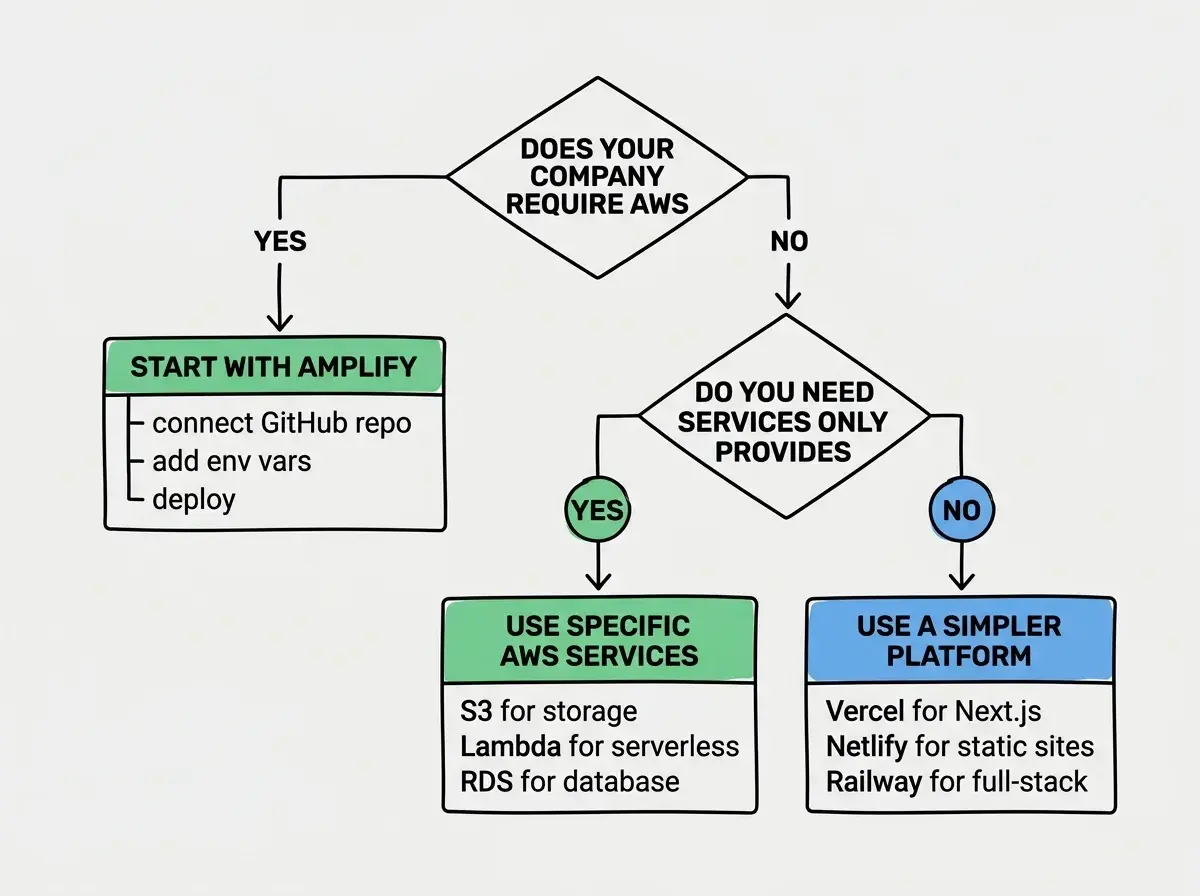
Use AWS when your employer mandates it, when you need a service only AWS provides, when you are scaling past simpler platforms, or when you want it on your resume (it remains the most-requested cloud skill in job listings).
Do not use AWS because it sounds impressive. The professional choice is the one that gets your app deployed with the least friction and lowest cost.
AWS Amplify as the Vercel of AWS
If you do end up on AWS, Amplify deserves a deeper look. Amplify Gen 2 uses a file-based configuration system where you define backend resources in TypeScript files within an amplify/ directory. Authentication, data models, storage, and functions are all configured in code rather than through the AWS console. Your AI tool can generate and modify these configuration files directly.
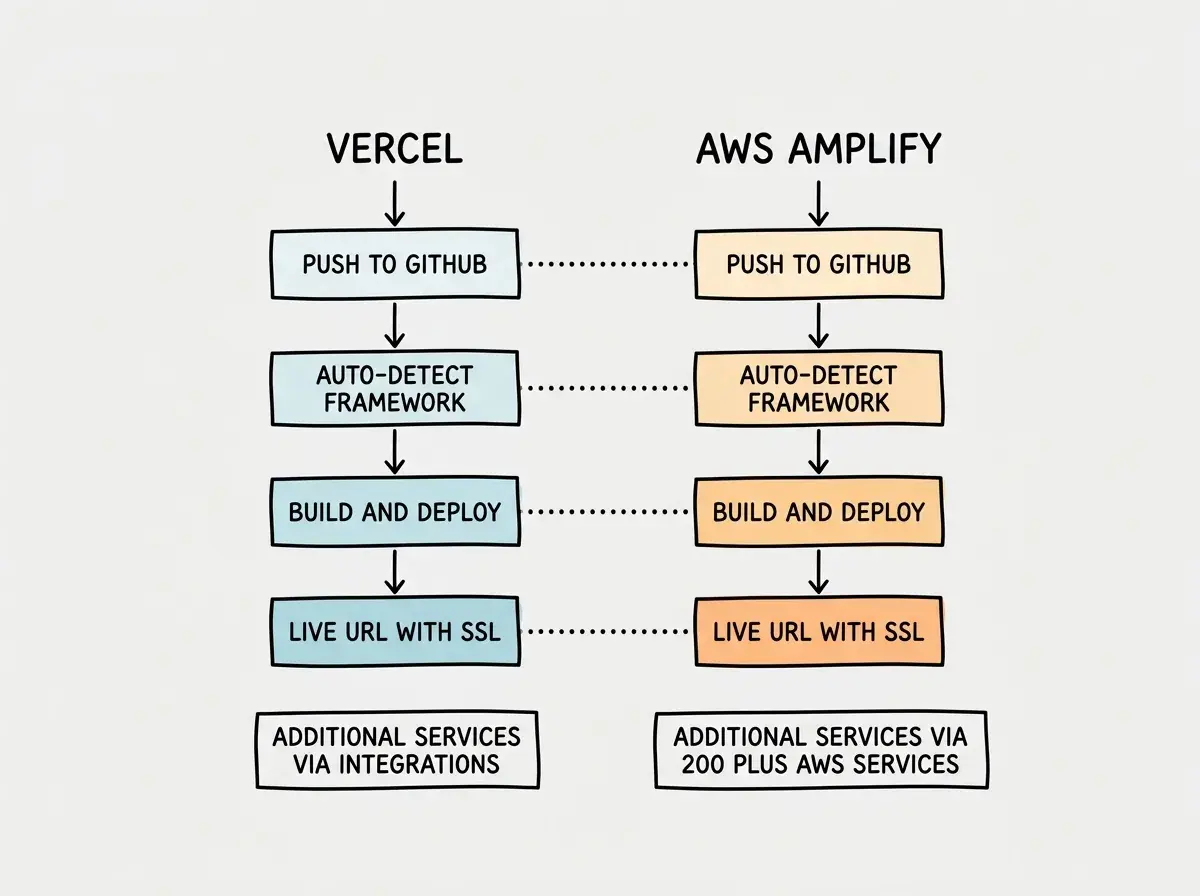
Where Amplify surpasses Vercel is access to the broader AWS ecosystem. Need a managed database? RDS is one configuration away. Need machine learning inference? SageMaker integrates directly. This is Amplify's real selling point for projects that outgrow simpler platforms.
Cost Gotchas That Will Bite You
AWS pricing is the most confusing aspect of the platform. Every service has its own pricing model designed around enterprise usage patterns. The most important thing you can do is set up billing alerts before deploying anything.
AWS billing alerts are not optional. They are the single most important configuration you will make on the platform. Stories of developers receiving unexpected $500+ bills are common, and they almost always happen to people who did not set up billing alerts. Do it first, before deploying anything, before even creating your first resource.
Here are the specific gotchas that catch vibe coders.
RDS instances run 24/7. Unlike Lambda, which only charges when code is running, an RDS database charges for every hour it exists, whether anyone is using it or not. If you create a test database and forget about it, you will pay for it every month until you delete it. The free tier covers 12 months, then the bills start.
Data transfer adds up quietly. AWS charges for data leaving its network. If your S3 bucket serves large files, data transfer charges can exceed compute charges. CloudFront reduces this but does not eliminate it.
Stopped is not deleted. Stopping an RDS database stops compute charges but not storage charges. The only way to stop all charges is to delete the resource entirely.
NAT Gateways are expensive. If you accidentally create a VPC with a NAT Gateway (which some AI-generated configurations include by default), it costs about $32 per month just to exist, processing zero traffic. Delete any you do not explicitly need.
Setting Up Billing Alerts Step by Step
Open the AWS console and search for "Budgets." Click "Create a budget," choose "Customized" then "Cost budget." Set the amount to $10 (or your maximum acceptable spend). Add alert thresholds at 50%, 80%, and 100% with your email address. Click "Create budget." You will now get an email when spending crosses those thresholds. Two minutes of setup, and the cheapest insurance in cloud computing.
What This Means For You
AWS is a jungle, and this guide gave you a machete and a map. The five services that matter for vibe coders are Amplify (frontend hosting), S3 (file storage), Lambda (serverless functions), RDS (databases), and CloudFront (CDN). Everything else is for enterprise teams solving enterprise problems.
If you do not have a specific reason to use AWS, start with Vercel, Netlify, or Cloudflare Pages. They will get you further, faster, with less confusion. But when AWS becomes unavoidable, you now know which paths to take and which parts of the jungle to avoid.
Set up billing alerts. Start with Amplify. Ignore the other 195 services until you have a concrete reason to explore them. That is the entire AWS strategy for vibe coders.
New to deployment? Start with the fundamentals before tackling AWS.
Read the Deployment GuideAWS is just one piece of the puzzle. Learn what running a vibe-coded app actually costs.
See the Full Cost Breakdown