Every app builder promises you can export your code and take it with you. That promise matters because nobody wants to build something valuable on a platform they cannot leave. But when you actually export code from an app builder like Lovable, Bolt, or Replit, what you get varies wildly. Some exports hand you a clean project folder. Others hand you a tangled mess that technically runs but makes experienced developers wince. I use AI tools daily (92% of my workflow at this point), and I have exported projects from all three platforms to see exactly what comes out the other side.
Here is what I found, with no sugarcoating.
What Lovable Exports Look Like
Lovable generates React applications with Supabase as the backend. When you export a Lovable project, you get a React or Next.js frontend codebase that connects to your Supabase project for database, authentication, and storage. The Supabase project itself is already yours since it lives in your own Supabase account, so you do not lose your backend when you leave Lovable.
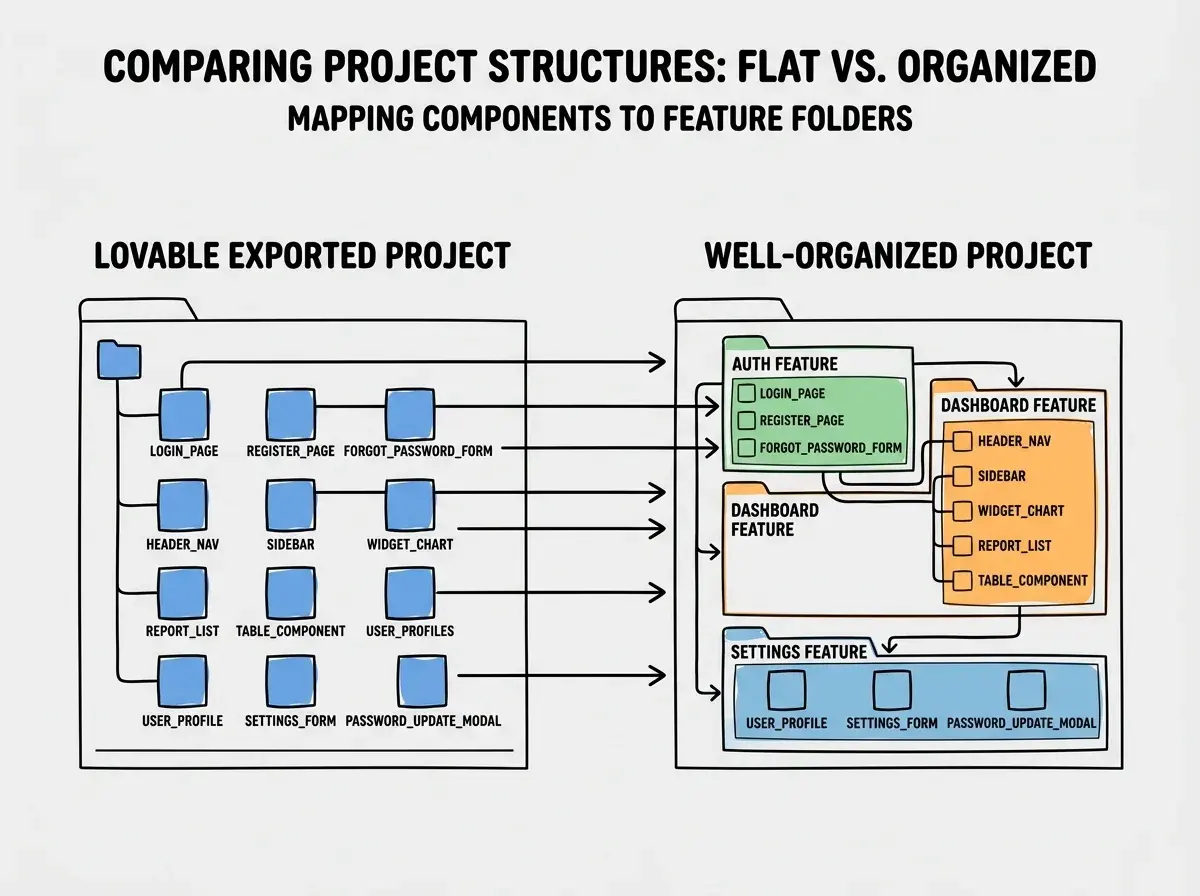
The frontend code is where things get messy. Lovable's AI generates components that work, but they are verbose and repetitive. You will see the same styling patterns copied across dozens of files instead of extracted into shared components. State management is scattered, with some components using local state and others using context with no consistent pattern. The folder structure is flat, with dozens of components sitting in a single directory rather than organized by feature.
I exported a project management tool I built in Lovable and opened it in VS Code. The app had about 40 components, and roughly 15 of them contained duplicated logic for fetching data from Supabase. No custom hooks, no shared patterns, Tailwind classes inline everywhere. The code worked perfectly. But maintaining it required reading through a lot of redundant code to understand what was happening.
The Supabase integration is actually the clean part. Lovable generates proper client initialization, uses the Supabase SDK correctly, and the database queries are straightforward. Your tables, RLS policies, and auth configuration all live in Supabase and are fully accessible regardless of what happens with Lovable.
What Bolt Exports Look Like
Bolt.new generates clean frontend code. This might surprise people who assume browser-based tools produce lower quality output, but Bolt's generated code is consistently more organized than Lovable's. Components are smaller and more focused. The file structure makes more sense out of the box. When you download a Bolt project as a zip file, you get a standard React or Next.js project that a developer would recognize immediately.
The catch is what is missing. Bolt is primarily a frontend tool. When you export, you get the UI and client-side logic, but there is no backend. No database. No authentication system. No server-side API routes. If you built something in Bolt that saves data to local storage or uses a mock API, that is exactly what you get in the export. The app runs, but it does not persist data or handle multiple users.
This is not necessarily a problem if you know what you are getting into. If you used Bolt to prototype a frontend and always planned to add a backend separately, the export gives you a solid starting point. The code is readable and connecting it to Supabase, Firebase, or a custom API server is straightforward.
Where Bolt exports get tricky is styling. Bolt generates a lot of inline Tailwind CSS with no abstraction layer. Every button might have its own set of classes rather than using a shared Button component. This is common across AI-generated code and one of the first things to clean up after export.
What Replit Exports Look Like
Replit gives you the most complete export of the three, and also the most complicated one. When you download a Replit project, you get everything: the frontend, the backend, the database configuration, the deployment scripts, and all the dependencies. It is a full project that you can run locally.
The complication is Replit-specific dependencies. Replit Agent often uses Replit's built-in database (Replit DB), Replit's deployment system, and Replit's environment variable management. When you take that project out of Replit, these integrations break immediately. You need to replace Replit DB with a real database like PostgreSQL or SQLite. You need to replace Replit's secrets management with environment variables or a secrets manager. You need to set up your own deployment pipeline.
The code quality from Replit Agent varies more than the other two tools. Because Agent builds autonomously and sometimes goes through multiple fix cycles, you can end up with dead code, commented-out experiments, and redundant error handling that was added during debugging but never cleaned up. I exported a Flask application built by Replit Agent and found three different database connection methods in the codebase. Two were abandoned attempts that the Agent replaced but never removed.
That said, Replit exports are functionally the most complete. You get a working backend with actual API routes, actual database queries, and actual authentication logic. The effort to clean up the code and replace Replit-specific services is real, but you are starting from a more complete foundation than either Lovable or Bolt.
Code Quality Comparison Across All Three
Here is the honest breakdown. None of these tools generate code that a senior developer would call production-ready. But they are all good enough to work, and "good enough to work" is actually a meaningful threshold.
Lovable produces the most code for any given feature but with the most duplication. The code works but is verbose. Bolt produces the cleanest frontend code but without backend functionality. Replit produces the most feature-complete code but with the most inconsistency.
If you are a founder building an MVP, any of these exports will serve that purpose. The code does not need to be elegant. It needs to work and survive long enough for you to decide whether the idea is worth investing in properly.
If you are a developer planning to maintain the project, Bolt requires the least cleanup per file but the most work adding missing functionality. Lovable requires the most refactoring but gives you a full-stack starting point. Replit requires the most targeted cleanup but gives you the most complete project.
Export quality varies dramatically between tools, but the real question is not which export is cleanest. It is whether the export gives you enough of a foundation that continuing development is faster than starting over. In most cases, cleaning up an AI-generated codebase takes 10 to 20 hours. Starting from scratch takes much longer.
What to Clean Up First After Export
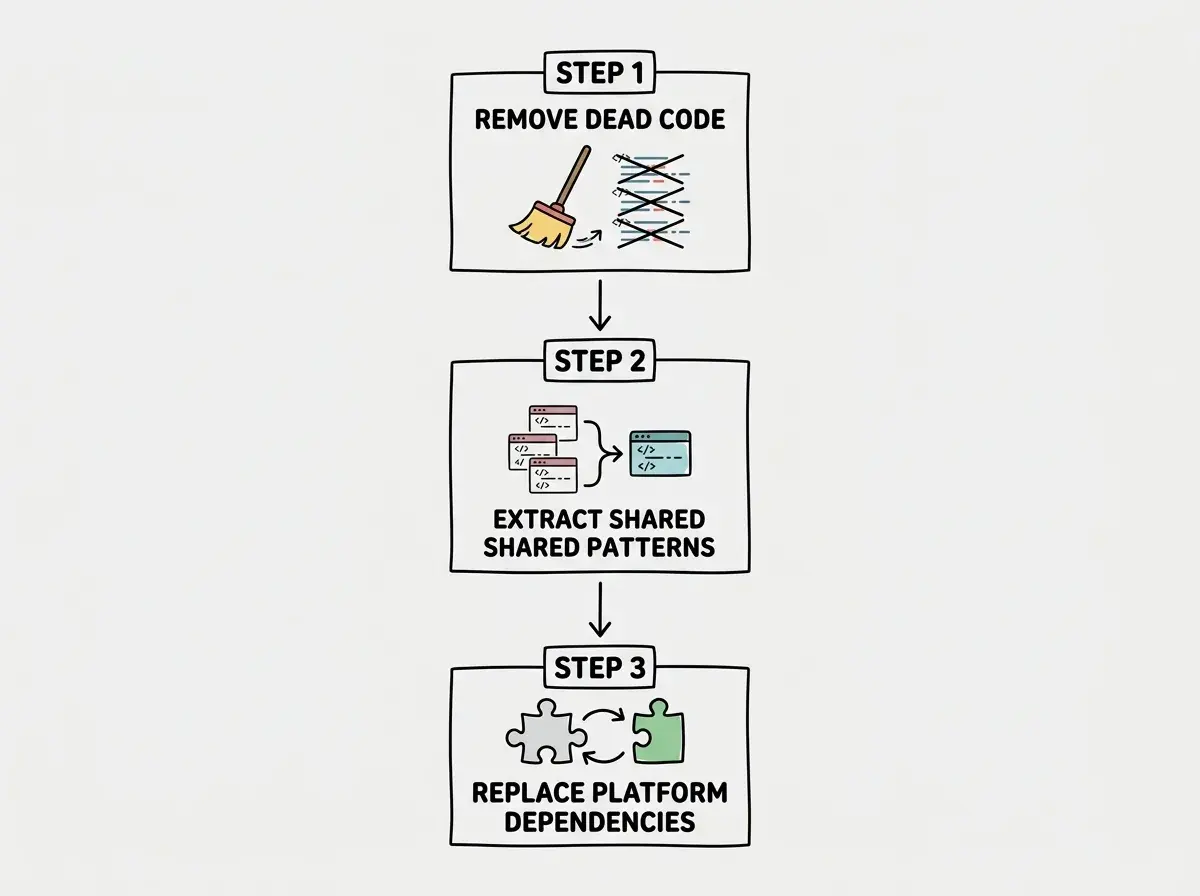
When you open an exported project in a real code editor for the first time, the temptation is to refactor everything. Resist that. Focus on three things first.
Remove dead code and unused imports. AI tools leave behind artifacts from their generation process. Unused variables, imports that reference nothing, commented-out experiments. Run your editor's linting tools and clear these out. This is fast work that immediately makes the codebase easier to read.
Consolidate duplicated patterns into shared utilities. Look for repeated logic, especially around data fetching, form validation, and error handling. Extract these into custom hooks or utility functions. This single cleanup step typically reduces the codebase by 15 to 25% and makes future changes dramatically easier.
Replace platform-specific dependencies. If you exported from Replit, replace Replit DB. If you exported from Lovable and want to move off Supabase eventually, start abstracting your data access layer now. If you exported from Bolt, prioritize adding the backend pieces you need.
Do not rewrite components that work correctly just because they are not structured the way you would write them. Aesthetic refactoring is a trap that burns hours without changing functionality.
Do not refactor working exported code for style before you have the app running locally with all dependencies resolved. Getting the export to run in your own environment is the first priority. Making the code prettier is the last.
When to Export vs When to Stay
Not every project needs to be exported. If you are building a simple internal tool or a prototype you will throw away in three months, staying inside the app builder is the right call. The convenience of the hosted environment outweighs the code quality tradeoffs.
Export becomes the right move when you need custom backend logic the builder cannot generate, when you are hitting the platform's limits on complexity, when you need integrations the builder does not support, or when your monthly platform costs exceed what self-hosting would cost.
The timing matters. Exporting a project with 10 features is dramatically easier than exporting one with 50. Every feature the AI adds is another cleanup task after export.
The Export Early Principle
This is the most practical advice in this entire article. If you think you might eventually need to export your project, export early.
Every week you spend building inside an app builder adds code that you will need to understand, clean up, or rewrite after export. The codebase grows, the AI-specific patterns accumulate, and the platform dependencies deepen. A project built over two weeks in Lovable might take a few hours to clean up after export. A project built over six months might take weeks.
The sweet spot is to use the app builder for the initial prototype and first round of user testing. Once you have validated that people want what you are building, export and transition to a real development environment. You keep the momentum from rapid prototyping while avoiding the growing maintenance burden of staying on the platform.
Once the project shifts from "figuring out what to build" to "building a thing people are using," that is the signal to export.
We have detailed guides for Lovable, Bolt, and Replit covering features, pricing, and limitations.
See How Each Builder ComparesWhat This Means For You
Exporting from an app builder is not a one-click escape hatch. It is a transition that requires understanding what you are getting and planning for cleanup work. Lovable gives you a full-stack app with messy frontend code. Bolt gives you clean frontend code with no backend. Replit gives you everything but with platform-specific dependencies you need to replace.
The quality of every export is good enough to work with. None of it is good enough to ship without review. That gap between "working" and "maintainable" is where your effort goes after export, and knowing that in advance lets you plan for it instead of being surprised.
If you are wondering whether you should export, the answer is almost always "yes, sooner than you think." Get your project into a real development environment while it is still small enough to understand completely, and you will thank yourself every month after.
New to AI-assisted development? Our walkthrough takes you from zero to working app.
Start Your First Vibe Coding Session