Ninety-two percent of AI tool users now rely on app builders daily, and app builder token costs are the thing nobody warns you about before you start. The sticker price says $25 per month. Your credit card statement says something very different. Bolt projects routinely cross $1,000 in total spend. A single Replit developer posted a $607 bill they never saw coming. And after v0 introduced its paid pricing model, the platform saw a 71% drop in visits. People are not leaving because the tools stopped working. They are leaving because the math stopped making sense.
This article breaks down exactly how these platforms charge, why the costs spiral, and what you can do to keep your spending predictable.
How Each Platform Actually Charges
Every major AI app builder uses a different pricing model, and none of them are as straightforward as a flat monthly fee. Understanding the mechanics matters because the same building session can cost $5 on one platform and $50 on another.
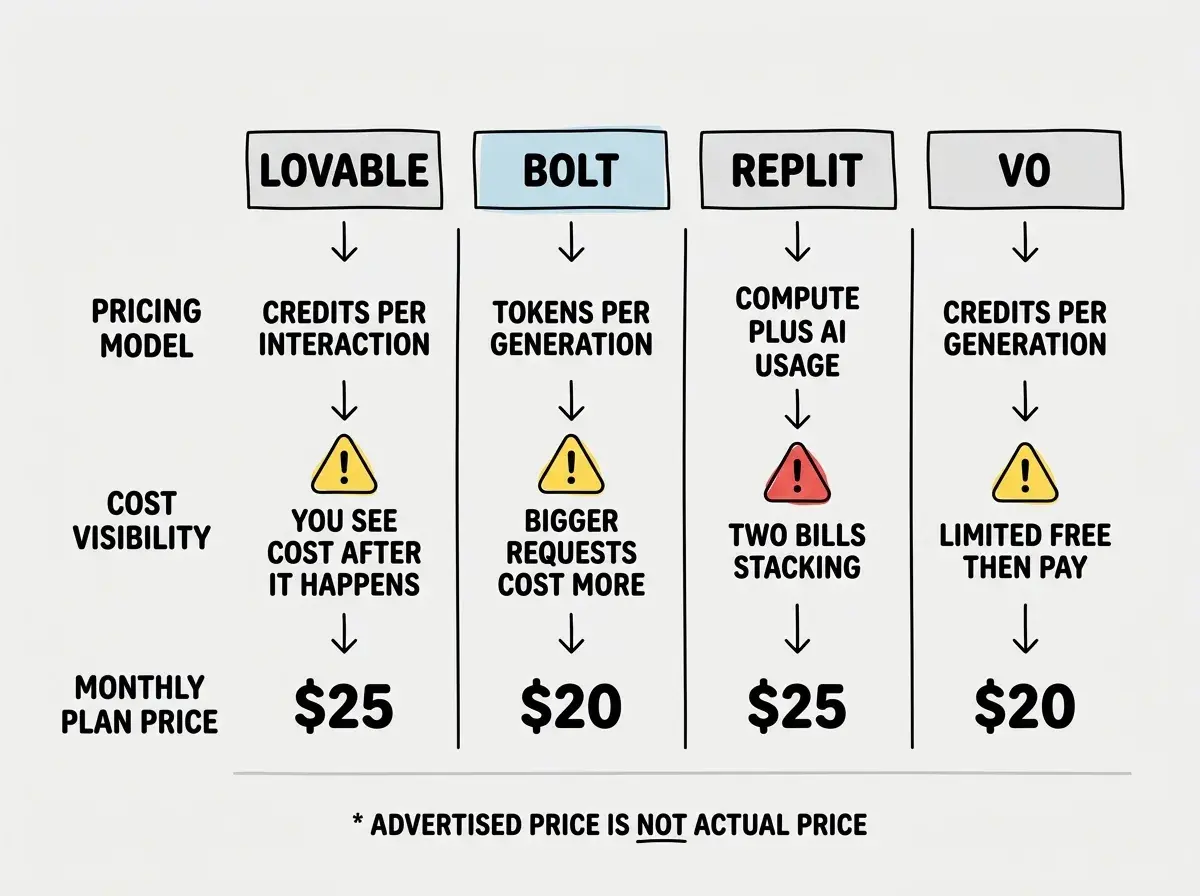
Lovable uses a credit system. You get a fixed number of credits per month, and each AI interaction consumes credits. A simple text change might cost one credit. A complex component generation might cost five or more. The problem is that you never know exactly how many credits an interaction will consume until after it happens.
Bolt charges per generation using tokens. Each time you ask Bolt to generate or modify code, it consumes tokens from your monthly allocation. Bigger requests eat more tokens. The $20 per month plan sounds reasonable until you realize that a moderately complex app can burn through your entire monthly token budget in a single afternoon of iteration.
Replit combines two cost layers. You pay for compute (server resources while your app runs) and for AI usage (each time you ask the AI to write or modify code). Compute charges accrue whether you are actively building or not, as long as your project is running. AI usage stacks on top. The result is a bill that grows in two dimensions simultaneously.
v0 (by Vercel) started generous with free generations, then shifted to a credit-based model. The pricing change was dramatic enough to drive away nearly three-quarters of its user base. The free tier now offers limited generations, and paid plans charge per generation with varying token limits.
Why Costs Spiral Beyond the Sticker Price
The pricing models themselves are not the real problem. The real problem is how AI app builders interact with human behavior and AI limitations to create spending loops.
AI mistakes consume your credits. When the AI generates code that does not work (which happens frequently), you need to ask it to fix the problem. That fix attempt costs another round of credits or tokens. If the fix introduces a new bug, you pay again. A single feature can cost three, five, or ten times what you expected because the AI needed multiple attempts to get it right.
Regeneration loops are expensive. You ask for a button. The AI makes it the wrong color. You ask for a fix. Now it is the right color but in the wrong position. You ask again. Now it moved another element. Each iteration feels small, but five rounds of "just fix this one thing" can burn through a significant chunk of your monthly allocation.
Scope creep happens faster with AI. Because it feels so easy to add features ("just ask for it"), you end up building more than you planned. Each added feature consumes credits, and because AI-generated features often need refinement, the cost compounds. A project that started as a simple landing page becomes a full app with auth, a dashboard, and payments, and each addition burned tokens along the way.
You pay for context, not just output. As your project grows, each AI interaction requires sending more context about your existing codebase. Larger context windows mean more tokens consumed per request, even if you are asking for a small change. A modification that cost 2 credits at the start of your project might cost 8 credits when your codebase is large.
The real cost of an AI app builder is not the subscription price. It is the subscription price multiplied by the number of iteration cycles your project needs. A $25 per month plan that advertises 200 credits can cost $200 in actual spending if your project requires heavy iteration, credit top-ups, or multiple months of building.
Real Cost Examples
Here is what actual spending looks like based on reports from builders in the community.
| Scenario | Platform | Plan Price | Actual Spend | Why |
|---|---|---|---|---|
| Simple landing page | Lovable | $25/mo | $25 | Stayed within credit limit |
| MVP with auth and payments | Bolt | $20/mo | $100+ | Token top-ups for iteration |
| Full app with ongoing development | Replit | $25/mo | $607 | Compute charges while debugging |
| Complex multi-page app | Bolt | $20/mo | $1,000+ | Months of iteration and refinement |
| Prototype exploration | v0 | $20/mo | $60 | Three months of generation credits |
The pattern is clear. Simple, well-defined projects stay near the sticker price. Anything that requires iteration, debugging, or ongoing development costs two to ten times more than the plan price suggests.
Strategies That Keep Spending Predictable
The good news is that these costs are controllable. The builders who spend the least are not the ones who use AI the least. They are the ones who use it most strategically.
Plan Before You Prompt
The single most effective cost-saving strategy is spending ten minutes writing down exactly what you want before you open the app builder. Describe the layout, the features, the colors, the flow. The more specific your first prompt, the fewer correction cycles you need. Fewer cycles means fewer credits consumed.
A vague prompt like "build me a project management app" generates something generic that requires dozens of refinements. A detailed prompt like "build a Kanban board with three columns, drag-and-drop cards with title and due date, blue and white color scheme" gets you 80% there on the first generation.
Export to a Code Editor Early
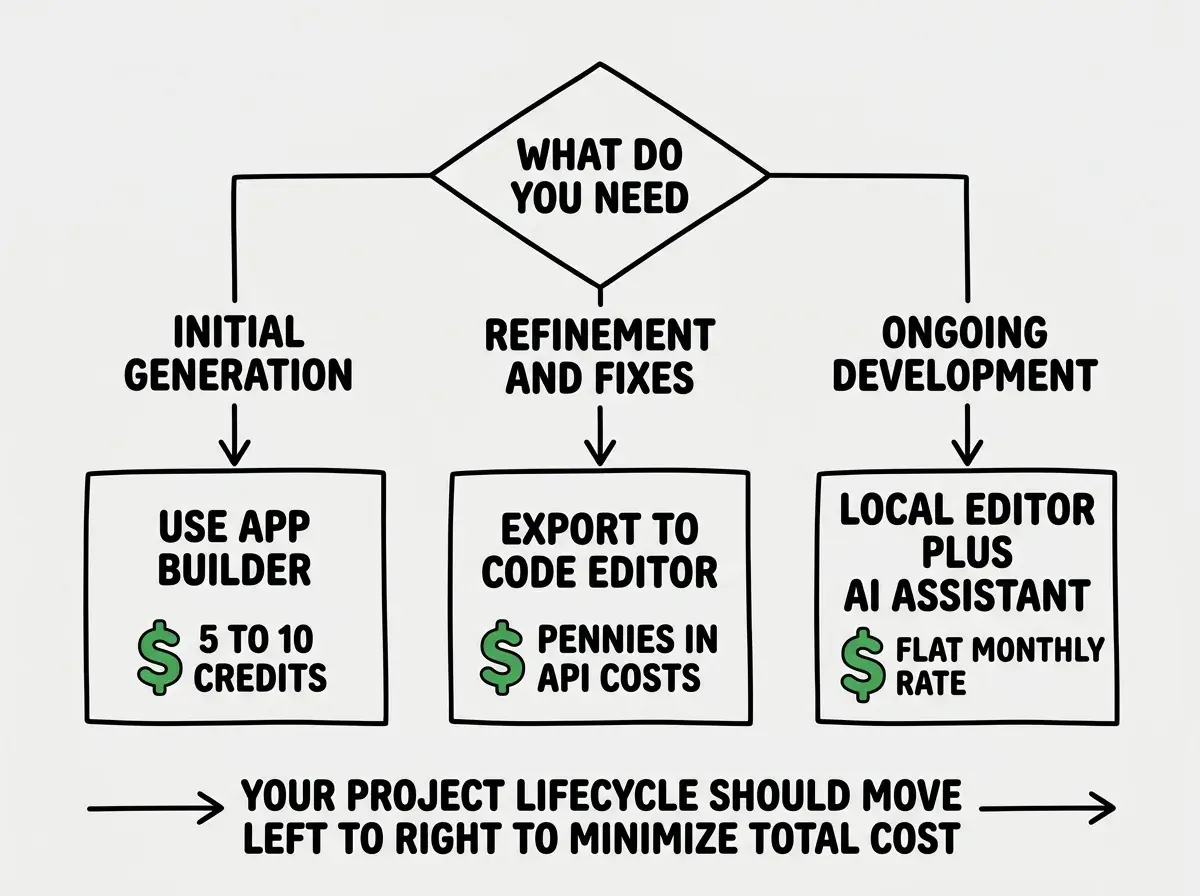
Every major app builder lets you export your project's code. Once the AI has generated your initial structure and core features, export the code to Cursor, VS Code, or another local editor. From that point forward, use a code-focused AI tool (like Cursor or Claude Code) for refinements instead of burning app builder credits.
Code editor AI tools typically charge flat monthly rates with generous usage limits, or per-token rates far cheaper than app builder credits. The same change that costs 5 Lovable credits might cost a fraction of a cent in Claude API calls through Cursor.
Set Daily Credit Limits
Most platforms let you set spending alerts or daily usage limits. Set them aggressively. If your plan includes 200 credits per month, limit yourself to 10 credits per day. When you hit the limit, stop and review what you have built so far. This forced pause prevents the "just one more fix" loop that drains budgets.
Buying credit top-ups in the moment because you are "almost done" with a feature. This is the app builder equivalent of chasing losses at a casino. When you hit your credit limit mid-feature, export your code and finish the work in a code editor. The top-up credits will cost more per unit than your plan credits, and the feature will probably need more fixes than you think.
Use Cheaper Tools for Iteration
Reserve your app builder credits for initial generation, the thing these tools do best. Use cheaper tools for everything else.
- Styling tweaks: Export code and adjust CSS in a code editor (free).
- Bug fixes: Paste the error into Claude, ChatGPT, or Cursor. Per-token API costs are pennies compared to app builder credits.
- Adding simple features: If you understand the codebase structure, a code editor AI can add features at a fraction of the cost.
- Testing and debugging: Run locally for free instead of debugging inside the builder's hosted environment (which consumes compute credits on platforms like Replit).
Track Your Spending Weekly
Open your billing dashboard every week. Write down three numbers: credits or tokens used, dollars spent, and features completed. Divide the dollars by the features. That is your cost per feature, and it is the only number that tells you whether the tool is worth it. If that number is climbing, you are in a spiral. Step back, plan more carefully, and consider switching tools for the next phase.
Start with the fundamentals before you start spending credits.
Read the guidesWhat This Means For You
The credit and token trap is not a scam. These platforms deliver real value and genuine speed. The trap is in the assumption that the subscription price is the whole price. It almost never is, especially for projects that go beyond a simple prototype.
- If you are a founder: Budget three to five times the plan price for your first serious project. A $25 per month plan will likely cost $75 to $125 per month during active development. Plan for that from day one, and the "surprise" bills disappear.
- If you are a career changer: Start with free tiers to learn, and set hard daily limits once you move to paid plans. The learning phase is where regeneration loops are most expensive because you are still figuring out how to prompt effectively. Give yourself permission to be slow and deliberate with credits while you build that skill.
The builders who thrive understand the billing mechanics, plan their prompts carefully, and know when to switch from an app builder to a code editor. That shift from convenient but expensive to slightly less convenient but affordable is the difference between a $607 surprise and a $50 monthly line item you planned for.
Knowing the fundamentals makes every credit count.
Start learning