Every vibe coding failure follows a pattern. The projects that collapse do not collapse randomly. They fail in specific, predictable ways that repeat across teams, tools, and experience levels. Understanding these patterns turns abstract risk into something you can see coming and prevent.
The data makes the scale clear. 92% of developers use AI coding tools daily. 41% of the code those tools produce gets reverted. The METR study found AI-assisted developers were 19% slower on real tasks despite perceiving themselves as 20% faster. 45% of AI-generated code introduces security vulnerabilities. 70% of vibe coders hit a wall where their project stalls and they cannot push through. Developer trust in AI code accuracy has dropped from 77% in 2023 to 33% today. These are not isolated findings. They are symptoms of seven recurring failure patterns.
Pattern 1. The 70% Wall
The most common vibe coding failure is the project that gets 70% done and then stops. The first phase flies. The AI generates pages, components, and features at a pace that feels like cheating. You have a working prototype in hours. Then you try to add the last 30%, the edge cases, the error handling, the integrations, the polish that separates a demo from a product, and everything slows to a crawl.
The 70% wall exists because AI coding tools are excellent at generating common patterns and terrible at handling the specific, context-dependent logic that makes your application unique. The first 70% is mostly boilerplate. Navigation, forms, data display, CRUD operations. The last 30% is where your application's actual value lives, and it requires understanding your business logic, your users, and your constraints in ways that a language model cannot infer from a prompt.
Early warning sign. You have a working demo but no error handling. Your happy path works perfectly, but you have not tested a single failure scenario. That gap between "it works" and "it works reliably" is where the wall lives.
Pattern 2. Dark Flow
Dark flow is the most insidious pattern because it feels like success. You are moving fast. Code is appearing. Features are shipping. You feel enormously productive. But the output quality is low, and you cannot see it because the velocity itself is intoxicating.
The METR study quantified this gap precisely. Developers using AI tools perceived a 20% speed increase while actually experiencing a 19% slower completion time. That is a nearly 40-point gap between perception and reality. Dark flow explains the discrepancy. The feeling of watching code generate instantly creates a dopamine response that overrides your critical evaluation. You stop reading the code. You stop questioning the approach. You accept suggestions because rejecting them would slow down the flow.
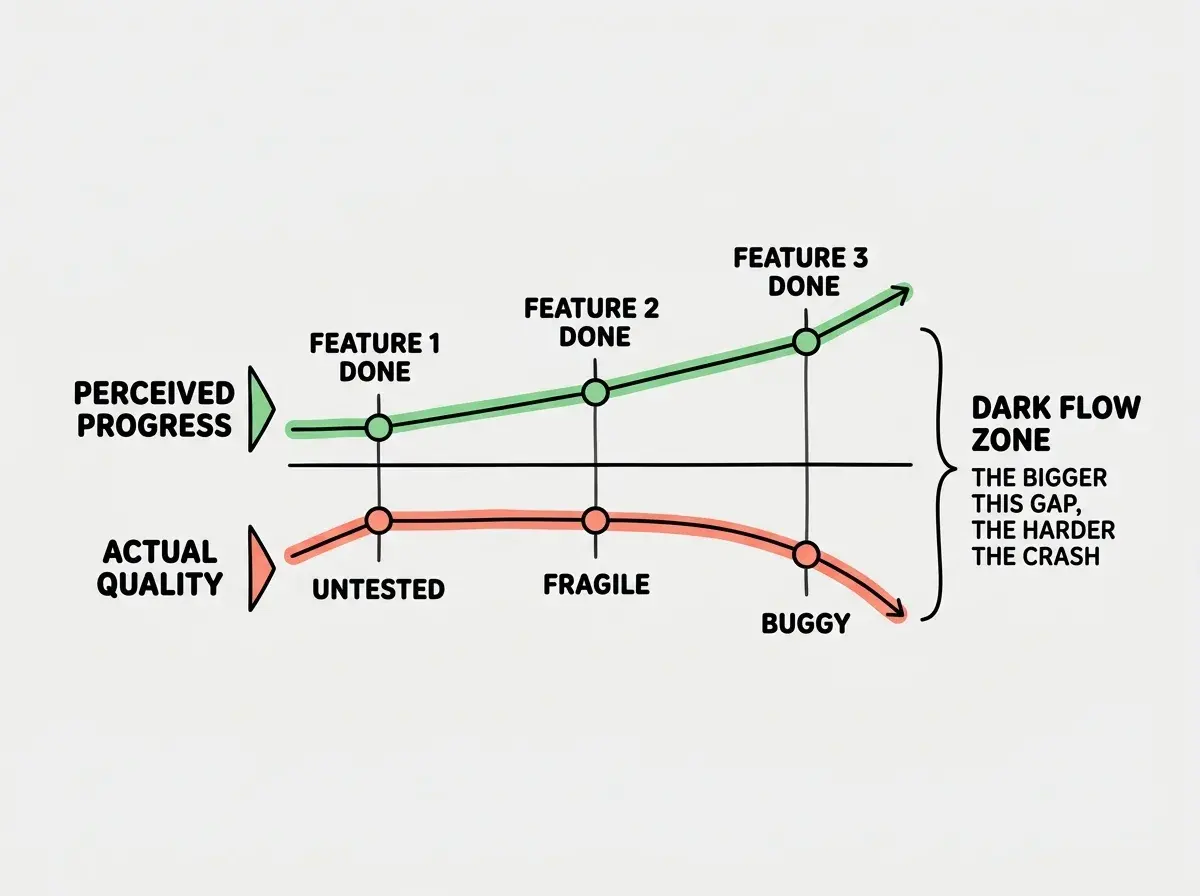
Early warning sign. You cannot explain what the code you just accepted actually does. If you are approving suggestions faster than you can read them, you are in dark flow.
Pattern 3. Scope Creep on Autopilot
AI makes adding features trivially easy, which makes scope creep frictionless. In traditional development, adding a feature requires effort, and that effort creates natural resistance. You think twice before adding something because building it takes time. With AI coding tools, adding a feature takes a prompt. There is no friction, so there is no filter.
The result is projects that balloon in scope without anyone making a conscious decision to expand them. You add a notification system because the AI can build one in thirty seconds. You add a dashboard because why not. You add real-time updates because the AI suggested it and it looked cool. Each addition is small. The cumulative effect is an application that does twenty things poorly instead of three things well.
Early warning sign. Your feature list is growing but your user count is not. You are building what the AI makes easy instead of what your users actually need.
The seven failure patterns share a common root. AI coding tools optimize for speed and volume, which means they amplify every bad habit that speed enables. Skipping reviews, expanding scope, ignoring security, accepting without reading. The tool does not cause these failures, but it removes the friction that used to prevent them.
Pattern 4. Security by Omission
AI coding tools do not add security unless you ask for it. They optimize for the requested functionality, and security is a constraint, not a feature. The result is that 45% of AI-generated code introduces OWASP vulnerabilities. Authentication checks, input validation, rate limiting, CSRF protection, and authorization logic are all consistently omitted because they were not in the prompt.
This pattern is structural, not incidental. When you ask an AI to "build a user profile page," it builds a user profile page. It does not add authentication to verify the viewer has permission to see that profile. It does not add input sanitization to prevent stored XSS. It does not add rate limiting to prevent enumeration attacks. Each omission is individually reasonable (you did not ask for it) and collectively catastrophic.
Early warning sign. You have built several features but have not written a single security test. If your test suite only checks that things work, not that unauthorized actions fail, security is being omitted.
Pattern 5. The Whack-a-Mole Bug Loop
You find a bug. You ask the AI to fix it. The fix introduces a new bug in a different part of the application. You ask the AI to fix that one. It breaks something else. Each fix is locally correct but globally destructive because the AI does not hold the full context of your application in its working memory.
This pattern accelerates as applications grow. The more code you have, the more interdependencies exist, and the more likely it is that a change in one place will break something in another. The AI fixes the symptom it can see without understanding the system it cannot.
Early warning sign. You have fixed the same area of your codebase more than twice in the same session. If fixes keep circling back to the same modules, you are in the loop.
Pattern 6. Architecture Debt From Day One
AI coding tools pick architecture patterns based on what appears most frequently in training data, not what fits your specific requirements. The most common pattern is not always the right pattern. You end up with a single massive database table when you need a relational schema. You get a monolithic API when you need separated services. You get client-side state management shoved into a project that needs server-side rendering.
The cost is not visible immediately. Wrong architecture choices feel fine at small scale. The pain arrives when you try to scale, add features that the architecture does not support, or onboard another developer who has to understand why everything is structured the way it is.
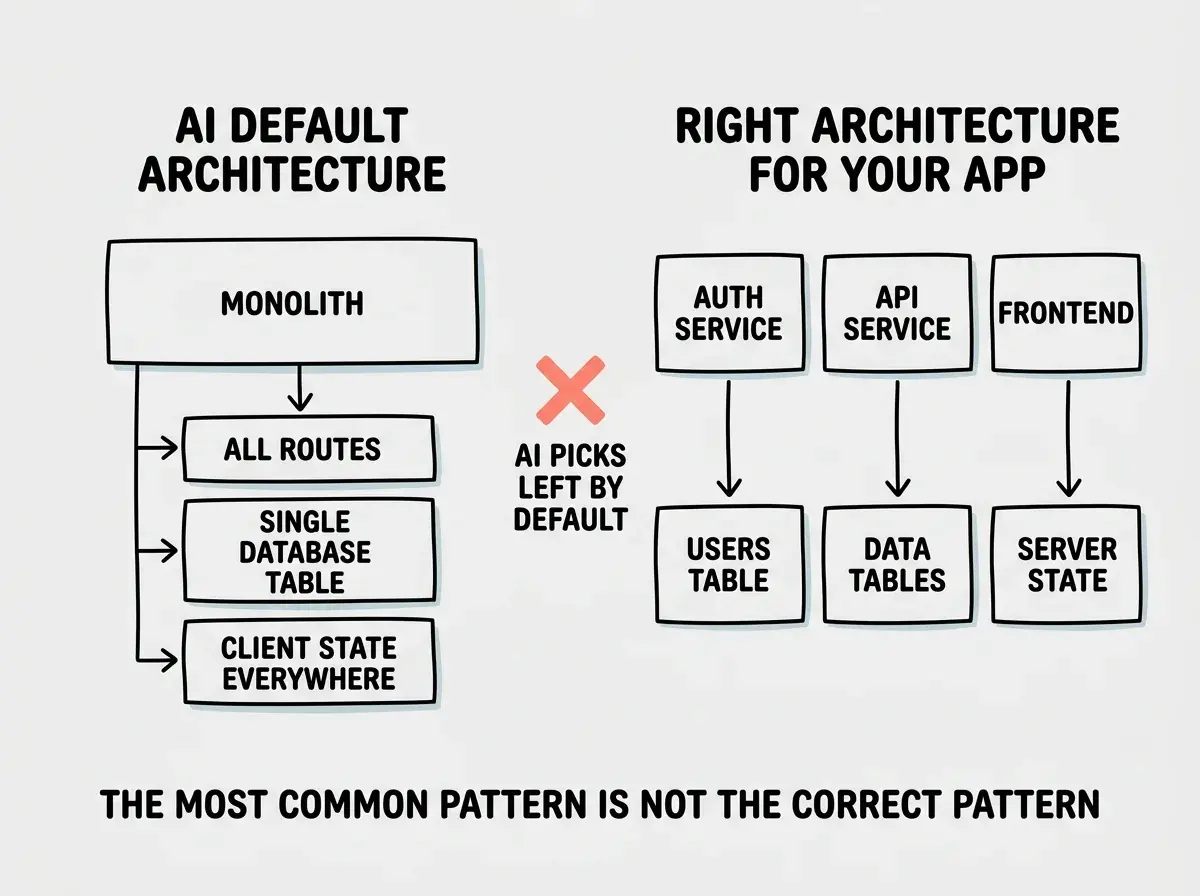
Early warning sign. You are working around your own architecture. If you find yourself writing hacks to make features fit into the structure the AI chose, the architecture is wrong and the debt is accumulating.
Assuming AI-generated architecture decisions are intentional. When an AI picks a state management approach or a database schema, it is not making a deliberate engineering decision. It is reproducing the most statistically common pattern from its training data. Treating these defaults as considered choices leads to building on foundations that were never designed for your use case.
Pattern 7. Dependency Sprawl
AI tools love packages. Ask for any feature and the AI will reach for a third-party library. Need date formatting? It installs moment.js, dayjs, and date-fns in the same project. Need animations? It adds three animation libraries because different suggestions came from different prompts. Your node_modules folder grows to 500MB. Your bundle size balloons. Your security surface area expands with every package, and you have no idea what half of them do.
Dependency sprawl is dangerous because each added package is a potential supply chain vulnerability. The AI does not evaluate whether a package is maintained, whether it has known CVEs, or whether a built-in language feature could do the same thing.
Early warning sign. Your package.json has dependencies you do not recognize. If you cannot explain why each package is there, sprawl has already started.
Understanding failure modes is the first step toward avoiding them.
Keep readingThe Compounding Effect
These seven patterns do not operate in isolation. They compound. Dark flow leads to scope creep because you feel productive enough to keep adding features. Scope creep increases the attack surface for security omissions. The larger codebase makes the whack-a-mole bug loop more severe. Architecture debt makes every fix harder. Dependency sprawl makes the whole system more fragile. And all of it pushes you closer to the 70% wall, where the accumulated technical debt becomes so heavy that forward progress stops entirely.
The 41% revert rate and the 33% trust score are the aggregate result of these patterns playing out across millions of projects. They are not caused by bad tools. They are caused by good tools that remove the friction that used to keep these failure modes in check.
What This Means For You
Every one of these patterns has an early warning sign, and every early warning sign is something you can check for today.
- If you are a founder building with AI, audit your project against all seven patterns right now. The 70% wall hits hardest when you have promised investors a timeline based on your prototype velocity. Budget 3x more time for the last 30% than you spent on the first 70%.
- If you are a senior developer, dark flow is your biggest risk because your experience makes you feel safe moving fast. Set a rule: never accept AI-generated code you have not read line by line. The METR study shows that even experienced developers misjudge their own productivity when AI is involved.
- If you are managing a team, track revert rates on AI-generated code the same way you track other quality metrics. A 41% average revert rate is the industry baseline. If your team is above that, one or more of these patterns is active. If you are below it, figure out what your team is doing right and formalize it.
The patterns are predictable. The warning signs are visible. The only question is whether you look for them before the wall or after.
The data shows where projects fail. Use it.
Explore more