Amazon Q Developer is AWS's answer to the AI coding assistant wave, and it arrives with a very specific pitch. While GitHub Copilot and Cursor are general-purpose tools that work well across any stack, Amazon Q is built from the ground up for developers who live inside the AWS ecosystem. Think of it this way: Copilot and Cursor are tourists with an excellent map of the city. Amazon Q Developer is a local guide who knows every street, shortcut, and hidden alley in the AWS city. That distinction shapes everything about how the tool works, where it excels, and where it falls short.
With 92% of developers using AI tools daily and 87% of Fortune 500 companies adopting vibe coding tools, the question is no longer whether to use an AI coding assistant. It is which one fits your team's workflow. If your team ships on AWS, Amazon Q Developer deserves a serious look.
What Amazon Q Developer Actually Is
Amazon Q Developer is an AI-powered coding assistant available as an IDE extension (VS Code, JetBrains, Visual Studio) and directly inside the AWS Console. It handles code completion, chat, security scanning, code transformation, and AWS-specific guidance. Unlike a generic assistant that happens to know some AWS APIs, Amazon Q has been trained specifically on AWS documentation, best practices, and service patterns.
It replaced the older CodeWhisperer product in 2024 and has expanded far beyond code suggestions into a full development lifecycle assistant.
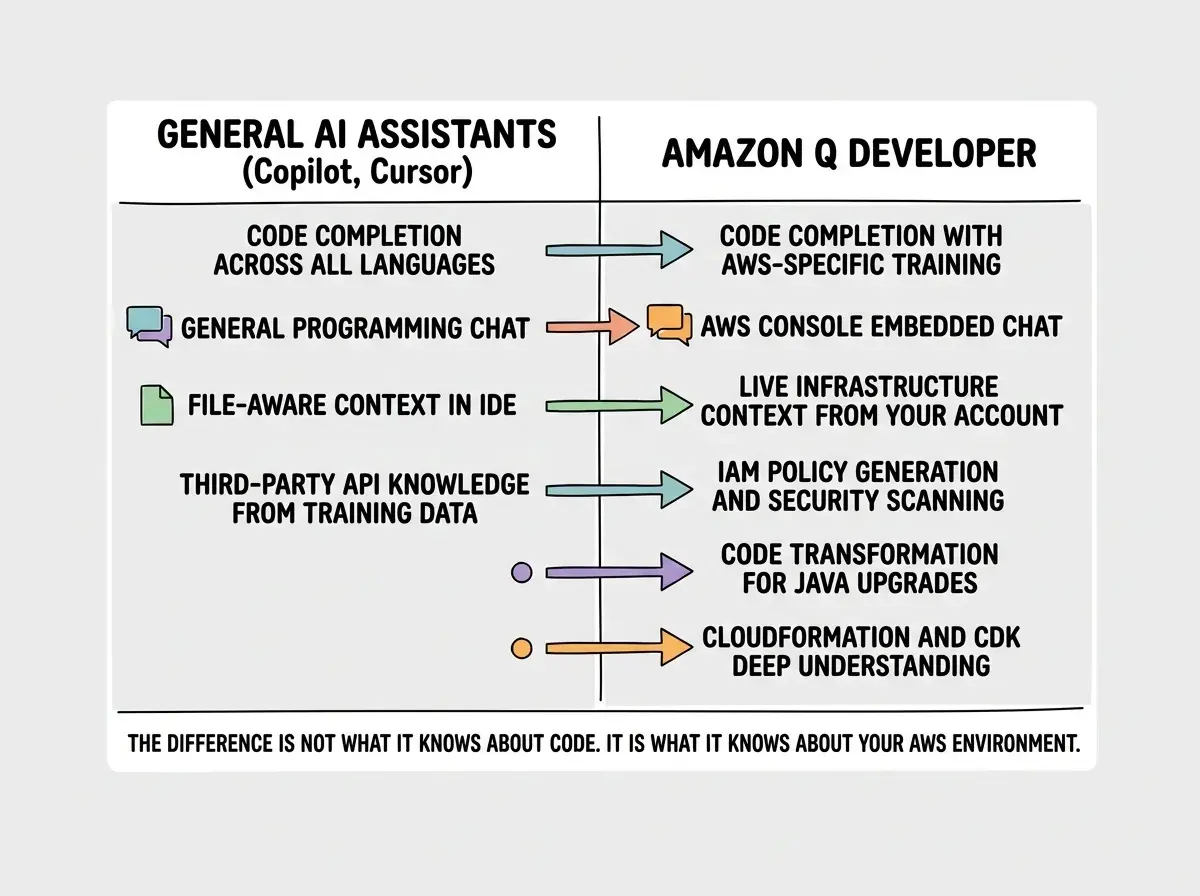
Amazon Q Developer is not just another Copilot clone with an AWS logo. Its real value lives in deep AWS integration that general-purpose tools cannot replicate, including IAM policy generation, CloudFormation debugging, and service-specific recommendations that understand your actual infrastructure. If you are not an AWS shop, most of that value disappears.
Code Completion and Chat
The code completion experience feels familiar if you have used Copilot or Cursor. You type, suggestions appear inline, and you tab to accept. The model handles Python, TypeScript, Java, C#, and most popular languages competently. For general-purpose code like building a React component or writing a utility function, the suggestions are solid but not dramatically different from Copilot.
Where the completions pull ahead is anything AWS-related. Writing a Lambda handler? Amazon Q suggests the correct event type signatures, proper response formatting, and error handling patterns aligned with AWS best practices. Configuring an S3 client? It knows the right SDK v3 import paths, suggests appropriate retry configurations, and handles credential provider chains correctly. These are areas where Copilot often generates plausible-but-subtly-wrong code because its training data mixes years of outdated SDK v2 patterns with current v3 syntax.
The chat interface works similarly to competitors. You can ask questions, get explanations, and have multi-turn conversations about your codebase. Amazon Q references files in your workspace and understands project context. The response quality for general programming questions is good, though not consistently better than Claude or GPT-4o through other tools.
The local guide analogy holds up perfectly here. Ask any AI assistant for directions to a restaurant and they will get you there. Ask for the fastest route that avoids construction, where to park for free, and which entrance skips the line, and only the local guide has those answers. Amazon Q is that guide for AWS.
AWS Integration That Goes Deep
This is the feature category where Amazon Q Developer creates real separation from the competition. The AWS integration is not surface-level knowledge of API names. It runs deep into your actual account and infrastructure.
Console integration. Amazon Q lives inside the AWS Console itself. You can ask questions about your running infrastructure, debug CloudWatch logs, generate IAM policies from natural language, and troubleshoot deployment failures. Asking "why is my Lambda function timing out?" in the console yields answers referencing your function's configuration, memory settings, and connected services. Copilot in your IDE has no access to that runtime context.
Infrastructure as Code assistance. Writing CloudFormation templates or CDK constructs with Amazon Q is noticeably better than with general-purpose tools. It understands interdependencies between AWS resources, suggests correct property names (not hallucinated ones), and catches misconfigurations that would fail during deployment. If you have ever spent an hour debugging a CloudFormation template because your AI suggested a nonexistent property, you will appreciate this.
Networking and security guidance. Configuring VPCs, security groups, and IAM roles is error-prone. Amazon Q provides recommendations that follow the principle of least privilege rather than suggesting overly permissive policies like most AI tools do when they just want the code to work.
Security Scanning
Amazon Q Developer includes built-in security scanning that analyzes your code for vulnerabilities, exposed credentials, and insecure patterns. This is not a bolted-on feature. It uses the same scanning engine as Amazon CodeGuru, which has been processing production code for years.
The scanner catches common issues like hardcoded secrets, SQL injection vulnerabilities, insecure cryptographic usage, and overly permissive IAM policies. It also identifies AWS-specific anti-patterns like Lambda functions that store state locally (they should not, because instances are ephemeral) or S3 bucket configurations missing encryption settings.
For AWS shops, this replaces a separate SAST tool in many cases. The scans run automatically on code changes and surface results directly in your IDE, with no separate CI pipeline or third-party scanning service required.
Code Transformation for Java Upgrades
One of Amazon Q Developer's most distinctive features is its code transformation capability, particularly for Java version upgrades. If you are maintaining a Java 8 or Java 11 application and need to migrate to Java 17 or 21, Amazon Q can analyze your entire codebase, identify incompatible APIs, update dependencies, refactor deprecated patterns, and generate a transformation plan.
This is not a trivial find-and-replace operation. Java version migrations involve changes to module systems, removed APIs, updated library versions, and subtle behavioral differences. Amazon Q handles multi-step transformations that would take a developer days or weeks to do manually. No other AI coding tool offers anything comparable for large-scale language version migrations.
Assuming Amazon Q Developer will replace your existing AI coding tool entirely. It works best as a complement, not a replacement. Use Amazon Q for AWS-specific work, infrastructure code, and security scanning. Keep Copilot or Cursor for general-purpose coding where their broader training data and faster iteration cycles provide a better experience. Running two AI assistants is not redundant if each one covers different territory.
How It Compares to Copilot and Cursor for AWS Shops
For teams evaluating AI coding tools, the comparison comes down to where your code spends most of its time.
If 60%+ of your code touches AWS services, Amazon Q Developer provides meaningfully better suggestions, catches more AWS-specific bugs, and offers infrastructure context that no competitor can match. The console integration alone saves hours of context-switching between your IDE and documentation.
If AWS is just your deployment target and most of your code is application logic, React components, and business rules, Copilot or Cursor will serve you better. Their models are broader, their IDE integrations are more mature, and their code completion for general programming is more polished.
The hybrid approach works well in practice. Many AWS-heavy teams run Amazon Q alongside Copilot or Cursor. Amazon Q handles the infrastructure layer, CDK constructs, Lambda functions, and AWS SDK calls. The general-purpose tool handles everything else. IDE extensions coexist without major conflicts, though you will want to configure which handles inline completions to avoid suggestion overlap.
Free Tier Generosity
Amazon Q Developer's free tier is genuinely generous. The Individual tier (free) includes code completions, chat interactions, security scans, and basic code transformation. Monthly limits exist on chat and transformation operations, but for a solo developer or small team evaluating the tool, the free tier provides enough usage to form a real opinion.
The Professional tier at $19/user/month adds organizational policy controls and higher limits. Compared to Copilot Business at the same price, the value proposition differs entirely based on your AWS usage.
Amazon Q Developer's free tier gives you enough to evaluate whether it fits your workflow.
Explore AI coding toolsLimitations Outside AWS
Here is where the local guide analogy reveals its flip side. A local guide is invaluable in their city and nearly useless in another.
Amazon Q Developer's suggestions for non-AWS code are competent but unremarkable. Writing a Next.js application, building GraphQL resolvers, or working with third-party APIs like Stripe or Twilio produces suggestions that are roughly on par with Copilot from two years ago. The model's training emphasis on AWS means it has less depth for the broader programming ecosystem.
The IDE extension, while functional, lacks some of the polish that Cursor and Copilot have refined over years of iteration. Features like codebase-wide context, multi-file editing, and agentic workflows are areas where competitors have a meaningful lead. Amazon Q is iterating quickly, but as of early 2026, the general-purpose coding experience still trails the market leaders. Community resources are also thinner, meaning fewer shared configurations and solved edge cases to reference.
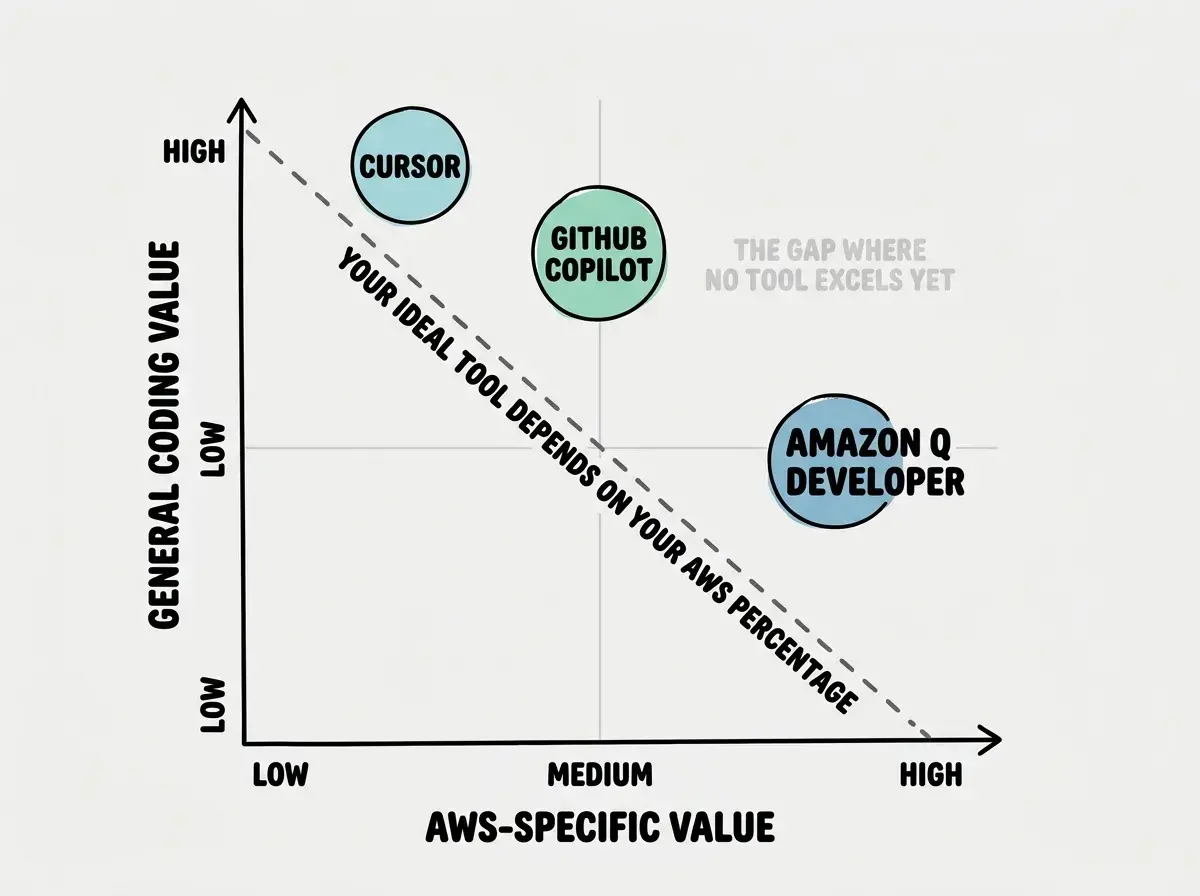
The gap in that upper-right quadrant is telling. No tool yet delivers both best-in-class general coding and deep AWS integration. Until one does, choosing means accepting tradeoffs.
The right combination of tools matters more than picking a single winner.
Compare AI toolsWhat This Means For You
Amazon Q Developer is the best AI coding tool for AWS-specific development, and it is not particularly close. The console integration, infrastructure awareness, security scanning, and Java transformation capabilities create genuine value that no general-purpose tool can replicate. If your team ships on AWS and you are not using Amazon Q, you are leaving productivity on the table.
But it is not a Copilot or Cursor replacement for everything else. The smartest approach for most AWS-heavy teams is to run both: Amazon Q for the AWS layer and a general-purpose tool for application code. The cost of two subscriptions is trivial compared to the productivity gain of having the right tool for each job.
The AI coding assistant market is consolidating around specialization rather than one-tool-fits-all. Amazon Q Developer is the strongest evidence yet that deep platform integration beats broad general knowledge for developers who live inside a specific ecosystem. If AWS is your city, get the local guide.