Most AI coding tools want to be your entire development environment. They bundle editors, chat panels, sidebars, and file explorers into one package, hoping you will never need to leave. Aider takes a completely different approach. If those all-in-one tools are Swiss Army knives, Aider is the single-purpose blade that does exactly one thing extremely well: editing code through conversation in your terminal.
With 92% of developers now using AI tools daily, the question is no longer whether to adopt AI-assisted coding. It is which tool fits your actual workflow. For developers who live in the terminal, who care about git hygiene, and who want to pick their own LLM, Aider makes a compelling case.
What Aider Actually Is
Aider is a free, open-source command-line tool that lets you pair program with large language models directly in your terminal. You launch it inside a git repository, tell it what you want changed, and it edits your files and commits the results. No browser tabs. No VS Code extensions. No account creation. Just pip install aider-chat and you are running.
The project was created by Paul Gauthier and has grown into one of the most actively maintained open-source AI coding tools available. It consistently ranks at the top of SWE-bench benchmarks, which measure how well AI tools can resolve real GitHub issues. The benchmarks are public and reproducible.
What makes Aider feel different is its philosophy. It treats your terminal as the interface, git as the safety net, and the LLM as a collaborator rather than a replacement. You stay in control while Aider handles the mechanical parts of applying edits across files.
Aider is not trying to replace your editor or your IDE. It is a focused terminal tool that excels at multi-file code editing with automatic git commits. If you want a graphical experience with built-in file browsing and project management, Aider is not for you. If you want a fast, scriptable, model-agnostic coding assistant that respects your existing workflow, it is worth serious consideration.
The Git-First Approach
Every AI coding tool claims some form of version control awareness, but Aider builds its entire workflow around git in a way that feels genuinely different.
When you ask Aider to make a change, it applies the edits to your files and immediately creates a git commit with a descriptive message. Each change gets its own commit. If Aider modifies three files to implement a feature, you get a clean commit that captures exactly what changed and why. If the result is wrong, you run git diff to see what happened and git revert to undo it. Your reflog stays clean and navigable.
This matters more than it sounds. Other AI tools apply changes to your working tree and leave you to sort out version control yourself. After a long session of back-and-forth edits, your git history becomes a mess of "AI changes" commits that you have to squash later. Aider's auto-commit approach means every interaction produces a meaningful, reversible checkpoint.
You can disable auto-commits if you prefer to stage changes manually, but most developers who try the default behavior end up keeping it. Knowing you can always revert the last AI edit without losing anything else in your working tree changes how freely you experiment.
Multi-File Editing and Repo Mapping
This is where the specialized blade analogy really holds up. Aider handles multi-file editing better than most AI coding tools, including some commercial ones.
When you start Aider in a repository, it builds a "repo map" of your entire codebase. This map includes file structures, function signatures, class definitions, and import relationships. The map gets sent to the LLM as context, so the model understands your project's architecture before you even ask your first question.
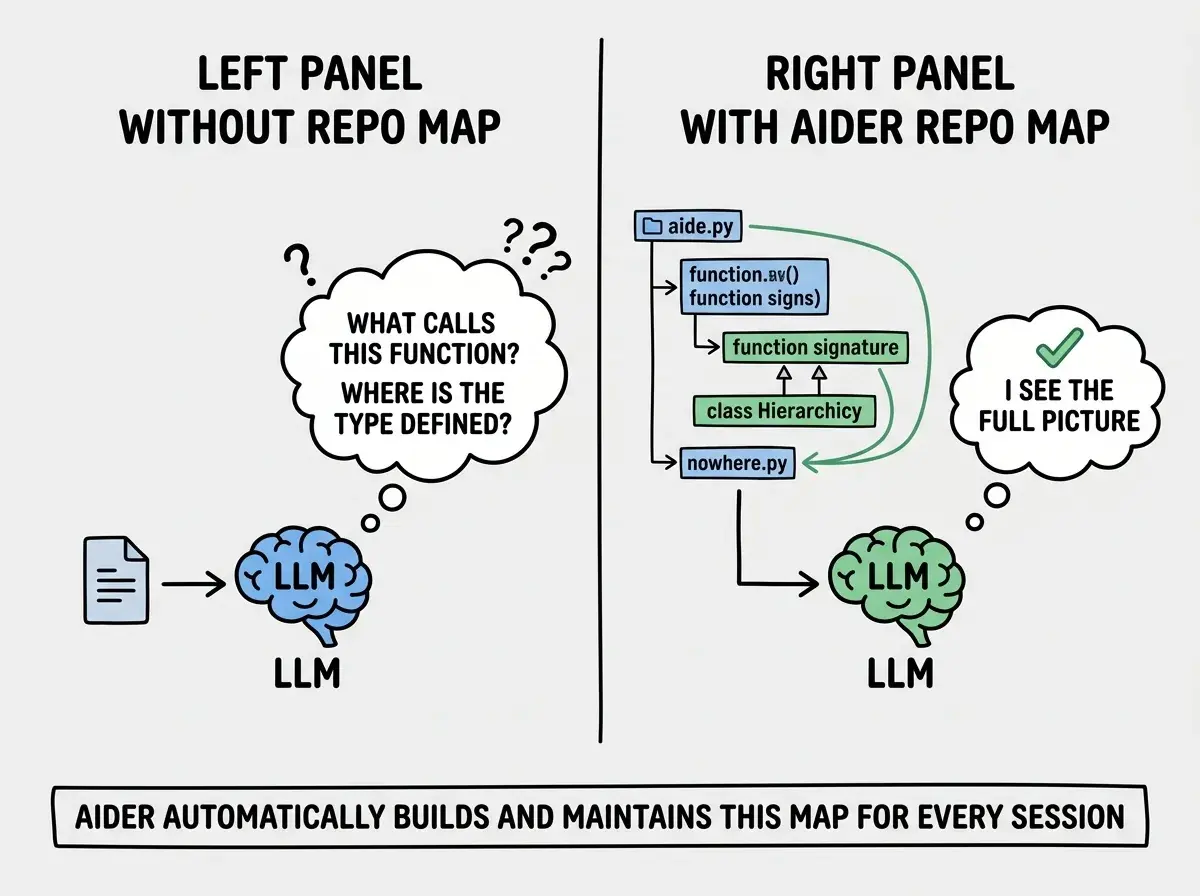
You control which files Aider can edit by adding them to the chat with /add filename. Files not explicitly added are still visible through the repo map (the model can read them for context) but cannot be modified. This prevents the tool from making unexpected changes to files you did not intend to touch.
In practice, a typical workflow looks like this: you add two or three related files, describe the change you want, and Aider edits all of them in a coordinated way. Need to add a new API endpoint, update the route handler, and modify the TypeScript types? Add the three files, describe the feature, and Aider handles the cross-file coordination. The repo map ensures it understands how those files relate to each other.
Model Flexibility
Here is where Aider's open-source nature becomes a real advantage. Unlike Claude Code (locked to Anthropic's models) or GitHub Copilot (locked to OpenAI/Azure), Aider works with essentially any LLM you can connect to.
Out of the box, Aider supports OpenAI, Anthropic, Google Gemini, Mistral, Cohere, and dozens of other providers. It also works with local models through Ollama and any OpenAI-compatible API endpoint. Want to use a fine-tuned model running on your own hardware? Point Aider at the API and it works.
This flexibility serves two practical purposes. First, you can pick the best model for each task: Claude Sonnet for complex refactoring, GPT-4o for quick edits, a local model for sensitive codebases that cannot leave your machine. Second, you are never locked into one provider's pricing or availability. If OpenAI has an outage, switch to Anthropic with a single flag.
Aider also benchmarks models rigorously and publishes the results. Their leaderboard shows which models perform best at code editing tasks, updated as new models release. Useful data when deciding which model to pair with the tool.
How Aider Compares to Claude Code
Both tools live in the terminal. Both edit files through conversation. But they solve different problems and make different tradeoffs.
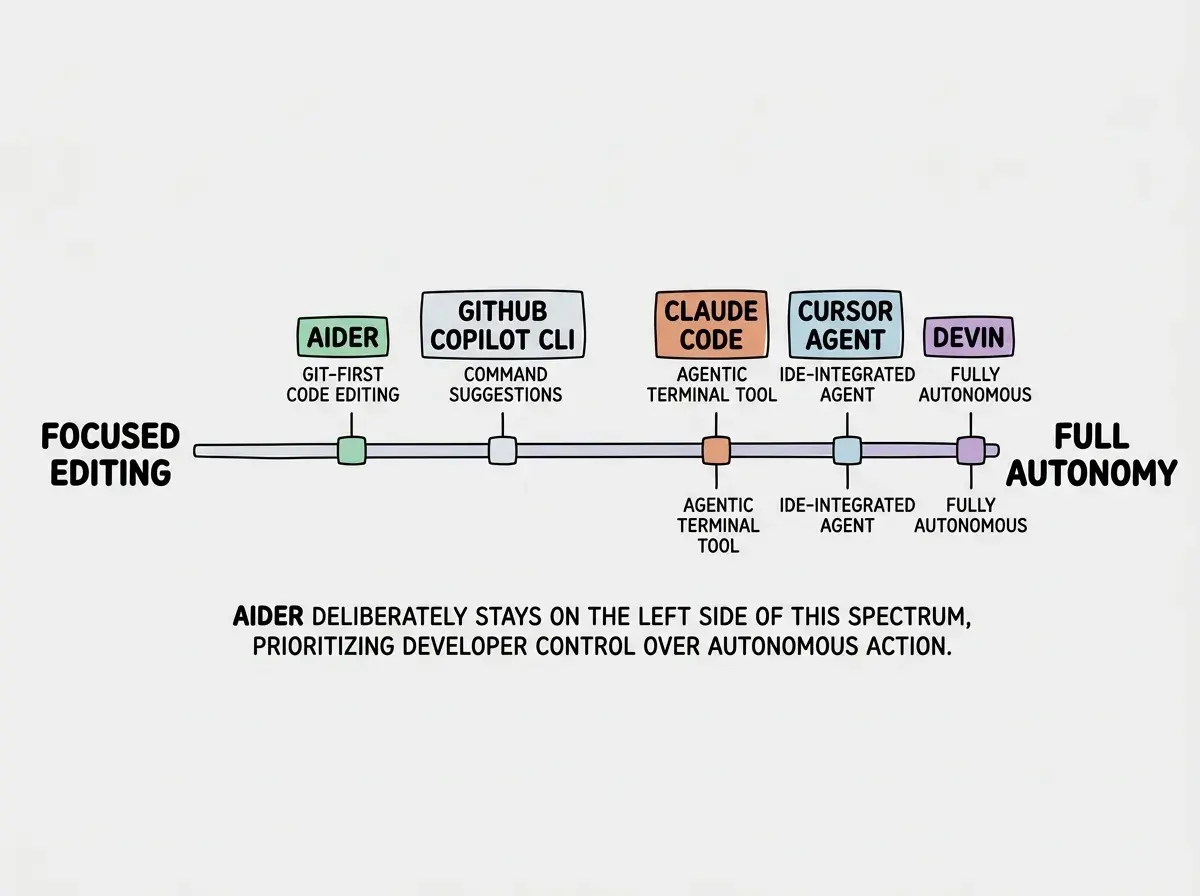
Claude Code is a first-party tool from Anthropic. It is tightly integrated with Claude's models, offers deep agentic capabilities (it can run commands, browse files, and execute multi-step plans autonomously), and benefits from direct optimization for Claude's architecture. If you are already paying for a Claude subscription and want the most polished experience with Anthropic's models, Claude Code is the natural choice.
Aider is model-agnostic, community-driven, and fully open source. You can read every line of code, contribute fixes, and customize the tool to your needs. It prioritizes clean git integration over agentic autonomy, meaning it edits files and commits rather than running arbitrary shell commands on your behalf. If you want transparency, model freedom, and git-first workflows, Aider is the stronger pick.
The philosophical difference matters too. Claude Code is designed to be an autonomous agent that can plan and execute complex tasks with minimal guidance. Aider is designed to be a pair programmer that works with you on each step. Neither approach is universally better, but they attract different kinds of developers.
| Aider | Claude Code | |
|---|---|---|
| Model support | Any LLM (OpenAI, Anthropic, local, etc.) | Claude models only |
| Git integration | Auto-commits every change | Manual commits |
| Agentic capabilities | Focused on code editing | Full shell access, autonomous planning |
| Source code | Fully open source (Apache 2.0) | Closed source |
| Price | Free (you pay for API calls) | Included with Claude subscription |
| Best for | Model flexibility, git hygiene, transparency | Deep Claude integration, autonomous workflows |
Assuming that open source means less capable. Aider regularly outperforms commercial tools on SWE-bench coding benchmarks. The tool's quality comes from focused engineering on the code editing problem, not from a large corporate team. Do not dismiss it before trying it on a real project in your own codebase.
Current Limitations
Aider is excellent at what it does, but it is honest about where it falls short.
No built-in agentic execution. Aider edits files. It does not run your test suite, spin up dev servers, or execute shell commands as part of a multi-step plan. You can pipe terminal output into the chat for context, but the tool itself stays focused on file editing.
Learning curve for optimal usage. Getting the most out of Aider requires understanding the repo map, edit formats (whole file vs. diff vs. unified diff), and when to add or remove files from context. The documentation is thorough, but initial setup takes more effort than tools that "just work" with defaults.
Terminal-only interface. There is no GUI, no web interface, and no built-in editor integration (though community plugins exist for VS Code and Neovim). If you are not comfortable in the terminal, Aider will feel like a step backward.
Token costs can surprise you. Because Aider sends the repo map plus file contents with every request, large repositories can consume significant tokens. The tool has optimization settings to manage this, but you need to pay attention to token usage, especially with expensive models like Claude Opus or GPT-4.
Getting Started
Installation takes under a minute. Run pip install aider-chat, set your API key as an environment variable, navigate to a git repository, and run aider. The tool drops you into an interactive chat where you can start describing changes immediately.
Start with a small, well-defined task. Add one or two files with /add, ask for a specific change, and watch Aider apply the edit and create the commit. Once you see the workflow, scale up to multi-file edits and larger features. The /model command lets you switch LLMs mid-session, and /tokens shows current usage.
Find the right tool for your development workflow and coding style.
Browse AI tool reviewsWho Should Use Aider
Aider is built for developers who value transparency, git discipline, and the freedom to choose their own models. It is not the right tool for everyone, and it does not pretend to be.
If you want a polished visual experience, look at Cursor or Windsurf. If you want deep autonomous capabilities tied to Claude's models, Claude Code is the better fit. But if you want an open-source terminal tool that edits code cleanly, commits every change, and works with whatever LLM you prefer, Aider is the sharpest blade in the drawer. In a landscape full of Swiss Army knives, sometimes the specialized tool is exactly what you need.
Learn which tools actually improve your development workflow.
See our tool reviews