Windsurf is the AI code editor you should try if you have been interested in tools like Cursor but hesitant about the subscription cost. Built by the Codeium team, Windsurf is a VS Code fork with a genuinely generous free tier and a standout feature called Cascade that handles multi-step reasoning across your codebase. It is not as polished as Cursor in every area, but it punches well above its price point, and for many developers the free tier is legitimately enough for daily use.
I spent three weeks using Windsurf as my primary editor to give it a fair evaluation. This is what I found, the good and the frustrating.
Windsurf is the right pick if you want a Cursor-class AI editor without the subscription. The free tier is genuinely usable for side projects and learning. Cascade beats Composer for continuous-flow reasoning across your codebase. Pro at $15 per month is half the cost of Cursor for similar power-user volume. Pick Windsurf if cost matters; pick Cursor if you want the most polished daily driver.
What Windsurf Is (and Isn't)
Windsurf is a desktop code editor forked from VS Code, similar to how Cursor is built. You get the same extension support, keybinding system, and general layout. AI features are integrated directly into the editor, including autocomplete, chat, and Cascade for multi-file autonomous coding.
What Windsurf is not is a Cursor clone. Although they share the same VS Code foundation, the teams made different design decisions about how AI should interact with your workflow. Cursor emphasizes Composer as a separate mode. Windsurf emphasizes Cascade as a continuous flow. Cursor gives you more model choices. Windsurf gives you more free usage. These are genuine product differences, not just branding.
You might think that a free AI editor must cut corners somewhere important. But actually, Windsurf's free tier includes enough autocomplete and Cascade usage for most developers working on side projects or learning. The limitations show up when you are using it heavily on a production codebase all day, which is when the Pro tier at $15 per month becomes necessary. For exploration, learning, and moderate use, the free tier is not a trial. It is a real product.
Getting Started with Windsurf
Download Windsurf from codeium.com/windsurf and install it. Like Cursor, it will offer to import your VS Code settings and extensions. Accept the import and you will have a familiar environment immediately.
Create an account (free) and you are ready to go. There is no API key to configure, no model to select, and no billing to set up. Windsurf manages the AI infrastructure on their end. You just start coding.
Open a project folder and let Windsurf index your codebase. The indexing is fast and runs in the background. Once complete, autocomplete suggestions will reference patterns from across your project. The quality of suggestions improves noticeably after indexing, so give it a minute before forming your first impression.
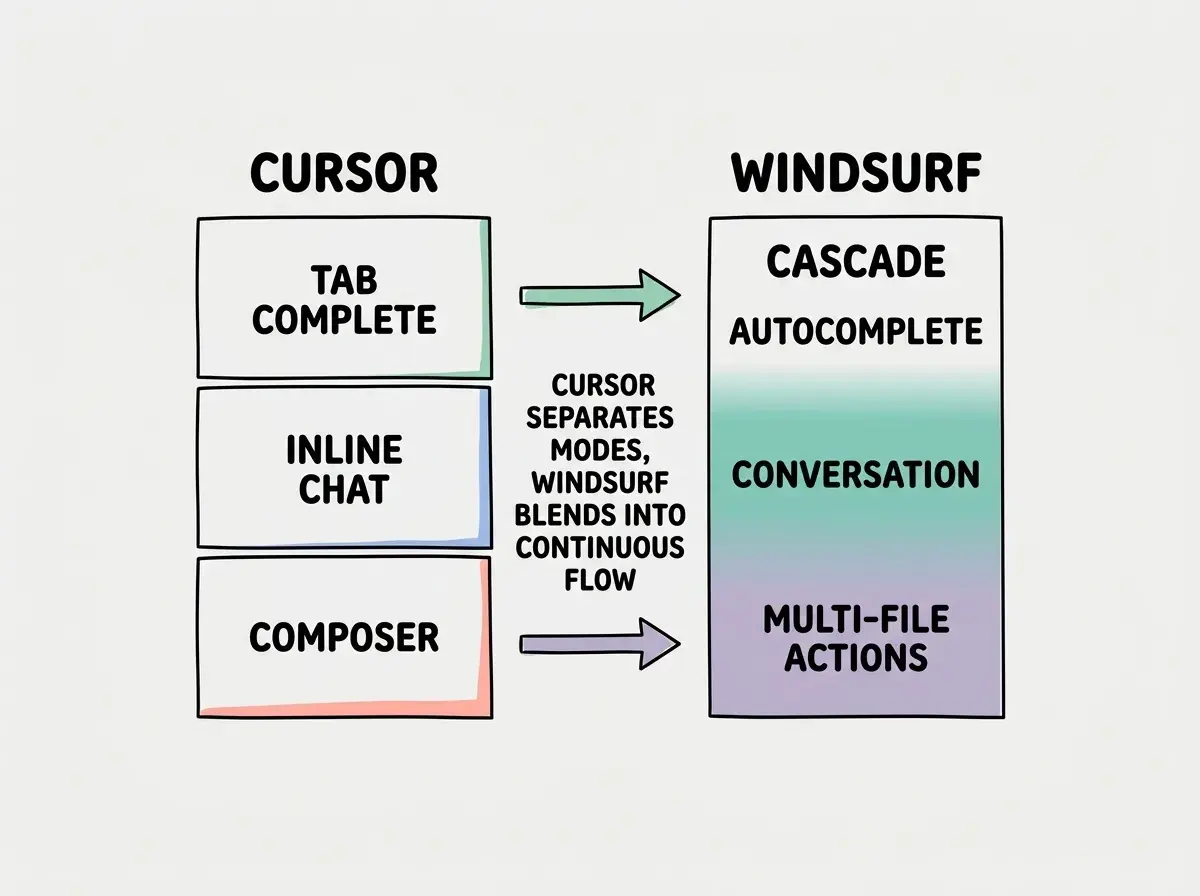
The initial experience feels very similar to Cursor and that is intentional. Windsurf wants the switching cost to be near zero. If you have used VS Code or any VS Code fork, you already know how to navigate. The AI-specific features layer on top of a familiar foundation.
Cascade Is the Standout Feature
Cascade is Windsurf's answer to multi-file, multi-step AI coding. You describe a task in natural language, and Cascade reasons through the steps, reads relevant files, makes changes across your codebase, and shows you exactly what it did. The name refers to how actions cascade through your project; one change triggers awareness of what else needs to change.
Here is exactly what I did to test it. I had a Next.js project with a basic product listing page. I asked Cascade: "Add a product detail page with dynamic routing. Include the product image, title, description, price, and an Add to Cart button. Use the existing ProductCard component as a style reference. Add the new route to the navigation."
Cascade read my existing files, identified the ProductCard component's styling patterns, and generated a product detail page that matched the visual style. It created the dynamic route file, added navigation links, and updated the layout component. The result was usable immediately. The styling was consistent because Cascade actually referenced the existing component rather than generating something generic.
Where Cascade differs from Cursor's Composer is in how it presents its reasoning. Cascade shows you its thought process as it works, explaining why it chose to read certain files and what patterns it identified. This transparency is useful for understanding what the AI is doing, especially when the output is not quite right and you need to give better instructions. Cursor's Composer is more of a black box by comparison.
Is Windsurf AI Free
Yes, genuinely free. Windsurf's free tier includes autocomplete, Cascade conversations, and chat without a credit card or trial period. The limits are per month, and they reset. For a developer working on side projects, learning, or building prototypes intermittently, the free tier covers real usage.
The limits exist, though. You get a set number of Cascade interactions and premium autocomplete suggestions per month. Once you hit the limit, the tool does not stop working; it falls back to the base-level autocomplete which is less capable but still functional. The experience degrades gracefully rather than cutting you off entirely.
Windsurf's free tier is not a marketing trick with artificially low limits. It is a real product that covers moderate daily use. The decision to upgrade to Pro should be based on hitting the limits consistently, not on feature gates. Almost every feature is available on the free tier, just with usage caps.
For context, I hit the free tier limits after about eight days of active use during my three-week test. That included substantial Cascade sessions on a medium-sized codebase. If I had been using it for lighter work (fixing bugs, writing individual functions, code review), the limits would have lasted the full month. Your mileage will depend on how heavily you lean on Cascade for multi-file changes.
Tips and Power User Features
Give Cascade explicit file references. Like Cursor, you can reference specific files when talking to the AI. Saying "follow the patterns in @ProductCard.tsx" gives Cascade a concrete style reference. Without this, it generates reasonable but generic code. With it, the output matches your existing codebase.
Use Cascade for refactoring, not just generation. Cascade is excellent at "convert this class component to a functional component with hooks" or "replace all instances of this deprecated API with the new one across the codebase." Refactoring tasks play to Cascade's strength of understanding relationships between files.
Set up your project context. Windsurf supports project-level instructions similar to Cursor's .cursorrules files. Add a rules file that describes your conventions, and every AI interaction will respect them. This is especially important for opinionated frameworks where default AI patterns might not match your project's approach.
Review the reasoning, not just the output. Cascade shows its thought process. Read it. If Cascade says "I noticed the project uses Tailwind CSS so I'll use utility classes" but your project actually uses CSS Modules, you can correct it before it generates wrong code. The reasoning step is where you catch misunderstandings early.
What Is Better Than Windsurf AI
Cursor is better at three things: model selection, Composer polish, and ecosystem maturity. Cursor lets you choose from more AI models, swap between them mid-session, and bring your own API keys. Cursor's Composer has had more development time and handles edge cases more gracefully. Cursor also has a larger community producing tips, .cursorrules templates, and workflow guides.
Claude Code is better if you prefer working in the terminal, need the most capable AI model for complex reasoning, or want fully autonomous agentic workflows. Claude Code operates at a higher level of abstraction, executing multi-step plans with minimal handholding. Windsurf's Cascade is powerful, but it is still fundamentally an editor feature rather than an autonomous agent.
Dismissing Windsurf because it is free. Free tools carry a stigma in professional software development, and some developers assume that free means inferior. Windsurf's free tier uses the same AI models and the same features as the paid tier, just with usage limits. Judging the tool's capability by its price rather than its output will cause you to miss a genuinely strong option.
Copilot is better at broad editor support. If you work in JetBrains or Neovim, Copilot is your only option among the major AI assistants. Windsurf is a standalone editor, not a plugin, so you cannot use it inside other editors. That is a dealbreaker for developers committed to non-VS Code environments.
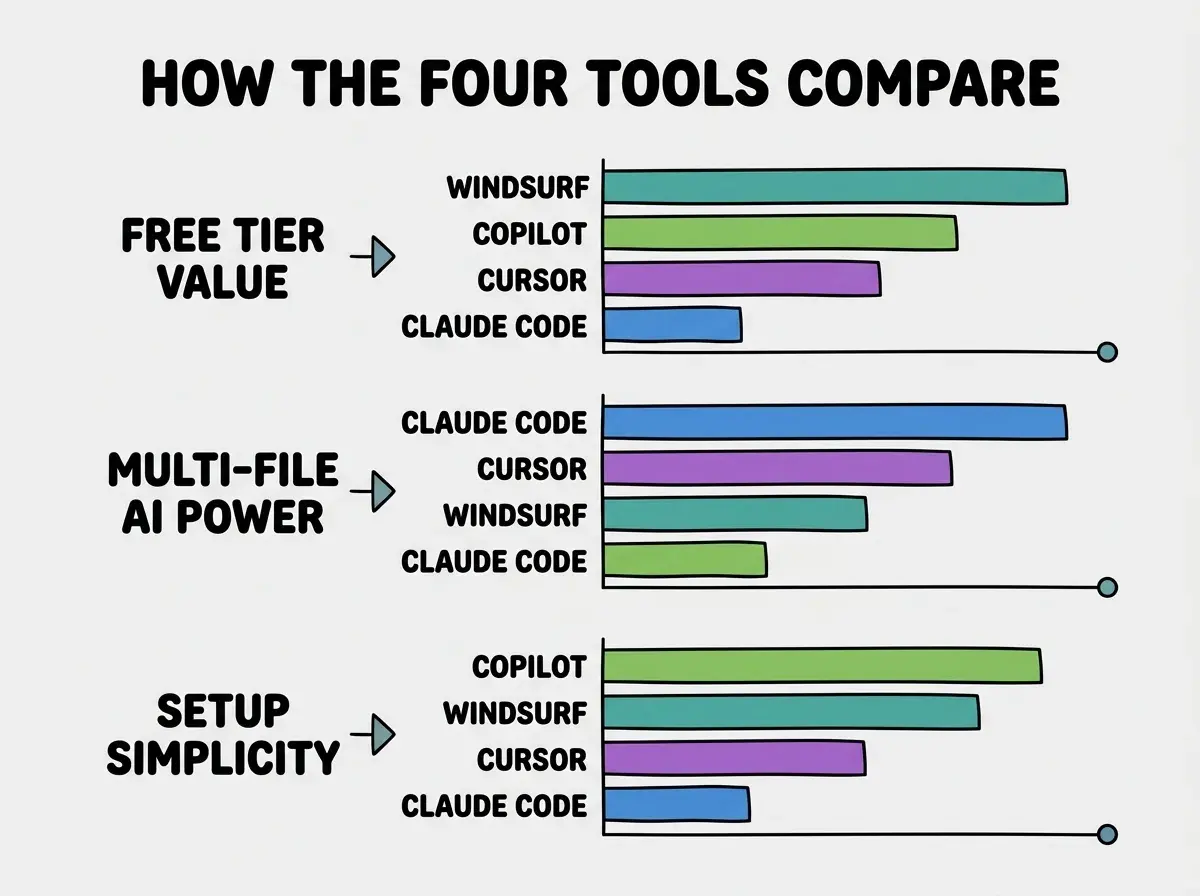
Where Windsurf beats all of them is value for money. The free tier is more generous than Cursor's free tier and Copilot's free tier. The Pro tier at $15 per month is cheaper than Cursor Pro ($20) and delivers comparable features. For budget-conscious developers, students, and anyone evaluating AI editors for the first time, Windsurf offers the best entry point.
Pricing Breakdown
Windsurf Free gives you autocomplete, Cascade, and chat with monthly usage limits. No credit card, no trial period, no feature gates. Windsurf Pro at $15 per month lifts the usage limits and adds priority access during peak times. That is a $5 per month savings over Cursor Pro for a comparable feature set.
There are no hidden costs. Unlike Claude Code where your bill scales with usage, Windsurf's pricing is flat and predictable. You pay $0 or $15, and you know exactly what you get. The Pro tier also includes faster response times during heavy usage periods, which matters if you rely on Cascade throughout the workday.
For teams evaluating AI editors, Windsurf's pricing makes it easy to pilot. Put the team on the free tier for a month. If they hit limits consistently, upgrade to Pro. There is no risk and no commitment required to evaluate the tool thoroughly, which is a significant advantage in corporate procurement processes where free trials with credit card requirements get stuck in approval.
Who Should Use Windsurf (and Who Shouldn't)
Windsurf is the right choice if you want a capable AI editor without an upfront cost commitment, if you are switching from VS Code and want a familiar experience, or if you primarily build small to medium projects where Cascade's reasoning covers your needs. It is excellent for students, career changers, and developers who want to try AI-assisted coding before committing to a paid tool.
Windsurf is not the right choice if you need maximum AI capability and do not mind paying for it, if you require extensive model selection, or if you work in a non-VS Code editor that you are not willing to leave. Developers on large enterprise codebases may find Cursor's more mature tooling or Claude Code's agentic approach better suited to complex, multi-file refactoring at scale.
Start with the fundamentals that apply to every tool.
Learn the basicsWhat This Means For You
Windsurf proves that AI-assisted coding does not need to be expensive. The free tier is real, the features are competitive, and the Cascade reasoning model offers something genuinely different from the completion-focused approach of other tools. The AI coding tool market is better because Windsurf exists, pushing competitors to justify their pricing with genuine capability advantages.
- If you are a founder on a budget: Start with Windsurf Free. Use Cascade for feature development and autocomplete for daily coding. You will get 80% of what Cursor offers at 0% of the cost. When your product has revenue and your development pace demands unlimited AI usage, upgrading to Pro at $15 per month or switching to a more powerful tool is a decision you can make with real experience rather than marketing claims.
- If you are a career changer: Windsurf is the best place to start because there is no financial barrier and no trial clock ticking. Install it, import your VS Code setup, and start using Cascade to learn how AI approaches coding tasks. The reasoning transparency in Cascade teaches you not just what code to write, but why the AI chose that approach. That understanding accelerates your learning faster than any tutorial.
- If you are a student: Use Windsurf Free alongside your coursework. The free tier is generous enough for academic projects and personal experiments. When you feel limited, that is a signal that you are using AI effectively enough to benefit from a paid tier. But do not upgrade until you actually hit the limits consistently. The free tier will surprise you with how far it goes.
See how Windsurf fits into the broader AI coding landscape.
Browse guides