Vibe coding vs no-code vs low-code comes down to a tradeoff between speed, flexibility, and ceiling. No-code tools like Webflow let you build visually with zero programming knowledge. Low-code platforms like Retool add pre-built components with some scripting. Vibe coding generates full, real code from natural language descriptions. Each fits a different builder and project.
This comparison matters because choosing the wrong approach wastes months. People start with no-code, hit its limits, rebuild everything in a different tool, hit new limits, and start over again. Understanding the tradeoffs upfront saves you from that cycle.
Why Three Options Exist Instead of One
This confuses everyone at first, so let me explain why the market split into three distinct approaches instead of converging on a single solution.
Each approach emerged to solve a different frustration. No-code tools appeared because most people who wanted websites and simple apps did not need (and could not afford) custom development. Visual builders like Webflow made it possible to drag and drop professional-looking sites into existence. For marketing pages, portfolios, and simple business sites, this was transformative.
Low-code platforms appeared because businesses needed internal tools, dashboards, and workflows that were too custom for no-code but too boring for developers to want to build. Retool, Appsmith, and similar tools let you wire together pre-built components (tables, forms, charts) and add light scripting where needed. IT departments and operations teams loved them.
Vibe coding appeared because AI models became capable enough to generate actual, full code from natural language. Unlike no-code and low-code, which constrain you to their building blocks, vibe coding produces the same output a developer would write. The code is real, exportable, and unlimited in what it can become. The $4.7 billion market and 2,400% growth in searches since early 2025 reflect just how many people wanted this option.
No-code, low-code, and vibe coding are not competitors evolving toward the same thing. They serve different needs at different levels of complexity. Sixty percent of Lovable's vibe coding users are non-developers who previously used no-code tools and hit their limits.
The reason all three continue to exist is that simplicity and power are genuinely in tension. The easier a tool is to start with, the sooner you hit its ceiling. The higher the ceiling, the steeper the learning curve after the initial honeymoon period. No tool has solved this tradeoff. They have just chosen different positions on the spectrum.
Three Ways to Get a Custom House
Here is the analogy that makes the differences between these three approaches intuitive. Think about three ways to get a custom house.
No-code is a prefab home. You choose from a catalog of pre-designed houses. You can pick your floor plan, select your finishes, and customize within the options available. The house goes up fast, looks professional, and handles most of what a typical family needs. But if you want something that is not in the catalog (a spiral staircase, a rooftop garden, a room shaped like a hexagon), you are out of luck. The catalog is the ceiling.
Low-code is a modular home. You start with pre-engineered modules (kitchen unit, bathroom unit, bedroom unit) and snap them together in different configurations. You get more flexibility than prefab because you can combine modules in custom ways and even modify individual modules if you know a bit about construction. But you are still working within the module system. Want a cantilevered living room that extends over a cliff? The modules do not support that.
Vibe coding is architect-directed construction. You describe the house you want to an architect (the AI), who draws up blueprints (generates code) and directs a construction crew (the computer). You can build anything, any shape, any feature, any level of complexity. But you need to describe what you want clearly enough for the architect to understand, and when something goes wrong you need to discuss the problem intelligently.
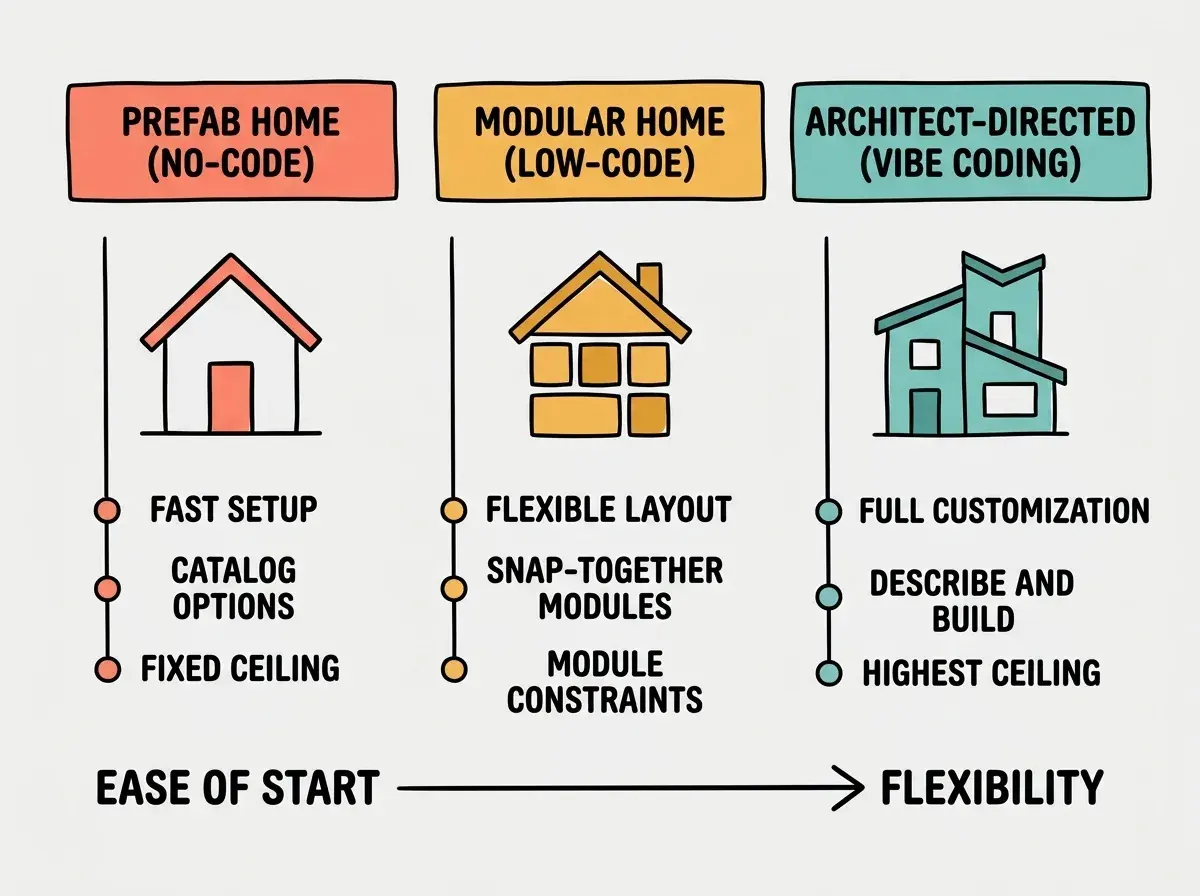
This analogy reveals the core tradeoff. Prefab is fastest and simplest but least flexible. Modular gives you more options but requires more decisions. Architect-directed can build anything but demands the most from you in terms of communication, patience, and willingness to iterate.
Most people who are frustrated with their current tool chose the wrong position on this spectrum. They picked prefab when they needed modular, or modular when they needed architect-directed. Understanding where your project falls prevents that mistake.
Specific Strengths and Limits of Each
Let me get concrete, because abstract comparisons only help so much.
No-code strengths. Webflow produces beautiful, responsive websites you design visually. Bubble lets you build web applications with user accounts, databases, and workflows without writing a line of code. For the right use cases, these tools are unbeatable. A marketing team that needs a new landing page every week should absolutely use Webflow.
No-code limits. The ceiling is real and you will hit it faster than you expect. Custom logic beyond what the platform supports is impossible. You cannot export your work as code and take it somewhere else. And you are dependent on the platform; if Bubble changes its pricing or shuts down, your application goes with it.
Low-code strengths. Retool is brilliant for internal dashboards and admin panels. You connect it to your database, drag in a table component, add some filters, and you have a functional internal tool in hours. The scripting layer lets you handle custom logic that no-code cannot.
Low-code limits. Customer-facing products built on low-code platforms tend to feel generic. The performance and design flexibility you need for a consumer app usually exceeds what low-code provides.
Our guides help you find the right approach for your specific project.
Explore the guidesVibe coding strengths. The code AI generates is real, full code. You can host it anywhere, modify it manually, hire a developer to extend it, or switch AI tools without starting over. There is no ceiling on what you can build because you are working with the same raw material (code) that professional developers use. The 36.4% of vibe coding users who are founders are choosing it specifically because they do not want to hit a platform ceiling six months into their business.
Vibe coding limits. The 70% wall is real. AI gets you most of the way fast, but the last stretch, debugging edge cases, handling error states, optimizing performance, can be painful without some conceptual understanding of what the code does. Bug loops, hallucinated APIs, and context window degradation are problems that no-code and low-code users never encounter, because those platforms handle the code layer entirely.
How to Choose Without Overthinking It
Here is a decision framework that works for most situations.
Choose no-code if your project is a website, a simple web app, or an automation workflow; you need it done this week; and you do not anticipate needing custom features beyond what the platform supports.
Choose low-code if your project is an internal tool, admin dashboard, or data workflow; you have a technical team member who can handle the scripting layer; and the project does not need to be customer-facing.
Choose vibe coding if you need full flexibility and ownership of the code; you are building a product that might grow beyond its initial scope; or you have tried no-code and hit its limits.
Choose a combination if your project has different components with different requirements. Many startups use Webflow for their marketing site, Retool for internal tools, and vibe coding for their core product.
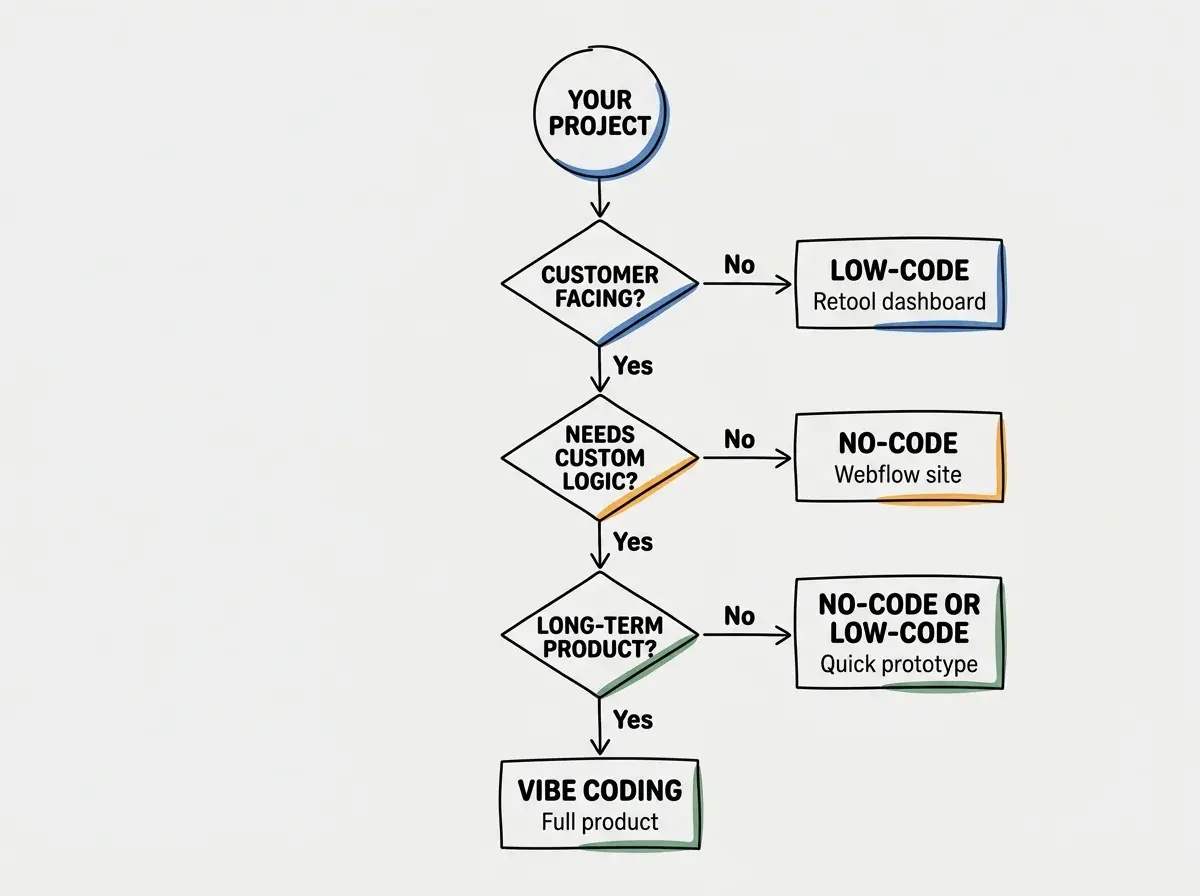
The most important thing is to be honest about what you are building. If it is genuinely a simple website, using vibe coding is overkill. If it is a product you want to grow into a business, starting with no-code means you will probably rebuild everything within a year.
The most common mistake is starting with no-code because it is easiest, discovering its limitations after months of building, and then having to rebuild from scratch in a different tool. Spending one hour understanding the tradeoffs upfront saves you from months of rework later.
You might think you should always pick the most powerful option. But actually, the best choice is the one that matches your project's actual needs, not its imagined future needs. A landing page does not need vibe coding. An internal dashboard does not need a custom codebase. Match the tool to the task.
The Convergence Nobody Is Talking About
These three categories are starting to blur at the edges. No-code tools are adding AI features. Low-code platforms are integrating natural language interfaces. Vibe coding tools are building visual editors on top of AI-generated code. In a few years, the distinction may matter much less than it does today.
But we are not there yet. Today, in 2026, these are still meaningfully different approaches with meaningfully different strengths. Choosing well means understanding those differences and matching them to your specific situation.
Dig deeper
A few hand-picked sources if you want to go further.
What This Means For You
No-code, low-code, and vibe coding are three positions on a spectrum of simplicity versus flexibility. None of them is universally better. The right choice depends on what you are building, how far you expect it to grow, and how much time you are willing to invest upfront.
- If you're a founder: Start by asking how far this product might go. If it is a test page for a weekend experiment, use no-code. If it is the core of a business you plan to scale, vibe coding gives you the flexibility to grow without rebuilding. The 25% of YC startups shipping with 95% AI-generated code chose vibe coding for exactly this reason.
- If you're a marketer: No-code is probably your best starting point for landing pages and campaign tools. But learn about vibe coding as a next step for when you need custom analytics dashboards, personalized user experiences, or tools that connect to your existing systems in ways no-code cannot support.
- If you're a creative: Your instinct might be to start with the most visual tool (no-code). That works for portfolios and showcase sites. But if you want to build interactive experiences, generative art tools, or anything that pushes creative boundaries, vibe coding gives you access to the full power of code without requiring you to learn syntax.
Guides for every approach, whether you choose no-code, low-code, or vibe coding.
Browse all guides