v0 by Vercel is an AI tool that generates React and Next.js UI components from text prompts. With 92% of developers now using AI tools daily, v0 carved out a niche by focusing entirely on frontend UI generation built around shadcn/ui and Tailwind CSS. The question is whether it does that well enough to justify paying for it.
I have used v0 extensively across multiple projects to generate component libraries, landing pages, and dashboard layouts. This guide covers what it actually delivers, what it costs after the pricing change that drove away most of its users, and when it genuinely saves time.
What v0 Is and How It Works
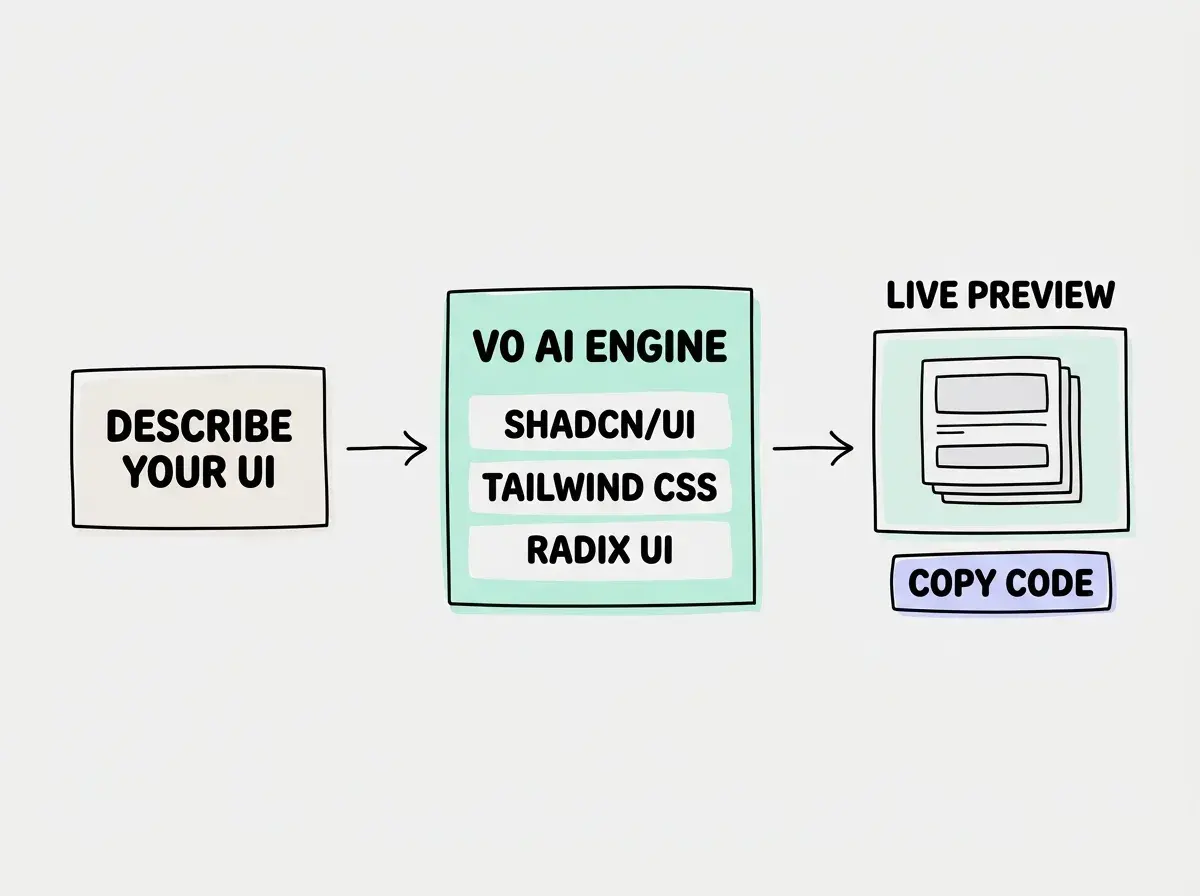
v0 is a web-based AI tool that takes a text description or an image and generates React components using shadcn/ui, Tailwind CSS, and Radix UI primitives. You describe what you want, and v0 produces a working component with a live preview that you can iterate on, copy, or install directly into your project via the CLI.
The important distinction is that v0 generates UI only. It does not generate backend logic, API routes, authentication flows, or database schemas. It produces the visual layer of your application. If you ask v0 for a "user dashboard with real-time data," you will get a beautifully designed dashboard with placeholder data and no actual data fetching. Understanding this boundary is essential to getting value from the tool.
You might think v0 is just another AI chatbot that writes React code. But actually, the deep integration with shadcn/ui is what makes it different. Every component v0 generates follows shadcn/ui conventions, uses the correct Radix UI primitives, and respects the Tailwind class patterns that shadcn components expect. This means the output drops into a shadcn-based project with minimal friction. If your project uses a different component library, that advantage disappears entirely.
Getting Started With v0
Go to v0.dev and sign in with your Vercel account. You can start generating immediately on the free tier, which gives you a limited number of messages per month. The interface is straightforward. Type a description of the component you want, and v0 generates it with a live preview.
Here is exactly what I did on my first serious v0 session. I needed a pricing table for a SaaS landing page. I typed: "A pricing table with three tiers, free, pro, and enterprise. Each tier shows the price, a list of features with check marks, and a CTA button. The pro tier should be visually highlighted as the recommended option. Use a clean, modern design." v0 produced a polished pricing component in about ten seconds. The shadcn/ui Card components were properly structured, the Tailwind classes were sensible, and the visual hierarchy was clear. I copied the code, dropped it into my project, and adjusted the content. Total time from prompt to production-ready component was about five minutes.
The iterative workflow is where v0 shines for UI work. After generating the initial component, you can say "make the cards rounded with more padding" or "add a monthly/annual toggle" and v0 modifies the existing output rather than starting over. This conversational refinement is faster than manually adjusting styles.
The Pricing Reality
v0 moved to a token-based pricing model, and this change fundamentally altered who uses the tool. The free tier gives you a limited number of messages per month. The Premium plan costs $20 per month and includes a larger token allocation. There is a Team tier for organizations.
The pricing shift was significant. According to traffic data, v0 experienced a 71% drop in visits after switching to the token-based model. That is not a small decline. That is nearly three quarters of the user base walking away. The reason is predictable. When generating UI components was free or nearly free, people used v0 experimentally. They would generate five variations of a button, pick the best one, and move on. Token-based pricing punishes exactly that kind of exploratory usage.
v0 is most cost-effective when you know exactly what you want before prompting. Write a detailed description with specific requirements for layout, components, and visual hierarchy. Vague prompts like "make a nice dashboard" will burn through tokens as you iterate toward what you actually need, while a precise prompt gets you there in one or two generations.
For developers already paying for Cursor or another AI coding tool, adding $20 per month for v0 is a hard sell. The value proposition only works if you generate enough UI components to justify the subscription, and for most developers, that threshold is higher than they expect.
What v0 Does Well
shadcn/ui component quality. The components v0 generates are genuinely well-structured. They use proper Radix UI primitives, follow accessibility patterns, and produce clean Tailwind classes. If you are building a project with shadcn/ui, the output requires minimal cleanup. This is v0's core strength and the reason it exists as a separate tool rather than just another feature in a general-purpose AI editor.
Rapid prototyping for design reviews. v0 is excellent for generating multiple UI variations quickly. Need to show a stakeholder three different approaches to a settings page? Generate all three in v0, share the preview links, and get feedback before writing any production code. This workflow saves real time compared to building prototypes by hand.
Image-to-code conversion. You can upload a screenshot or design mockup, and v0 will generate a React component that matches the visual design. This is particularly useful for converting Figma designs into code. The accuracy gets you 70-80% of the way there, which is a meaningful head start.
Limitations You Need to Know
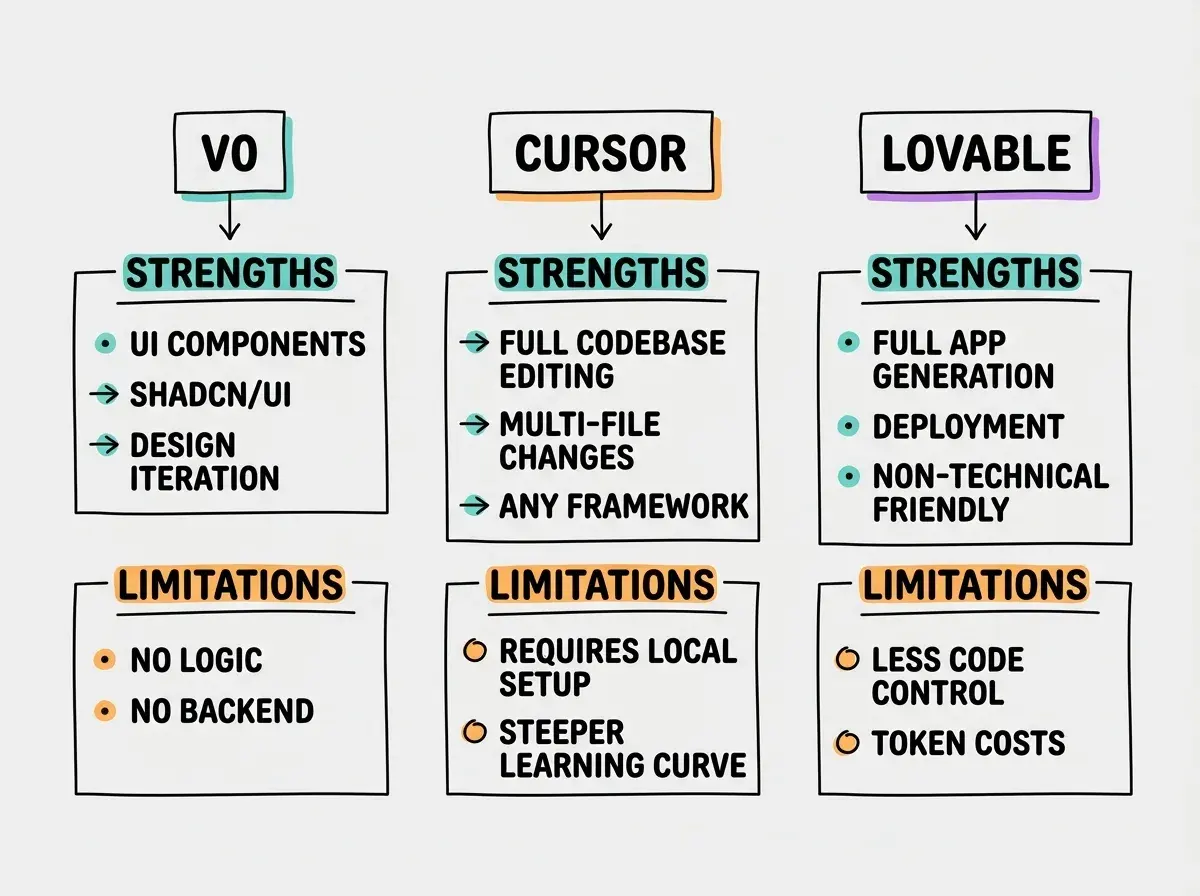
UI only, no logic. This is the fundamental limitation. v0 will not write your authentication flow, your form validation logic, your API integration, or your state management. It generates the visual shell. You write everything that makes it functional. Developers who expect v0 to produce working features are disappointed because that was never its purpose.
Token consumption scales with complexity. A simple button component uses few tokens. A complex dashboard with multiple interactive sections, data tables, and charts can consume a significant portion of your monthly allocation in a single conversation. There is no way to predict token usage before you start, which makes budgeting difficult.
Limited framework support. v0 is optimized for React with shadcn/ui and Tailwind. If your project uses Vue, Svelte, Angular, or even React with a different component library like Material UI or Chakra, v0's output requires substantial rewriting. The tool is deeply opinionated about its stack, which is a strength for matching projects and a dealbreaker for everything else.
Treating v0 as a full application builder. v0 generates UI components, not applications. If you need authentication, database integration, API routes, and deployment, use Lovable, Bolt.new, or Cursor instead. v0 is a specialized tool for one layer of your stack, and trying to force it beyond that layer wastes both time and tokens.
Context window limitations. In longer conversations, v0 loses track of earlier decisions and starts making inconsistent modifications. Starting fresh conversations for major changes produces better results than extending a long thread.
When to Use v0 vs Cursor vs Lovable
The decision depends on what you are building and where you are in the process.
Use v0 when you need polished UI components for a shadcn/ui project, you want to prototype multiple design variations quickly, or you are converting design mockups into React code.
Use Cursor when you are working on a full application with both frontend and backend code, you need multi-file edits, or you want AI assistance across your entire development workflow. Cursor handles UI generation too, but without v0's shadcn-specific polish.
Use Lovable when you are non-technical and want a complete working application with authentication, database, and deployment handled automatically.
The practical pattern I have seen work best is using v0 for initial UI exploration, then moving to Cursor for implementation. Generate the component in v0, copy it into your project, and use Cursor to wire up logic and data fetching. This plays to each tool's strength.
Find the right starting point for your experience level and goals.
Start hereBest Practices for Prompting v0
The quality of v0's output depends almost entirely on the quality of your prompts.
Be specific about components. Instead of "a form," say "a multi-step form with three steps, each in a Card component, with a progress indicator at the top, back/next buttons at the bottom, and form validation with inline error messages." The more specific you are, the less iteration you need.
Reference shadcn/ui components by name. "Use a Sheet for the mobile navigation" or "Use a Command component for the search" tells v0 exactly which primitive to build on. This produces much better results than describing behavior and hoping v0 picks the right component.
Provide visual context. Upload a screenshot, wireframe, or rough sketch. v0's image-to-code pipeline is surprisingly capable, and starting from a visual reference produces more accurate results than text alone.
Prompt for responsive behavior explicitly. v0 does not always generate responsive layouts by default. Adding "make it responsive with a stacked layout on mobile and a grid on desktop" ensures you get usable components across screen sizes.
What This Means For You
v0 by Vercel is a genuinely useful tool with a narrow but valuable specialty. It generates high-quality React UI components for the shadcn/ui ecosystem better than any general-purpose AI coding tool. The 71% traffic decline after the pricing change reflects market price sensitivity, not product quality. The free-tier experimenters left, and the question is whether you get enough value to justify $20 per month.
- If you are a developer building with shadcn/ui and Tailwind: v0 is worth trying for a month. Use it for component generation, design exploration, and converting mockups to code. If you find yourself using it multiple times per week, the subscription pays for itself in time saved. If you only need it occasionally, the free tier or generating components through Cursor might be sufficient.
- If you are a designer who wants to produce React code: v0 is one of the most accessible bridges between design and code. Upload your designs, generate components, and hand production-ready React code to your development team. This workflow genuinely changes the designer-developer handoff.
- If you are evaluating AI tools for your team: v0 fills a specific gap in the UI layer. It is not a replacement for Cursor, Copilot, or any full-stack AI tool. Budget it as a supplementary tool for teams that build heavily with shadcn/ui and need to produce UI components quickly.
See how v0 stacks up against every major option in the vibe coding ecosystem.
Browse tools