If your serverless app hits the same database query five hundred times a minute, you are paying for five hundred identical round trips. Upstash Redis serverless is like adding an express checkout lane to your store so repeat customers don't wait in line every time. Instead of querying your database for the same product page data on every request, you serve it from a cache that responds in single-digit milliseconds. With 92% of developers using AI tools daily to scaffold apps faster than ever, the bottleneck is shifting from "how do I build this" to "how do I make this fast without managing infrastructure."
This review covers what Upstash Redis actually does, where it fits, what it costs, and where it falls short.
What Upstash Redis Actually Is
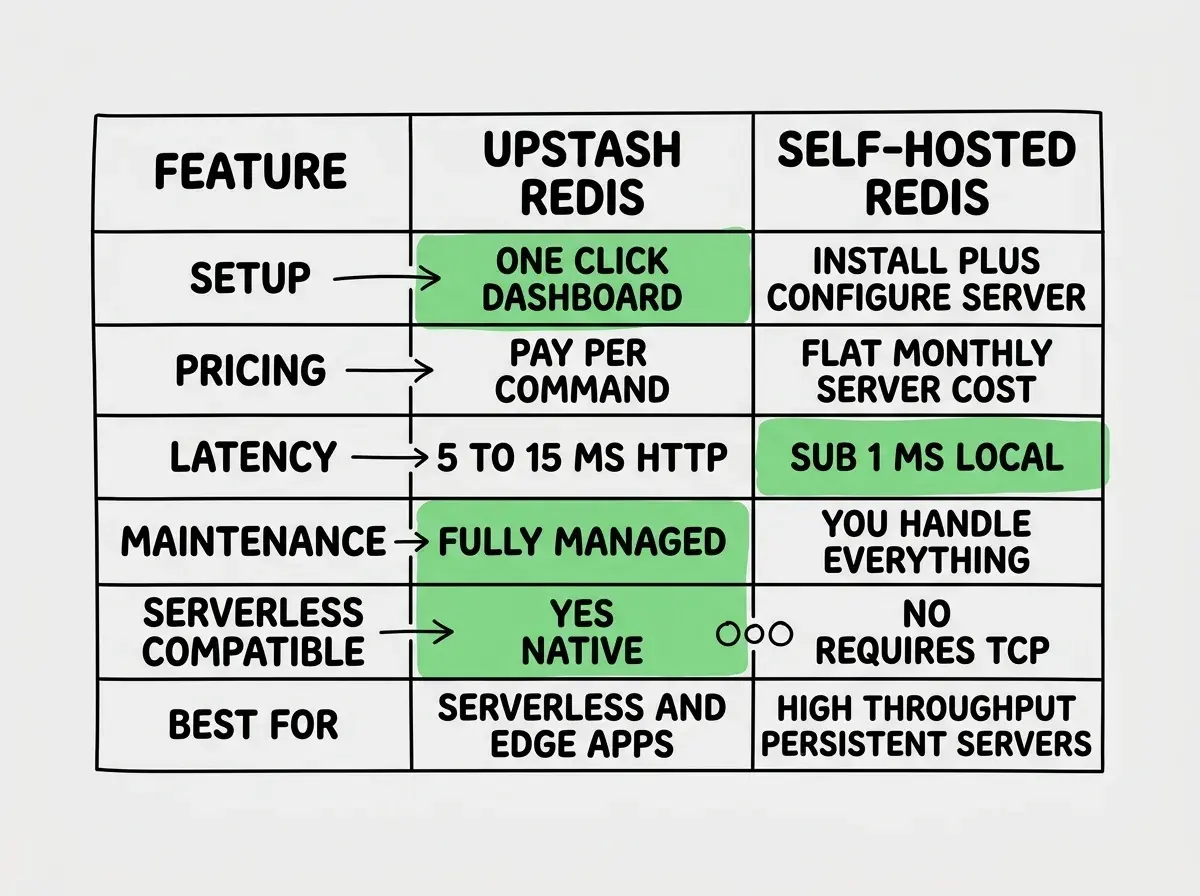
Upstash is a managed Redis service designed specifically for serverless environments. Traditional Redis requires a persistent server. You spin up an EC2 instance or a DigitalOcean droplet, install Redis, configure memory limits, set up replication, handle failovers, and pay a flat monthly fee whether you use it or not. Upstash removes all of that.
You create a database through their dashboard or CLI, get a REST endpoint and a token, and start making requests. There is no server to manage, no memory to configure, no replication to set up. Upstash handles durability by persisting data to disk, which is unusual for Redis. Traditional Redis is in-memory only by default, meaning a restart wipes your data. Upstash gives you the speed of Redis with the durability of a database.
The pay-per-request pricing model is the key differentiator. You pay per command, not per hour. If your app makes 10,000 Redis commands in a month, you pay for 10,000 commands. If it makes zero, you pay nothing (on the free tier). Think of it as the express checkout lane sitting idle when the store is empty. It only costs you when customers are actually using it.
Where Upstash Redis Fits in Your Stack
Rate Limiting
This is the use case where Upstash shines brightest. The @upstash/ratelimit SDK gives you a production-ready rate limiter in about ten lines of code. You define a limiter with a sliding window or token bucket algorithm, call limiter.limit(identifier), and get back a boolean telling you whether to allow the request.
For AI-powered apps that proxy calls to OpenAI or Anthropic, rate limiting is not optional. Without it, a single user (or bot) can rack up hundreds of dollars in API costs in minutes. The express checkout lane needs a bouncer, and @upstash/ratelimit is that bouncer.
import { Ratelimit } from "@upstash/ratelimit";
import { Redis } from "@upstash/redis";

const ratelimit = new Ratelimit({
  redis: Redis.fromEnv(),
  limiter: Ratelimit.slidingWindow(10, "10 s"),
});

const { success } = await ratelimit.limit(userId);
if (!success) {
  return new Response("Too many requests", { status: 429 });
}
Session Storage
Storing sessions in a traditional database adds latency to every authenticated request. Storing them in Redis keeps session lookups under 5ms. Upstash works well here because sessions are naturally short-lived (you set a TTL and forget about them), and the pay-per-request model means you only pay when users are actually active.
Response Caching
Cache expensive database queries, API responses, or computed values. If your app generates AI summaries that take 3 seconds to produce, caching those results in Upstash means the second user who requests the same summary gets it instantly. The express checkout lane remembers what the last customer ordered and has it ready.
Background Job Queues
Upstash also offers QStash, a separate product for message queues and scheduled jobs. It complements the caching layer by letting you offload work like sending emails, processing uploads, or triggering webhooks on a delay. All serverless, all pay-per-use.
Upstash Redis serverless works best for transient, high-read data like rate limits, sessions, and cached responses. It is not a replacement for your primary database. Think of it as the fast layer that sits in front of your database and absorbs repeated reads so your database handles less traffic.
Setting Up Upstash With Vercel and Cloudflare
Vercel Integration
Vercel has a first-party Upstash integration in their marketplace. You click "Add Integration," connect your Upstash account, and Vercel automatically injects the UPSTASH_REDIS_REST_URL and UPSTASH_REDIS_REST_TOKEN environment variables into your project. From there, Redis.fromEnv() picks them up automatically.
import { Redis } from "@upstash/redis";

const redis = Redis.fromEnv();

// Cache a value for 60 seconds
await redis.set("page:home:stats", JSON.stringify(stats), { ex: 60 });

// Read it back
const cached = await redis.get("page:home:stats");
The @upstash/redis SDK uses HTTP requests under the hood, not TCP connections. This is critical for serverless because traditional Redis clients maintain persistent TCP connections, which break in environments where functions spin up and down constantly. Upstash's REST-based approach means every request is stateless. No connection pooling headaches, no "too many connections" errors at scale.
Cloudflare Workers
Upstash works on Cloudflare Workers without any adapters or workarounds. Because the SDK uses fetch-based HTTP requests, it runs anywhere that supports the Web API standard. You add your Upstash credentials as secrets in your Wrangler config, import @upstash/redis, and you are done.
This is a significant advantage over self-hosted Redis, which requires TCP connections that Cloudflare Workers do not support. If you are building on Workers, Upstash is one of the few Redis options that works at all.

The SDKs
@upstash/redis
The core SDK. It wraps the Upstash REST API in a typed TypeScript client that mirrors the Redis command set. You get get, set, del, hset, lpush, expire, and most other Redis commands. The API feels familiar if you have used ioredis or node-redis, with the main difference being that everything is async and HTTP-based.
One feature worth highlighting is the pipeline support. You can batch multiple commands into a single HTTP request, which reduces latency when you need to read or write several keys at once.
const pipeline = redis.pipeline();
pipeline.get("user:123:name");
pipeline.get("user:123:email");
pipeline.get("user:123:plan");
const [name, email, plan] = await pipeline.exec();
@upstash/ratelimit
A purpose-built rate limiting library that handles the tricky parts of distributed rate limiting. It supports fixed window, sliding window, and token bucket algorithms. The sliding window approach is the most commonly used because it prevents the burst problem that fixed windows have at boundary edges.
The SDK handles atomic operations internally so you do not have to worry about race conditions between concurrent requests. Two requests arriving at exactly the same millisecond will not both slip through the limit.
Pricing vs Self-Hosted Redis
The free tier gives you 10,000 commands per day, which is enough for hobby projects and prototyping. The pay-as-you-go tier charges $0.20 per 100,000 commands. The Pro plan starts at $280/month for higher throughput and dedicated resources.
Self-hosted Redis on a small VPS costs roughly $5-20/month. At low traffic, self-hosted is cheaper. At very high traffic (millions of commands per day), self-hosted is dramatically cheaper. The crossover point depends on your volume, but roughly speaking, if you consistently exceed 50 million commands per month, self-hosted Redis starts looking more economical.
But cost is not the full picture. Self-hosted Redis requires you to handle backups, monitoring, failover, security patches, and scaling. Upstash handles all of that. For a solo developer or small team shipping AI-built apps, the operational cost of managing Redis infrastructure often exceeds the dollar cost of Upstash's pricing.
Think of it as paying for the convenience of that express checkout lane being maintained by someone else. You could build your own checkout lane, but then you are also the one fixing it at 2 AM when it breaks.
Caching everything with long TTLs and never invalidating. Redis is fast, but stale data causes subtle bugs that are painful to debug. Always set explicit TTL values on cached data and implement cache invalidation for any data that changes through user actions. A 60-second TTL on read-heavy data is usually the right starting point.
Limitations Worth Knowing
Latency is higher than local Redis. Self-hosted Redis on the same machine as your app responds in sub-millisecond times. Upstash adds network latency because every command is an HTTP request. You will see 5-15ms response times depending on your region. For most applications this is perfectly fine. For ultra-low-latency use cases like real-time gaming leaderboards, it might not be.
No persistent connections. The HTTP-based approach is a feature for serverless, but it means higher per-command overhead compared to a pipelined TCP connection. If you are running a traditional long-lived server process, ioredis connected to a standard Redis instance will outperform Upstash on raw throughput.
Data size limits. The free and pay-as-you-go tiers have a 256 MB storage limit. For typical use cases like sessions, rate limit counters, and API response caches, 256 MB is plenty. Larger datasets need the Pro tier or a self-hosted solution.
Vendor lock-in is minimal but real. The @upstash/redis SDK is Upstash-specific, but the command interface is standard Redis. Migrating to self-hosted means swapping the client library while your set, get, and hset calls stay the same.
See the complete breakdown of tools that work best in serverless environments.
Explore the toolsWhen Upstash Is the Right Call
Upstash Redis serverless makes the most sense when three conditions are true. First, you are deploying to a serverless or edge platform where traditional Redis cannot run. Second, your traffic is variable enough that pay-per-request pricing saves money compared to a running server. Third, you do not want to manage Redis infrastructure.
For AI-built apps that need rate limiting on API proxy routes, session storage, and response caching for expensive computations, Upstash covers all three without adding operational burden. The express checkout lane handles the rush, stays idle during slow hours, and someone else keeps it running.
If you are running a high-traffic app on a persistent server with predictable load, self-hosted Redis will be cheaper and faster. But if you are shipping a serverless app and need caching that just works, Upstash is one of the most practical options available right now.
Learn how to go from AI-generated code to a deployed product without the usual headaches.
Read the guide