What can I build with Xano?
Build the behind-the-scenes part of an app, such as saving appointments and deciding when a customer can cancel one. Xano supplies a PostgreSQL database, which organizes information in related tables, and a visual editor for the work that uses it.
Connect the pages your customers use to this backend. Xano also documents hosting for pages delivered as prebuilt files on eligible plans. Check where your pages will run and how they will reach the backend.
How do I save one appointment using visual steps?
Start in a test workspace, where Xano keeps the tables and steps for your app. Create a bookings table and an API endpoint, the address your app calls to send a booking. Set the steps to check the details, save the record and return the result. Then connect one page and try it with disposable information.
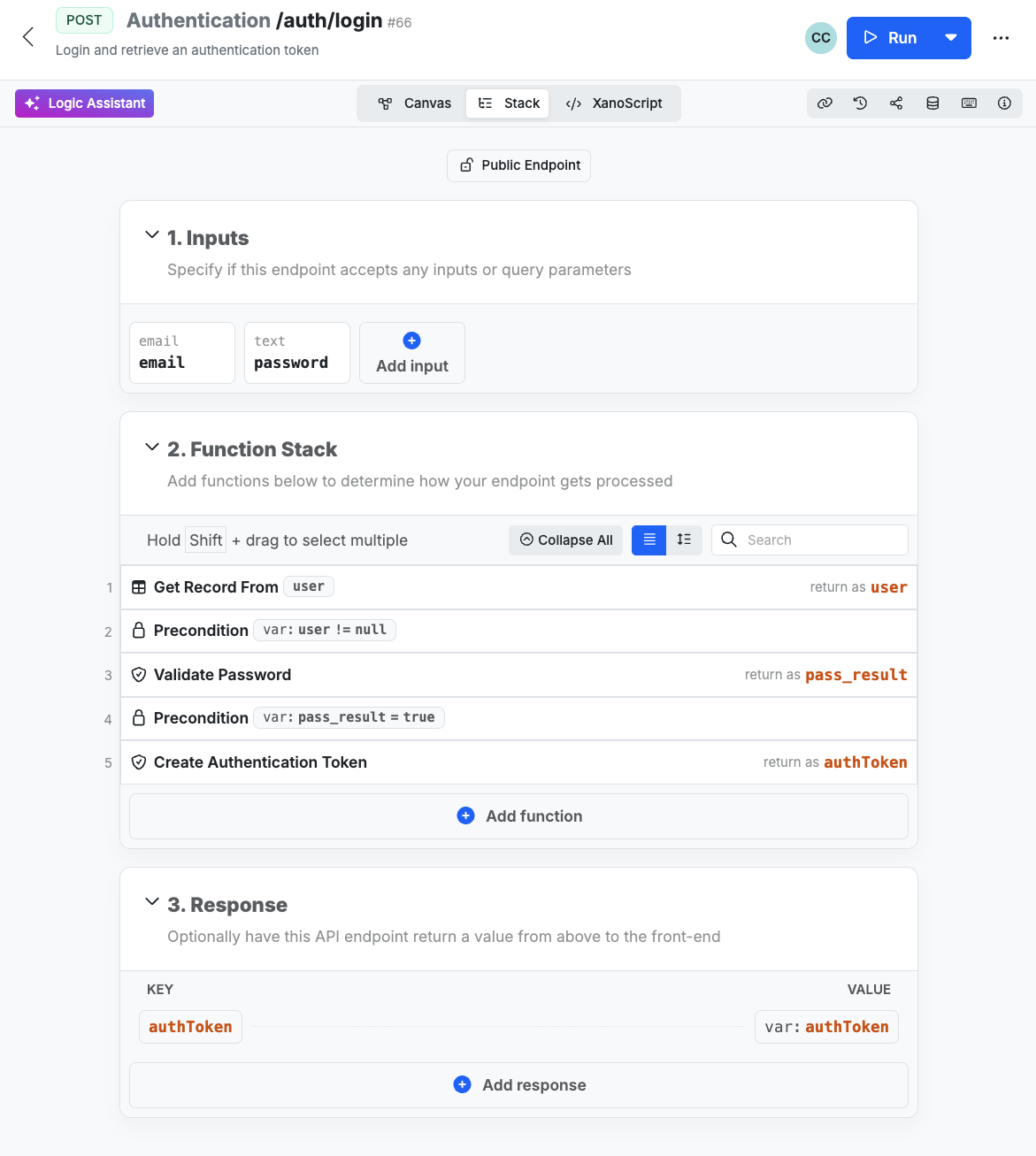
Xano calls the ordered steps that run at that address a Function Stack. Open the table after submitting a valid booking and check that the expected fields were saved. Try invalid details and confirm that they create no record.
- See a Xano Function Stack exampleThe vendor’s login example shows how the editor groups inputs, checks and the response.
How do I keep bookings and files private?
Require sign-in for private actions and check the signed-in account against the owner or allowed team before returning or changing a booking. Xano’s documented example uses an explicit match between the record and the signed-in identity.
Try the action from a second account using the first customer’s exact record. Xano’s guide lists private file storage on Pro. Check the person’s permission before issuing a temporary link. Anyone who gets the link can open the file until it expires. Verify the storage option on your plan.
Who runs the backend once my app is live?
On a hosted plan, Xano runs the backend service. You connect the app, set permissions and review changes before they reach customers. Xano also lists deployment on your own infrastructure as a Custom-plan option to arrange with its team.
Confirm which workspace and address the live app uses. The way you separate test data from live data depends on your plan and setup.
For development, Xano’s TypeScript tools can download and run Xano Engine on your own computer without a Xano account. Xano currently makes the prebuilt program free to run under provisional terms. The SDK guide says a restart or update starts with empty local records, so use disposable information.
What does Xano charge for a hosted setup?
Start by checking the plan’s limits for requests, stored records and files, team access and the features your app needs.
These are dollar amounts listed November 8, 2026. Annual figures are monthly equivalents billed for the year. Add-ons and Custom deployments can change the total. Check the checkout currency and taxes.
| Plan | Listed base price | What to check |
|---|---|---|
| Free | $0 | The plan lists a limit of 10 API requests per 20 seconds. Check request and storage limits while testing. |
| Essential | $99 per month, or $85 per month billed annually | Lists a dedicated backend, background tasks and direct database access. |
| Pro | $249 per month, or $224 per month billed annually | Check the documented private file option, capacity and workspace features you need. |
On a small screen, scroll the table sideways to read every column.
How do I recover the app after a bad change?
Xano documents instance backups for paid plans. Check the plan’s backup window and whether uploads are included. A manual backup has a separate option to include media files.
The plan page lists 7 days for Essential and 14 days for Pro. The general backup guide describes a 3-day window for paid plans. Confirm the window for your own instance. Test a restore with disposable records and files, then check sign-in and access to the restored booking and attachment. Take a fresh backup of the current instance before restoring an older copy.
Can I move my records and visual steps elsewhere?
Use a table export to copy records. Xano also documents a separate workspace archive and a way to pull the steps as text files in its XanoScript format. Decide how the next system will run those steps and identify customers.
A table export is a useful starting point. List the original files, account information, settings and logic separately. Verify what each export actually contains, and restore a small sample on the planned destination before moving customer data.
When would I add scheduled tasks or live updates?
Add a scheduled task when something needs to happen later, such as an appointment reminder. Use live updates when a screen needs to show a change while someone is looking at it.
The current Realtime setup sends messages to connected screens through channels, which are named groups for updates. Decide who can join a channel and see a message. For reminders, check the plan, what happens after a failed send and how you avoid duplicates.
Where can you learn the next steps?
- Check a second account against the same bookingUse ordinary sessions to verify sign-in, wrong-user access, unchanged records and private downloads.