Vibe coding for kids is like giving them a chemistry set instead of a chemistry textbook. They do not memorize the periodic table first. They mix things, watch what happens, build something that fizzes or glows, and the understanding comes through the doing. AI-assisted coding works the same way. Kids describe what they want to build, the AI generates the code, and they learn by steering the result toward their vision.
This is a guide for parents and teachers. If you are wondering whether your child or student should be learning this way, you are asking the right question at the right time.
The Chemistry Set, Not the Textbook
Traditional coding education follows the textbook model. Learn syntax. Memorize functions. Understand loops and conditionals. Build a calculator. Build a to-do app. Eventually, after weeks or months of foundational work, build something interesting. Most kids lose interest somewhere between "Hello World" and "for loop."
Vibe coding flips this entirely. A twelve-year-old can say "I want to make a quiz game about dinosaurs where you earn points and unlock new levels" and have a working version within an hour. The AI handles the syntax, the structure, the boring parts. The kid handles the creative vision, the testing, the iteration. They are doing real problem-solving without the gatekeeping of syntax memorization.
This confuses everyone at first because it feels like cheating. If the AI writes the code, is the kid really learning? This is the same question people asked when calculators entered math classrooms in the 1970s. The answer then, and the answer now, is that the tool changes what you need to learn, not whether you are learning.
CodaKid published their "Vibe Coding for Kids: Ultimate Guide" in early 2026, and Clemson University launched a dedicated Creative Inquiry course for students built around AI-assisted development. These are not fringe experiments. This is the educational mainstream recognizing that the way we teach coding needs to evolve alongside the tools.
85% of students already use AI coding assistants according to recent surveys. The question is not whether kids will encounter these tools. It is whether they will learn to use them thoughtfully, with guidance, or pick them up on their own without any framework for critical thinking about AI output.
That 85% number should reframe the entire conversation. Your kids are likely already using AI tools for schoolwork, creative projects, or just curiosity. Teaching vibe coding is not about introducing something new. It is about adding structure and critical thinking to something they are already doing.
What Kids Actually Learn (It Is Not What You Expect)
You might think kids learning vibe coding are just learning to talk to an AI. But actually, they are developing a set of skills that transfers far beyond coding.
Problem decomposition. When a kid says "I want to build a game," the AI will ask clarifying questions or produce something that does not match their vision. They learn to break their idea into smaller, specific pieces. "I want a game" becomes "I want a grid of cards that flip when you click them, and matching pairs stay revealed." That is problem decomposition, and it is foundational to every technical and creative discipline.
Iterative thinking. The first version the AI produces is never perfect. Kids learn to test, identify what is wrong, describe the fix, and try again. This feedback loop (build, test, refine, repeat) is the core skill of every engineer, designer, and scientist. They are learning it through something that feels like play.
Critical evaluation. Not everything the AI produces works correctly. Kids learn to spot when something looks right but behaves wrong. They develop a healthy skepticism about AI output that will serve them in every future interaction with AI systems, not just coding.
Communication precision. Describing what you want to an AI requires clarity. "Make it better" does not work. "Make the button bigger, change the color to blue, and add a sound effect when you click it" does work. Kids learn that precise communication produces better results, a skill every teacher wishes they could instill more effectively.
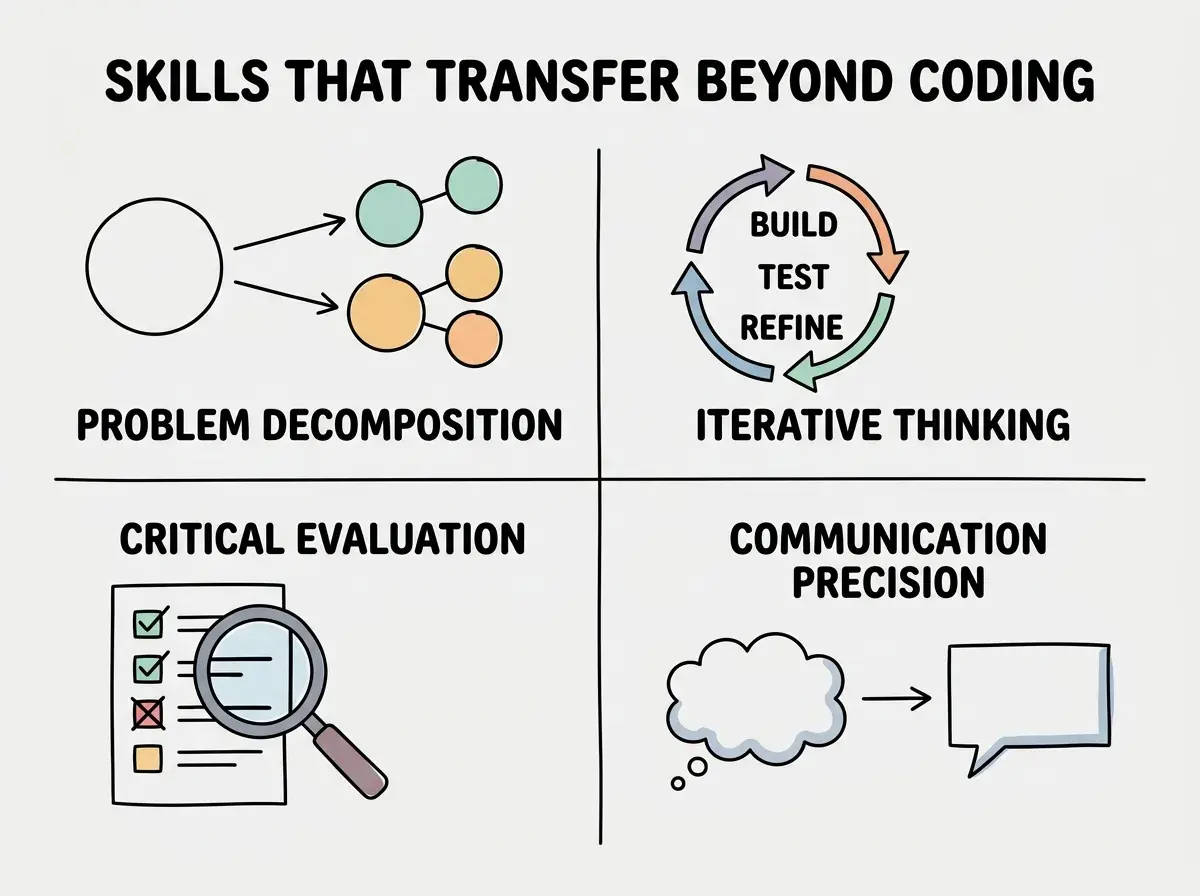
The chemistry set analogy holds here too. Kids playing with a chemistry set are not becoming chemists. They are learning the scientific method (hypothesize, test, observe, adjust) through a medium that captivates them. Vibe coding teaches computational thinking through a medium that captivates them. The specific code does not matter. The thinking patterns do.
Age-Appropriate Starting Points
Not every age group should approach vibe coding the same way. Here is a practical breakdown.
Ages 10 to 12. Start with visual, self-contained projects. Quiz games, simple animations, interactive stories. The goal is creative expression, not technical depth. Let them describe what they want and marvel at the result. Encourage them to change things ("What if the background was dark? What if there were more levels?"). Keep sessions to 30 to 45 minutes. The AI tool does most of the heavy lifting, and that is fine.
Ages 13 to 15. Introduce the concept of "reading" what the AI produced. They do not need to understand every line, but they should start recognizing patterns. "See how it repeats this block for each question? That is a loop." This is where the chemistry set starts becoming chemistry class, but the set is still on the table. Projects can be more ambitious: simple websites, basic mobile apps, tools that solve a real problem they have.
Ages 16 to 18. This is where vibe coding becomes a genuine career skill. Teens at this age can build portfolio-worthy projects. They should be learning to evaluate AI code for correctness, asking why the AI made certain choices, and starting to understand the fundamentals underneath. The goal shifts from "build cool things" to "build cool things and understand enough to fix them when they break."
Understand the fundamentals so you can guide the young people in your life.
Start learningFor teachers, the key insight is that vibe coding does not replace your curriculum. It accelerates the motivating part (building something real) so students arrive at the conceptual part (understanding how it works) with genuine curiosity instead of obligation.
The Risks Worth Discussing
Every chemistry set comes with safety warnings, and vibe coding is no different. Here are the risks that parents and teachers should address directly.
Over-reliance without understanding. If a kid uses AI to build projects for years without ever peeking underneath, they will struggle when something breaks and they cannot diagnose why. The fix is simple: periodically ask "what do you think this part does?" and encourage them to explain their projects, not just demonstrate them.
Privacy and data sharing. Kids will be typing prompts into AI tools. Teach them the same internet safety principles that apply everywhere: do not share real names, addresses, or school names in prompts. Use age-appropriate AI tools with privacy protections built in.
The illusion of mastery. A kid who builds an impressive app with AI might believe they deeply understand software development. The remedy is honest conversation: "You built something amazing. The AI helped with the code part. Your creativity and problem-solving made it work. Those skills are real."
Screen time concerns. Vibe coding is active, creative screen time, more like drawing on a tablet than scrolling social media. But it still counts toward the total, and balance matters.
Treating vibe coding as a replacement for foundational computer science education. It is a complement, not a substitute. Kids should still learn basic concepts like variables, loops, and logic, but vibe coding gives them a reason to care about those concepts because they have already seen them in action inside projects they built themselves.
The biggest risk is actually inaction. Digital natives with no legacy habits to unlearn are in the best position to develop a healthy, productive relationship with AI tools. If they do not learn critical AI interaction skills now, in a guided setting, they will develop habits on their own without the framework for evaluating quality, questioning output, or understanding limitations.
What the Classroom Looks Like
Clemson University's approach offers a useful model that scales down to younger students. Their Creative Inquiry course has students building real projects with AI assistance from day one, then reflecting on what the AI did well, what it got wrong, and why.
A practical classroom exercise: give every student the same project brief ("Build a weather dashboard for your city"). Let them each use AI tools to build it. Then compare the results. Why did some versions work better? What prompts produced better output? Students learn that the quality of their thinking determines the quality of the output.
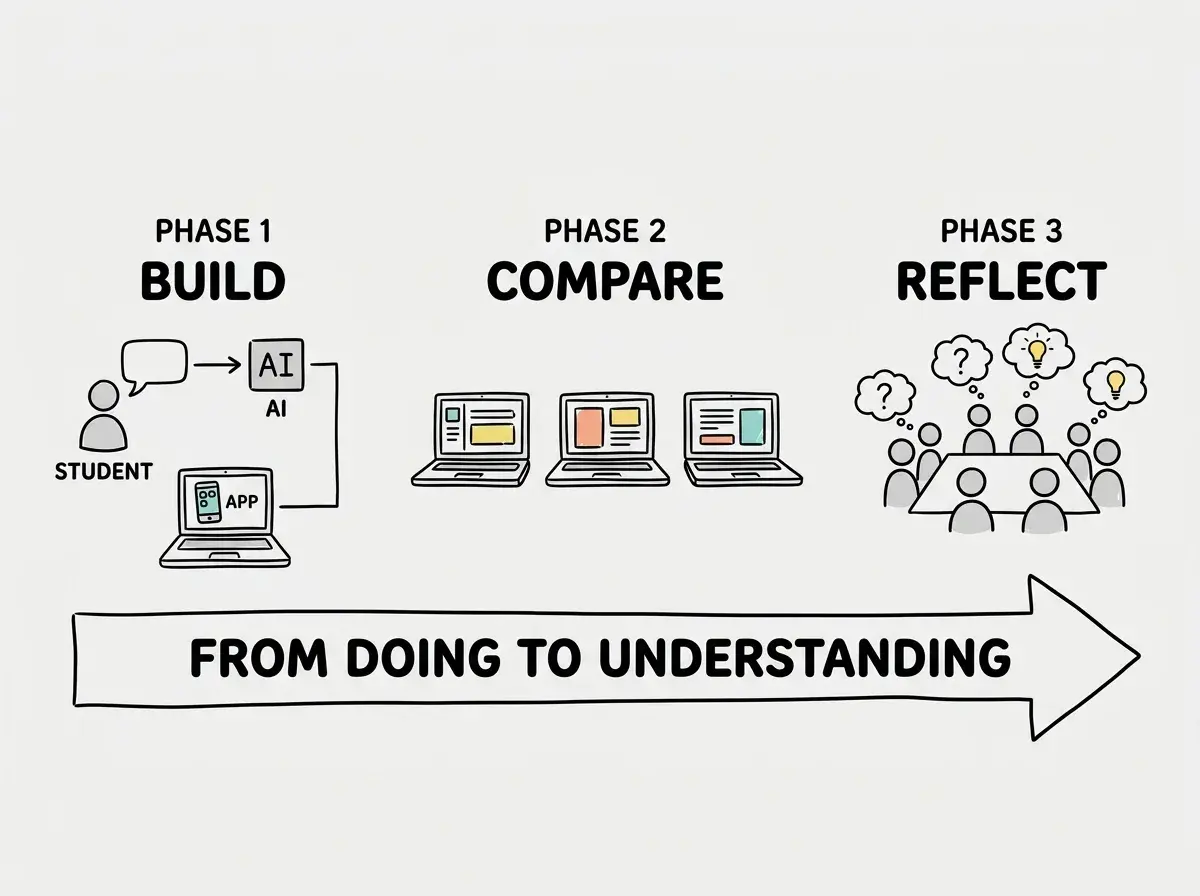
For parents doing this at home, the structure is simpler. Sit with your kid while they build something. Ask questions. "What are you trying to make?" "Why did you tell the AI that?" "Does this match what you imagined?" "What would you change?" Your curiosity teaches them reflection, which is the ingredient that turns play into learning.
Dig deeper
A few hand-picked sources if you want to go further.
What This Means For You
Vibe coding for kids is not about creating child programmers. It is about giving young people a creative tool that teaches problem-solving, communication, and critical thinking through projects they genuinely want to build. The chemistry set does not make every kid a chemist, but it makes science tangible, exciting, and real.
- If you are a founder: The next generation of employees and collaborators will have grown up with AI as a default tool. Understanding how they learned (project-first, AI-assisted, iteration-heavy) will help you build teams and products that match their strengths. Start paying attention to how education is shifting, because it will shape your future talent pipeline.
- If you are a career changer: The skills that kids are learning through vibe coding are the same skills you need. Problem decomposition, iterative thinking, precise communication with AI tools. If a twelve-year-old can learn this through a dinosaur quiz game, you can learn it through the projects that matter to your career transition. Lower the bar for your first project and let curiosity drive the learning.
- If you are a student: You are in the best position of anyone reading this. You have no legacy habits to unlearn, no muscle memory pulling you back to older tools, and no professional identity wrapped up in doing things the old way. Start building things that interest you. Use AI to get there faster. Then, when the fundamentals start clicking, you will understand them in context instead of in a vacuum. That is how lasting knowledge works.
Whether you are learning yourself or guiding someone else, start with the fundamentals.
Get started