Replit is an online IDE that has evolved into one of the most capable AI app building platforms available. Its standout feature is Replit Agent, an AI that does not just generate code snippets but autonomously builds entire applications, installing packages, creating files, configuring databases, and deploying to a live URL. If you want the closest thing to telling a computer "build me an app" and having it actually work, Replit Agent is the most complete implementation of that idea right now. It is also the platform where cost surprises can add up fastest if you are not paying attention.
I have used Replit extensively, including Agent mode, and participated in their vibe coding community. Here is the honest breakdown.
What Replit Is and Why It Matters
Replit started as a simple online coding environment where you could write and run code in the browser without installing anything. Over the years, it has grown into a full development platform with file management, package installation, database hosting, deployment, collaboration tools, and now AI that builds software autonomously.
The key difference between Replit and tools like Bolt.new or Lovable is scope. Bolt runs a JavaScript environment in your browser tab. Lovable generates React apps connected to Supabase. Replit runs actual cloud VMs that execute Python, Node.js, Java, Go, Ruby, and dozens of other languages with a real Linux terminal and real deployment infrastructure.
You might think an online IDE would feel like a watered-down version of a desktop editor. But actually, Replit's environment is capable enough that thousands of developers use it as their primary platform. The 1,170+ submissions to Replit's Vibe Code Game Jam prove that people build real, complex projects entirely within it. Collaborative features let multiple people code in the same project simultaneously, making it popular for education and team prototyping.
How Replit Agent Works
Replit Agent is the feature that transforms Replit from an IDE into an app builder. When you activate Agent mode, you describe what you want to build, and the AI takes over. It does not just generate code and hand it to you. It actively works through the entire development process.
Here is exactly what I did to test Agent on a real project. I told it: "Build a personal finance tracker where I can log expenses by category, set monthly budgets per category, and see a dashboard showing spending vs budget with charts. Use Python with Flask for the backend and SQLite for the database." Agent started working autonomously. It created the project structure, wrote the Flask application, set up SQLite tables, built HTML templates with Chart.js for the dashboard, added forms for logging expenses, and configured the whole thing to run. It took about three minutes, and when it finished, I had a working application with a live URL I could share.
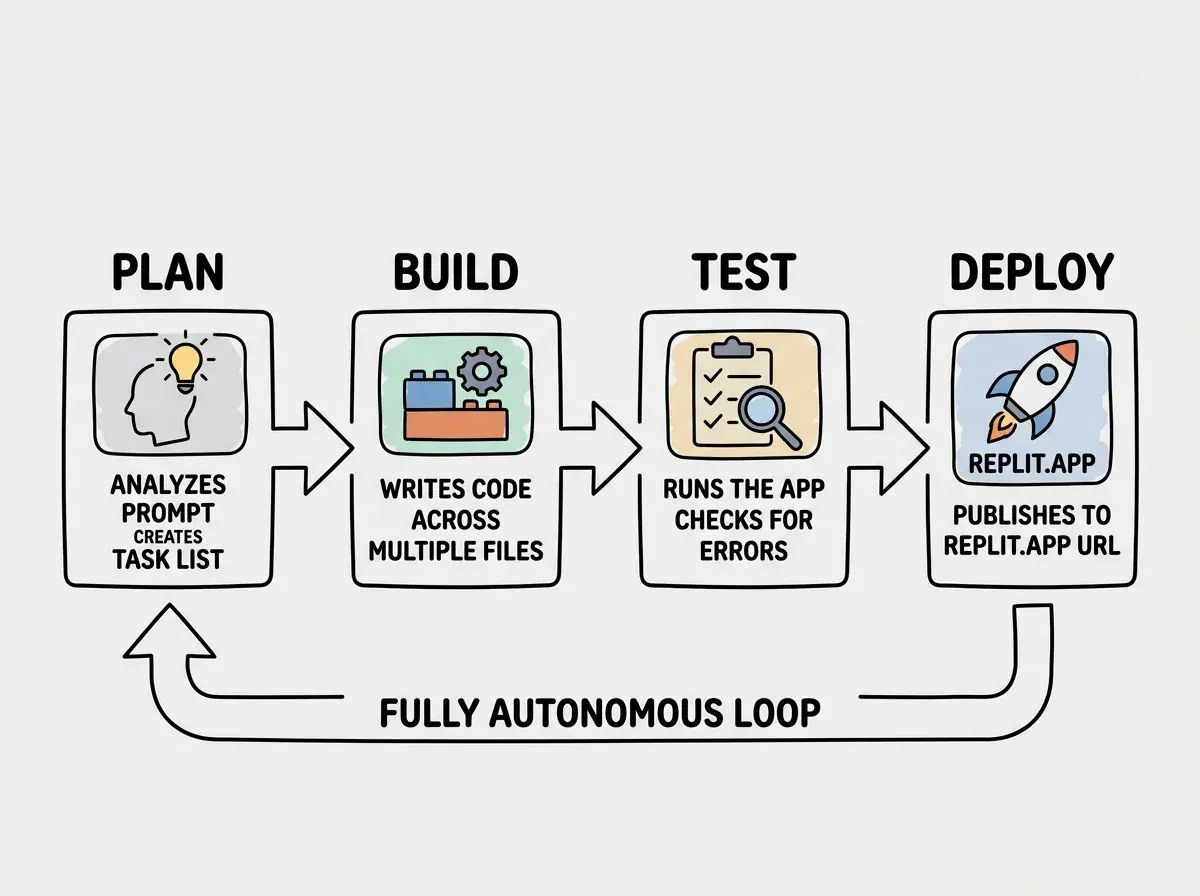
The Agent does not stop at initial generation. When it encounters errors, it reads the error messages, diagnoses the problem, and attempts fixes. I watched it install a missing package, realize the import syntax was wrong, correct it, and restart the server without any input from me. This self-correcting behavior makes Agent feel like a junior developer working through a task rather than a tool that produces output and stops.
That said, Agent's autonomy is a double-edged sword. Sometimes it goes down rabbit holes, trying fix after fix for a fundamentally wrong approach. It can burn through cycles and money when the right answer is to take a completely different direction. Knowing when to interrupt and redirect is an important skill.
Is Replit a Good AI Tool for Building Apps
Yes, with important context about what kinds of apps and at what cost. Replit Agent can build functional web applications, APIs, bots, data tools, and simple SaaS products. The breadth of languages and frameworks it supports means you are not limited to one tech stack. If your project needs Python, it works. If it needs Node.js, it works. If you need both talking to each other, Agent can set that up too.
Where Replit excels compared to other AI builders is the combination of autonomous building plus a real development environment. After Agent builds your app, you have full access to every file, the terminal, the package manager, and the deployment system. You can manually edit anything, run commands, install additional tools, and use Replit as a traditional IDE. This hybrid of AI building and manual development is something Lovable and Bolt.new do not match.
The community aspect matters too. Replit has a large, active user base that shares projects, templates, and knowledge. For students and beginners, this ecosystem provides examples to learn from and people to collaborate with. The Vibe Code Game Jam with its 1,170+ submissions showed how engaged the community is with AI-assisted building.
The realistic limitation is that Agent-built apps tend to work well for the happy path but need human attention for edge cases, security, and performance. Agent will build you a working app, but making it production-ready still requires review and refinement.
Pricing and the Cost Trap
Replit's pricing has three tiers. The free tier gives you limited compute and limited AI usage, enough to explore the platform but not enough for serious building. The Hacker tier at $25 per month gives you more compute, more storage, and access to AI features including Agent. The Pro tier at $45 per month increases limits further and adds features like faster machines and more storage.
The cost trap comes from compute charges beyond your plan's allocation. Agent uses compute while it works, and complex projects where Agent iterates through multiple attempts consume resources quickly. One widely shared story involved someone accumulating $607.70 in charges over just a few days of intensive Agent use, with Agent trying different approaches repeatedly and each attempt consuming compute.
Set spending limits in your Replit account settings before you start using Agent. Replit lets you cap your monthly spending, and you should use this feature from day one. Decide what you are willing to spend, set the limit, and let Agent work within that boundary rather than discovering the bill afterward.
This is not unique to Replit. All AI app builders have cost dynamics that can spiral. But Replit's combination of autonomous Agent behavior (it keeps working and consuming resources without asking permission) and compute-based pricing (you pay for the machine time Agent uses, not just the prompts) makes it particularly easy to accumulate unexpected charges.
The value proposition at the base price is reasonable. $25 per month for an online IDE with AI assistance, database hosting, and deployment is competitive. The risk is in the variable costs that sit on top of that base price.
Deployment and Hosting
One of Replit's genuine strengths is integrated deployment. When your app is ready, you click a button and it goes live on a Replit-hosted URL. There is no separate hosting provider to configure, no CI/CD pipeline to set up, and no DNS to manage. For getting a working app in front of users quickly, this is hard to beat.
Replit also offers custom domain support on paid plans, and the hosting infrastructure handles automatic HTTPS.
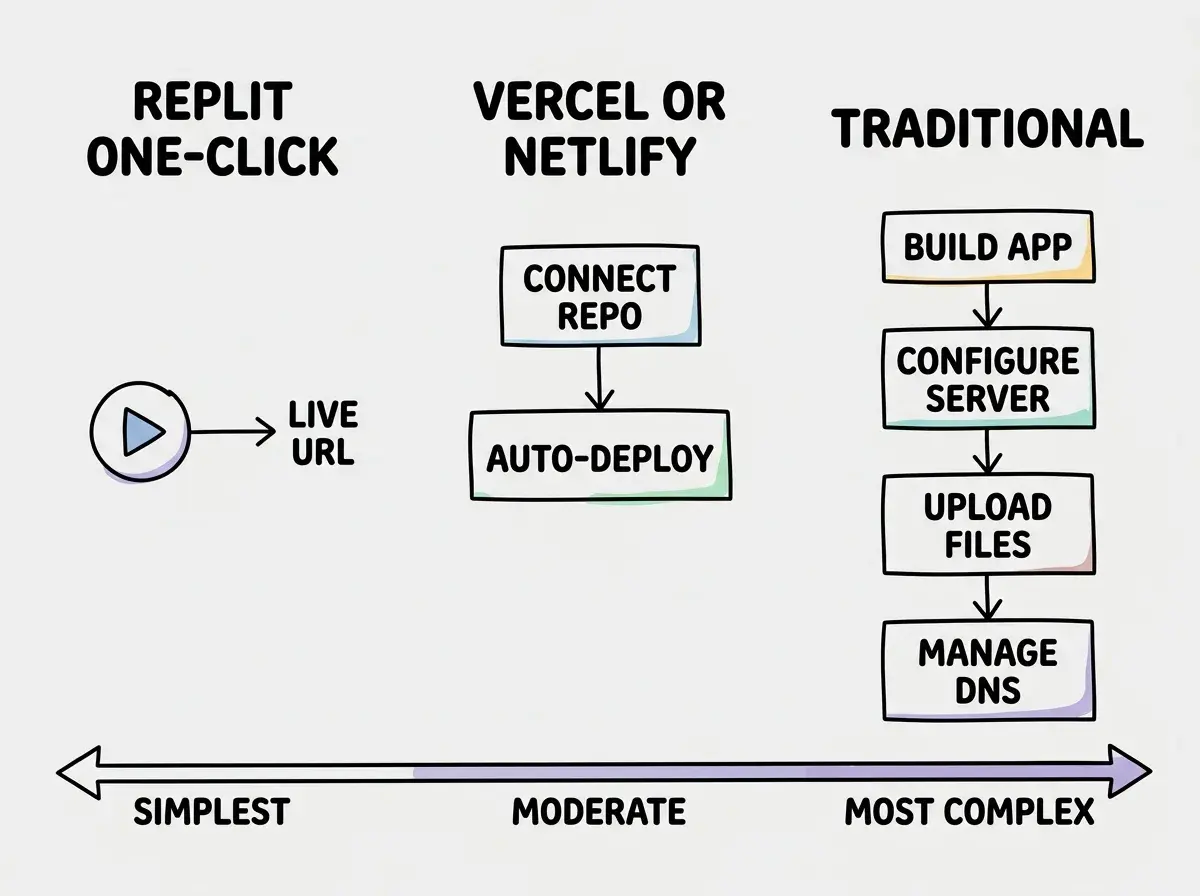
The tradeoff is that your app's performance and uptime depend on Replit's servers. For prototypes and early-stage products, this is fine. For production apps with significant traffic, you may want to export your code and deploy to dedicated infrastructure later.
What Is Better Than Replit AI
This depends entirely on what you prioritize. No single tool is universally better, but there are clear tradeoffs.
For a pure no-code experience, Lovable is simpler. For the fastest browser-based prototyping with full code visibility, Bolt.new is slightly faster. For professional developers, Cursor or Claude Code integrate better with existing workflows.
Where Replit wins is the combination of breadth and autonomy. It supports more languages than any other AI builder, Agent works more independently, and hosting lives in the same platform. For someone who wants everything in one place, Replit is the most complete option.
Letting Agent run indefinitely on complex problems without intervening. When Agent has been working on the same error for more than a few minutes, it is often cheaper and faster to stop it, read the error yourself, and give it a more specific instruction about how to fix the problem. Autonomous does not mean unsupervised.
Limitations Worth Knowing
Performance ceiling. Replit's cloud machines are adequate for development and light production use, but they are not equivalent to dedicated servers. Apps that need significant compute power, handle heavy traffic, or require large amounts of memory will eventually need to move to dedicated infrastructure.
Agent reliability varies. Agent handles common patterns (CRUD apps, REST APIs, standard web frameworks) reliably. Less common requirements (unusual libraries, complex integrations, niche frameworks) produce inconsistent results. The AI works best when you are building something it has seen many examples of in its training data.
Vendor dependency. While your code is downloadable, Replit-specific features like the built-in database do not transfer directly. Using standard databases like PostgreSQL or SQLite from the start avoids this lock-in.
Learn the core concepts that apply across every tool.
Start hereWhat This Means For You
Replit has built the most complete single-platform experience for AI-assisted app building. The combination of Agent's autonomy, multi-language support, and integrated hosting is unmatched. The cost dynamics require attention and active management, but the underlying platform is genuinely powerful.
- If you are a founder building an MVP: Replit Agent can get you from idea to deployed app in hours, not weeks. Use it for the initial build, set a spending limit to control costs, and plan to migrate to dedicated infrastructure if the product gains traction. The ability to deploy instantly and share a URL with potential users or investors is a significant advantage over tools that require separate hosting setup.
- If you are a career changer: Replit's online environment means you can learn and build from any computer without installing development tools. Start with the free tier to learn the basics, then upgrade when you are ready for Agent. The community and templates give you starting points, and the real IDE experience teaches skills that transfer to professional development environments.
- If you are a student: Replit is one of the best platforms for learning to code and building projects for your portfolio. The free tier is sufficient for coursework and small projects. Agent can help you build more ambitious projects for hackathons and portfolio pieces. The collaborative features make it easy to work on group projects, and the one-click deployment means you always have a live link to show.
See how Replit compares to other tools vibe coders use.
Browse tools