Bolt.new is an AI app builder that generates and runs full-stack applications entirely inside your browser. No local setup, no terminal, no downloading anything. You describe what you want, and Bolt creates a working app you can see, click, and test immediately. It is one of the fastest ways to go from idea to working prototype, and it is also one of the easiest ways to accidentally spend over $1,000 if you do not understand how its token-based pricing works. This guide covers both sides honestly.
I have built multiple projects with Bolt.new to test its limits, and the experience is genuinely impressive until you check your token balance. Here is everything you need to know.
Bolt.new is the fastest tool for going from idea to working in-browser prototype, and the easiest tool to overspend on. The free tier lasts about one or two small projects. The Pro plan at $50 per month is realistic for daily building. The cost spiral is real and is why most users churn. Pick Bolt if speed of demo matters; skip it if you have a tight monthly budget or need a long-running production app.
What Bolt.new Is and How It Works
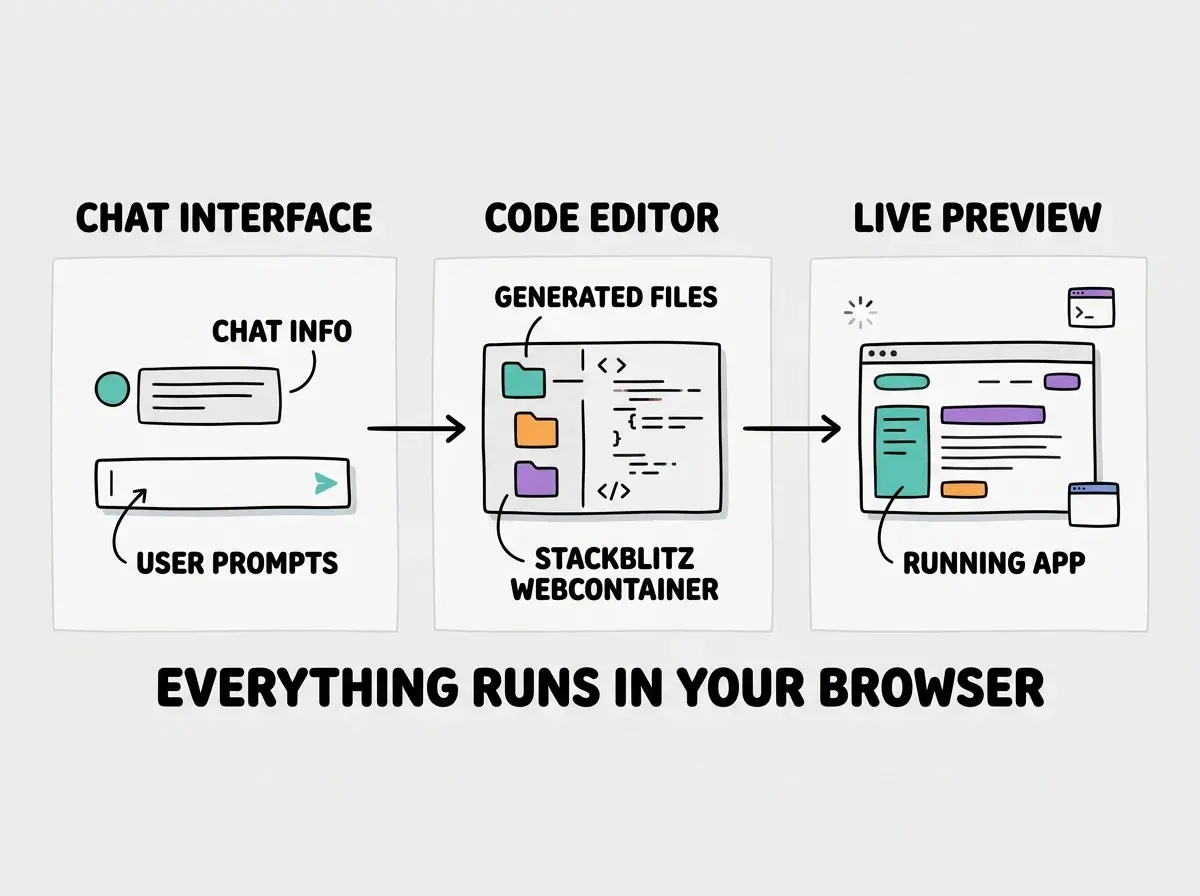
Bolt.new is built on top of StackBlitz's WebContainers technology, which runs a full Node.js environment inside your browser. This is not a simplified sandbox or a mock preview. It is an actual development environment with a real file system, package manager, and development server running entirely in the browser tab. When Bolt generates code, it writes real files, installs real npm packages, and starts a real dev server that you can interact with.
You start by describing your app in a prompt, and Bolt generates the code across multiple files, installs dependencies, and shows you a live preview alongside the code. You can chat with the AI to make changes, or you can edit the code directly in the built-in editor. This hybrid approach is one of Bolt's key differentiators. It works for both non-technical users who want to stay in the chat and developers who want to jump into the code when needed.
You might think running a full development environment in the browser would be slow and limited. But actually, StackBlitz's WebContainers handle React, Next.js, Vue, Svelte, Express servers, and most Node.js packages without issues. Performance is comparable to local development for small to medium projects. It struggles only with very large dependency trees or packages requiring native system binaries.
Getting Started With Bolt.new
Go to bolt.new and you can start building without creating an account. The free tier gives you a limited number of tokens to experiment with, which is enough to generate one or two simple apps and understand how the workflow feels.
Here is exactly what I did for my first Bolt project. I typed: "Build a habit tracker app where users can add daily habits, check them off each day, and see a weekly streak calendar. Use React with a clean, minimal design." Bolt generated a complete React application with components for the habit list, daily checkboxes, and a streak visualization. It installed the dependencies, started the dev server, and I was clicking through a working app in about forty-five seconds.
The iterative loop is smooth. You ask for changes, the AI modifies the relevant files, and the preview updates. "Add a dark mode toggle." "Make the streak calendar show the last 30 days instead of 7." "Add local storage so habits persist between sessions." Each request takes a few seconds, and you see the results immediately.
Where things get interesting is the code editor. Unlike Lovable, which keeps you entirely in the chat interface, Bolt shows you all the generated files. You can read them, modify them directly, and the preview reflects your manual changes too. For people learning to code, this transparency is invaluable. For developers, it means you can fix things the AI gets wrong without trying to explain the fix through natural language.
Is Bolt.new Free
Yes, Bolt.new has a free tier, but it is extremely limited. You get a small number of tokens that deplete quickly, especially with complex prompts or large projects. Most users burn through the free allocation within their first or second project.
The paid plans are $20 per month for the Starter tier and $50 per month for the Pro tier. The key difference is the number of tokens included each month. Starter gives you enough for casual use, maybe a few projects per month with moderate iteration. Pro gives you a larger allocation suitable for regular building.
The important thing to understand is that Bolt.new uses a token-based consumption model, not an unlimited usage model. Every prompt you send, every AI response generated, and every code edit the AI makes consumes tokens from your monthly allocation. Longer conversations, larger projects, and more complex requests burn through tokens faster. This is fundamentally different from tools like Cursor that give you a fixed number of requests per month regardless of size.
How Much Does Bolt.new Actually Cost
This is where Bolt.new's reputation gets complicated. The $20 and $50 monthly prices look reasonable on the surface, but many users report spending dramatically more than expected.
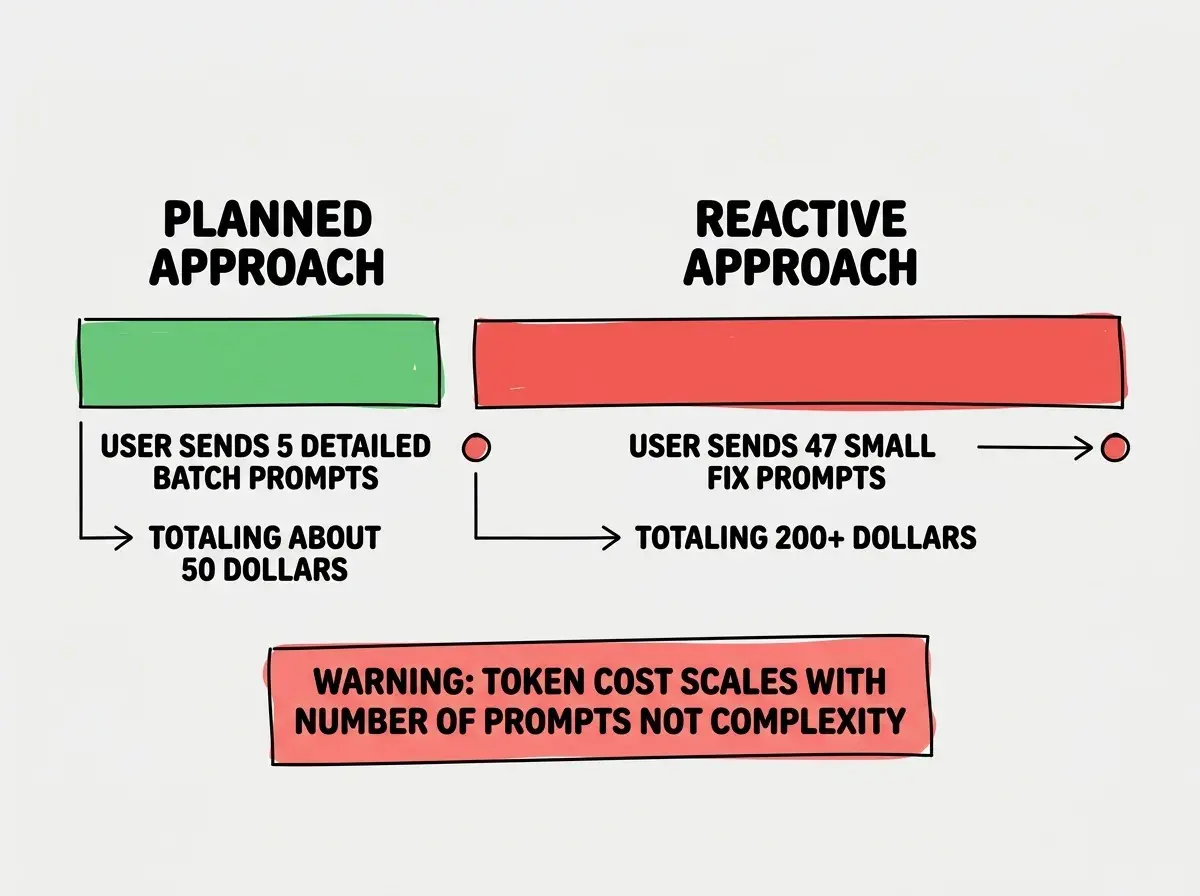
The problem is the token consumption model. When you are building something and iterating quickly, firing off prompts like "fix this bug" and "now add this feature" and "actually change that layout," each message eats tokens. A single extended building session can consume a significant portion of your monthly allocation. Users on forums and social media regularly report spending over $1,000 on a single project because they kept hitting their token limit and purchasing additional tokens to keep going.
The psychology makes this worse. You are in the middle of building something, it is almost working, you just need one more fix, and your tokens are gone. The option to buy more tokens is right there. It is the same dynamic that makes mobile game microtransactions effective. Each individual purchase feels small, but they accumulate fast.
Before starting a Bolt.new project, set a hard budget for yourself and track your token consumption actively. Decide in advance how much you are willing to spend, and stop when you hit that number. The sunk cost fallacy is real, and "just one more prompt" is how $50 becomes $500.
The most cost-effective approach is to plan your prompts carefully. Instead of firing off twenty small requests, write one detailed prompt that describes multiple features at once. Think of each prompt as an expense and optimize accordingly. Users who batch their instructions spend dramatically less than users who iterate through rapid-fire messages.
Features That Stand Out
Multi-model support. Bolt.new lets you choose from several AI models, each with different strengths. Some are faster but less capable. Others are slower but handle complex logic better. Being able to switch models mid-project based on what you need is a genuine advantage over tools locked to a single AI provider.
One-click deployment. Bolt includes built-in deployment to platforms like Netlify. When your app is ready, you can deploy it without leaving the browser. No CLI tools, no configuration files, no build pipeline to set up. For non-technical users, this removes one of the biggest barriers between "working prototype" and "live on the internet."
Full code access. Everything Bolt generates is visible and editable. You can download the entire project as a zip file and continue development locally. This means you are never locked in. If you outgrow Bolt or want to switch to a traditional development workflow, your code comes with you.
Limitations and Gotchas
Backend complexity is limited. Bolt works best for frontend-heavy applications. While it can generate Express servers and API routes, complex backend architectures with multiple services, job queues, WebSockets, and database migrations push beyond what the in-browser environment handles smoothly. If your app is primarily a backend system, Bolt is not the right tool.
Token consumption is unpredictable. There is no reliable way to estimate how many tokens a project will require before you start. A simple landing page might use a fraction of your monthly allocation. A full-stack app with authentication, database integration, and complex UI could exhaust it several times over. This unpredictability makes budgeting difficult.
Long conversations degrade quality. As your chat history grows, the AI loses context and starts making inconsistent decisions. You might find it reintroducing bugs you already fixed. Starting fresh conversations periodically helps, but you lose accumulated project context.
No native mobile apps. Bolt.new is a web application builder. You can build responsive web apps and PWAs, but not native iOS or Android apps.
Starting to build without a clear, detailed plan and iterating through dozens of small prompts. This is the direct path to the cost spiral that catches most users off guard. Write a complete description of your app, break it into three to five major features, and prompt for each feature in a single detailed message rather than twenty small ones.
Frequently Asked Questions
When to Use Bolt.new vs Alternatives
Bolt.new is the right choice when you want to build a web application quickly, you value seeing the code alongside the output, and you are disciplined about token management. It is particularly good for frontend-heavy projects, rapid prototyping, and situations where you want to download the code and continue developing locally.
Choose Lovable if you are non-technical and prefer a purely chat-based experience. Choose Replit if you want a full IDE with deployment built in. Choose Cursor if you are already a developer who wants AI in a professional editor.
The honest take is this. Bolt.new has the smoothest in-browser development experience of any AI app builder, but its pricing model punishes the exploratory iteration that building software actually requires.
Understand the fundamentals before choosing your first tool.
Start hereWhat This Means For You
Bolt.new proves that building software in the browser is not just possible but genuinely productive. The StackBlitz foundation is technically impressive, and the AI integration is smooth. The pricing model is the primary concern, not the technology.
- If you are a founder building a prototype: Bolt.new is one of the fastest paths from idea to working demo. Use it for investor demos, user testing prototypes, and proof-of-concept builds. Set a firm token budget before you start, plan your prompts in advance, and download the code once you are happy with the result so you can continue development locally without ongoing costs.
- If you are a career changer learning to code: Bolt.new's code visibility makes it a powerful learning tool. Generate an app, then read through every file the AI created. Modify things manually and see what breaks. This hands-on exploration teaches you how applications are structured in a way that tutorials alone cannot. Just be mindful of the free tier limits.
- If you are a student: The free tier is good for quick experiments and hackathon prototypes. The ability to deploy with one click is perfect for class presentations and portfolio projects. Focus on planning your prompts carefully to maximize what you build within the free allocation.
See how Bolt.new compares to other builders in the vibe coding ecosystem.
Browse tools