Most apps you build with AI coding tools work the same way. The user clicks something, the app sends a request, the server responds, and the page updates. That is the mailbox model. You walk to the mailbox, check if anything is there, and walk back. It works, but you only know about new mail when you bother to check. Real-time data with WebSockets flips that model entirely. Instead of checking the mailbox, you have a walkie-talkie with an open channel. The moment something happens on the server, your app hears about it instantly.
With 92% of developers now using AI tools daily, you can scaffold a real-time feature in minutes. But the AI will not tell you when real-time is the right tool and when it is overkill. That decision is on you, and getting it wrong means either a sluggish user experience or a needlessly complex architecture. This tutorial covers both sides so you can make that call confidently.
How WebSockets Actually Work
HTTP follows a strict request-response cycle. Your client asks a question, the server answers, and the connection closes. Every new question opens a new connection. Like calling someone, asking one thing, hanging up, and calling back for the next question.
WebSockets start as a normal HTTP request but then "upgrade" the connection into a persistent, two-way channel. Once open, both the client and server can send messages at any time without waiting for the other side to ask first. That is the walkie-talkie. You open the channel once and leave it open. Messages flow in both directions whenever either side has something to say.
The client sends an HTTP request with an Upgrade: websocket header. The server responds with a 101 status code (Switching Protocols), and from that point the connection stays open. No more handshakes, no more HTTP overhead per message.
// Browser-native WebSocket API
const socket = new WebSocket('wss://your-app.com/ws');

socket.onopen = () => {
  console.log('Channel open');
  socket.send(JSON.stringify({ type: 'subscribe', channel: 'orders' }));
};

socket.onmessage = (event) => {
  const data = JSON.parse(event.data);
  // Update your UI instantly
  updateOrderList(data);
};

socket.onclose = () => {
  console.log('Channel closed, reconnecting...');
  // Implement reconnection logic here
};
That is the raw API. It works, but managing reconnection, authentication, message routing, and scaling across multiple server instances gets complicated fast. That is why most teams reach for a managed service or library instead of rolling their own WebSocket server.
Supabase Realtime for Database Subscriptions
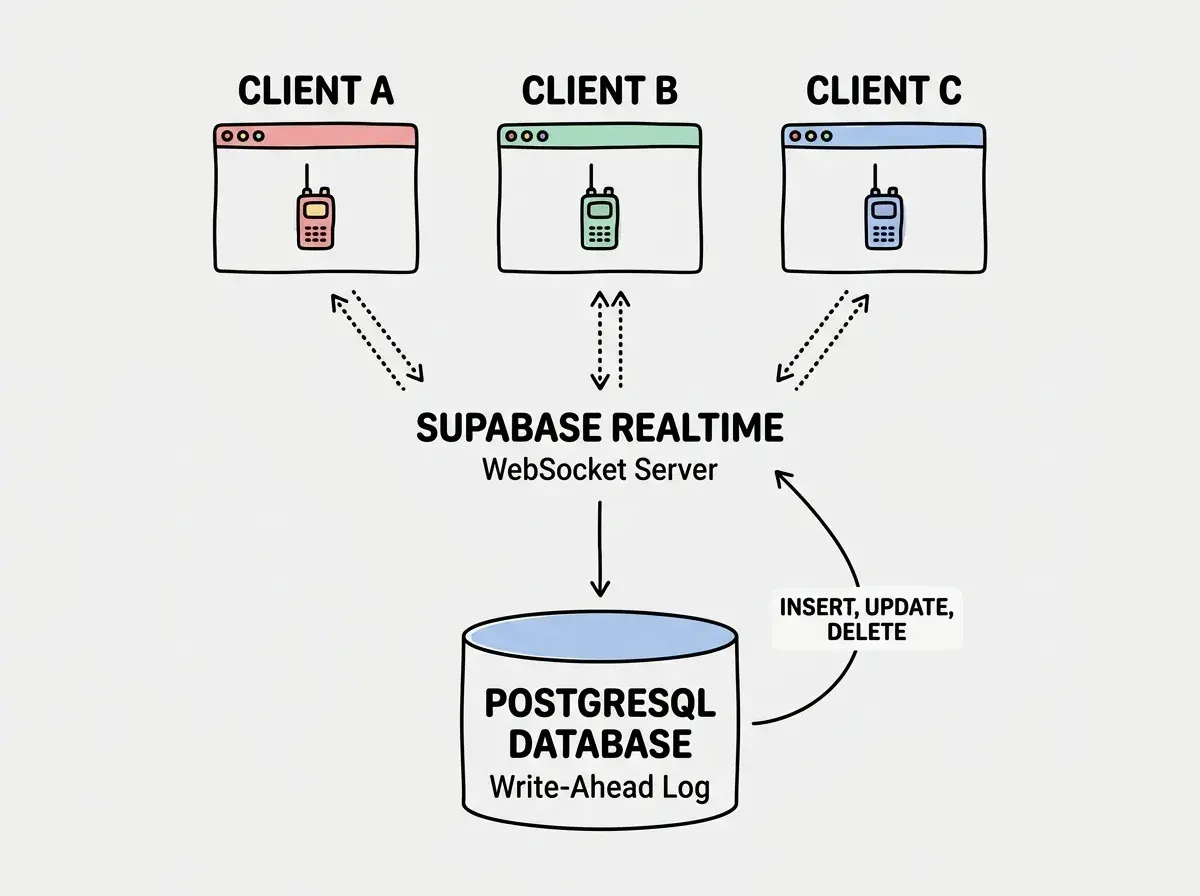
If your app already uses Supabase (and a lot of AI-built apps do), you get real-time subscriptions essentially for free. Supabase Realtime listens to your PostgreSQL database's Write-Ahead Log (WAL) and pushes changes to subscribed clients over WebSockets. You do not need to build or manage a WebSocket server at all.
Think of it this way. Instead of you checking the mailbox for new database rows, Supabase hands you a walkie-talkie that broadcasts every INSERT, UPDATE, and DELETE as it happens.
import { createClient } from '@supabase/supabase-js';

const supabase = createClient(SUPABASE_URL, SUPABASE_ANON_KEY);

// Subscribe to all changes on the "messages" table
const channel = supabase
  .channel('room-messages')
  .on(
    'postgres_changes',
    { event: '*', schema: 'public', table: 'messages' },
    (payload) => {
      if (payload.eventType === 'INSERT') {
        addMessageToChat(payload.new);
      } else if (payload.eventType === 'UPDATE') {
        updateMessageInChat(payload.new);
      } else if (payload.eventType === 'DELETE') {
        removeMessageFromChat(payload.old);
      }
    }
  )
  .subscribe();
You can filter subscriptions down to specific rows using the filter parameter. If your app has chat rooms, you do not want every client receiving messages from every room. Filter by the room ID so each client only hears traffic on the channels that matter to them.
// Only listen for messages in a specific room
const channel = supabase
  .channel('room-42')
  .on(
    'postgres_changes',
    {
      event: 'INSERT',
      schema: 'public',
      table: 'messages',
      filter: 'room_id=eq.42',
    },
    (payload) => addMessageToChat(payload.new)
  )
  .subscribe();
Supabase Realtime also supports Presence (tracking who is online) and Broadcast (sending arbitrary messages between clients without touching the database). For most CRUD-heavy apps, postgres_changes is the feature you want. But if you are building collaborative features like cursor tracking or typing indicators, Presence and Broadcast cover those use cases without database writes.
Supabase Realtime works by listening to PostgreSQL's built-in change log. This means any change to your database, whether it comes from your app, an admin panel, a cron job, or a raw SQL query, automatically broadcasts to subscribed clients. You do not need to add publish calls throughout your codebase. The database itself is the source of truth for real-time events.
Pusher, Ably, and Other Managed Alternatives
Supabase Realtime is excellent when your data lives in Supabase. But if you use a different database, or if you need features like message history, guaranteed delivery, or global edge infrastructure, dedicated real-time services are worth evaluating.
Pusher is the most established option. It provides channels, presence, and event-based messaging with client libraries for every major platform. Your server triggers events on channels, subscribed clients receive them, and Pusher handles all the connection management and scaling.
Ably positions itself as the enterprise-grade alternative with stronger delivery guarantees, message history and replay, and a global edge network. If you are building something where missed messages are unacceptable (financial data, collaboration tools, IoT), Ably's reliability features matter.
Socket.IO is the self-hosted option. It is a library, not a service, so you run your own WebSocket server. It handles fallbacks, rooms, namespaces, and reconnection automatically. The trade-off is managing the infrastructure yourself, which means thinking about scaling, load balancing, and sticky sessions.
For most AI-built apps in the early stage, Supabase Realtime or Pusher gets you to production fastest. You can always migrate to Ably or Socket.IO later if your requirements outgrow the simpler options.
Subscription Patterns That Scale
The way you structure your real-time subscriptions determines whether your app stays fast as it grows or grinds to a halt under load. Here are the patterns that work.
Subscribe narrow, not wide. Never subscribe to an entire table without filters. A chat app should subscribe to the current room, not all rooms. A dashboard should subscribe to the current user's data, not all users' data. Wide subscriptions waste bandwidth and create security risks.
Unsubscribe on unmount. Every subscription you open consumes a connection on the server. In React, clean up subscriptions in a useEffect return function. In Vue, use onUnmounted. Failing to clean up creates connection leaks that slow down both the client and the server.
// React pattern for real-time subscriptions
useEffect(() => {
  const channel = supabase
    .channel(`user-${userId}`)
    .on('postgres_changes', {
      event: '*',
      schema: 'public',
      table: 'notifications',
      filter: `user_id=eq.${userId}`,
    }, handleNotification)
    .subscribe();

  return () => {
    supabase.removeChannel(channel);
  };
}, [userId]);
Optimistic updates with server reconciliation. When a user sends a message, add it to the UI immediately (optimistic update), then let the real-time subscription confirm or correct it when the server-side INSERT broadcasts back. This eliminates perceived latency while keeping the UI consistent with the database.
Batch updates for high-frequency data. If your subscription receives dozens of events per second (stock tickers, IoT sensors, game state), do not re-render on every message. Buffer events and update the UI on a requestAnimationFrame tick or a short debounce interval.
Opening a new WebSocket subscription every time a component re-renders. This happens when you put your subscription setup inside a useEffect without proper dependency tracking, or when you forget the cleanup function. Each orphaned subscription stays open, and after a few navigation events your app has dozens of duplicate connections all receiving the same data. Always include a cleanup function and use stable identifiers in your dependency array.
When to Use Real-Time vs Polling
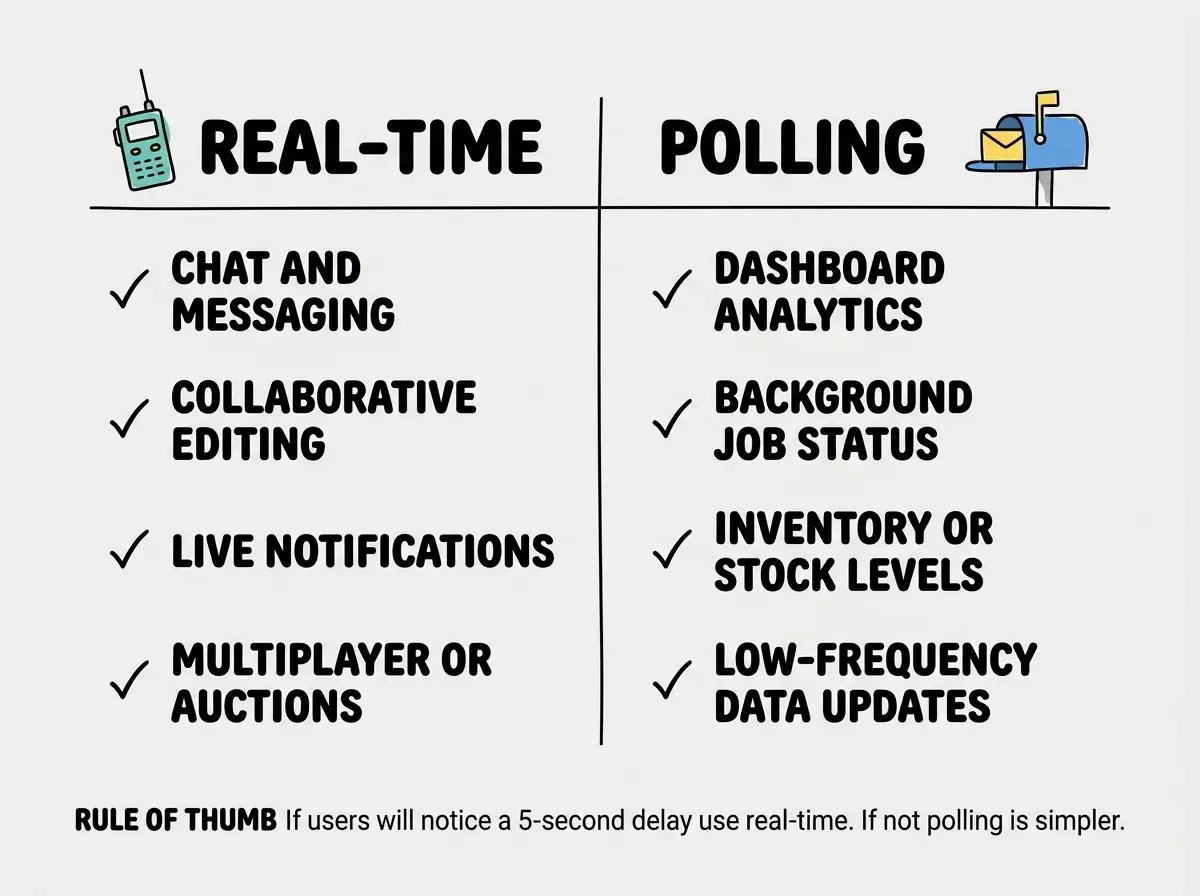
Not everything needs a walkie-talkie. Sometimes checking the mailbox every few seconds is the right answer.
Use real-time when updates need to appear within one second of the change. Chat messages, collaborative editing, live notifications, multiplayer game state, auction bidding. Users expect instant feedback in these contexts, and even a two-second delay feels broken.
Use polling when data changes infrequently and near-instant updates are not critical. Dashboard analytics that refresh every 30 seconds, background job status that updates every 5 seconds, inventory counts that shift a few times per hour. Polling with a reasonable interval is simpler to implement, simpler to debug, and does not require persistent connections.
There is a middle ground too. Server-Sent Events (SSE) give you a one-way stream from server to client over plain HTTP. No WebSocket upgrade, no bidirectional channel. SSE works well for live feeds, progress indicators, and any scenario where the client only listens.
The cost factor. Managed real-time services charge based on concurrent connections and messages. A chat app with 10,000 daily active users generates significantly more real-time traffic (and cost) than a dashboard with the same user count. Sometimes a hybrid approach, real-time for chat and polling for analytics, is the most cost-effective design.
Learn the AI-powered workflow that gets apps to production fast.
Start buildingPutting It Together
When you prompt your AI tool to add real-time features, include four specific requirements: filtered subscriptions, cleanup on unmount, optimistic updates, and error handling for disconnections. Those four details produce production-quality real-time code on the first generation. Skip any of them and you will be debugging connection leaks or stale UI within a week.
What This Means For You
Real-time data transforms static CRUD apps into dynamic, collaborative experiences. The walkie-talkie model, once you wire it up, makes your app feel alive in a way that polling and manual refreshes never will.
- If you are adding real-time to an existing Supabase app: Start with a single subscription on the highest-value table (notifications, messages, or order status). Get the pattern working end-to-end with proper cleanup before expanding to other tables. Supabase Realtime requires enabling replication for each table in the dashboard, so do not forget that step.
- If you are evaluating real-time services for a new project: Match the service to your database. Supabase Realtime if you are on Supabase, Pusher or Ably if you need database-agnostic event broadcasting. Avoid self-hosting Socket.IO unless you have specific infrastructure requirements that managed services cannot meet.
- If you are deciding between real-time and polling: Apply the five-second rule. If your users would notice and care about a five-second delay in receiving an update, use real-time. If not, polling is simpler and cheaper. Most apps benefit from a hybrid approach where a few high-value features use real-time and everything else polls on a comfortable interval.
Explore more build tutorials for AI-powered apps.
See all tutorials