Imagine a Google Sheet where everyone on your team can see changes the instant someone types in a cell. No refreshing. No "save" button. Someone adds a row in Tokyo and it appears on your screen in Brooklyn before you finish your sip of coffee. Firebase works the same way, except instead of a spreadsheet, it is the backend for your app. Your users open the app, data flows in real time, and you never have to manage a server. This Firebase tutorial for vibe coding walks you through setting it all up, even if you have never touched a backend before.
92% of developers now use AI tools daily, and a huge chunk of them are building apps that need live, syncing data. Chat features. Collaborative dashboards. Live notifications. Firebase handles all of that, and when you pair it with an AI coding assistant, the setup becomes surprisingly fast.
What Firebase Actually Is (And Is Not)
Firebase is a Backend-as-a-Service (BaaS) from Google. Think of it as a pre-built backend that comes with authentication, a real-time database, file storage, hosting, and analytics, all wired together and ready to go. You do not spin up a server, configure a database engine, or write API endpoints from scratch. You connect your app to Firebase, and Firebase handles the infrastructure.
Going back to the spreadsheet analogy, a traditional backend is like building your own spreadsheet software from scratch. You design the grid, write the save logic, build the sharing system, and host the whole thing. Firebase is like using Google Sheets directly. The grid, the saving, the sharing, the hosting, it is all done for you. You just structure your data and start building.
Is Firebase beginner friendly? Absolutely. Google designed it to reduce the number of moving parts between "I have an idea" and "my app works." The documentation is solid, the free tier is generous, and the SDK handles most of the heavy lifting. For vibe coders working with AI assistants, Firebase is one of the fastest paths to a working backend because your AI tool already knows Firebase's patterns inside and out.
Firebase is not a database. It is an entire backend platform. Authentication, real-time data, file storage, and hosting all come bundled together. For most vibe-coded apps, Firebase replaces the need for a separate server, a separate database, and a separate hosting provider. One platform, one dashboard, one bill.
And for anyone worried about longevity, let's address this directly. Is Firebase being discontinued? No. Google has invested heavily in Firebase over the past decade, integrating it deeper into Google Cloud with each update. Firebase had a major rebrand and feature expansion in 2023, and it continues to receive regular updates. It is one of Google's flagship developer products with millions of active projects. Your app is safe here.
Setting Up Your First Firebase Project
The setup takes about ten minutes. Here is the step-by-step process, written so you can follow along with your AI assistant.
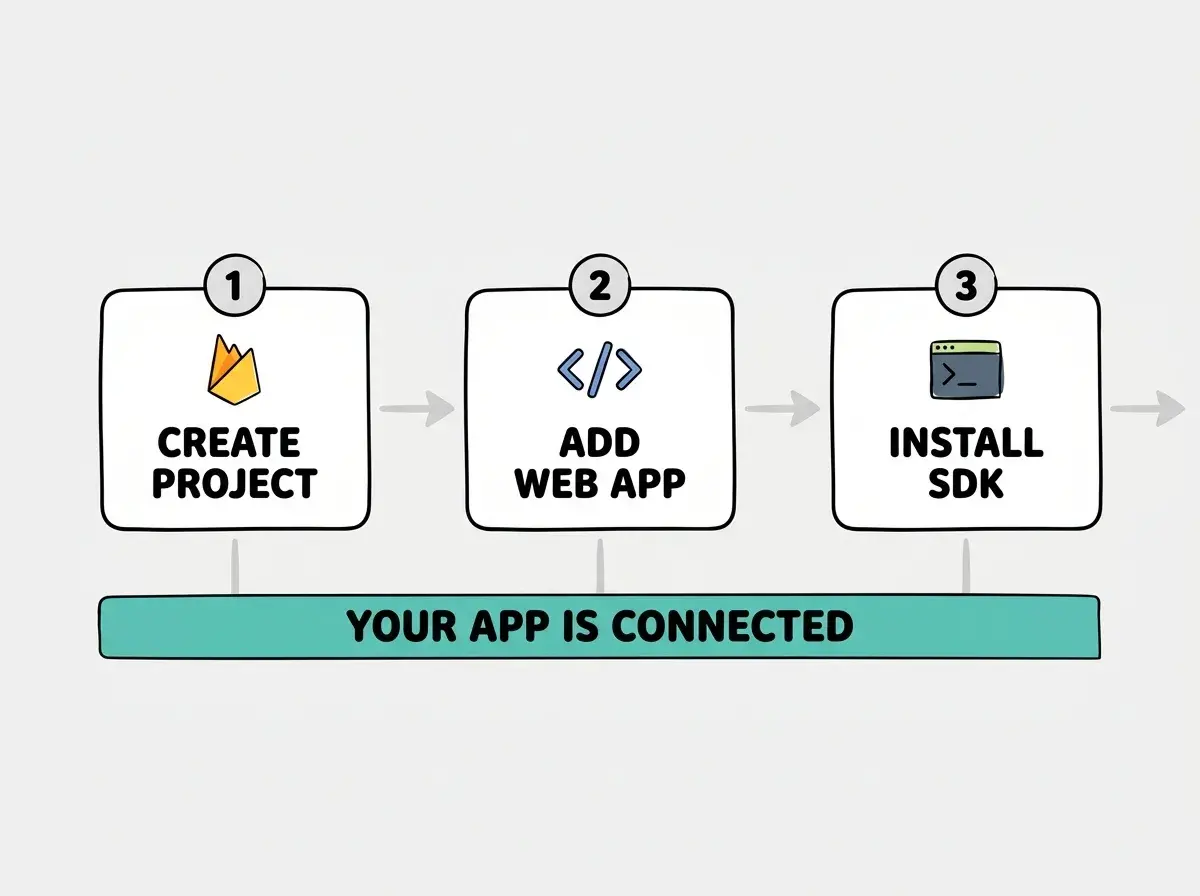
Step 1, create the project. Go to console.firebase.google.com and click "Create a project." Give it a name (something like "my-vibe-app"), accept the defaults, and wait about thirty seconds for Google to provision everything. You now have a Firebase project with its own dashboard.
Step 2, add a web app. In your project dashboard, click the web icon (it looks like angle brackets: </>). Register your app with a nickname. Firebase will show you a configuration object with API keys and project identifiers. Copy this entire block.
Step 3, install the SDK. Tell your AI assistant: "Install the Firebase JavaScript SDK and initialize it with this config." Paste the config object. Your AI tool will create an initialization file, typically lib/firebase.ts, that exports the Firebase app instance.
That is it for setup. Think of this like opening a new Google Sheet and sharing the link with your app. The connection is live.
Adding Authentication in Five Minutes
Most apps need user accounts, and Firebase Authentication is the fastest way to add them. Instead of building a login system from scratch (password hashing, session management, email verification), you tell Firebase which sign-in methods you want and it handles the rest.
In your Firebase console, go to Authentication and click "Get started." Enable the sign-in providers you want. Email/password is the simplest. Google sign-in is the most popular with users. You can always add more later.
Now tell your AI assistant: "Add Firebase Authentication to my app with Google sign-in. Create a login page with a 'Sign in with Google' button, and protect the dashboard route so only authenticated users can access it."
Your AI tool will generate the auth logic, the login UI, and a route guard. When a user clicks "Sign in with Google," Firebase opens a popup, handles the OAuth flow, and returns a user object with their name, email, and profile photo. Your app never sees their password. Firebase manages the entire auth lifecycle.
This is where the spreadsheet analogy extends nicely. Authentication is like controlling who has edit access to your Google Sheet. Firebase handles the permissions layer so your data stays protected, and you do not have to build that access system yourself.
Building With the Real-Time Database
This is the feature that makes Firebase special. The Realtime Database (and its newer sibling, Cloud Firestore) lets your app listen for changes instead of constantly asking "is there new data?"
Traditional databases work on a request-response model. Your app asks "give me the latest messages," the server checks, and sends them back. If someone posts a new message one second later, your app does not know until it asks again. Firebase flips this. Your app subscribes to a data path, and when anything changes at that path, Firebase pushes the update to every connected client instantly.
Tell your AI assistant: "Create a simple shared todo list using Firebase Firestore. Users should be able to add todos, mark them complete, and see updates from other users in real time without refreshing."
Your AI tool will set up a Firestore collection called something like todos, write functions to add and update documents, and use Firestore's onSnapshot listener to stream changes to the UI. When one user adds a todo, every other user's screen updates within milliseconds.
Back to the spreadsheet. Firestore's onSnapshot is exactly like having a Google Sheet open on two computers. You type in cell A1 on one machine, and it appears on the other machine immediately. That is real-time sync, and Firestore handles it at any scale.
Using the original Realtime Database when you should be using Cloud Firestore. Firebase offers two database products, and new projects should almost always use Firestore. It has better querying, scales more predictably, and structures data in collections and documents (which AI tools understand better than the Realtime Database's JSON tree). If your AI assistant sets up the Realtime Database, ask it to switch to Firestore instead.
Security Rules Matter More Than You Think
Firebase databases are open by default during development, which means anyone with your project's config could read and write data. This is fine for testing, but it is dangerous in production.
Firebase Security Rules are the access control layer. They determine who can read, write, and modify each piece of data. Tell your AI assistant: "Write Firestore security rules that only allow authenticated users to read and write their own documents in the todos collection. Each todo should have a userId field that matches the authenticated user's UID."
Your AI tool will generate a firestore.rules file. Review it carefully. The rules should check that request.auth != null (user is logged in) and that request.auth.uid == resource.data.userId (user owns the document). Deploy with firebase deploy --only firestore:rules. In spreadsheet terms, security rules are like protecting cells so each user can only edit their own rows.
Understand authentication fundamentals before you start wiring things up.
Learn the basicsDeploying Your App With Firebase Hosting
Firebase includes free hosting that works well for frontend apps. Run firebase init hosting in your project, point it to your build output folder, and then run firebase deploy. Your app gets a URL like your-project.web.app with HTTPS included automatically.
The beauty of keeping everything in Firebase is that authentication, database, and hosting all live under one roof. One dashboard to monitor, one set of credentials to manage, one billing account. When you are moving fast and iterating with AI tools, this simplicity matters more than having the theoretically "best" individual service in each category.
When Firebase Is the Right Choice (And When It Is Not)
Firebase excels at apps with real-time requirements and straightforward data models. Chat apps, collaborative tools, live dashboards, notification systems, simple SaaS products. If your data flows in real time and your team is small, Firebase will save you weeks of backend setup.
Firebase is less ideal for apps with complex relational data or heavy server-side processing. An app that joins six database tables for every page load will fight against Firestore's document model. For those use cases, a traditional backend with PostgreSQL (like Supabase) is a better fit.
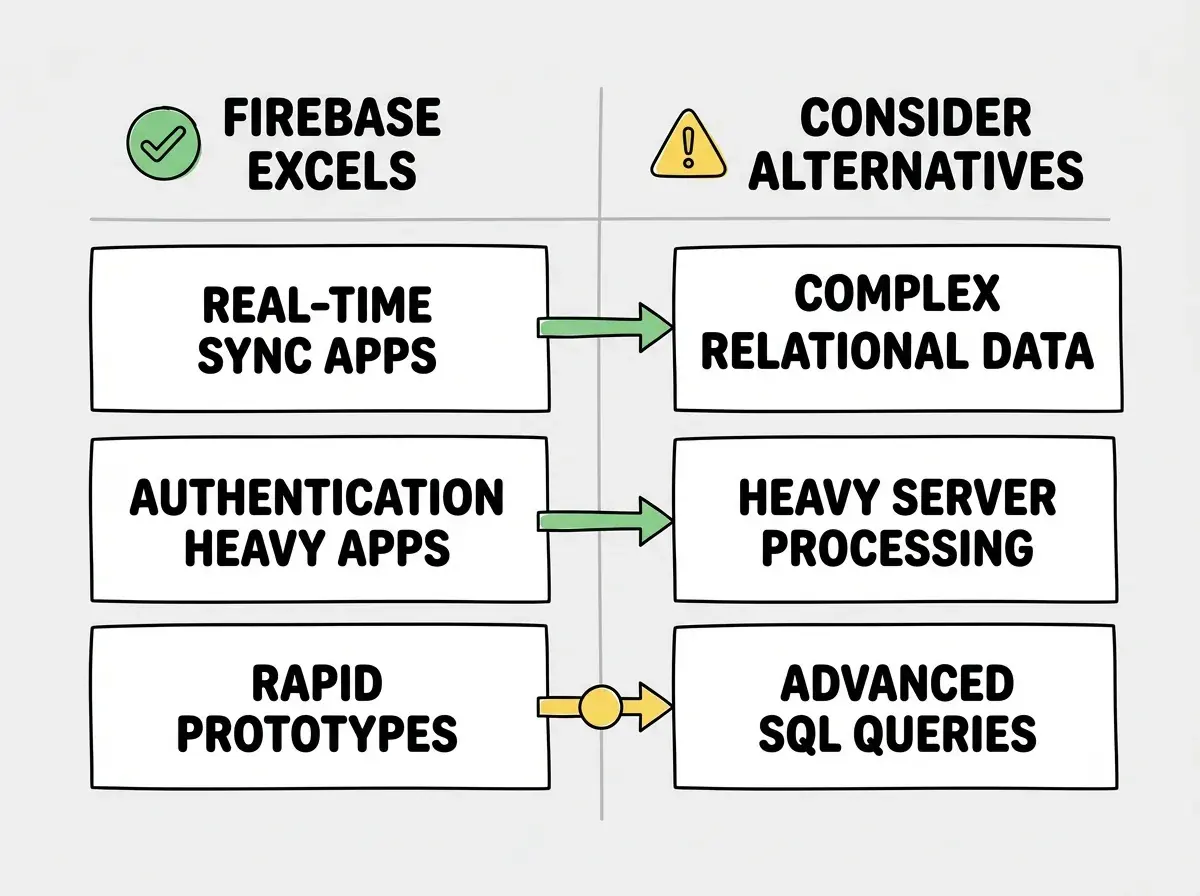
For most vibe coders building their first real app, Firebase hits the sweet spot. It is powerful enough for production traffic, simple enough to set up in an afternoon, and well-documented enough that your AI assistant can guide you through almost any problem.
What This Means For You
Firebase removes the biggest barrier between your app idea and a working product. You do not need to learn server administration, database management, or DevOps. You connect Firebase, add auth, structure your data, and ship.
- If you are a founder validating an idea, Firebase lets you go from concept to working prototype in a single weekend. Set up auth, build your core data model in Firestore, deploy to Firebase Hosting, and put it in front of users. You will learn more from five real users than from five more weeks of planning. Start today, ship by Sunday.
- If you are a career changer building portfolio projects, Firebase on your resume signals that you can build full-stack apps with modern tools. Create a real-time project (a collaborative note-taking app, a live poll system, a shared task board) and deploy it. Interviewers notice apps that actually work at a live URL, and Firebase makes that easy to demonstrate.
The spreadsheet analogy holds all the way through. Firebase is Google Sheets for your app's data, real-time, collaborative, and managed for you. The difference is that instead of rows and columns, you get documents and collections that power a real product. Open your Firebase console and start building.
Get the foundation right before you start wiring up your backend.
Start with the basics