AI testing prompts are the difference between a test suite that catches bugs and one that gives you green checkmarks while your app breaks in production. With 92% of developers using AI tools daily, most are also asking AI to write tests. The problem is that 41% of AI-generated code gets reverted, and bad tests are a major reason.
The default behavior of every AI coding tool is to write tests that pass. That sounds obvious, but it is the root of the problem. The AI optimizes for green checkmarks, not for catching bugs. It writes tests that confirm what the code already does instead of tests that verify what the code should do. The result is a test suite that looks impressive in your coverage report and catches absolutely nothing when something breaks.
Why AI Writes Bad Tests by Default
When you ask an AI to "write tests for this function," it reads the implementation, figures out what the code does, and writes tests that confirm that behavior. This creates a mirror instead of a safety net. If the code has a bug, the test confirms the bug. If the code handles edge cases incorrectly, the test confirms the incorrect handling.
There are three patterns that show up in almost every AI-generated test suite.
Happy path addiction. The AI writes five tests for the scenario where everything works perfectly and zero tests for the scenario where the database is down, the user sends malformed data, or the network times out. Real bugs live in edge cases, not in the golden path.
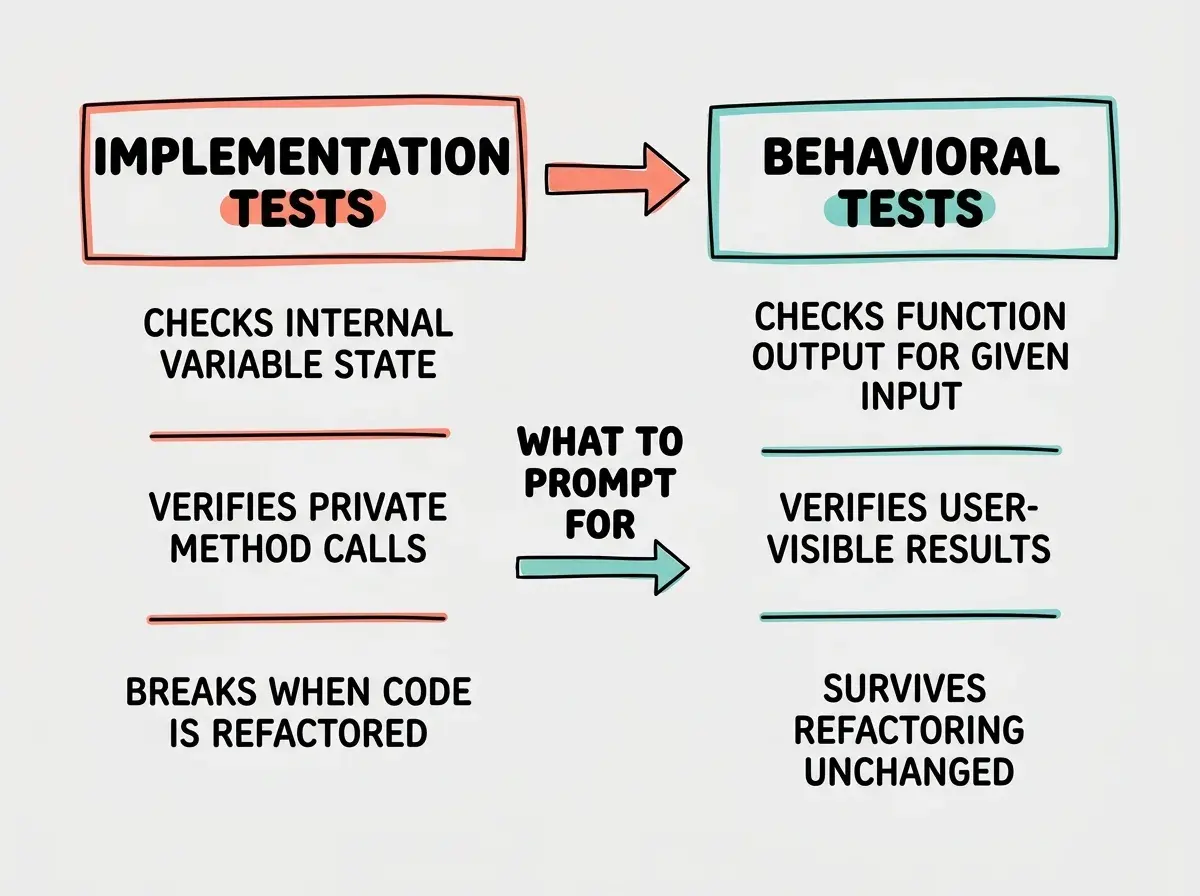
Implementation coupling. The AI peeks at your code and writes tests that depend on internal details. It tests that a specific private method was called, that a particular variable was set, or that an internal data structure has a specific shape. Change the implementation without changing the behavior and every test breaks. These tests punish refactoring instead of protecting against regressions.
Trivial assertions. The AI generates twenty tests that check things like "the function returns a value" or "the response has a status code." These tests will never fail unless the function itself is deleted. They pad your coverage number without testing anything meaningful.
AI-generated tests are dangerous because they create false confidence. A 90% coverage report full of implementation-coupled, happy-path-only tests is worse than 30% coverage of well-written behavioral tests. The coverage number makes you trust your test suite, and that trust is misplaced. Prompt for behavior verification, not coverage metrics.
The fix is not to avoid AI-generated tests. It is to change what you ask for.
Test the Behavior, Not the Implementation
The single most important principle for AI testing prompts is this: describe what the code should do from the outside, not how it does it on the inside.
Instead of "write tests for my calculateDiscount function," try "write tests that verify the discount calculation rules: 10% off orders over $100, 20% off orders over $500, no discount under $100, and discounts should never produce a negative total."
The first prompt makes the AI read your code and mirror it. The second prompt gives the AI a specification and asks it to verify that spec. The tests from the second prompt will survive a complete rewrite of the function because they test the contract, not the implementation.
This is not a new idea. Behavior-driven testing has been a best practice for decades. But it matters more now because AI tools are so good at reading implementations that they will always default to testing what the code does rather than what it should do. You have to actively steer them away from that default.
Prompt Template for Unit Tests
Here is a prompt structure that consistently produces useful unit tests from any AI coding tool.
"Write unit tests for [function/module name]. Do not read the implementation. Instead, test against these behavioral requirements: [list the requirements as bullet points]. For each requirement, include a test for the expected success case and at least one failure or edge case. Name each test so that reading the test names alone explains the full specification."
The key phrase is "do not read the implementation." This instruction forces the AI to treat your requirements as the source of truth instead of your code. Some AI tools will still glance at the implementation for syntax and import paths, which is fine. The important thing is that the test logic comes from your spec, not from reverse-engineering the code.
A concrete example: "Write unit tests for the subscription billing module. Do not base tests on the implementation. Test these rules: monthly plans bill on the same day each month, annual plans bill once per year on the signup date, failed payments retry three times over seven days, accounts are suspended after all retries fail, prorated refunds are calculated based on remaining days in the billing period. Include edge cases for leap years, months with different lengths, and timezone boundaries."
That prompt produces tests you can actually trust because they encode business rules that exist independently of the code.
Prompting for Integration Tests
Unit tests verify individual pieces. Integration tests verify that the pieces work together. AI is even worse at integration tests by default because it tends to mock everything, which defeats the purpose.
The prompt pattern for integration tests is different: "Write integration tests for [workflow or feature]. Use real [database/API/service] connections where possible. Only mock external services we do not control. Test the complete flow from [starting point] to [ending point], including the data that passes between components."
For example: "Write integration tests for the user signup flow. Use a real test database. Test the complete flow: form submission, validation, user creation in the database, welcome email trigger, and redirect to the dashboard. Verify that the user record exists in the database after signup, that the email service was called with the correct template, and that the session token is valid."
Notice what this prompt does. It explicitly tells the AI what to mock and what not to mock. Left to its own judgment, the AI would mock the database, mock the email service, and test nothing useful. By specifying "real test database" and only mocking what you cannot control, you get tests that actually exercise the integration points.
Letting AI mock everything in integration tests. The whole point of an integration test is to verify that real components work together. If you mock the database, the API, and the file system, you are writing a unit test with extra steps. Tell the AI explicitly what should be real and what should be mocked. Default to real; mock only what you must.
Edge Case Generation With "What Could Go Wrong?"
The most valuable prompt for testing is also the simplest: "What could go wrong?"
After generating your initial tests, follow up with: "Now think about what could go wrong with this feature. Consider invalid inputs, race conditions, network failures, empty states, maximum limits, concurrent users, and timezone issues. Write tests for each failure scenario you identify."
This prompt shifts the AI from confirmation mode to adversarial mode. Instead of proving the code works, it tries to find ways the code breaks. The AI is surprisingly good at this when explicitly asked, but it will never do it on its own.
You can make this even more targeted: "What happens when the payment amount is zero? What happens when two users claim the same discount code simultaneously? What happens when the database connection drops mid-transaction? What happens when the user submits the form twice in rapid succession?"
Each "what happens when" becomes a test case that catches a real bug.
Learn the prompting techniques that separate working apps from frustrating revision loops.
Explore the guidesThe Testing Pyramid for AI-Generated Code
When you use AI to build features, your testing strategy needs to account for the fact that AI-generated code is inherently less predictable than code written by a developer who understands the full system context.
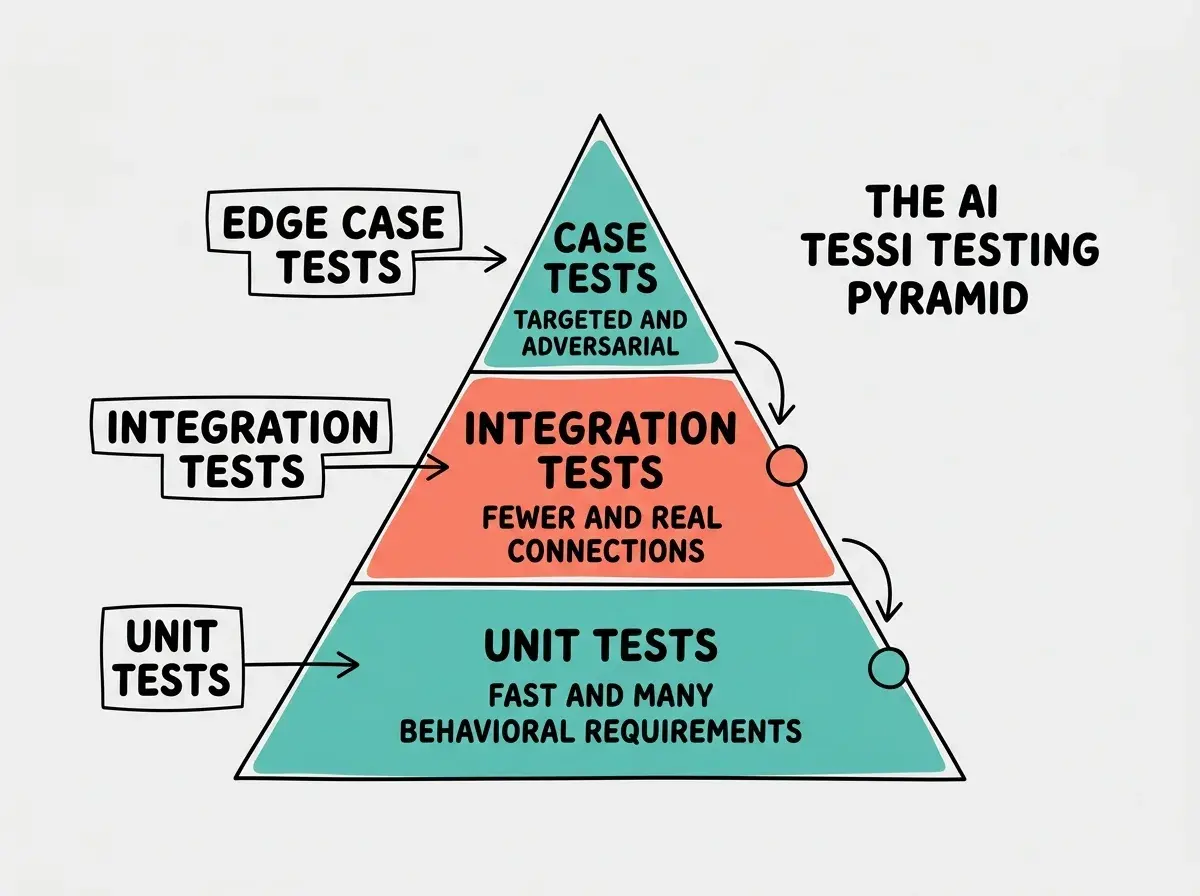
The testing pyramid for AI-generated code looks like this:
Base layer: behavioral unit tests. These are your foundation. Every function that handles business logic should have tests derived from specifications, not implementations. Generate these first, immediately after the AI writes the feature code. The prompt pattern is the unit test template from above.
Middle layer: integration tests with real connections. For every workflow that crosses boundaries (database, API, file system), write integration tests that use real connections. These catch the wiring bugs that AI is most likely to introduce, things like incorrect query syntax, wrong API endpoint paths, or mismatched data formats between services.
Top layer: adversarial edge case tests. After the base and middle layers are solid, run the "what could go wrong" prompt. These tests catch the subtle bugs that only appear under unusual conditions, the ones that slip through code review and show up in production at 2 AM.
The pyramid matters because it tells you where to invest your prompting effort. Spend 60% of your testing prompts on behavioral unit tests, 25% on integration tests, and 15% on edge cases.
One final technique: after the AI generates your tests, read the test names out loud. If they sound like "test_calculate_discount_1," the tests are probably implementation mirrors. If they sound like "monthly_orders_over_500_get_20_percent_discount," you have behavioral tests. The names tell you everything.
What This Means For You
Testing is where AI tools deliver the most value or cause the most damage, depending entirely on how you prompt. The techniques in this guide turn AI from a coverage-padding machine into a genuine quality tool.
- If you are a senior developer using AI tools: You already know how to write good tests. The value here is speed. Use the behavioral prompt template to generate scaffolding in seconds, then review and refine. The "what could go wrong" prompt surfaces edge cases you might not think of immediately. Treat AI-generated tests as useful first drafts that need human judgment before merging.
- If you are an indie hacker shipping fast: Testing feels like a luxury when you are racing to launch, but untested AI-generated code is how you end up debugging a production outage all weekend. The behavioral unit test template takes five minutes and saves hours of firefighting. Start with the critical paths: payment processing, authentication, and data mutations. If those three have solid behavioral tests, you can ship with reasonable confidence.
Put these techniques to work in your next coding session.
Start building