AI refactoring prompts require a fundamentally different approach than prompts for building new features. 92% of developers now use AI tools daily, but most of them write every prompt the same way regardless of whether they are creating something new or restructuring something that already works. That single habit is responsible for more broken codebases than any other prompting mistake.
Building a new feature is an act of creation. Refactoring is an act of preservation. The AI needs to understand which one you are asking for, because the default behavior of every AI coding tool leans heavily toward creation. When you tell an AI to "improve this code," it interprets that as permission to rewrite, reorganize, and reimagine. That is exactly what you want for new features. It is exactly what you do not want for refactoring.
Why the Same Prompts Fail for Both Tasks
When you prompt for a new feature, you want the AI to be creative. You want it to suggest architecture, pick patterns, and make decisions. A prompt like "build a notification system that supports email and push notifications" gives the AI freedom to choose the best approach. That freedom is a feature, not a bug.
Refactoring is the opposite. You have working code. Users depend on it. The behavior must stay identical while the structure changes. When you write the same style of open-ended prompt for refactoring ("clean up this authentication module"), the AI treats it as a greenfield task. It rewrites the logic, changes function signatures, renames variables, and restructures the flow. The code looks cleaner. It also breaks three things that were working fine before.
The core problem is that AI tools optimize for "impressive output." A refactored file that looks dramatically different from the input feels like a bigger accomplishment. But in refactoring, the best outcome is code that works identically while being easier to read, test, or extend. The AI does not optimize for behavioral preservation unless you explicitly tell it to.
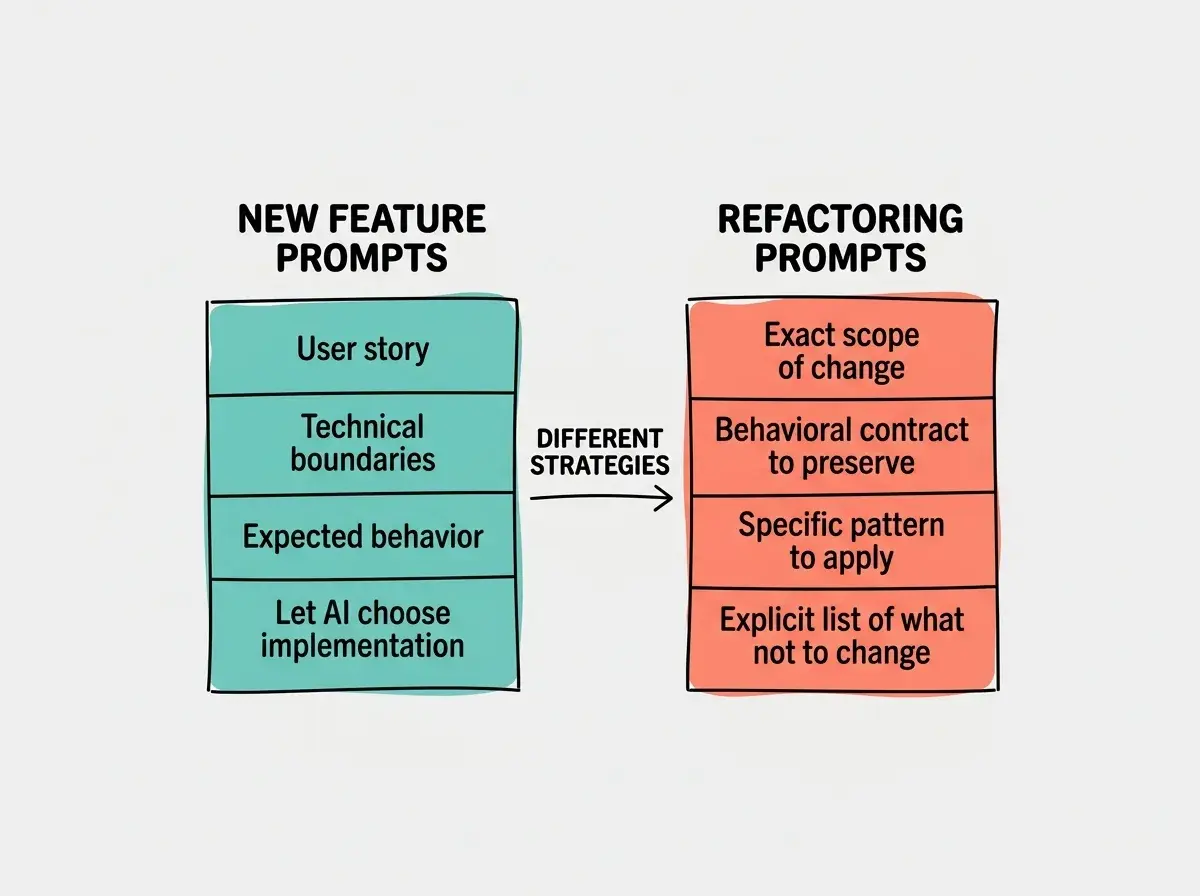
New feature prompts should maximize creative freedom. Refactoring prompts should maximize behavioral constraints. The more you restrict what the AI can change during a refactor, the safer the result. Think of refactoring prompts as a set of rules about what NOT to touch, with a narrow window of what you actually want changed.
This distinction matters more as your codebase grows. A broken refactor in a 500-line project is annoying. A broken refactor in a 50,000-line project cascades through dozens of files and takes hours to untangle.
The New Feature Prompt Pattern
New feature prompts work best when they are expansive. You want to give the AI room to make good decisions while anchoring it on the outcomes you care about. Here is the pattern that consistently produces strong results.
Start with the user story. "A user should be able to filter their transaction history by date range, category, and amount." This tells the AI what the feature needs to accomplish from the user's perspective.
Define the technical boundaries. "This project uses Next.js with TypeScript, Tailwind CSS, and Supabase for the database. The existing transactions are stored in a transactions table with columns for amount, category, date, and user_id." This prevents the AI from guessing your stack.
Describe the behavior you expect. "The filters should update results in real time without a page reload. If no transactions match, show an empty state with a message. The date range picker should default to the current month." Behavioral details eliminate the most common back-and-forth cycles.
Let the AI choose the implementation. Do not specify which React hooks to use or how to structure the SQL query unless you have a strong preference. The AI often picks reasonable approaches, and over-constraining a new feature prompt slows down the process without improving quality.
This pattern works because new features are additive. You are building on top of what exists. If the AI makes an odd architectural choice, you can adjust it in the next prompt. The risk of breaking existing functionality is low because you are adding, not changing.
The Refactoring Prompt Pattern
Refactoring prompts work best when they are narrow and explicit. Every piece of information you include should tell the AI what to preserve or what specific transformation to make. Here is the pattern.
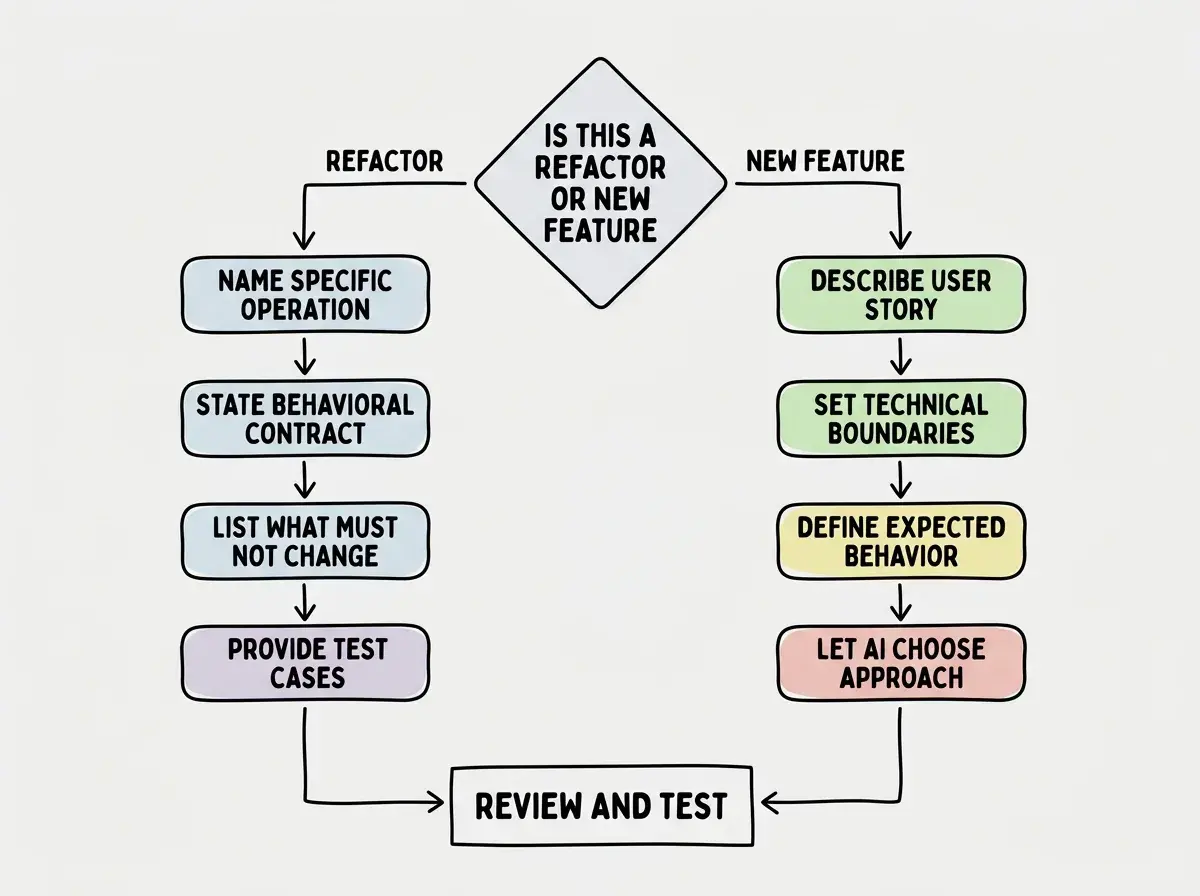
Name the exact refactoring operation. Instead of "clean up this code," say "extract the validation logic from the handleSubmit function into a separate validateFormData function." Instead of "make this more readable," say "rename the variables in this function to use descriptive names instead of single letters, but do not change any logic." Naming the specific refactoring operation eliminates interpretation.
State the behavioral contract. "This function currently accepts a user object and returns a boolean indicating whether the user has permission. After refactoring, it must still accept the same input and return the same output for every possible input." This is the single most important line in any refactoring prompt. It tells the AI that the inputs and outputs are frozen.
Specify what must not change. "Do not modify the function signature. Do not change the return type. Do not rename the exported function. Do not alter the error handling behavior." Negative constraints are more powerful than positive instructions in refactoring because they create a safety boundary.
Provide the test cases. "This function should still return true when the user has role admin, return false when the user has role viewer, and throw an AuthError when the user object is null." Concrete test cases give the AI something to verify its changes against.
Here is a complete refactoring prompt that uses this pattern:
"Refactor the processPayment function in src/services/payment.ts. Extract the fee calculation logic into a separate calculateFees function in the same file. The processPayment function must continue to accept a PaymentRequest object and return a PaymentResult. Do not change any import statements in files that use processPayment. Do not modify the error handling. The fee calculation currently handles three cases: domestic transactions (1.5%), international transactions (3.2%), and crypto transactions (0.5%). All three must produce the same fee amounts after refactoring."
Compare that to "clean up the payment processing code." Both ask for improvement. Only one is safe.
The most dangerous refactoring prompt is "improve this code" with no constraints. The AI will happily rewrite your working authentication flow, change your database query patterns, and rename your API endpoints. Every one of those changes might be individually reasonable, but together they break your application in ways that are extremely hard to debug. Always constrain refactoring prompts to one specific transformation at a time.
The Scope Problem and How to Solve It
The biggest risk in AI-assisted refactoring is scope creep. You ask the AI to rename a variable, and it also reorganizes the imports, adds type annotations, and restructures a conditional. Each change might be an improvement, but unplanned changes in a refactoring session are a liability.
The solution is to prompt for one refactoring operation per interaction. Do not combine "extract this function" with "rename these variables" with "add error handling." Each should be a separate prompt with its own behavioral contract. This feels slower but is dramatically safer. You can review each change in isolation, verify that behavior is preserved, and roll back a single step if something goes wrong.
For large refactoring projects, ask the AI to suggest a sequence of refactoring steps first. Review the plan. Then execute each step as a separate prompt with its own constraints.
Learn the frameworks that separate productive AI users from frustrated ones.
Explore morePrompt Patterns for Common Refactoring Tasks
Here are specific AI refactoring prompts for the operations you will use most often.
Extract function: "Extract the code on lines 45-62 of UserProfile.tsx into a new function called formatUserDisplayName. The new function should accept a User object and return a string. The existing code in UserProfile.tsx should call the new function. Do not change any other code in the file."
Rename for clarity: "In the function calculateTotal in cart.ts, rename the variable 'x' to 'itemPrice', 'y' to 'taxRate', and 'z' to 'discountAmount'. Do not change any logic or behavior. The function must return the same value for every possible input."
Simplify conditional logic: "The function getPermissionLevel in auth.ts has a nested if/else chain on lines 30-55. Simplify it to use early returns instead. The function must return the same permission level string for every possible combination of user role and subscription status."
Split a large file: "Split src/utils/helpers.ts into three files: src/utils/string-helpers.ts, src/utils/date-helpers.ts, and src/utils/number-helpers.ts. Move each function to the appropriate file based on what type it operates on. Update all import statements across the project that reference functions from helpers.ts. No function should change its name, signature, or behavior."
When the Lines Blur
Sometimes you need to refactor as part of building a new feature. Maybe you need to extract a shared component before you can reuse it in a new page. The key is to separate the two phases in your prompts, not combine them.
First, send the refactoring prompt with all the constraints and behavioral contracts. Verify that the refactored code works exactly as before. Then, in a new prompt, build the new feature on top of the refactored code. This two-step approach prevents the AI from trying to refactor and extend simultaneously, which breaks existing behavior while building the new thing.
Senior developers already do this instinctively. They make a refactoring commit, verify it passes tests, then make a feature commit. The same discipline applies to AI-assisted work.
Testing After AI Refactoring
No matter how precise your refactoring prompt is, you need to verify the result. Ask the AI to generate test cases before the refactoring, run them, then run them again after. If the tests pass both times, you have strong evidence that behavior was preserved.
For frontend refactoring, also click through the user flows that touch the refactored code. AI-generated refactors sometimes change subtle timing or rendering behavior that automated tests miss.
Learn the prompting techniques that experienced developers use to ship faster without breaking things.
Keep learningWhat This Means For You
The next time you open your AI coding tool, pause before you type. Ask yourself whether you are building something new or changing something that already works. If you are building, write an expansive prompt that gives the AI creative room. If you are refactoring, write a constrained prompt that locks down behavior and specifies exactly one transformation. This single habit will eliminate the most frustrating category of AI-assisted coding mistakes and save you hours of debugging broken refactors. The tools are powerful. The strategy you bring to them determines whether that power builds or breaks.