Negative prompting in AI coding means explicitly telling the model what NOT to do, and it is one of the most underused techniques in prompt engineering. With 92% of developers now using AI tools daily and 41% of AI-generated code getting reverted, the gap between useful output and wasted effort often comes down to a single skill: setting boundaries before the AI starts writing.
Most prompt advice focuses on describing what you want. Add more context. Be more specific. Give examples. That advice is solid, but it only covers half the equation. The other half is telling the AI what to avoid, what patterns to skip, and what decisions to leave alone.
Why AI Defaults to the Wrong Patterns
AI coding models are trained on millions of repositories. That training creates strong default preferences. When you ask for authentication, the AI reaches for the pattern it has seen most often. When you ask for state management, it gravitates toward whatever approach dominated its training data.
The problem is that the most common pattern is not always the right pattern for your project. localStorage for tokens is common in tutorials but terrible for production security. The any type in TypeScript is everywhere in beginner code but defeats the purpose of type safety. Inline styles appear in thousands of Stack Overflow answers but create maintenance nightmares in real applications.
Positive prompts ("build authentication with JWT") tell the AI what to build. Negative prompts ("do NOT store tokens in localStorage") tell it which traps to avoid. The combination produces code that is both functional and production-ready.
AI models default to the most statistically common patterns from their training data. Those patterns are often tutorial-quality, not production-quality. Negative prompts act as guardrails that steer the AI away from common-but-dangerous defaults and toward the approaches that experienced developers actually use. Think of negative prompts as encoding your engineering judgment directly into the request.
This is why senior developers often get better results from AI tools than beginners. They know what to exclude. They have years of experience knowing which patterns cause problems, and they instinctively add constraints. The good news is that you can learn those constraints without the years of painful experience.
The Anatomy of an Effective Negative Prompt
A negative prompt has three parts: the exclusion, the reason (optional but helpful), and the alternative (what to do instead). Compare these two approaches.
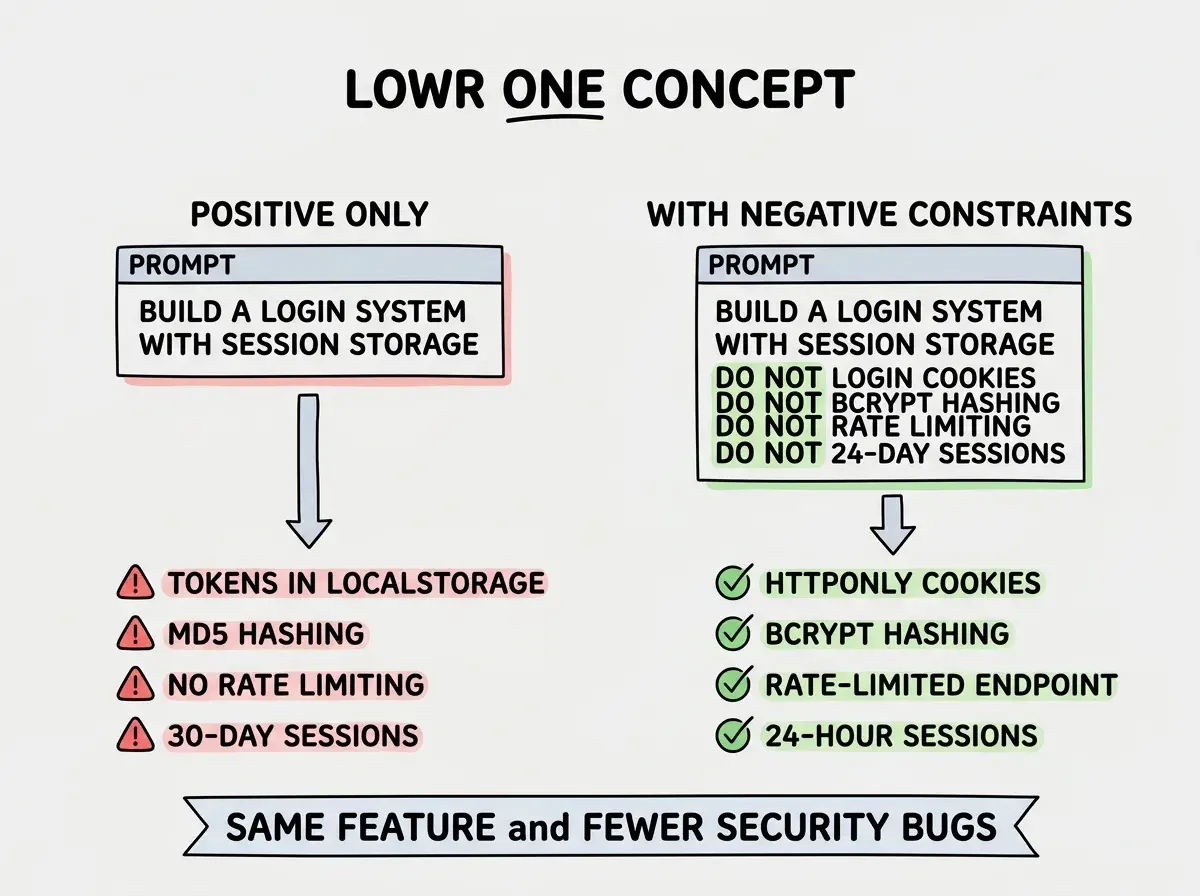
Positive only: "Build a login system with email and password using Next.js and store the session."
The AI will produce working code, but it will make dozens of unconstrained decisions. Where to store the token. What hashing algorithm to use. Whether to add rate limiting. How to handle session expiry. Each decision is a coin flip between tutorial-grade and production-grade.
Positive with negative constraints: "Build a login system with email and password using Next.js. Do NOT store auth tokens in localStorage or sessionStorage. Do NOT use MD5 or SHA-1 for password hashing, use bcrypt with at least 10 rounds. Do NOT skip rate limiting on the login endpoint. Do NOT set session expiry longer than 24 hours."
The second prompt takes thirty seconds longer to write and eliminates four of the most common security mistakes in AI-generated auth code. Every "do NOT" in that prompt represents a bug you will never need to fix.
Learn the prompting patterns that turn AI from a frustrating toy into a reliable engineering partner.
Start building smarterFive Negative Prompts Every Developer Needs
These are the negative constraints that produce the biggest improvements across different types of projects. Each one addresses a specific AI default that causes real problems.
1. "Do NOT use localStorage for auth tokens"
Without this constraint, AI models almost always store JWTs in localStorage because that pattern dominates tutorial code. The result is code vulnerable to XSS attacks, where any injected script can steal every user's session.
What the AI does instead: httpOnly cookies with secure flags, or server-side session management. Both are dramatically more secure with minimal extra complexity.
2. "Do NOT use any types in TypeScript"
Left unconstrained, AI models sprinkle any throughout TypeScript code whenever the type gets even slightly complex. Generic functions, API responses, event handlers, and error objects all become any because it compiles without errors.
What the AI does instead: proper generics, union types, and explicit interfaces. The code is longer but actually delivers the safety TypeScript promises.
3. "Do NOT add inline styles"
AI loves inline styles because they are self-contained and require zero setup. But they create components that are impossible to theme, inconsistent across the application, and painful to maintain.
What the AI does instead: Tailwind utility classes, CSS modules, or whatever styling system you specify. Consistent, maintainable, and themeable.
4. "Do NOT create new files unless necessary"
This is a meta-constraint, and one of the most powerful. Without it, AI tools will happily create a new utility file, a new component, a new hook, and a new type file for what could have been a ten-line addition to an existing file. You end up with fragmented code scattered across twenty files when five would have been cleaner.
What the AI does instead: modifies existing files, extends existing components, and asks before creating new abstractions. Your project stays organized instead of exploding in complexity.
5. "Do NOT mock the database in tests"
When asked to write tests, AI defaults to mocking everything because mocked tests are simpler to generate. But heavily mocked tests give false confidence. They test your mock implementation, not your actual code.
What the AI does instead: integration tests with a real test database, or at minimum, tests that exercise actual query logic. Tests that catch real bugs instead of passing while production breaks.
Before and After in Practice
Let me show you a complete prompt transformation. Imagine you are building a user settings page.
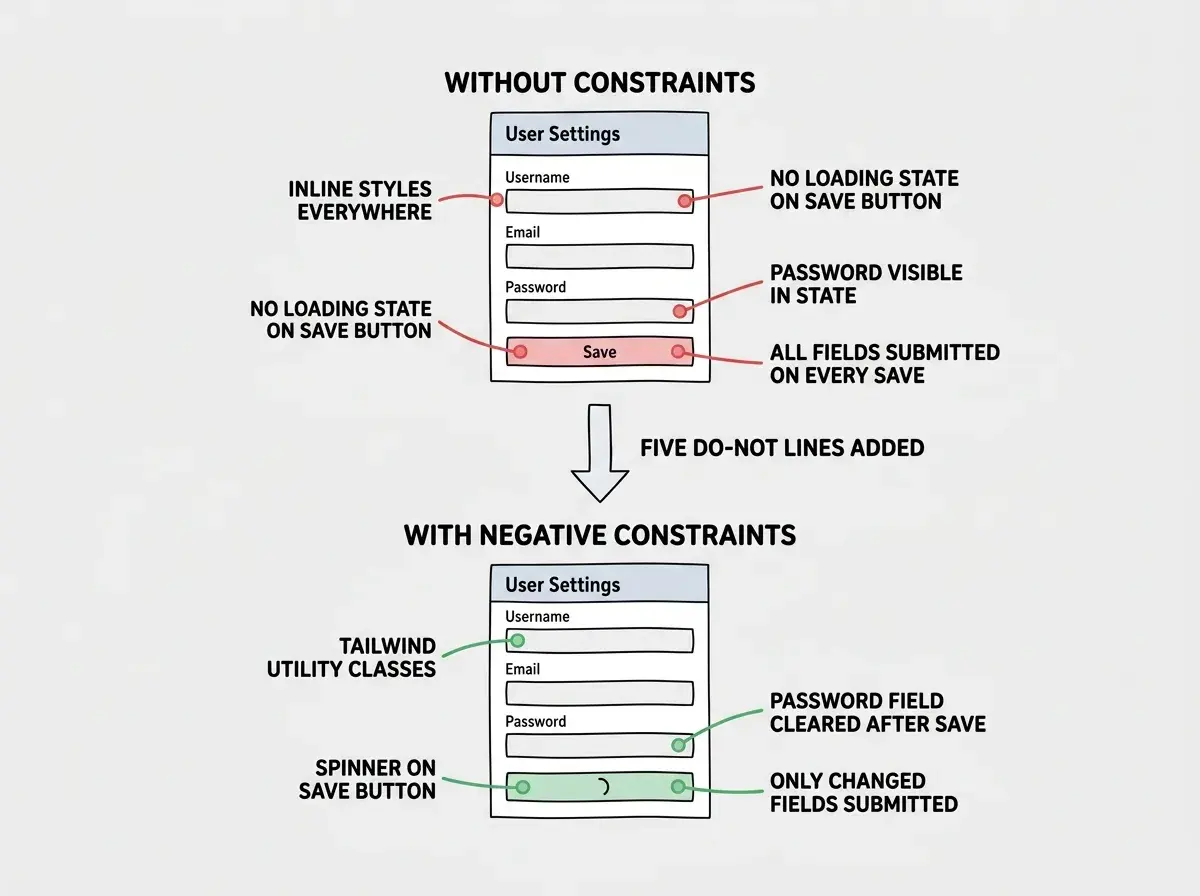
Without negative constraints:
"Build a user settings page where users can update their name, email, and password. Include form validation and a save button."
The AI produces a settings page with inline styles, no loading states, optimistic updates that do not handle failures, password stored in component state as plain text, and a single form that submits all fields at once whether they changed or not.
With negative constraints:
"Build a user settings page where users can update their name, email, and password. Include form validation and a save button. Do NOT use inline styles, use Tailwind. Do NOT store the password in component state after submission. Do NOT submit unchanged fields. Do NOT use optimistic updates without rollback handling. Do NOT skip loading and error states on the save action."
The AI now produces a settings page with Tailwind classes, separate dirty-field tracking, proper loading spinners, error toasts, and password fields that clear after submission. Same feature, dramatically better implementation.
Writing negative prompts that are too vague to be actionable. "Do NOT write bad code" gives the AI nothing to work with because "bad" is subjective. "Do NOT use any types in TypeScript" is specific and enforceable. Every negative constraint should name a concrete pattern, library, approach, or behavior. If you cannot point to a specific thing the AI should avoid, the constraint is not specific enough to help.
Building Your Own Negative Prompt Library
The most effective negative prompts come from your own experience of fixing AI mistakes. Every time you revert AI-generated code or spend time fixing a pattern the AI chose, that is a negative prompt waiting to be written.
Start a simple list. Each entry follows this format: the pattern to avoid, why it causes problems, and what to use instead. After two weeks of building with AI, you will have ten to fifteen negative constraints that cover 80% of the issues you encounter.
Here is a starter template for common web projects:
"Do NOT use var, use const and let." "Do NOT fetch data in useEffect without cleanup, use a data fetching library or server components." "Do NOT hardcode API URLs, use environment variables." "Do NOT skip error boundaries around async components." "Do NOT add console.log statements in production code."
Put these constraints in your project's system prompt, CLAUDE.md file, or .cursorrules file. That way every AI interaction in your project starts with your accumulated engineering judgment already loaded.
Learn the prompting techniques that separate frustrated builders from productive ones.
Explore prompting guidesCombining Positive and Negative for Maximum Effect
The most effective prompts layer positive instructions with negative constraints. Think of positive prompts as the destination and negative prompts as the guardrails on the road.
A pattern that works well is to state what you want first, then list three to five things to avoid. The positive description gives the AI direction. The negative constraints prevent it from taking shortcuts. Together, they produce code that is both correct and production-quality on the first pass.
You do not need to anticipate every possible mistake. Start with the constraints you know from experience, and add new ones when the AI surprises you with a bad pattern. Your negative prompt library grows naturally alongside your projects.
What This Means For You
The 41% code reversion rate is not a limitation of AI tools. It is a symptom of prompts that describe what to build without specifying what to avoid. Negative prompting closes that gap.
- If you are a senior developer: You already know which patterns cause problems. Write them down as explicit constraints and add them to your project's system prompt. Your AI tool will start producing code that matches your standards instead of fighting them.
- If you are an indie hacker shipping fast: Pick the five negative constraints from this article that match your stack and paste them into every major prompt. Thirty seconds of typing saves hours of debugging code that "works" but is not production-ready.
- If you are new to AI coding: Start with "do NOT use any types" and "do NOT add inline styles" as your first two constraints. These alone will improve the quality of every TypeScript component the AI generates for you. Add more constraints as you learn which AI defaults cause you problems.