AI error handling prompts are the difference between an app that works in demos and one that survives real users. 92% of developers use AI coding tools daily, but research shows 45% of AI-generated code contains vulnerabilities. The biggest gap is not logic or features. It is error handling. AI generates happy-path-only code by default, and if you do not prompt for failures, you will not get them.
You have probably experienced this. You ask an AI tool to build a form that submits to an API. It works perfectly in testing. Then you deploy, a user has a slow connection, the API times out, and your app shows a blank white screen. No error message, no retry button, nothing. The user closes the tab and never comes back.
Why AI Defaults to the Happy Path
AI coding tools are trained on massive amounts of code, and most code in tutorials, documentation, and open-source examples focuses on what happens when everything works. The training data is heavily skewed toward success scenarios. When you ask "build a function that fetches user data from an API," the AI interprets that as "build a function that successfully fetches user data." Failure is not part of the request, so it is not part of the response.
This is not a flaw in the AI. It is doing exactly what you asked. The problem is that most prompts describe the desired outcome without mentioning the undesired outcomes that need handling. "Create a checkout flow" becomes a checkout flow where the payment always succeeds, the network never drops, and the user always enters valid data. Tutorials skip error handling because it clutters the example. Stack Overflow answers show the minimal solution. The AI learned from all of this, so it reproduces the same patterns.
AI does not skip error handling out of laziness or limitation. It skips error handling because your prompt described the success case and the AI delivered exactly that. Error handling is a feature you need to explicitly request, the same way you would request specific styling or a particular data structure. If it is not in the prompt, it will not be in the code.
The "What Could Go Wrong?" Prompt Suffix
The simplest and most effective technique is appending a single question to the end of any coding prompt: "What could go wrong with this, and handle each failure case gracefully."
That one line transforms the AI's approach. Instead of writing a linear success flow, it starts thinking about failure modes. Network errors, invalid input, missing data, permission issues, rate limits, timeouts. The AI knows about all of these. It just needs permission to address them.
Here is the difference in practice. Without the suffix, you get this:
async function fetchUserProfile(userId: string) {
  const response = await fetch(`/api/users/${userId}`);
  const data = await response.json();
  return data;
}
With "What could go wrong?" appended to the prompt, you get something closer to this:
async function fetchUserProfile(userId: string) {
  if (!userId) {
    throw new Error("User ID is required");
  }

  try {
    const response = await fetch(`/api/users/${userId}`, {
      signal: AbortSignal.timeout(10000),
    });

    if (!response.ok) {
      if (response.status === 404) {
        return null;
      }
      throw new Error(`Failed to fetch profile: ${response.status}`);
    }

    const data = await response.json();
    return data;
  } catch (error) {
    if (error instanceof DOMException && error.name === "TimeoutError") {
      throw new Error("Request timed out. Please try again.");
    }
    throw error;
  }
}
Same function. Same purpose. But the second version handles missing input, HTTP errors, 404s as a valid empty state, and timeouts with a user-friendly message. All because the prompt asked "what could go wrong?"
Prompting for Network Failures and Timeouts
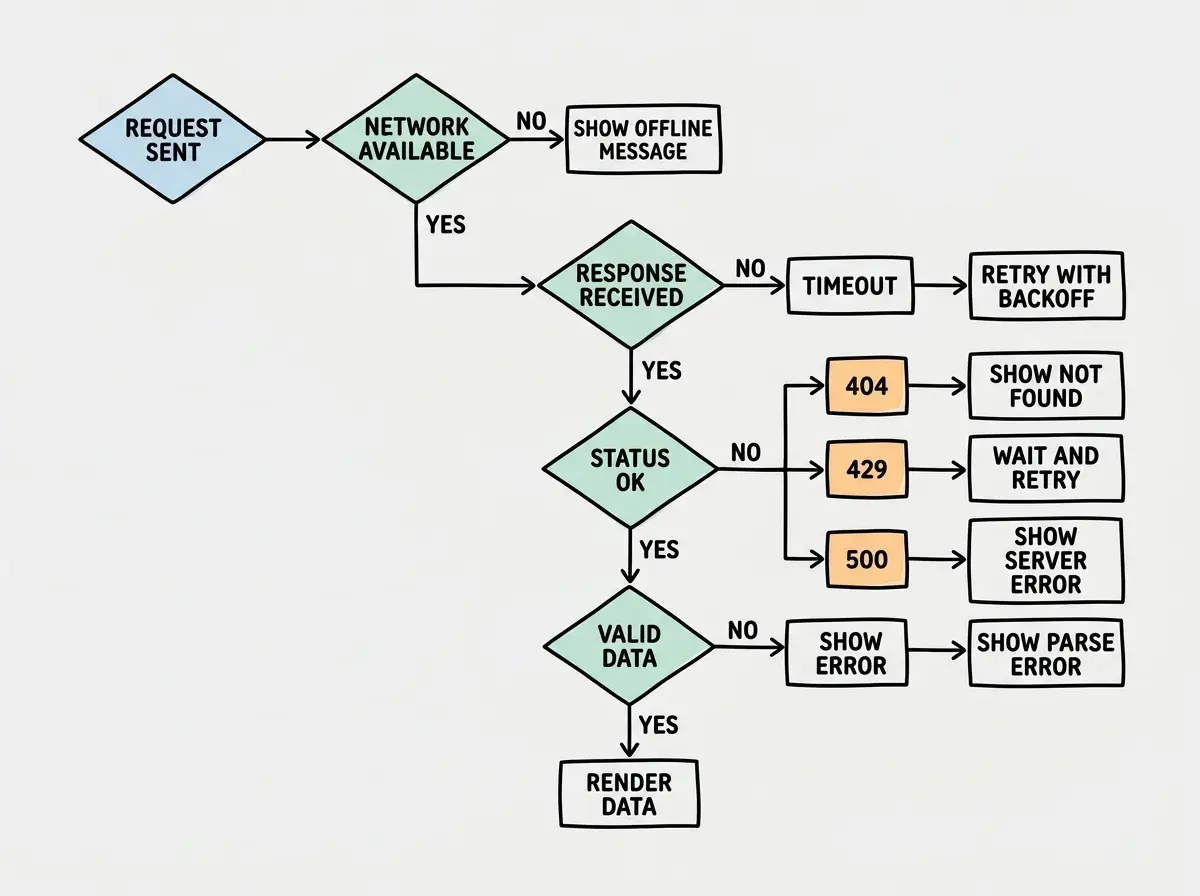
Network failures are the most common real-world error category and the one AI handles least by default. Users on mobile connections, behind corporate firewalls, or in areas with spotty wifi will hit network issues constantly. Your prompts need to account for this explicitly.
A strong network-aware prompt looks like this: "Build a data fetching function that handles network timeouts after 10 seconds, retries failed requests up to 3 times with exponential backoff, and shows the user a clear message if all retries fail. Include an offline detection check before attempting the request."
When you specify retry logic, timeout durations, and offline handling in the prompt, the AI builds all of it. When you just say "fetch data from the API," you get a bare fetch call with no safety net.
For API calls specifically, include these failure modes in your prompts: request timeouts, server 500 errors, rate limiting (429 responses), malformed response data, and authentication expiration. Each happens in production and each needs a different response.
User-Friendly Error Messages vs Stack Traces
There is a prompt pattern that dramatically improves error message quality in AI-generated code. Instead of just asking for error handling, ask for "user-friendly error messages that tell the user what happened and what they can do about it."
Without that instruction, AI defaults to developer-facing errors. You get TypeError: Cannot read properties of undefined showing up on screen. Or worse, the app silently fails and the user stares at a spinner that never stops.
Asking for "error handling" without specifying who the error messages are for. AI interprets "error handling" as try/catch blocks with console.error statements. That handles errors for developers reading logs, not for users staring at a broken screen. Always specify that errors should produce visible, actionable feedback for the end user.
The prompt pattern is: "When an error occurs, show the user a message that explains what happened in plain language and gives them a clear next step. Never show raw error codes or technical details to the user. Log the technical details to the console for debugging."
This produces code that shows "We could not save your changes. Check your connection and try again." instead of Error: ECONNREFUSED 127.0.0.1:5432. Both convey that something failed. Only one helps the user.
Loading, Error, and Empty States
Every component that displays data has three states that most prompts ignore: loading (data is being fetched), error (something went wrong), and empty (the request succeeded but returned no data). AI will build the success state beautifully and forget the other three entirely unless you ask.
The prompt template that fixes this is: "Build [component] with four explicit states: loading (show a skeleton or spinner), success (show the data), error (show a retry button with an explanation), and empty (show a helpful message when there is no data yet). Handle all four states visually."
Here is what this produces in a React component:
function UserDashboard({ userId }: { userId: string }) {
  const { data, error, isLoading } = useUserData(userId);

  if (isLoading) {
    return <DashboardSkeleton />;
  }

  if (error) {
    return (
      <ErrorState
        message="We could not load your dashboard."
        action="Try again"
        onRetry={() => window.location.reload()}
      />
    );
  }

  if (!data || data.items.length === 0) {
    return (
      <EmptyState
        message="No activity yet."
        suggestion="Start by creating your first project."
      />
    );
  }

  return <Dashboard data={data} />;
}
Four states, four user experiences. Without the prompt specifying these, you get the last block only, and users see nothing during loading, a crash on error, and a confusing blank page when the data is empty.
Learn the prompt patterns that produce production-ready code, not demo-ready code.
Explore tutorialsThe Error Handling Checklist
Here is a checklist you can append to any prompt. Copy it whenever you are building something that will face real users.
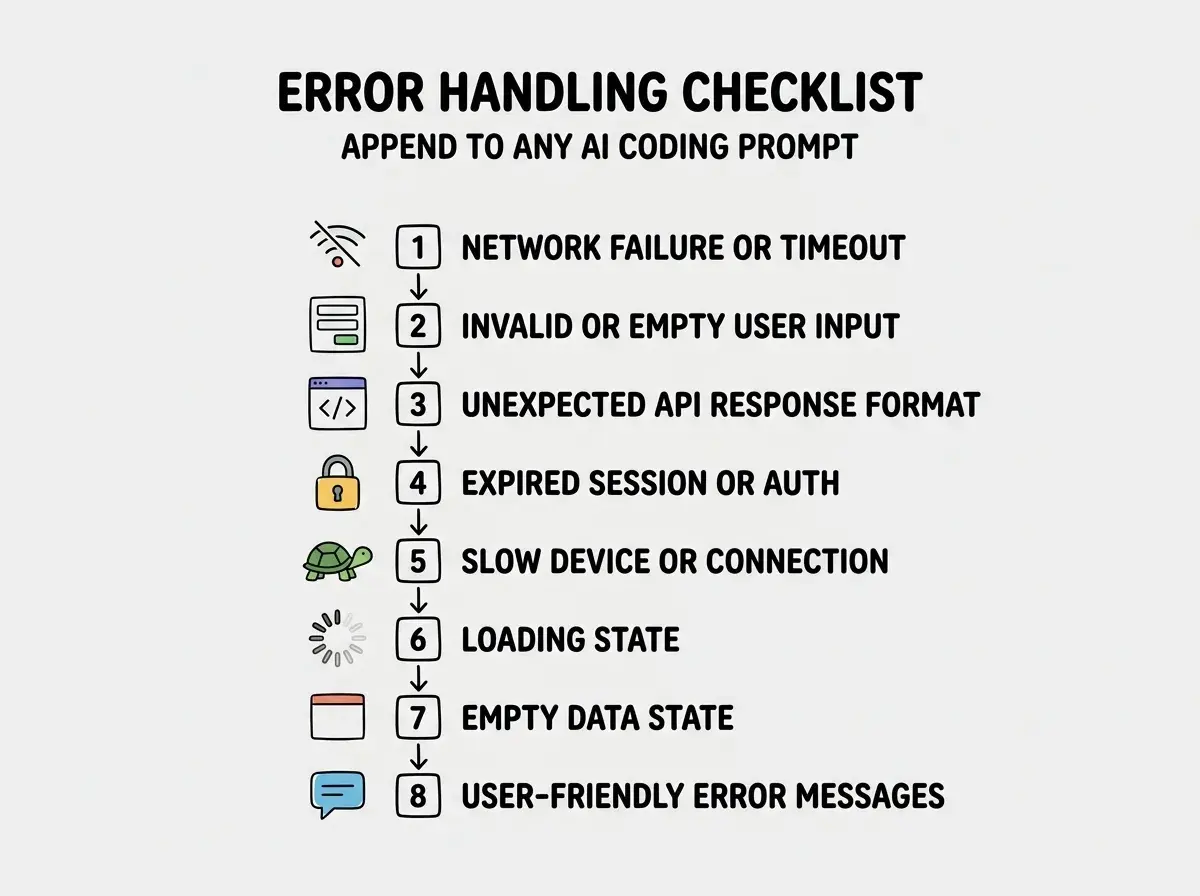
Add this to the end of your prompts: "Before writing the code, consider and handle these failure modes: (1) What happens if the network request fails or times out? (2) What happens if the user submits invalid or empty data? (3) What happens if the API returns an unexpected format? (4) What happens if the user's session or authentication has expired? (5) What happens if this runs on a slow device or connection? (6) What does the user see during loading? (7) What does the user see when there is no data? (8) Are all error messages user-friendly and actionable?"
You do not need all eight for every prompt. A utility function might only need items one and three. A full-page component needs all of them. The checklist forces the AI to think about failure before writing the success path.
When you consistently prompt for error handling, you build a codebase that handles failures from the start instead of patching them after users complain. Every component has loading and error states. Every API call has timeouts and retries. Every form validates input. The result is an app that feels polished and reliable, not because you spent weeks on error handling, but because you spent ten extra seconds on each prompt.
What This Means For You
The gap between AI-generated demo code and AI-generated production code is almost entirely about error handling. The AI knows how to write robust code. It just needs you to ask for it.
- If you are a senior developer using AI tools: You already know what error handling should look like. The value here is making it automatic. Instead of reviewing AI output and manually adding error handling, front-load it in the prompt. Append the checklist to your coding prompts and let the AI do the work you were going to do in code review anyway.
- If you are an indie hacker shipping fast: Error handling is the difference between an app users trust and one they abandon. You do not have a support team to field bug reports, so your app needs to handle failures gracefully on its own. The "what could go wrong?" suffix takes five seconds to type and saves hours of post-launch firefighting.
Take whatever prompt you were about to write and add "What could go wrong with this, and handle each failure case with a user-friendly message." That single habit will transform the quality of every piece of code your AI generates.
Prompt patterns that separate hobby projects from apps people actually use.
Keep learning