Database schema prompting is one of those skills that separates apps that survive their first thousand users from apps that collapse under their own weight. When 92% of builders use AI tools daily, almost everyone can get a working schema in minutes. The problem is that "working" and "scalable" are very different things, and most AI-generated schemas fall apart the moment real traffic arrives.
I have watched this happen over and over. Someone prompts Cursor or Claude to "create a database for my SaaS app," gets back a flat table with twenty columns, ships it, and three months later spends a painful weekend rewriting everything. The schema was not wrong. It just was not designed to grow.
Why AI Generates Bad Schemas by Default
AI models are trained on millions of code examples, and a huge number of those examples are tutorials, prototypes, and quick demos. Tutorial code optimizes for simplicity, not production readiness. So when you ask an AI to "create a database schema for a project management app," you tend to get exactly what a tutorial would show you.
The most common problems with default AI-generated schemas include everything being crammed into a single table (denormalization by default), missing indexes on columns you will absolutely query by, string fields where enums should be, no foreign key constraints, and timestamps without timezone awareness. The AI is not being lazy. It is pattern-matching against the most common examples in its training data, and those examples prioritize getting something working quickly over building something that lasts.
The fix is not to stop using AI for schema design. The fix is to prompt it with the constraints that production databases actually need.
AI defaults to tutorial-quality schemas because that is what dominates its training data. Your job is to prompt with production constraints (normalization, indexes, foreign keys, enums) so the AI generates schemas that scale from day one instead of requiring a painful rewrite at month three.
The Prompt Template for Schema Design
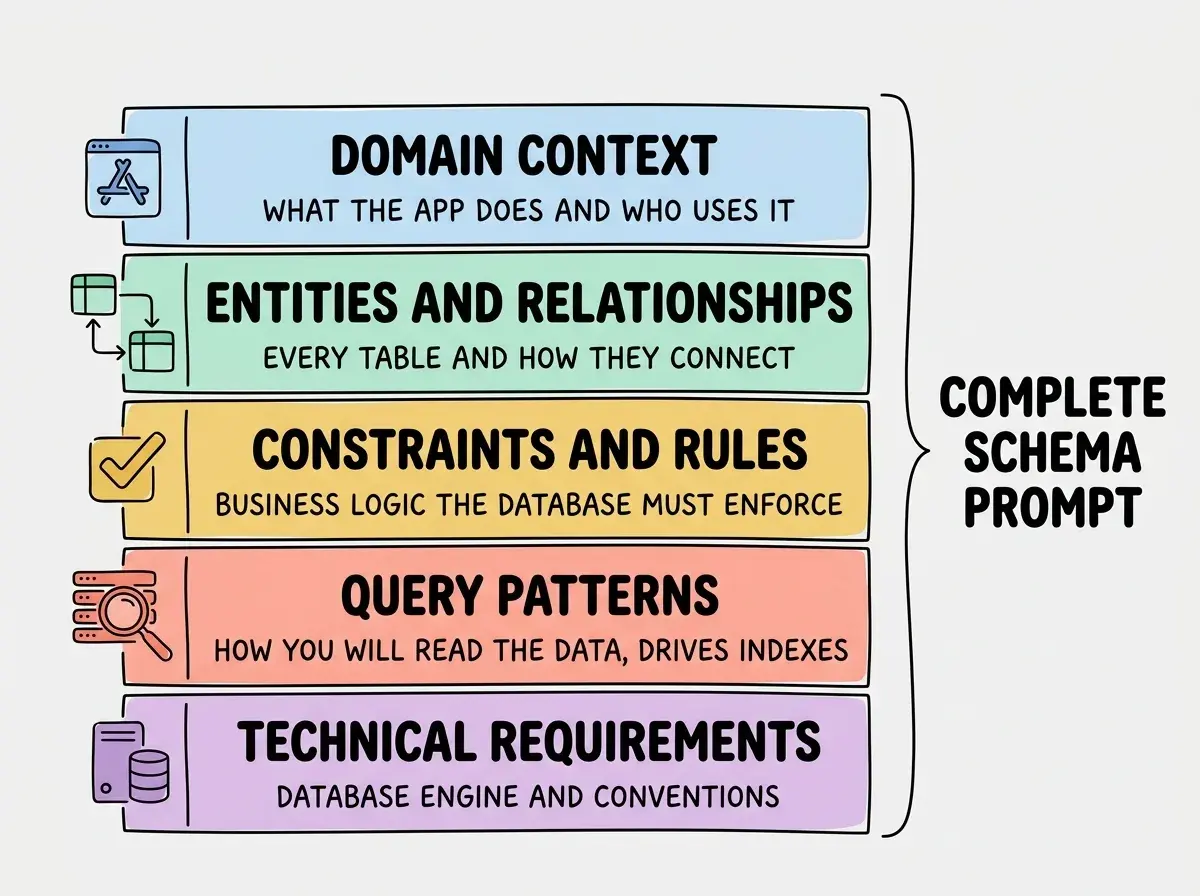
After dozens of iterations, I have landed on a prompt structure that consistently produces production-quality schemas. It has five sections, and each one eliminates a category of mistakes the AI would otherwise make.
Section 1: Domain Context
Start by telling the AI what the application does and who uses it. "I am building a B2B SaaS where organizations can manage team subscriptions" gives the AI enough context to make smart decisions about multi-tenancy, user roles, and billing relationships.
Section 2: Entity List With Relationships
Name every entity and describe how they relate. "Users belong to Organizations (many-to-many through Memberships). Organizations have Subscriptions (one-to-many). Subscriptions reference Plans (many-to-one)." This is where most people stop, but there are three more sections that matter just as much.
Section 3: Constraints and Business Rules
State the rules your data must enforce. "An organization must always have at least one admin member. A subscription cannot overlap with another active subscription for the same organization. Email addresses must be unique across the entire system." These constraints drive check constraints, unique indexes, and trigger logic.
Section 4: Query Patterns
Tell the AI how you will read this data. "I will frequently query all members of an organization, filter subscriptions by status, and look up users by email." This section directly drives index creation. Without it, the AI creates tables with no indexes, and your queries get slower with every new row.
Section 5: Technical Requirements
Specify your database engine, conventions, and preferences. "Use PostgreSQL. Use UUIDs for primary keys. Include created_at and updated_at timestamps with timezone on every table. Use snake_case for all names. Generate as a migration file."
Real Example for a SaaS With Users, Organizations, and Subscriptions
Let me show you this template in action. Here is the full prompt I would use for a typical B2B SaaS data model.
Design a PostgreSQL database schema for a B2B SaaS application.

DOMAIN: Team subscription management platform where organizations
invite members, choose plans, and manage billing.

ENTITIES AND RELATIONSHIPS:
- Users (email, name, avatar_url, email_verified_at)
- Organizations (name, slug, billing_email)
- Memberships (links Users to Organizations, many-to-many,
  with role: owner/admin/member)
- Plans (name, stripe_price_id, monthly_price_cents,
  max_seats, features as JSONB)
- Subscriptions (links Organizations to Plans, includes
  status: active/past_due/canceled/trialing,
  current_period_start, current_period_end,
  stripe_subscription_id)

CONSTRAINTS:
- Each organization must have exactly one owner
- Email addresses are globally unique
- Only one active or trialing subscription per organization
- Organization slugs are unique and URL-safe
- Subscription status uses a PostgreSQL enum, not a string

QUERY PATTERNS:
- Look up user by email (authentication)
- List all members of an organization with roles
- Get active subscription for an organization
- List all organizations a user belongs to
- Filter subscriptions by status across all organizations (admin)

TECHNICAL REQUIREMENTS:
- UUIDs for all primary keys (gen_random_uuid())
- created_at and updated_at with timestamptz on every table
- Proper foreign key constraints with ON DELETE behavior
- Indexes for every query pattern listed above
- Output as a single SQL migration file
When I run this prompt, the AI generates normalized tables with proper foreign keys, a PostgreSQL enum for subscription status, composite unique constraints (one active subscription per org), indexes on every column mentioned in the query patterns section, and appropriate ON DELETE CASCADE/SET NULL behavior. Compare that to what you get from "create a database for a SaaS app," which typically produces a single users table with organization_name as a text column and subscription_status as a varchar.
Supabase-Specific Prompting
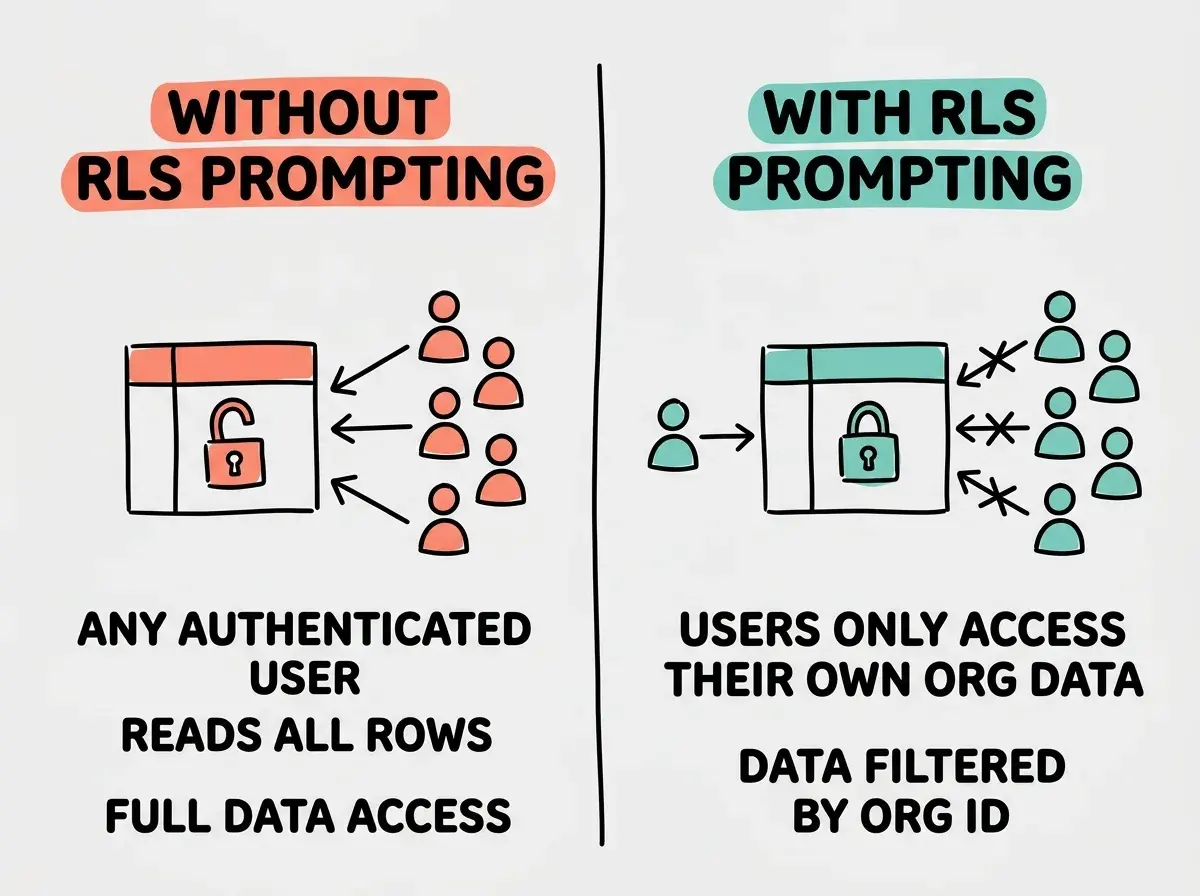
If you are building on Supabase (and many vibe coders are), your schema prompts need an additional section for Row Level Security policies. RLS is what prevents User A from seeing User B's data, and getting it wrong is a security vulnerability, not just a bug.
Add this section to your prompt when targeting Supabase:
SUPABASE-SPECIFIC:
- Enable Row Level Security on all tables
- RLS policies:
  - Users can read/update their own profile
  - Organization data is visible only to members
  - Memberships are visible to members of the same org
  - Only owners/admins can modify organization settings
  - Subscriptions are visible to org admins and owners
- Use auth.uid() to reference the current user
- Create a trigger function for updated_at timestamps
- Use Supabase-native enums (CREATE TYPE)
This produces RLS policies that actually work instead of the generic "enable RLS and add a policy for authenticated users" that AI tends to generate without guidance. The key is specifying the permission logic per table. "Visible only to members" tells the AI to join through the memberships table in the policy check, which is the correct pattern for multi-tenant apps.
Forgetting to specify RLS policies in your Supabase schema prompt. The AI will generate tables without RLS, and you will ship an app where any authenticated user can read any row in any table. Always include your access control rules as part of the schema prompt, not as an afterthought.
Migration-Aware Prompting
One more pattern that saves enormous headaches later. When your schema needs to evolve (and it will), you want AI-generated migrations that work with your existing data, not just a fresh schema dump.
Add migration context to your prompt:
MIGRATION CONTEXT:
- This is an ALTER migration, not a fresh schema
- The users and organizations tables already exist
- Add a new "invitations" table for pending org invites
- Add a "invited_by" column to memberships
- Preserve all existing data
- Include both UP and DOWN migration SQL
- Use IF NOT EXISTS and IF EXISTS guards
The key phrase is "preserve all existing data." Without it, the AI sometimes generates DROP TABLE statements or column changes that would destroy information. Specifying UP and DOWN migrations means you get rollback capability, which you will be grateful for the first time a deployment goes wrong.
For ongoing projects, paste your current schema (or at least the relevant tables) into the prompt. The AI cannot generate a correct ALTER migration if it does not know what already exists. Cursor and similar tools that have project context handle this better, but being explicit never hurts.
Ready to put these prompt patterns into practice? Start with the five-section template and generate a production-quality schema for your next project.
Build Your First SchemaTesting Your Generated Schema
Once the AI gives you a schema, run through this quick validation checklist before you apply it.
First, check that every table has a primary key (preferably UUID), created_at, and updated_at. Second, verify that every foreign key has an explicit ON DELETE behavior. Third, confirm that every column in your QUERY PATTERNS section has a corresponding index. Fourth, ensure enum types are used for columns with a fixed set of values (status fields, role fields). Fifth, if using Supabase, confirm RLS is enabled on every table and that policies reference auth.uid().
You can even prompt the AI to validate its own output: "Review this schema for missing indexes, missing foreign key constraints, and potential N+1 query issues. Suggest improvements." This second pass catches mistakes that slipped through the first generation.
What This Means For You
Database schema prompting is not about memorizing SQL syntax. It is about knowing which constraints to communicate so the AI builds foundations instead of prototypes. The five-section template (domain context, entities, constraints, query patterns, technical requirements) works because it mirrors how experienced database engineers think about schema design.
Start with your next project. Write out the five sections before you prompt. You will spend ten extra minutes on the prompt and save days of refactoring when your app actually gets users. The AI is capable of generating excellent schemas. It just needs you to ask for one.
Learn more practical prompting patterns for shipping real applications with AI tools.
Explore More Build Tutorials