AI API integration prompting is the skill that separates projects that ship from projects that stall. 92% of developers now use AI tools daily, yet most of those tools generate API integration code that references deprecated endpoints, skips error handling entirely, and hardcodes secrets directly into source files. The gap between "it works in my test" and "it works in production" is where your prompts need to do the heavy lifting.
I have watched this across dozens of projects. Someone asks "add Stripe payments" and gets back code using an API version from 2022, catching zero errors, with the secret key in a constant at the top of the file. It works in testing. Then the first edge case in production (a declined card, a network timeout, an unexpected webhook payload) brings everything down.
The fix is not a better AI model. The fix is better prompts.
Why API Integration Prompts Fail
When you ask "integrate Stripe," the AI reaches for whatever pattern appears most frequently in its training data. That pattern might be two years old. Three failure modes show up consistently.
Outdated API versions. The AI uses stripe.charges.create() when you should be using stripe.paymentIntents.create(). It imports from package versions that have been deprecated. It follows patterns from tutorials written in 2021.
Missing error handling. The AI generates the happy path. Payment succeeds, email sends, database writes. It does not handle what happens when the payment fails, the email service is down, or the database times out. Every external API call can fail, and the AI treats them all as local function calls.
Hardcoded credentials. The AI puts const STRIPE_KEY = "sk_live_..." right in the source file. Or it references process.env.STRIPE_KEY without documenting which variables need to exist or what format they should be in.
API integration prompts fail for three predictable reasons, and all three are fixable with better prompts. Tell the AI which API version to use, demand explicit error handling for every external call, and specify your environment variable strategy upfront. These three additions to any integration prompt will eliminate 80% of the rework.
The "Include the Docs" Technique
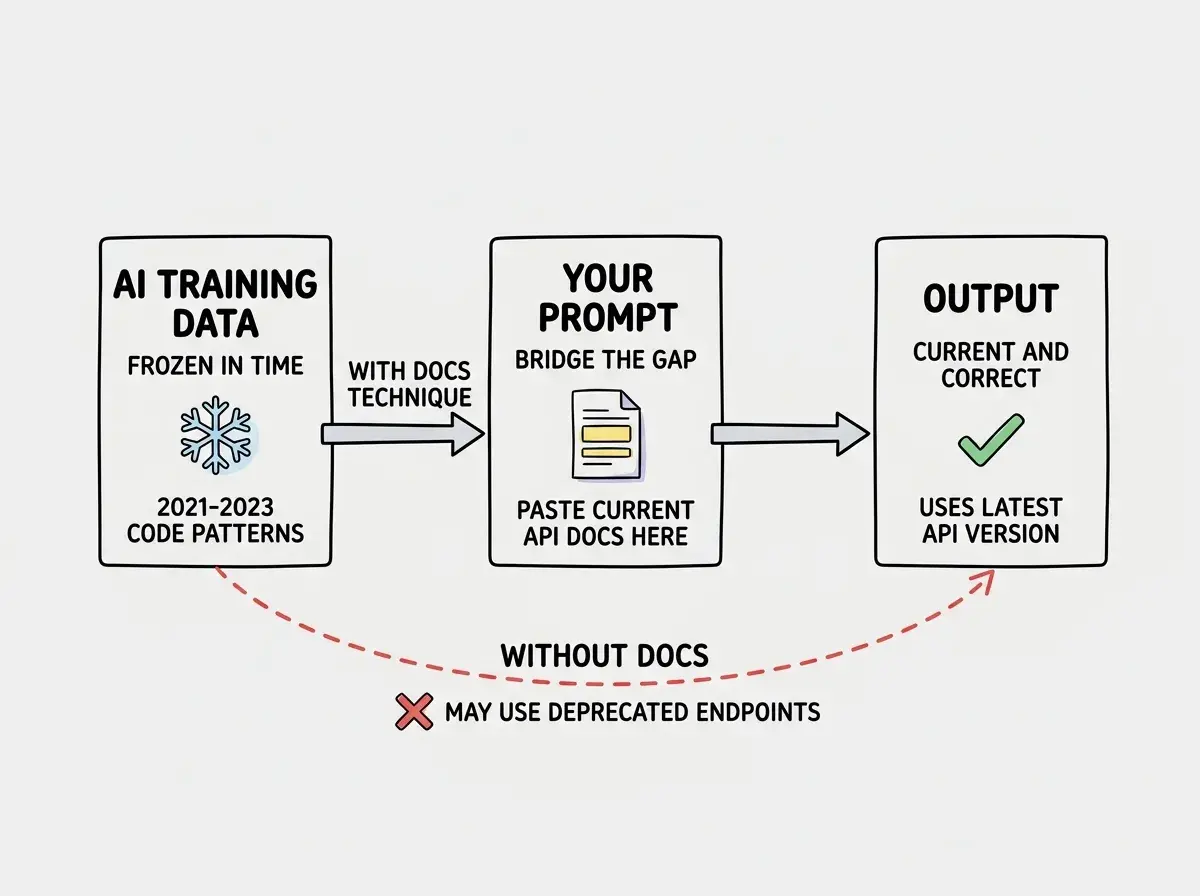
The single most effective technique for AI API integration prompting is pasting the relevant documentation directly into your prompt. The AI's training data is frozen at a point in time. The docs you paste in are current.
You do not need to paste entire documentation sites. Grab the specific section that covers what you are building. If you are integrating Stripe Checkout, copy the "Create a Checkout Session" section from Stripe's docs. If you are adding Resend for transactional email, copy the "Send Email" endpoint reference.
Here is how this looks in practice:
I need to integrate Stripe Checkout for one-time payments in
my Next.js 14 app (App Router). Here is the current Stripe
API reference for creating a checkout session:

[paste the relevant Stripe docs section here]

Create an API route at app/api/checkout/route.ts that:
- Creates a Checkout Session for a single product
- Uses the price ID from an environment variable STRIPE_PRICE_ID
- Sets success_url and cancel_url using NEXT_PUBLIC_HOST env var
- Returns the session URL as JSON
- Handles Stripe API errors with proper status codes

Also create the webhook handler at app/api/webhooks/stripe/route.ts
that verifies the webhook signature using STRIPE_WEBHOOK_SECRET
and handles checkout.session.completed events.
The docs in the prompt override whatever outdated patterns live in the AI's training data. This is the difference between getting code that uses the current API and getting code that uses whatever the AI remembers.
Prompt Template for Stripe Integration
This template works for any Stripe integration. Adapt the specifics, but keep the structure.
I am building [describe your app] using [framework and version].
I need to integrate Stripe for [specific payment flow].

Current API reference: [Paste the relevant Stripe docs section]

Requirements:
- Create [specific files with paths]
- Use stripe npm package version [check npm for latest]
- All keys from env vars: STRIPE_SECRET_KEY,
  STRIPE_PUBLISHABLE_KEY, STRIPE_WEBHOOK_SECRET
- Never import Stripe on the client side

Error handling (required):
- Wrap every Stripe call in try/catch
- Handle StripeCardError separately (user-friendly message)
- Handle StripeInvalidRequestError (log for debugging)
- Handle StripeAPIError and StripeConnectionError (retry)
- Return proper HTTP status codes (400 client, 500 server,
  402 payment failure)

Webhook security:
- Verify signatures using stripe.webhooks.constructEvent
- Return 200 immediately, process async
- Log full event in development

List all required env vars with format at the end.
The "Error handling (required)" section is doing the critical work. Without it, the AI assumes every call succeeds. With it, you get production-ready handling on the first generation.
Prompt Template for Email Services
Email integrations (Resend, SendGrid, Postmark) have their own pitfalls. The AI generates fire-and-forget code with no verification that the email was actually accepted.
I am building [describe your app] using [framework].
I need to send transactional emails using Resend.

Current API reference: [Paste Resend's Send Email API docs]

Requirements:
- Reusable email service at lib/email.ts
- React Email templates in emails/ directory
- API route at app/api/send-email/route.ts

Error handling (required):
- Check response status (do not assume success)
- Handle rate limiting (429) with exponential backoff
- Handle invalid addresses (return specific error)
- Log email ID on success for delivery debugging

Environment variables:
- RESEND_API_KEY (format: re_...)
- EMAIL_FROM (format: Name <email@yourdomain.com>)
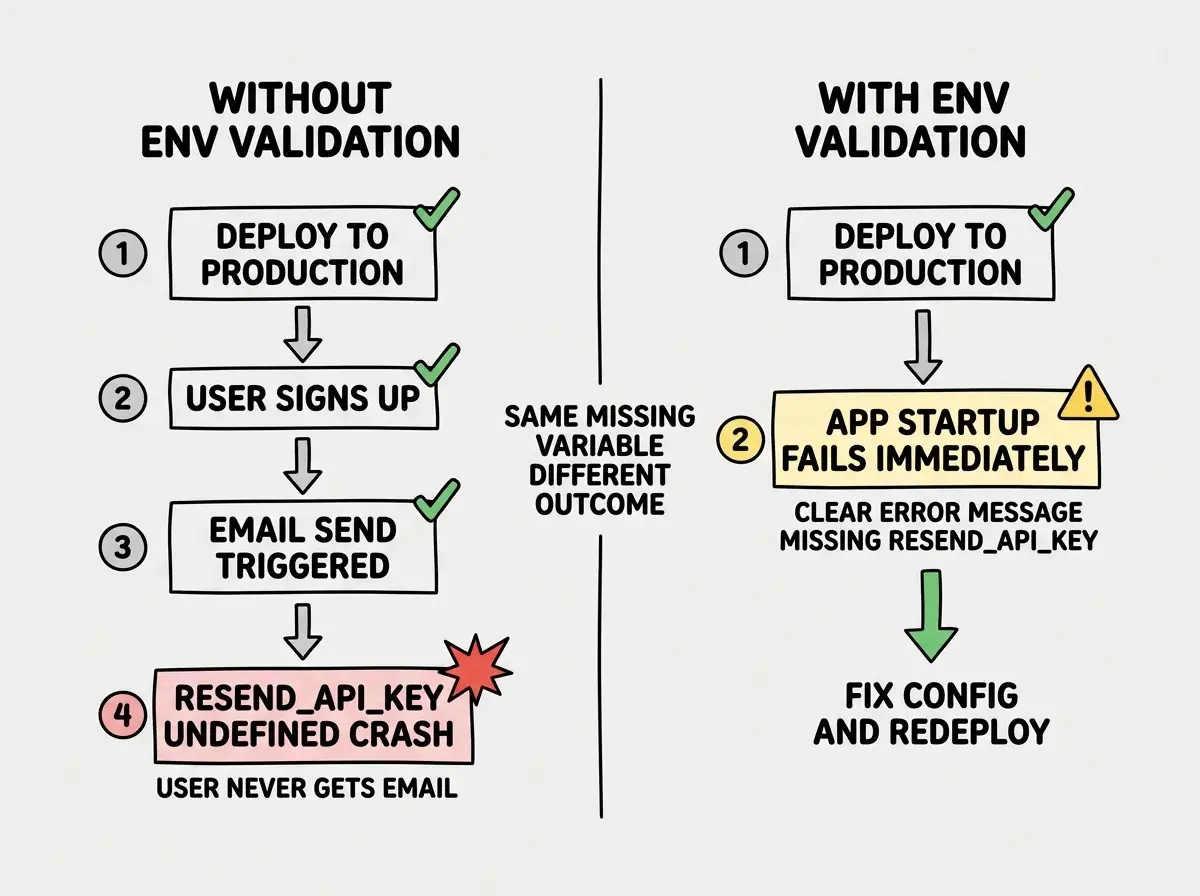
- Validate env vars at startup, not at send time

Constraints:
- Never send from client-side code
- Never log email content (PII concern)
- Include unsubscribe link in marketing emails
The "Validate env vars at startup, not at send time" line is critical. Without it, the AI generates code that only discovers a missing API key when a user triggers an email send. By then your user has completed a signup and never receives their confirmation.
The most common API integration failure is not a code bug. It is a missing environment variable that only surfaces in production. Your prompt should explicitly tell the AI to validate all required environment variables at application startup and throw a clear error message if any are missing. This catches configuration problems during deployment, not during the first user interaction.
Handling Environment Variables in Prompts
Environment variable handling is where AI-generated code breaks most often in production. The code works locally because you have a .env.local file. It fails on Vercel, Cloudflare, or Railway because nobody configured the variables there.
Always include this pattern in your integration prompts: "Create a lib/env.ts file that validates all required environment variables at import time using Zod. Export typed values from this file. Import from lib/env.ts everywhere instead of using process.env directly. Add all variables to .env.example with placeholder values."
This gives you a single source of truth for configuration. Missing something in production? Clear error at startup, not a mystery failure at runtime.
// lib/env.ts - what the AI should generate
import { z } from "zod";

const envSchema = z.object({
  STRIPE_SECRET_KEY: z.string().startsWith("sk_"),
  STRIPE_WEBHOOK_SECRET: z.string().startsWith("whsec_"),
  RESEND_API_KEY: z.string().startsWith("re_"),
  DATABASE_URL: z.string().url(),
});

export const env = envSchema.parse(process.env);
Error Handling Patterns AI Misses
Beyond the specific templates above, there are error handling patterns that AI tools consistently skip unless you ask for them explicitly.
Timeout handling. External APIs can hang. The AI never sets request timeouts. Add to your prompts: "Set a 10-second timeout on all external API calls. Return 504 if exceeded."
Idempotency. Payment and email endpoints should be safe to retry. Tell the AI: "Use idempotency keys for Stripe calls. Store email send records to prevent duplicate sends."
Graceful degradation. When a non-critical service is down, the main operation should still succeed. "If email is unavailable, complete the signup and queue the email for retry."
Structured logging. The AI generates console.log("error") which tells you nothing in production. "Log errors with structured data: service name, operation, error code, and request ID."
Add this checklist to any integration prompt and the AI treats each item as a requirement:
Error handling checklist:
- [ ] Timeout on every external call (10s default)
- [ ] Retry with exponential backoff for transient failures
- [ ] Idempotency keys for payment and mutation endpoints
- [ ] Graceful degradation when non-critical services fail
- [ ] Structured error logging (service, operation, code)
- [ ] User-friendly error messages (never expose internals)
- [ ] Proper HTTP status codes (not 500 for everything)
Without this, you get try { } catch (e) { return Response.json({ error: "Something went wrong" }, { status: 500 }) } for every endpoint.
Putting It All Together
The template structure stays the same regardless of which service you are integrating: context, current docs, specific requirements, explicit error handling, and environment variable management. Whether you are wiring up Supabase auth, Twilio SMS, or OpenAI completions, these five sections produce integration code that actually works in production.
What This Means For You
Every external API integration is a potential production failure, and the quality of your prompt determines whether that failure surfaces during development or in front of your users. These templates are not theory. Copy them, fill them in, and use them today. Paste the current docs, specify error handling, define your environment variable strategy, and let the AI generate correct integration code from clear instructions. The developers who ship reliable products are the ones whose prompts include everything the AI would otherwise skip.