AI context management is the practice of controlling what your AI coding tool can see at any given moment. With 92% of developers using AI tools daily and context windows ranging from 128K to 1M tokens, the bottleneck is no longer raw capability. It is focus. Managing that focus separates productive AI-assisted development from frustrating trial and error.
Small projects are forgiving. You can dump your entire codebase into a conversation and the AI keeps up. But once your project crosses about 15 to 20 components, something shifts. The AI starts generating code that contradicts your existing patterns. It forgets conventions it followed perfectly ten minutes ago. It introduces bugs by referencing functions that do not exist or APIs you deprecated two weeks back. This is not a model limitation you can upgrade away from. It is a context management problem, and it has practical solutions.
Why AI Degrades on Large Codebases
Every AI model has a context window, the total amount of text it can process at once. Current models range from 128K tokens (most Cursor models) to 1M tokens (Claude with extended context). That sounds like plenty, but tokens fill up faster than you expect. A single React component might be 200 to 400 tokens. A full-stack app with 50 files can easily hit 20,000 to 40,000 tokens just for the code, before you even start prompting.
The real issue is not running out of space. It is attention degradation. AI models process information at the beginning and end of their context window more reliably than information in the middle. As your context grows, the AI's grip on the details weakens. Research from Bolt's own team showed that projects beyond 15 to 20 components consistently produced lower-quality outputs because the AI could not maintain coherent understanding of the full system.
This creates a paradox. The bigger your project, the more you need AI. But the bigger your project, the worse AI performs unless you actively manage what it sees.
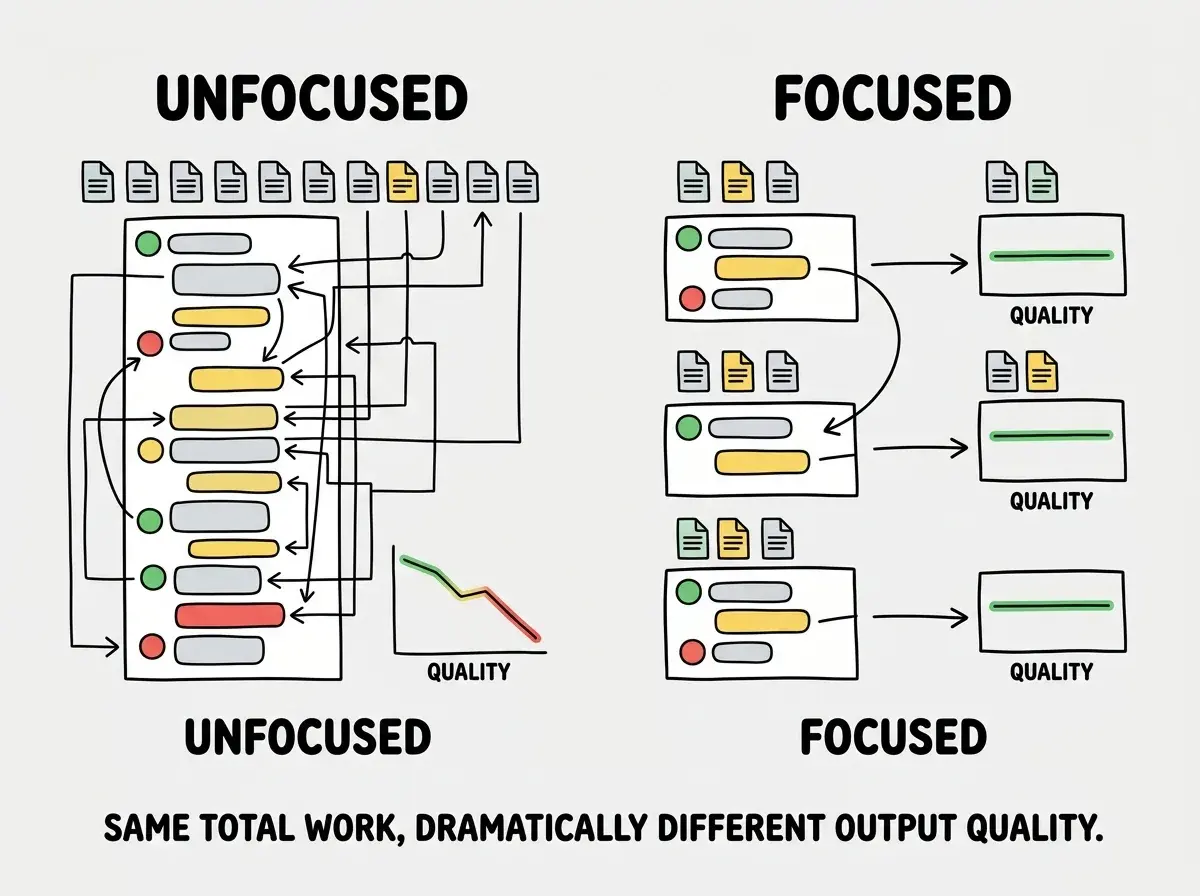
Context management is not about having a bigger context window. It is about being intentional with what goes into the window. A focused 10K-token context produces better results than a bloated 100K-token context where most of the information is irrelevant to the current task.
Persistent Context with .cursorrules and CLAUDE.md
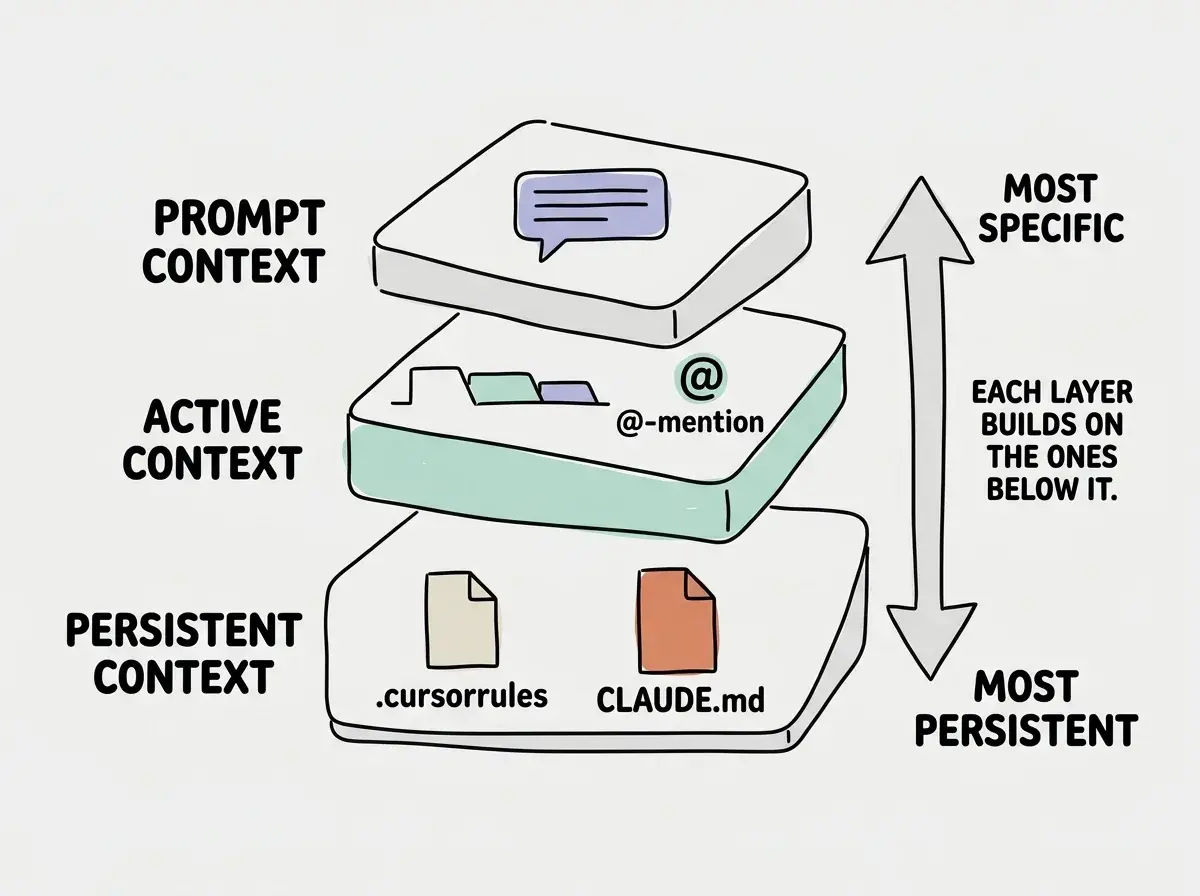
The first layer of context management is persistent project knowledge. These are files that tell the AI about your project before every single interaction, without you needing to repeat yourself.
In Cursor, the .cursorrules file (or the newer .cursor/rules/ directory) gets automatically injected into every conversation. In Claude Code, the CLAUDE.md file serves the same purpose. Windsurf uses .windsurfrules. The format differs slightly, but the principle is identical.
A good persistent context file covers four things. First, your tech stack and versions, because AI defaults to whatever was most common in its training data, which might be three major versions behind what you are running. Second, your file structure and naming conventions, so the AI places new code where it belongs. Third, your code style preferences, covering everything from import ordering to error handling patterns. Fourth, explicit "do not" rules for patterns you have banned in your project.
Here is what this looks like in practice for a Next.js project:
## Stack
- Next.js 15 (App Router), TypeScript strict, Tailwind CSS v4
- Database: Supabase with Row Level Security
- Auth: Supabase Auth (not NextAuth)

## Structure
- app/ for routes, components/ui/ for shared primitives
- lib/ for utilities, server/ for server-only logic
- All API routes in app/api/, all server actions in server/actions/

## Rules
- Server components by default. Only add 'use client' for interactivity.
- Named exports only. No default exports.
- Never use any type. Use unknown and narrow.
- All database queries go through server actions, never client-side.
This file costs you maybe 300 tokens of context per conversation, but it eliminates an entire category of AI mistakes. Without it, you spend those tokens (and more) correcting the AI after every response.
File-by-File vs Whole-Project Approaches
There are two fundamentally different ways to feed your codebase to AI, and choosing wrong is the most common source of degraded output.
Whole-project approach means giving the AI access to everything. Tools like Cursor's codebase indexing and Claude Code's automatic file reading do this by default. The AI can see relationships between files, but most of that information is noise for any given task.
File-by-file approach means you manually control exactly which files the AI sees. You get laser focus, but you might miss a dependency the AI needs to know about.
The right answer is a hybrid. Use persistent context (.cursorrules, CLAUDE.md) for project-wide knowledge, then manually scope each conversation to the specific files that matter. Think of it as setting a stage. The persistent context is the set design. The file references are the actors you bring on for each scene.
In practice, this means resisting the urge to add "and also look at these other files just in case" to your prompts. Every file you add that is not directly relevant to the current task dilutes the AI's attention on the files that matter.
Using @-Mentions to Scope Context
Both Cursor and Claude Code give you explicit tools for controlling context, and learning to use them well is a genuine competitive advantage.
In Cursor, the @ symbol lets you reference specific files (@components/Button.tsx), folders (@lib/), documentation (@docs), or even web content. Each @-mention pulls that content into the conversation, giving the AI exactly the context it needs and nothing more.
In Claude Code, you can reference files inline or use the / commands to add specific files to context. The tool also reads your CLAUDE.md automatically, so your baseline context is always present.
The discipline is restraint. When fixing a bug in your checkout flow, reference the checkout component, the cart utility, and the relevant API route. Do not reference your authentication system, your admin dashboard, or your landing page. They are irrelevant, and including them actively makes the AI worse at the task you care about.
A practical rule of thumb: for any given task, you should be referencing three to five files at most. If you find yourself needing to reference more than that, your task is probably too large and should be broken into smaller pieces.
Including your entire codebase in every AI conversation because "it might need to know about other files." This floods the context window with irrelevant information and forces the AI to divide its attention across dozens of files when it only needs three or four. Scope aggressively.
Breaking Large Tasks Into Focused Prompts
Context management is not just about files. It is about how you structure your prompts over time. A single conversation that tries to build an entire feature from scratch will degrade faster than a series of focused conversations that each handle one piece.
The pattern that works is what experienced developers call "one concern per conversation." You start a conversation to build the data model. You start a new one to build the API endpoint. You start another to build the UI component that calls that endpoint. Each conversation gets only the context it needs, which means each conversation produces better output.
This feels slower at first. But a focused 15-minute conversation with the right three files in context will produce better code than a sprawling 90-minute conversation where the AI has seen every file in your project but cannot remember what it said about any of them.
Here is the workflow that scales:
- Plan the task in plain language (outside the AI, even just notes to yourself)
- Identify the files that need to change (usually three to five)
- Start a fresh conversation with only those files in context
- Complete the specific change, test it, and commit
- Start the next conversation for the next piece
This "one file at a time" discipline is especially critical for projects beyond 20 to 30 components. At that scale, you simply cannot hold the whole system in context and expect good results. The developers who ship large projects with AI are not using bigger context windows. They are using smaller, more focused slices of context, more often.
Managing Context Across Sessions
Real projects span days, weeks, and months. No single conversation covers the whole thing, which means you need a strategy for carrying knowledge between sessions.
Persistent context files handle the baseline. But for decisions that evolve over time, maintain a lightweight DECISIONS.md file in your project root that captures key architectural choices. When you start a new conversation next week, reference that file and the AI immediately knows you chose Supabase over Firebase, that auth uses magic links, and that billing runs on Stripe webhooks. Without this, the AI defaults to whatever is most common in training data, which might contradict what you already built.
The pattern is simple. After each significant decision, add a one-line entry. When you start a new conversation about a related topic, reference that file alongside the code. This gives the AI institutional memory that survives across sessions without bloating any single conversation.
Start with the fundamentals of how AI coding tools actually work.
Read the guideDig deeper
A few hand-picked sources if you want to go further.
What This Means For You
Context management is the skill that separates developers who use AI occasionally from developers who ship entire products with AI assistance. The tools will keep getting better, context windows will keep growing, but the fundamental principle will not change. Focused context produces focused output.
- If you are a senior developer, invest 30 minutes in writing a proper
.cursorrulesorCLAUDE.mdfile for each project. It pays for itself within the first hour of AI-assisted work and compounds from there. - If you are an indie hacker, adopt the "one concern per conversation" pattern today. It will feel slower for the first two or three sessions, then it will feel dramatically faster because you stop fighting regressions and contradictions.
- If your project has grown past 15 to 20 components and AI output quality has dropped, that is not a signal to switch tools. It is a signal to tighten your context management. Scope your conversations to three to five files, break tasks into smaller pieces, and maintain persistent context so the AI never has to guess about your project fundamentals.
The developers building real products with AI are not the ones with the biggest context windows. They are the ones who manage context like a limited resource, because it is one.
Learn the practical techniques that make AI tools actually useful at scale.
Explore more