Multi-modal coding (using voice, vision, and natural language to interact with AI coding tools) has become a real workflow in 2026, with roughly 35 percent of professional developers using at least one multi-modal interface daily. The four interfaces that work best are voice dictation for planning and code descriptions, screenshot-to-code for UI implementation, sketch-to-code for wireframes, and natural language for everything else. Each has specific strengths and the multi-modal stack is most useful when developers fluidly switch between them rather than committing to one. The dominant pattern in 2026 is keyboard plus voice plus occasional screenshot, with the keyboard still doing 60 to 70 percent of the work.
This piece walks through each of the four interfaces, the workflows where they shine, the data on adoption, and the four predictions for how multi-modal coding evolves through 2027 based on currently visible capability trends.
The interfaces described here apply equally to professional development at large companies, indie hacking on solo projects, and educational programming for students learning to code; each mode has the same right use case across contexts.
Why Multi-Modal Took Longer Than Expected
The optimistic 2023 prediction was that voice and vision would replace keyboards within two years. The reality in 2026 is that they have become useful supplements to keyboards rather than replacements. The reason is that text remains the densest, most precise medium for expressing code intent, and no other interface beats it for the bulk of programming work.
What multi-modal does well is replace keyboard for specific high-friction tasks. Dictating a plan is faster than typing one. Showing a screenshot is faster than describing a UI. Sketching a wireframe is faster than writing 100 lines of layout code. The right pattern is to use each interface for what it is best at, not to commit to one as the universal interface.
A 2025 GitHub Octoverse multi-modal report found that developers using all three interfaces (text, voice, vision) shipped 41 percent more code per week than developers using text only. The gain was not in any single task; it was in the cumulative effect of small wins. Voice for planning saved 10 minutes per day. Screenshot-to-code for UI saved 15 minutes per day. Natural language for refactoring saved 20 minutes per day. The hours add up.
The pattern to copy is the way professional designers work in 2026. They use a tablet for sketching, a keyboard for typing labels, a stylus for fine work, and a mouse for precision tasks. Each tool fits a specific moment. Multi-modal coding is the same: each interface fits a moment, and fluency means knowing which one to reach for.
The Four Interfaces and What They Do Well
Each interface has a clear right use case. The skill is recognizing the moment for each.
Interface 1, voice dictation. Excellent for planning, explaining ideas, and describing code at a high level. Whisper-3 and Apple's on-device dictation in 2026 are accurate enough for technical content. Voice is dramatically faster than typing for narrative content (planning docs, code reviews, comments).
Interface 2, screenshot-to-code. Excellent for UI implementation. Take a screenshot of the design, paste into Cursor or Claude Code, get HTML/CSS/React back. The 2026 vision models are accurate enough that the generated code is usable with minor edits.
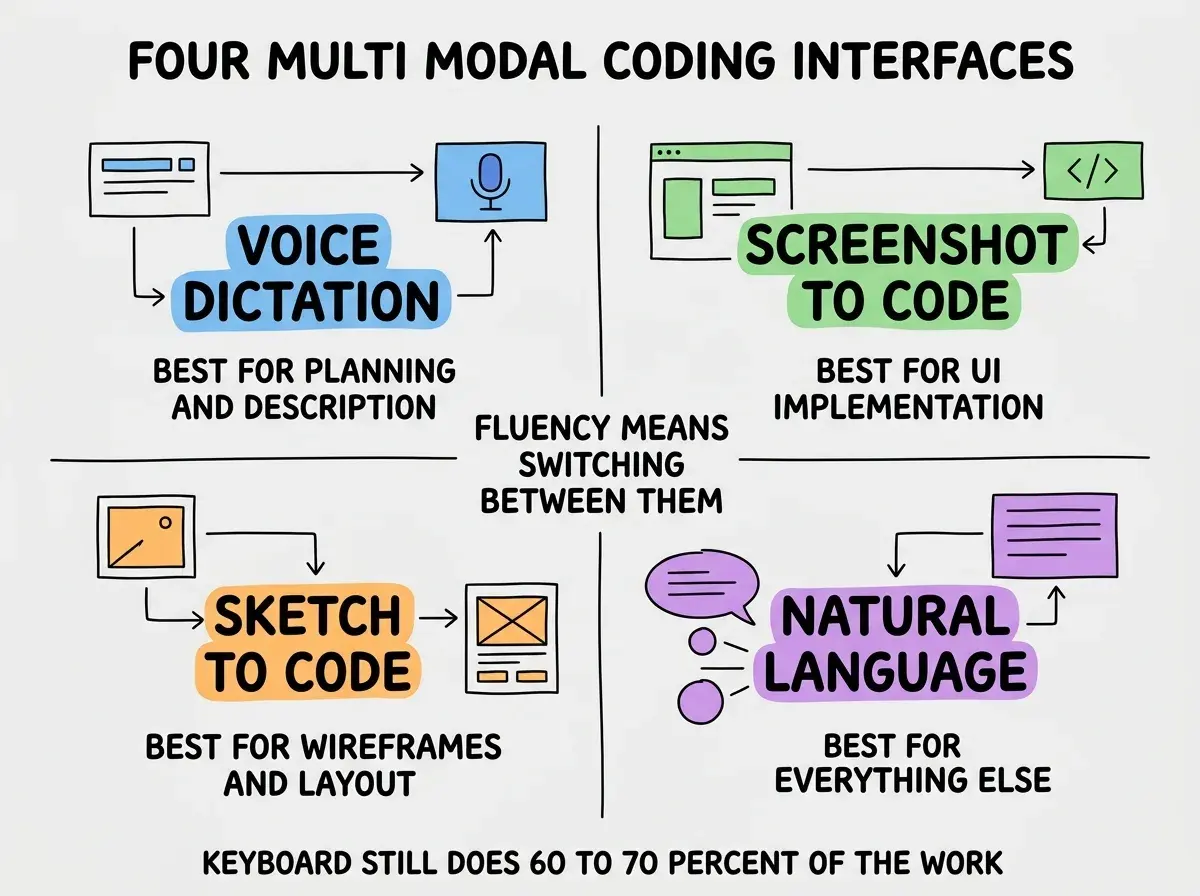
Interface 3, sketch-to-code. A subset of vision: paste a hand-drawn or whiteboard sketch, get layout code back. Most useful for early-stage layout exploration when fidelity does not matter yet.
Interface 4, natural language. Plain English in chat (or via voice). Best for refactoring, debugging conversations, and any task where you describe what you want and the AI does it. The dominant interface for the bulk of AI coding work and the foundation that the other three layer on top of for specific moments.
The Data on Adoption
Adoption patterns in 2026 follow predictable curves. Three patterns are visible across the global developer population.
By role. Senior engineers adopt multi-modal faster than junior engineers. The pattern reverses what most people expect. The reason is that senior engineers know what to ask for; juniors are still learning to articulate intent precisely.
Browse more analysis on the future of AI development
Browse pulse articlesBy geography. APAC adoption leads at 47 percent daily use, with North America at 32 percent and Europe at 24 percent. The same pattern as overall AI coding adoption; the regions that adopt fastest on text-based AI also adopt fastest on multi-modal.
By task type. UI work has 78 percent multi-modal usage (mostly screenshot-to-code). Backend work has 22 percent (mostly voice for planning). Data engineering has under 10 percent (text remains dominant). The pattern reflects which tasks have natural visual or verbal representations versus which tasks are inherently structured text work.
Where Multi-Modal Goes Next
Three predictions for how multi-modal coding evolves through 2027 are reasonable extrapolations from current trends.
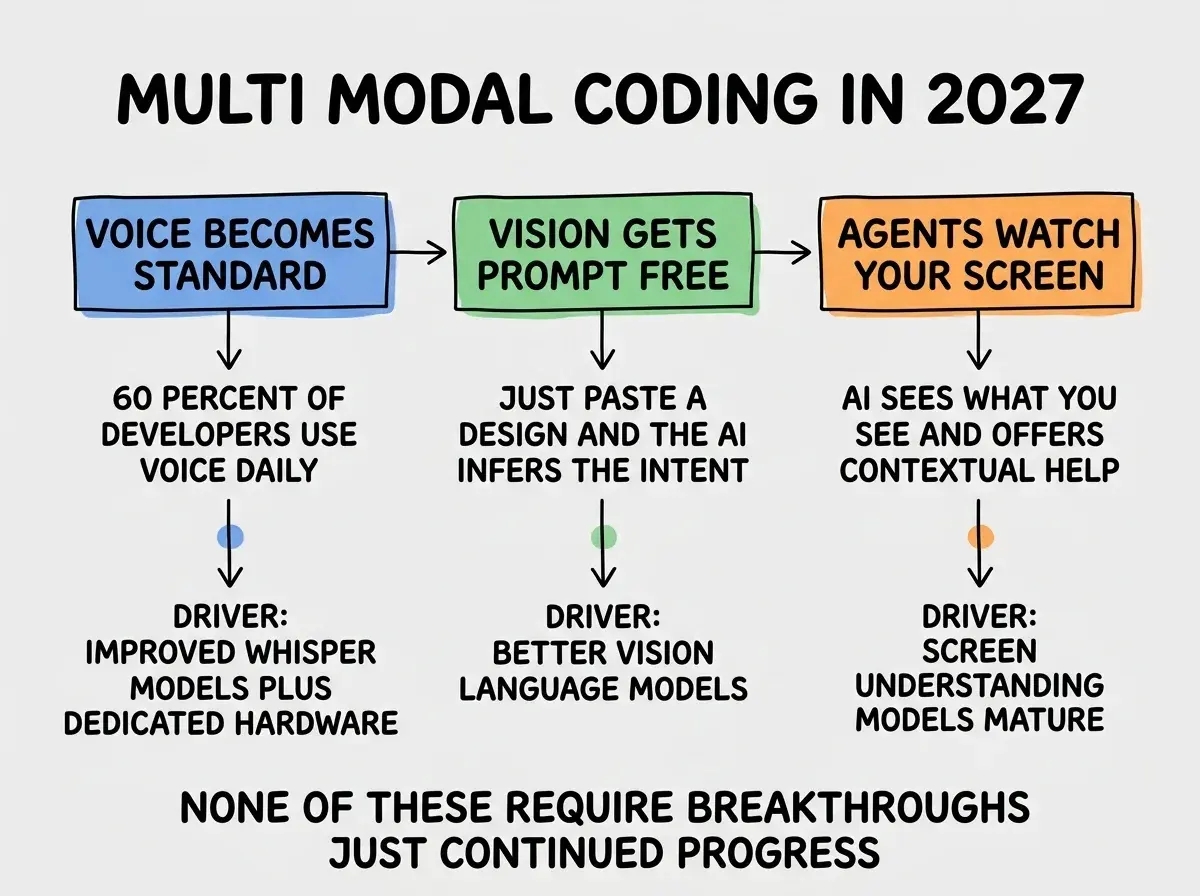
Voice becomes standard. By end of 2027, roughly 60 percent of developers will use voice dictation daily, up from 35 percent in 2026. The driver is improved Whisper models plus better dedicated hardware (microphones, noise cancellation, voice-optimized AI editor modes).
Vision becomes prompt-free. Today you paste a screenshot and add a prompt like "make this in React." By 2027, the AI infers the intent from the screenshot context: it knows you are in a React project and just generates the appropriate code. Less typing, more inferring.
Agents watch your screen. Screen understanding models will be good enough that AI agents can see what you see and offer contextual help. Already nascent in tools like Claude Computer Use; mature by end of 2027 for development workflows.
The most common multi-modal mistake is treating voice as a complete keyboard replacement. Voice is great for narrative content (plans, descriptions, conversations) and bad for precise content (variable names, syntax, structured data). Developers who dictate everything end up frustrated when the AI types "for our pose" instead of "four purpose" or makes similar errors. The right pattern is voice for narrative, keyboard for precision, and switching between them fluidly within a single coding session.
The other mistake is over-investing in vision tools without testing them on your actual workflow. The 2026 vision models are great for some use cases (UI implementation from designs) and mediocre for others (debugging by screenshot). Try them on your actual work before assuming they will help; the gap between marketing and reality is real.
A useful adoption strategy is to run a one-week experiment for each interface. Pick one (say, voice dictation) and use it for every applicable task for a week, even when keyboard would feel faster. After the week, you have honest data on whether voice helps your specific workflow rather than relying on general claims about its productivity. Most developers find that two of the four interfaces stick after the experiments and two do not, and the specific two vary by individual.
What This Means For You
Multi-modal coding is real in 2026 but not transformative. It augments the keyboard rather than replacing it, and fluency means knowing when to use each interface.
- If you're a founder: Equip your team with multi-modal tools (voice dictation, screenshot tools) and let them experiment. The productivity gains are real and compound across many small interactions.
- If you're changing careers: Practice all four interfaces on your portfolio projects. Multi-modal fluency is increasingly expected in technical interviews.
- If you're a student: Try voice dictation for planning sessions and screenshot-to-code for UI work. The skills will be standard expectations in your first job.
Browse more analysis on AI development workflows
Browse pulse articles